Data Domain - Unable to SSO PowerProtect DD System Manager from DPC Console "System Management."
摘要: Unable to SSO PowerProtect DD System Manager UI from Data Protection Central (DPC) Console Every time when tried to open the DD System Manager from DPC Console - "System Management," it gave the following Error "You do not have any roles assigned in DD System Manager. Contact your DD administrator." ...
本文适用于
本文不适用于
本文并非针对某种特定的产品。
本文并非包含所有产品版本。
症状
Unable to SSO PowerProtect DD System Manager UI from Data Protection Central (DPC) Console
When trying to open the DD System Manager from DPC Console - "System Management," it gave the following Error:
"You do not have any roles assigned in DD System Manager. Please contact your DD administrator." 原因
The User Groups created on PowerProtect DD System Manager UI under Administration - Access - Authentication - Single Sign-On (SSO) were the below two User Groups.
DPC Group Domain Role
------------- --------- -----
admin dpc.local admin
administrator dpc.local admin
------------- --------- -----
With the above User Groups having names - "admin" and "administrator," DPC is unable to SSO to the Data Domain.
This is causing the error: "You do not have any roles assigned in DD System Manager. Contact your DD administrator." The naming is not correct for the User Groups.
解决方案
To fix this issue, the User Groups "Admin and "Administrator" must be deleted and a new User Group with name "dp-admin" must be created on the PowerProtect DD System Manager UI under - Administration - Access - Authentication - Single Sign-On (SSO) with Domain Name as "dpc.local" and Management Role as "Admin." Please see the screenshot below for this setting done when creating the new User Group under SSO. And then Click OK.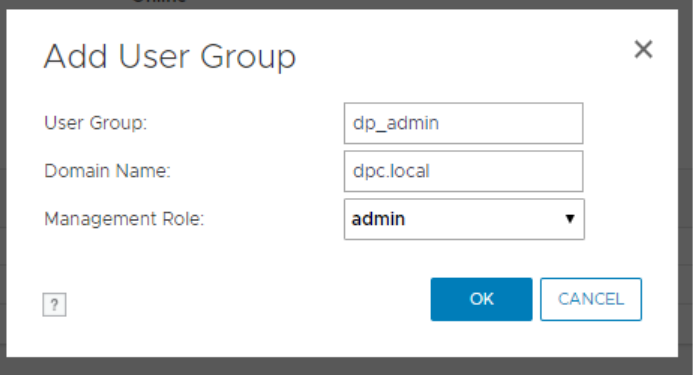
NOTE: If you are on an IDPA/PowerProtect DP appliance using the internal LDAP (ipdauser account), you have to add a second group with the following:
User Group:       dp_admin
Domain Name:      idpa.local
Management Role:  admin
Then try to SSO from the DPC Console, and you should be able to open DD UI System Manager from the DPC Console without any errors and without entering login credentials.
受影响的产品
Data Domain产品
Data Domain, Data Protection Central, DD OS文章属性
文章编号: 000173331
文章类型: Solution
上次修改时间: 14 4月 2025
版本: 4
从其他戴尔用户那里查找问题的答案
支持服务
检查您的设备是否在支持服务涵盖的范围内。