PowerFlex 3.X: Credentials are not updated when "Update Service Details" is run.
摘要: Credentials are not updated when "Update Service Details" is run.
本文适用于
本文不适用于
本文并非针对某种特定的产品。
本文并非包含所有产品版本。
症状
PowerFlex Manager 3.6 and earlier:
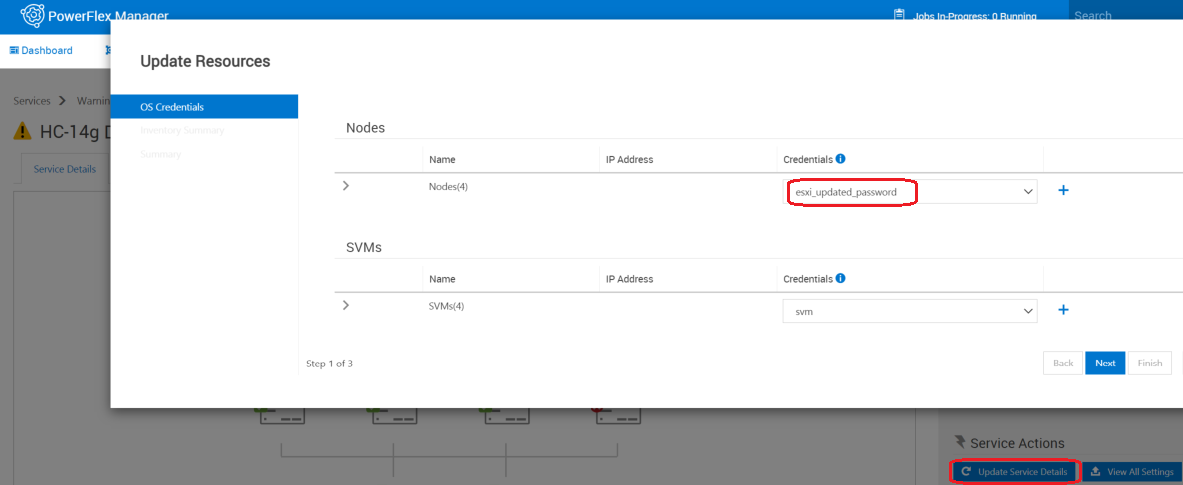

- Creation of new credential with updated user/password
- Service is updated by selecting "Update Service Details" and change to the new credentials
- Select "View All Settings", OS credentials are still using the original credentials.
原因
Software issue.
解决方案
Work around:
Option 1: if there's a change to existing credentials
Option 2: If new credential is being created
Fix:
This will be fixed in PowerFlex Manager release 3.7 .
Option 1: if there's a change to existing credentials
- Edit the password field with the updated password in Credential Manager.
- Settings > Credential Management > edit
Option 2: If new credential is being created
- Change the password manually on components outside of PowerFlex Manager.
- In PowerFlex Manager, go to Services > click on name of your service > click "remove service" > Service removal type = Remove Service > Leave nodes in Managed mode > Remove.
- Create new credential in Credential Manager:
- Settings > Credential Management > Create
- Go to Services > Add Existing Service to add Service back in (use newly created credential)
Fix:
This will be fixed in PowerFlex Manager release 3.7 .
受影响的产品
PowerFlex Software文章属性
文章编号: 000184515
文章类型: Solution
上次修改时间: 25 11月 2025
版本: 8
从其他戴尔用户那里查找问题的答案
支持服务
检查您的设备是否在支持服务涵盖的范围内。