PowerStore: System Health Checks detects an issue in the CPU IERR Check
摘要: The CPU IERR Check performed by the System Health Checks detected a failure.
本文适用于
本文不适用于
本文并非针对某种特定的产品。
本文并非包含所有产品版本。
说明
System Health may display a CPU IERR Asserted in SEL (KB#000196192) message in one of the following scenarios:
- Running a System Check using PowerStore Manager (UI) with the Run Upgrade Extensions option:
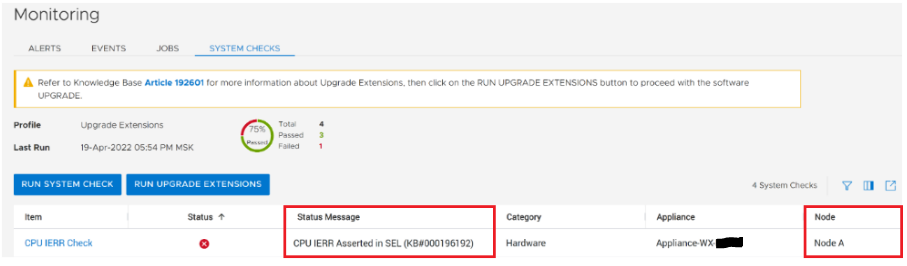
Tip: The Profile field displays Upgrade Extensions when the Run Upgrade Extensions option is used to perform a System Check.
- Running a System Check using PowerStore Manager (UI) with the Run System Check option:
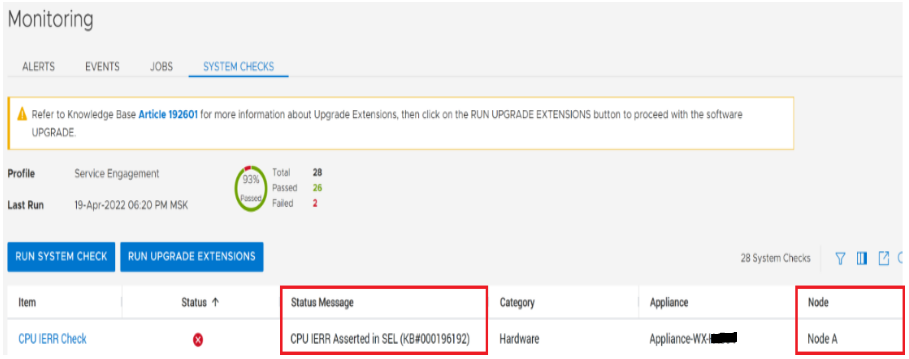
Tip: The Profile field displays Service Engagement when the Run System Check option is used to perform a System Check.
- Running the System Health Service Script (svc_health_check) using an SSH connection:
Note: Output truncated for illustrative purposes.
[SVC:service@66W1BW2-A user]$ svc_health_check run
Name                               Location  Status     Description
CPU IERR Check                     node_a    FAILED     CPU IERR Asserted in SEL (KB#000196192)
The above message indicates that the Node has experienced a CPU Internal Error (IERR) and requires attention.
If System Health detects this condition, software upgrades may fail and a risk to other cluster services may be present. The issue should be replaced before proceeding with a NDU.
The impacted Node may need to be replaced. In the examples above, Node A would be the faulty Node that is a candidate for replacement. However, other issues, such as a faulty DIMM may be detected by this same heath check. Contact Dell Technical Support for assistance to determine the correct remedial action. Reference KB # 000196192 for expedited attention and resolution.
受影响的产品
PowerStore文章属性
文章编号: 000196192
文章类型: How To
上次修改时间: 13 6月 2025
版本: 5
从其他戴尔用户那里查找问题的答案
支持服务
检查您的设备是否在支持服务涵盖的范围内。