NetWorker: File-system recovery is failing with error "file Index is missing"
摘要: File system recovery is failing with error "file Index is missing Please contact the system administrator to recover or re-create the index."
本文适用于
本文不适用于
本文并非针对某种特定的产品。
本文并非包含所有产品版本。
症状
An error is returned stating that the file index is missing when performing file level recovery of a NetWorker client from the NetWorker Management Console (NMC):
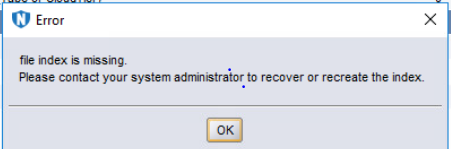
Figure 1: Error Message: File Index is Missing.
原因
The client file index folder is missing or empty:
Linux: /nsr/index/CLIENT-NAME
Windows: C:\Program Files\EMC NetWorker\nsr\index\CLIENT-NAME
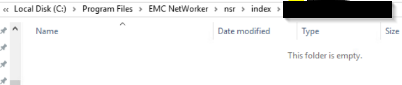
Figure 2: Screenshot of Missing Client File Index Folder
解决方案
On the NetWorker server, open an admin prompt and run as root:
nsrck -L7 client-name
NOTE: Client-name should match how the client name is specified in Clients tab of NetWorker Management Console; optionally the nsraldb on the NetWorker client also shows this. On the NetWorker client, open an admin prompt and run as root:
nsradmin -p nsrexecd "nsrla"
Monitor the nsrck command output for any errors. Once completed, the client index folder should be repopulated and the data restore can be performed.
其他信息
This is not applicable to file level recoveries of VMware Virtual Machines backed up using the NetWorker VMware Protection (NVP) vProxy appliance.
受影响的产品
NetWorker Family文章属性
文章编号: 000200061
文章类型: Solution
上次修改时间: 19 3月 2025
版本: 4
从其他戴尔用户那里查找问题的答案
支持服务
检查您的设备是否在支持服务涵盖的范围内。