NVP vProxy:从独立 ESXi 备份虚拟机失败,并显示“Received an HTTP code:400...."
摘要: NetWorker VMware Protection (NVP) vProxy 一体机部署在独立的 VMware ESXi 虚拟机管理程序 (7.0U3) 主机上。所有虚拟机备份立即失败,并显示消息“无法创建 BackupVmSession 资源。记录到 CIS 主机时出错,无法获取 guestOSImage 详细信息”
本文适用于
本文不适用于
本文并非针对某种特定的产品。
本文并非包含所有产品版本。
症状
独立 ESXi 主机已添加到 NetWorker(无 vCenter Server)。
ESXi 主机的版本为 7.0U3。
vProxy 版本为 4.3.0-46。
ESXi 主机是使用 root 帐户和“部署在云中”选项(必需)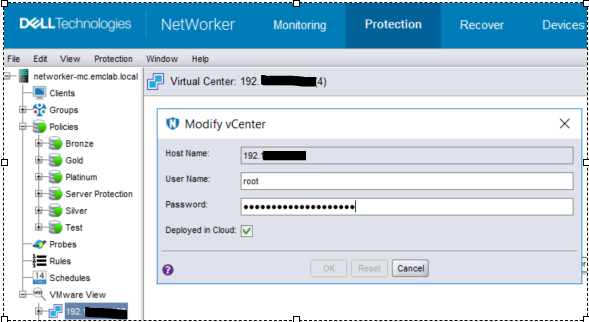
添加的:图 1:“修改 vCenter”页面的屏幕截图
虚拟机备份操作立即失败,并在操作日志中显示以下错误消息: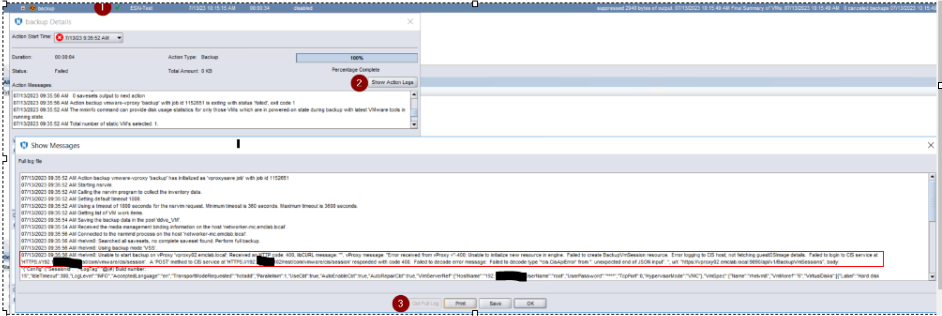
图 2:操作日志中的备份操作失败消息
错误消息:
07/13/2023 09:35:56 AM rhelvm8: Unable to start backup on vProxy 'vproxy02.emclab.local': Received an HTTP code: 400, libCURL message: "", vProxy message: "Error received from vProxy ="-400: Unable to initialize new resource in engine. Failed to create BackupVmSession resource. Error logging to CIS host, not fetching guestOSImage details. Failed to login to CIS service at 'HTTPS://192.xxx.xx.xxx/rest/com/vmware/cis/session'. A 'POST' method to CIS service at 'HTTPS://192.xxx.xx.xxx/rest/com/vmware/cis/session' responded with code 400. Failed to decode error message: Failed to decode type '*cis.CisApiError' from '': unexpected end of JSON input". ", url: "https://vproxy02.emclab.local:9090/api/v1/BackupVmSessions",
原因
消息处理
中的 vProxy 错误消息“Error logging to CIS host not fetching guestOSImage details”应作为警告处理,并允许备份继续;但是,它被视为失败,并停止运行备份。
解决方案
临时解决方法是降级到 vProxy 4.3.0-41。
此问题预计将在即将发布的 vProxy 版本中得到解决。请查看 https://www.dell.com/support/home/product-support/product/networker-family/drivers 是否有空房。
受影响的产品
NetWorker产品
NetWorker Family, NetWorker Series文章属性
文章编号: 000215790
文章类型: Solution
上次修改时间: 10 4月 2024
版本: 7
从其他戴尔用户那里查找问题的答案
支持服务
检查您的设备是否在支持服务涵盖的范围内。