Dell Networking SONiC Sådan konfigureres Static Anycast-gateway (Anycast-adresse)
摘要: Denne artikel beskriver, hvordan du konfigurerer Static Anycast Gateway (anycast-adresse) i Dell Networking Enterprise SONiC.
本文适用于
本文不适用于
本文并非针对某种特定的产品。
本文并非包含所有产品版本。
说明
ForudsætningerVi bruger standard interface navngivning til at demonstrere begreberne. Se artiklen Dell Networking S-serien: Basic Interface Configuration – SONiC 4.0 for at få flere oplysninger om navngivning af grænseflader |
Indeks
Statisk Anycast-gateway
SAG i MCLAG
Syntaks
for konfigurationEksempel på konfiguration
Statisk Anycast-gateway
Static Anycast Gateway (SAG) gør det muligt for flere switche at distribuere pakker samtidigt ved hjælp af en delt gateway-adresse i en aktiv/aktiv routerkonfiguration. Hver switch er konfigureret med en anycast virtuel IP-adresse og en anycast virtuel MAC-adresse. Den virtuelle anycast-MAC deles på tværs af alle konfigurerede anycast IP-adresser.
I en spine-leaf EVPN-opsætning har alle gateway-dirigerede bladswitche ensartede anycast-konfigurationer. Specifikt er hver switch konfigureret med den samme anycast virtuelle IP-adresse og anycast virtuel MAC-adresse.
SAG i MCLAG
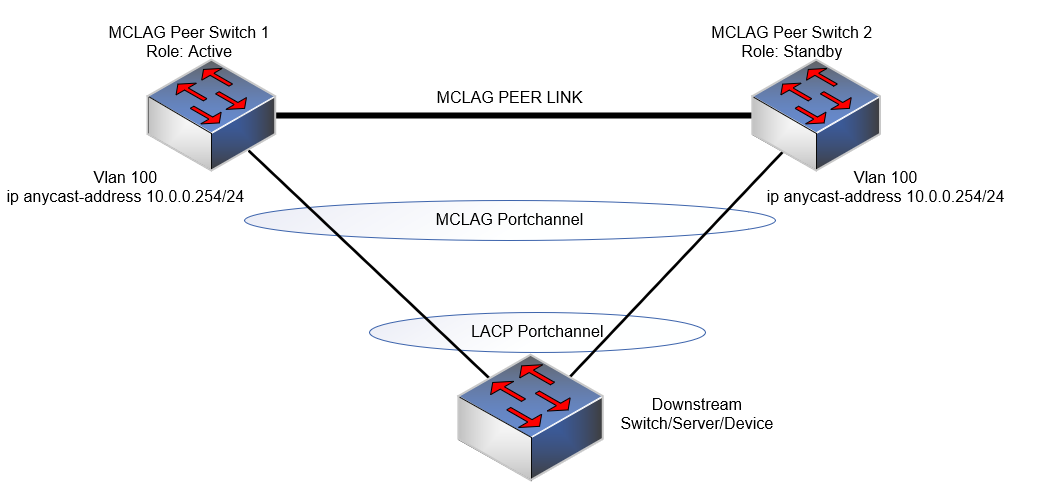
Brug i stedet Static Anycast Gateway på VRRP, når MCLAG (Multi-chassis link Aggregation) bruges i Dell SONiC. Konfigurer den samme anycast IP-adresse og anycast MAC-adresse på begge MCLAG peers på den samme vlan-grænseflade.
I Dell Enterprise SONiC understøtter MCLAG i øjeblikket ikke VRRP. Fra og med den nyeste version (Dell SONiC 4.2) er denne erklæring stadig nøjagtig. For fremtidig kompatibilitet, se brugervejledningen til din version.
Som et eksempel bruger vi i nedenstående topologi den samme anycast IP-adresse 10.0.0.254/24 til vlan 100 i begge MCLAG-peers.
BEMÆRK:
- Anycasts IP-adresse kan ikke bruges til administrationsformål.
- Anycast virtuel MAC-adresse kan ikke være en multicast MAC-adresse.
Syntaks for konfiguration
| Konfiguration | Forklaring |
|---|---|
admin@DELLSONiC:~$ sonic-cli |
Indtast Dell SONiC CLI |
DELLSONiC# configure terminal |
Gå til konfigurationstilstand. |
DELLSONiC(config)# ip anycast-address enable |
Aktivér anycast-gatewayadresse |
DELLSONiC(config)# ip anycast-mac-address xx:xx:xx:xx:xx:xx |
Konfigurer anycast MAC-adresse |
DELLSONiC(config)# interface Vlan <vlan ID> |
Konfigurer vlan |
DELLSONiC(config-if-Vlan-<ID>)# ip anycast-address <A.B.C.D/mask> |
Konfigurer anycast-gateway-adresse |
Sådan deaktiverer du anycast-gateway:
| Konfiguration | Forklaring |
|---|---|
DELLSONiC(config)# ip anycast-address disable |
Deaktiver Anycast-gateway-adresse |
For at bekræfte brug kommando nedenfor:
| Konfiguration | Forklaring |
|---|---|
DELLSONiC# show ip static-anycast-gateway |
Se detaljer på static-anycast-gateway |
Eksempelkonfiguration
Konfiguration af IP anycast-adresse i Vlan 100: admin@DELLSONiC:~$ sonic-cli DELLSONiC# configure terminal DELLSONiC(config)# ip anycast-mac-address 00:11:22:33:44:55 DELLSONiC(config)# ip anycast-address enable Lets configure anycast IP in interface vlan 100 DELLSONiC(config)# interface Vlan 100 DELLSONiC(config-if-Vlan100)# ip anycast-address 10.0.0.254/24 DELLSONiC(config-if-Vlan100)# end DELLSONiC# |
Sådan bekræftes IP-adressen for Vlan 100:
DELLSONiC# show ip interfaces Flags: U-Unnumbered interface, A-Anycast IP ----------------------------------------------------------------------------------------------------------------- Interface IP address/mask VRF Admin/Oper Flags ----------------------------------------------------------------------------------------------------------------- Vlan100 10.0.0.254/24 up/up A |
Sådan bekræfter du statiske anycast-gateways:
DELLSONiC# show ip static-anycast-gateway Configured Anycast Gateway MAC address: 00:11:22:33:44:55 IPv4 Anycast Gateway MAC address: enable Total number of gateway: 1 Total number of gateway admin UP: 1 Total number of gateway oper UP: 1 Interfaces Gateway Address Vrf Admin/Oper ------------------- --------------- --------------- ---------- Vlan10 10.0.0.254/24 up/up |
受影响的产品
Enterprise SONiC Distribution, PowerSwitch E3200-ON Series, Dell EMC Networking N3200-ON, PowerSwitch S5212F-ON, PowerSwitch S5224F-ON, PowerSwitch S5232F-ON, PowerSwitch S5248F-ON, PowerSwitch S5296F-ON, PowerSwitch Z9100-ON, PowerSwitch Z9264F-ON
, PowerSwitch Z9332F-ON, PowerSwitch Z9432F-ON
...
文章属性
文章编号: 000223335
文章类型: How To
上次修改时间: 20 3月 2024
版本: 3
从其他戴尔用户那里查找问题的答案
支持服务
检查您的设备是否在支持服务涵盖的范围内。