Dell Security Management Server Virtual Upgrade Fails on Interfaces.d
摘要: Upgrading Dell Security Management Server Virtual appliance fails with an error referencing the interfaces.d directory.
本文章適用於
本文章不適用於
本文無關於任何特定產品。
本文未識別所有產品版本。
症狀
Affected Products:
- Dell Security Management Server Virtual
Affected Versions:
- v10.2.9 to v10.2.11
Affected Operating Systems:
- Linux
The Dell Security Management Server Virtual upgrade stops with a message Failed to restore from backup file: and this occurs after attempting the restore of the files in the etc/network/interfaces directory.
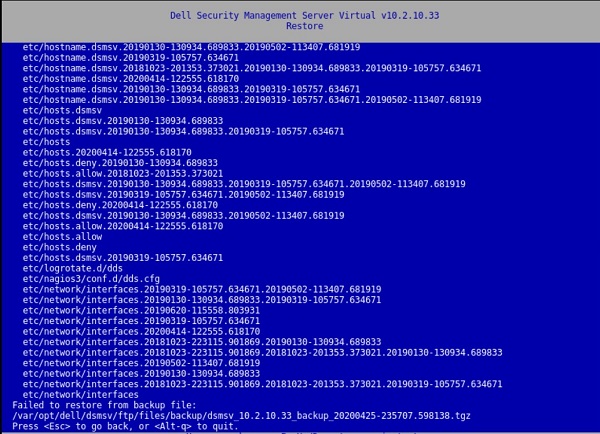
Figure 1: (English Only) Restore returns Failed to restore from backup file:
Pressing a key result in a window with:
[Errno 21] Is a directory:
‘/etc/network/interfaces.d’.
This error is also present in the /var/log/messages file:
![[Errno 21] Is a directory: ‘/etc/network/interfaces.d’](https://supportkb.dell.com/img/ka06P000000sfPFQAY/ka06P000000sfPFQAY_en_US_6.jpeg)
Figure 2: (English Only) [Errno 21] Is a directory: ‘/etc/network/interfaces.d’
原因
Not Applicable
解析度
To resolve the issue, follow the instructions to rename the interfaces.d directory.
- Log in to the Dell Security Management Server Virtual Console.
- Select Launch Shell in the Dell Security Management Server Virtual Administration Console.
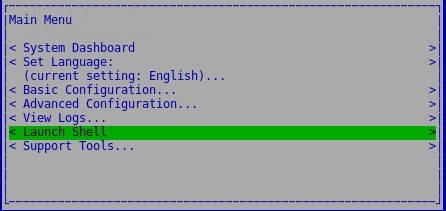
Figure 3: (English Only) Launch Shell
- Switch to the
dellsupportuser account using the commandsu dellsupport.

Figure 4: (English Only) Switch to dellsupport
- Provide the password for the
dellsupportuser. By default, the password isdellsupport.

Figure 5: (English Only) Type password
- Rename the interfaces.d directory with the following command:
sudo mv /etc/network/interfaces.d /etc/network/interfaces.old

Figure 6: (English Only) Type sudo mv /etc/network/interfaces.d /etc/network/interfaces.old
- Exit out of the shell by typing
exitor usingctrl-dtwice and run the upgrade through the user interface.
To contact support, reference Dell Data Security International Support Phone Numbers.
Go to TechDirect to generate a technical support request online.
For additional insights and resources, join the Dell Security Community Forum.
受影響的產品
Dell Encryption文章屬性
文章編號: 000131146
文章類型: Solution
上次修改時間: 06 7月 2023
版本: 10
向其他 Dell 使用者尋求您問題的答案
支援服務
檢查您的裝置是否在支援服務的涵蓋範圍內。