Latitude 3510: Keyboard Function Key Guide
摘要: The following guide lists the keyboard shortcuts available and the functions they perform on the Dell Latitude 3510 laptop.
本文章適用於
本文章不適用於
本文無關於任何特定產品。
本文未識別所有產品版本。
症狀
Keyboard Shortcut Key Functions
The below table is a list of combination short-cut key functions available on the Latitude 3510 Notebook
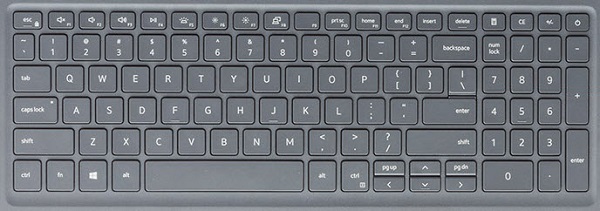
| Keys | Primary behavior | Secondary behavior (Fn + Key) |
|---|---|---|
| Fn + Esc | Escape |
Toggle Fn-key lock |
| Fn + F1 |
Mute audio |
F1 |
| Fn + F2 |
Decrease volume |
F2 |
| Fn + F3 |
Increase volume |
F3 |
| Fn + F4 |
Mute microphone |
F4 |
| Fn + F5 |
Turn on/off keyboard backlight |
F5 |
| Fn + F6 |
Decrease brightness |
F6 |
| Fn + F7 |
Increase brightness |
F7 |
| Fn + F8 |
Switch to external display |
F8 |
| Fn + F10 |
Print screen |
F10 |
| Fn + F11 |
Home |
F11 |
| Fn + F12 |
End |
F12 |
| Fn + Ctrl |
Open application menu |
-- |
Note: The keyboard backlight functionality depends on having a backlight capable keyboard fitted on your laptop.
原因
Not Applicable.
解析度
 Visit our Keyboard knowledge base for additional resources and information.
 For additional articles and information visit our Touchpad support page.
 Additional articles and information can also be found on our Mouse support page.
受影響的產品
Latitude 3510文章屬性
文章編號: 000129906
文章類型: Solution
上次修改時間: 04 6月 2025
版本: 7
向其他 Dell 使用者尋求您問題的答案
支援服務
檢查您的裝置是否在支援服務的涵蓋範圍內。