Dell Unity: Replication transfers stop working (User Correctable)
摘要: How to deal with an event in which Replication transfers stopped.
本文章適用於
本文章不適用於
本文無關於任何特定產品。
本文未識別所有產品版本。
症狀
Even though automatic synchronization by RPO is set in Replication, no transfer is being performed and the Last Sync Time is still out of date.
Although the transfer is not in progress, the Sync State is idle, and Health State is OK.
Although the transfer is not in progress, the Sync State is idle, and Health State is OK.
原因
The following are possible causes.
(1) There is some problem with the Snapshot to be transferred.
(2) When clearing the task of a JOB in manual sync is performed.
(1) There is some problem with the Snapshot to be transferred.
(2) When clearing the task of a JOB in manual sync is performed.
解析度
(1) Resolution:
This issue is addressed in Unity OE 5.4.0.
Workaround:
Perform the following steps to delete the problematic snapshot from the Unisphere UI.
Pause replication > Delete a snapshot > Resume replication
(2) Pause and resume replication.
This issue is addressed in Unity OE 5.4.0.
Workaround:
Perform the following steps to delete the problematic snapshot from the Unisphere UI.
Pause replication > Delete a snapshot > Resume replication
NOTE: Contact Dell Technical Support if an error occurs during any of the steps.
(2) Pause and resume replication.
其他資訊
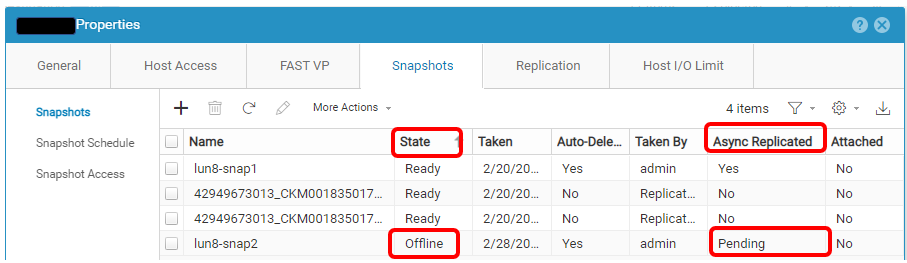
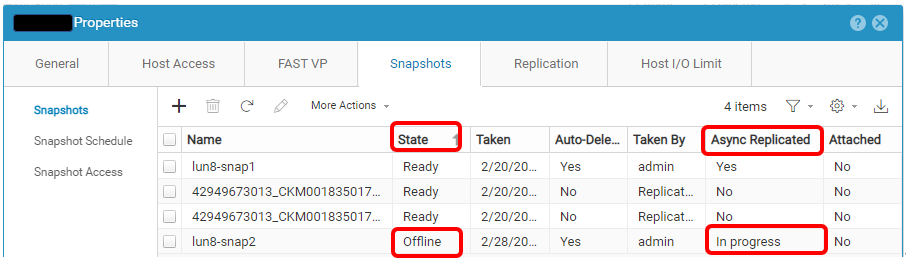
Here is an example of a problematic Snapshot.
受影響的產品
Dell EMC Unity, Dell Unity 300, Dell EMC Unity 300F, Dell EMC Unity 350F, Dell EMC Unity XT 380, Dell EMC Unity XT 380F, Dell EMC Unity 400, Dell EMC Unity 400F, Dell EMC Unity 450F, Dell EMC Unity XT 480, Dell EMC Unity XT 480F, Dell EMC Unity 500
, Dell EMC Unity 500F, Dell EMC Unity 550F, Dell EMC Unity 600, Dell EMC Unity 600F, Dell EMC Unity 650F, Dell EMC Unity XT 680, Dell EMC Unity XT 680F, Dell EMC Unity XT 880, Dell EMC Unity XT 880F, Dell EMC Unity Family |Dell EMC Unity All Flash, Dell EMC Unity Family, Dell EMC Unity Hybrid, Dell EMC UnityVSA Professional Edition/Unity Cloud Edition
...
文章屬性
文章編號: 000210066
文章類型: Solution
上次修改時間: 31 12月 2025
版本: 2
向其他 Dell 使用者尋求您問題的答案
支援服務
檢查您的裝置是否在支援服務的涵蓋範圍內。