NetWorker message "workflow Server backup missed" when Server Protection Policy workflows run
摘要: The daemon.log logs a message "workflow Server backup missed" when the Server Protection Policy workflows run.
本文章適用於
本文章不適用於
本文無關於任何特定產品。
本文未識別所有產品版本。
症狀
- The daemon.log logs a message "workflow Server backup missed" when the Server Protection Policy workflows run.
- The Server backup workflow completes without errors.
- The rest of the workflows under Server Protection Policy complete without errors.
- There is no corrupted policy resource in the nsrdb\dbg folder.
- The Server Protection Policy workflows start twice in a day.
原因
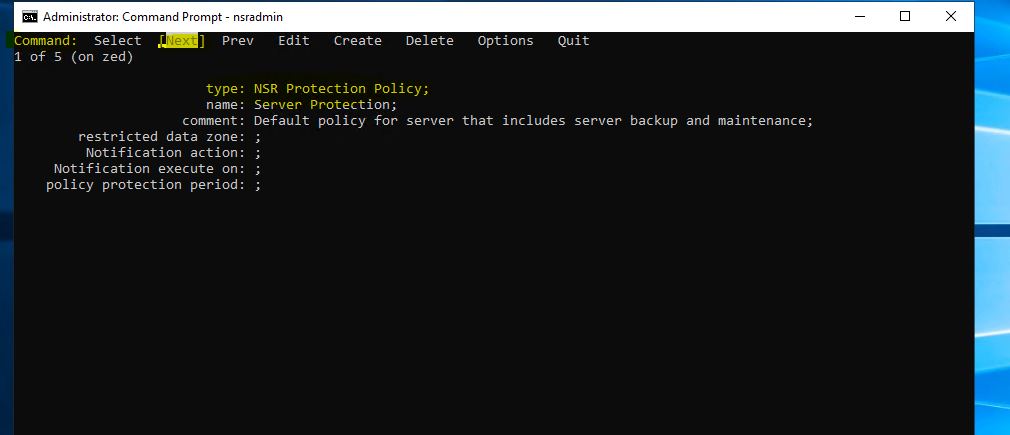
There are two identical (duplicate) Server Protection Policies. The duplicate is not visible from the NMC UI, but can be displayed with a nsradmin query.
解析度
Delete the duplicate policies in nsrdb with the nsradmin command in offline mode.
1. Stop the NetWorker service on the NetWorker server.
2. At the command line run: nsradmin -d <full path to>nsrdb .
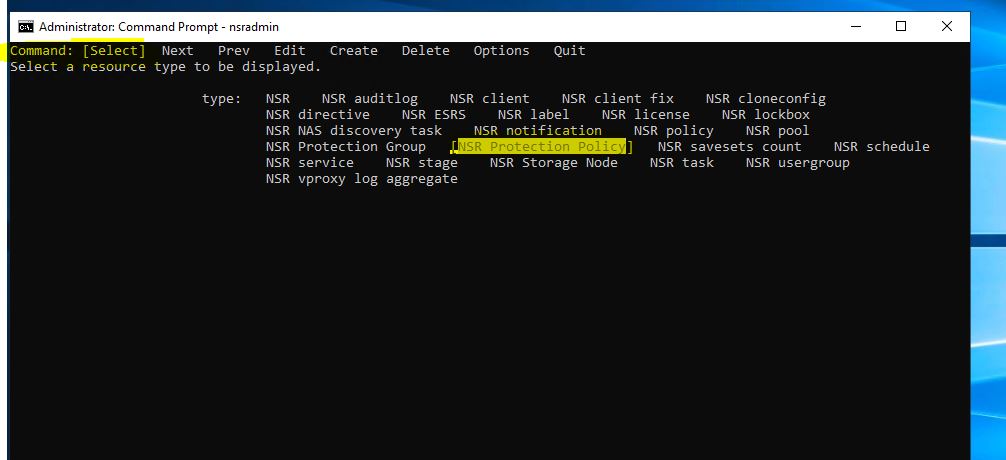
4. Press the arrow key to highlight Delete and press Enter to remove the resource or press Next until the Policy you want to delete is displayed.
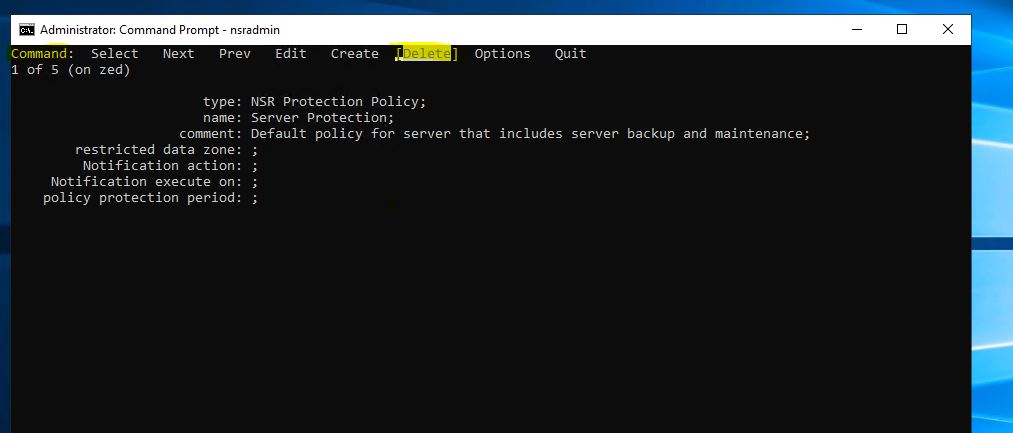
5. Press the arrow key to highlight Quit and press Enter to exit from the nsradmin prompt.
6. Start the NetWorker service.
1. Stop the NetWorker service on the NetWorker server.
Linux: systemctl stop networker
Windows: net stop nsrd
Windows: net stop nsrd
2. At the command line run: nsradmin -d <full path to>nsrdb .
Linux: /nsr/res/nsrdb
Windows: C\Program Files\EMC NetWorker\nsr\res\nsrdb
3. At the nsradmin prompt, type "visual." Choose the "Select" Command. Press Enter.
Windows: C\Program Files\EMC NetWorker\nsr\res\nsrdb
Press the arrow key until the NSR Protection Policy is highlighted. Press Enter.
4. Press the arrow key to highlight Delete and press Enter to remove the resource or press Next until the Policy you want to delete is displayed.
5. Press the arrow key to highlight Quit and press Enter to exit from the nsradmin prompt.
6. Start the NetWorker service.
Linux: systemctl start networker
Windows: net start nsrd
Windows: net start nsrd
文章屬性
文章編號: 000219404
文章類型: Solution
上次修改時間: 19 8月 2024
版本: 2
向其他 Dell 使用者尋求您問題的答案
支援服務
檢查您的裝置是否在支援服務的涵蓋範圍內。