Design Guide—Data Analytics with SQL Server 2022 on Red Hat OpenShift and Dell ObjectScale
Introduction
Introduction
Business challenge
Solution introduction
Design guide introduction
Terminology
Solution Concepts
Solution concepts
Overview
This section discusses the concepts involved in building the solution. The following list includes the hardware and software layers in the solution stack.
- AMD-based Dell PowerEdge servers.
- Red Hat OpenShift Container Platform.
- Red Hat OpenShift Data Foundation.
- Dell ObjectScale
- Microsoft SQL Server 2022
- Apache Spark and Delta Lake
Data Lakehouse
A traditional data lake tends to be a flexible and cost-effective implementation by storing data in its raw form typically unstructured or semi-structured. A data warehouse is a more advanced repository that stores structured data for reporting and analysis, typically cleansed and optimized for better data quality and querying.
A data lakehouse is a modern data platform that combines the flexibility low cost, and scalability of data lakes with the ACID transaction, data management, and data querying capability of the data warehouse to provide a centralized repository for all data.
A data lakehouse supports diverse datasets such as structured, semi-structured, and unstructured data, meeting the needs of both business intelligence and data science use cases. It typically supports programming languages like Python, R, and SQL.
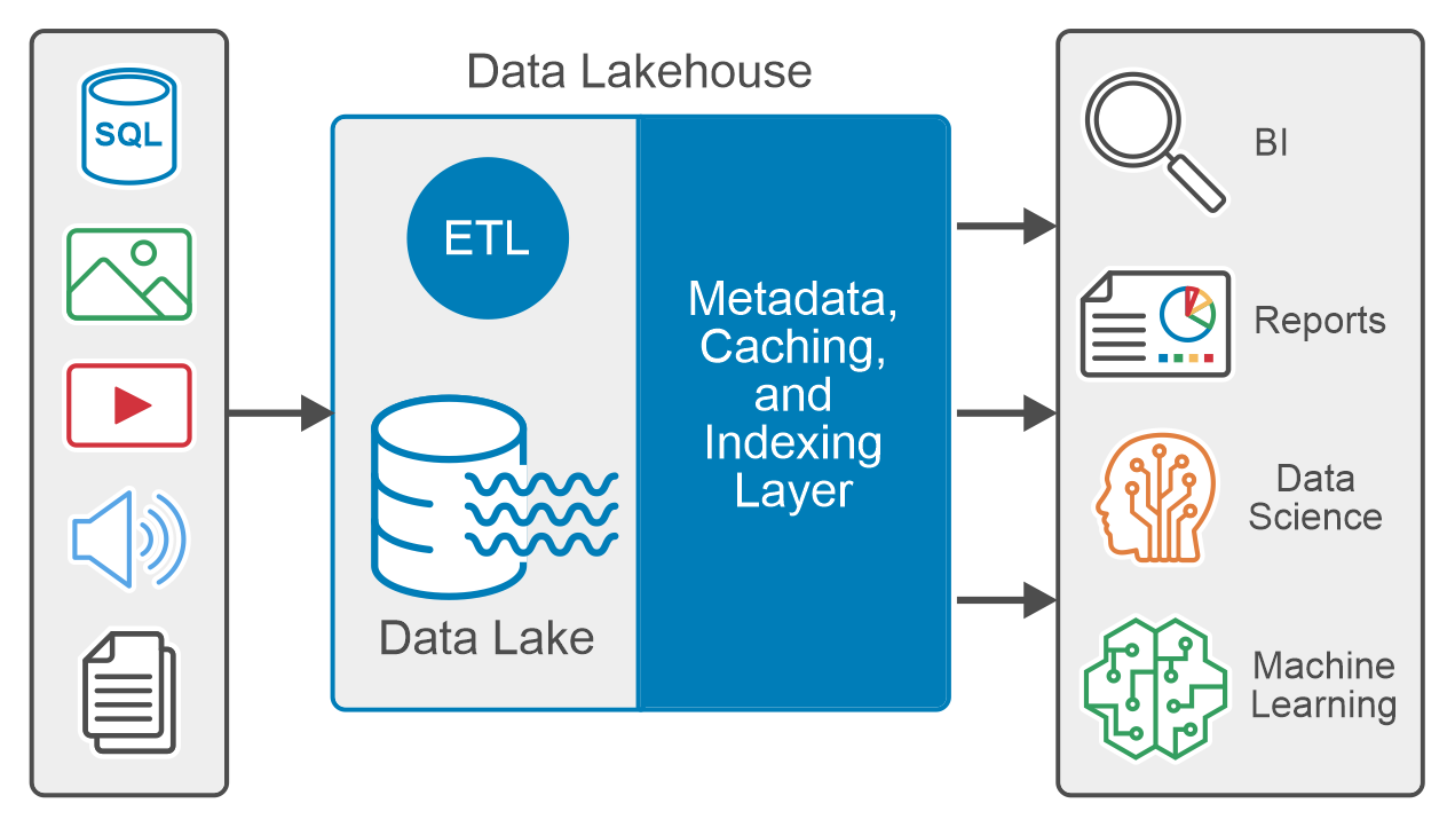 Figure 1. Data Lakehouse logical diagram
The metadata layer, like the open-source Delta Lake, is the foundation of the data lakehouse architecture. The metadata layer is a unified catalog that maintains metadata for every object in the data lake storage, which helps to organize and provide information about the data in the system. The metadata layer enables other features common in data lakehouse, like support for ACID transactions, streaming, caching hot data, time travel, schema enforcement, evolution, and data validation.
Data virtualization
Data virtualization is a data management methodology that enables applications to access and manipulate data without requiring technical knowledge of the source data, physical location, or the format.
Data virtualization involves abstracting multiple sources through a single data access layer. This enables organizations to integrate different types of data virtually. The integration is critical for data mining, analytics, and predictive analytics tools which use machine learning (ML) and artificial intelligence (AI).
Dell ObjectScale
Dell ObjectScale is a software-defined, containerized architecture that delivers enterprise-class, high-performance object storage in a Kubernetes-native environment. ObjectScale empowers organizations with the ability to put data closer to the applications they support, reducing latency and improving the user experience. Dell ObjectScale is the foundation that provides support to store, manipulate, and analyze unstructured data on a very large scale.
Dell ObjectScale is built on a Kubernetes platform, to deliver a simplified product where operating system and hardware-level layers are managed by Kubernetes and ObjectScale manages the storage.
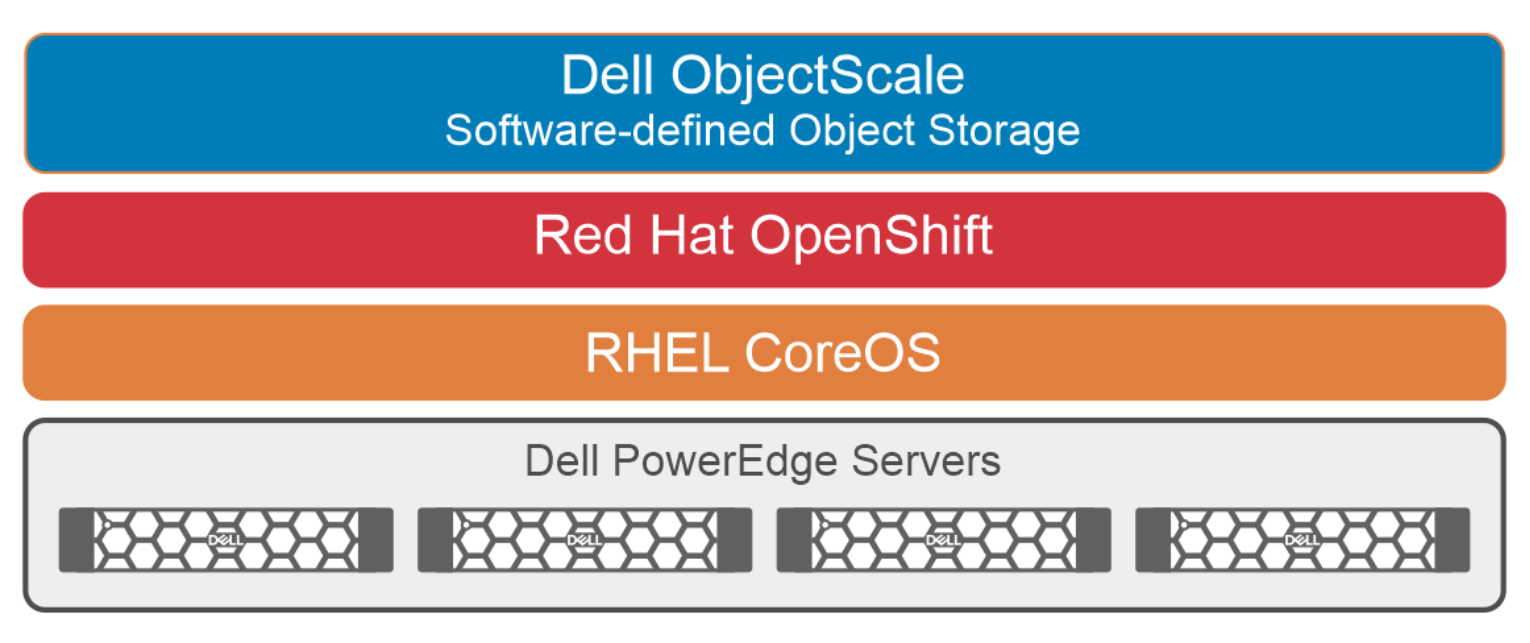 Figure 2. Dell ObjectScale physical architecture
ObjectScale is a next-generation object storage software that is lighter, faster, and deployable on existing infrastructure. It can be deployed on the Red Hat OpenShift Container Platform or SUSE Linux Enterprise Server (SLES) infrastructure. ObjectScale allows organizations to deliver scalable cloud services with the reliability and control of a private cloud infrastructure.
Key features of ObjectScale include:
- Kubernetes native, customer-deployable
- Rich S3 compatibility
- Self-service APIs help in the quick spin-up of object storage containers
- Scalability
- Built as a scaled-out, software-defined architecture, following the microservices principle of cloud applications
- Data protection
- Geo-replication
- Superior performance irrespective of the size of an object
The following list describes some of the benefits that Kubernetes provides for ObjectScale:
- Dynamic scaling of resources
- Deployment using minimal required resources
- Highly portable
- Self-healing: Auto placement, auto restart, and auto replication
For more information, see the Dell ObjectScale webpage.
Partner technology overview
Red Hat OpenShift Container Platform
RHOCP is a consistent hybrid cloud foundation for containerized applications, powered by Kubernetes. Using RHOCP Developers and DevOps engineers can quickly build, modernize, deploy, run, and manage applications anywhere, securely, and at scale.
RHOCP is powered by open-source technologies and offers flexible deployment options ranging from physical, virtual, private, and public cloud, and at the Edge. RHOCP cluster consists of one or more control-plane nodes and a set of worker nodes.
For more information about RHOCP, see the Red Hat webpage.
Red Hat OpenShift Data Foundation
RHODF is a highly available software-defined, persistent storage and cluster data management solution integrated with and optimized for the Red Hat OpenShift Container Platform. RHODF allows the provision and management of file, block, and object storage for containerized workloads, from the same underlying raw block storage.
RHODF runs anywhere OpenShift runs such as on-premises, private, or public cloud environments, and at the edge, and provides a consistent experience, irrespective of the underlying infrastructure. Organizations can extend and federate data across multiple infrastructures using multicloud data management capabilities.
RHODF is deployed, consumed, and managed through the OpenShift administrator console. This platform is built on Red Hat Ceph storage, offering tightly integrated persistent data services for OpenShift environments. RHODF supports a broad range of diverse workloads and applications including analytics, and AI/ML.
For more information, see the Red Hat webpage.
AMD processor
The 4th Generation AMD EPYC processors have been engineered to provide optimization capabilities across various market segments and applications. By doing so, businesses can effectively allocate data center resources to facilitate additional workload processing and expedite output.
For the SQL Server 2022 database instances, we opted for AMD EPYC 9334 processors in this exercise. This decision was made based on the requirement for fast response time when running T-SQL queries for data analytics. The AMD EPYC 9334 processors are equipped with 32 cores per socket, operating at a default speed of 2.7 GHz, and offer an L3 cache size of up to 1152 MB per socket. These specifications provide the necessary horsepower to handle any data analytic workloads.
For more information about AMD EPYC, see the AMD webpage.
Microsoft SQL Server 2022
Microsoft SQL Server 2022 is a robust database platform that includes many new features that enhance its capabilities as a leading relational database management system.
The analytics feature of Microsoft SQL Server 2022 is a game-changer for organizations seeking to extract valuable insights from disparate data sources. This feature introduces object storage integration to the data platform, enabling users to seamlessly integrate SQL Server with S3-compatible object storage.
PolyBase technology has been enhanced in SQL Server 2022. This technology significantly reduces data transfer and transformation processes such as extract, transform, and load (ETL) by allowing data to remain in its source location and format. It empowers businesses to run T-SQL queries across relational databases, big data systems, and cloud-based data sources.
For more information about Microsoft SQL Server 2022 and the PolyBase feature, see the Microsoft webpage.
Apache Spark
Apache Spark is an open-source distributed data-processing engine used for big data. It can handle both batch and real-time analytics and data processing workloads. It is designed to deliver the computational speed, scalability, and programmability required for big data applications.
One of the main features of Apache Spark is its in-memory computing which increases the processing speed for any application. Apache Spark is designed to cover a wide range of workloads such as batch processing, interactive queries, and streaming. Apart from supporting all these workloads in a system, it also reduces the management burden of maintaining multiple tools.
For more information about Apache Spark, see the Spark webpage.
Delta Lake
A Delta Lake is an open-source storage layer that brings reliability, security, and performance to the data lake. Delta Lake runs on top of your existing data lake and supports ACID transactions, scalable metadata handling, and unified streaming and batch data processing.
It enables building a Lakehouse architecture with compute engines including Spark, PrestoDB, Flink, Trino, and Hive and APIs for Scala, Java, Rust, and Python.
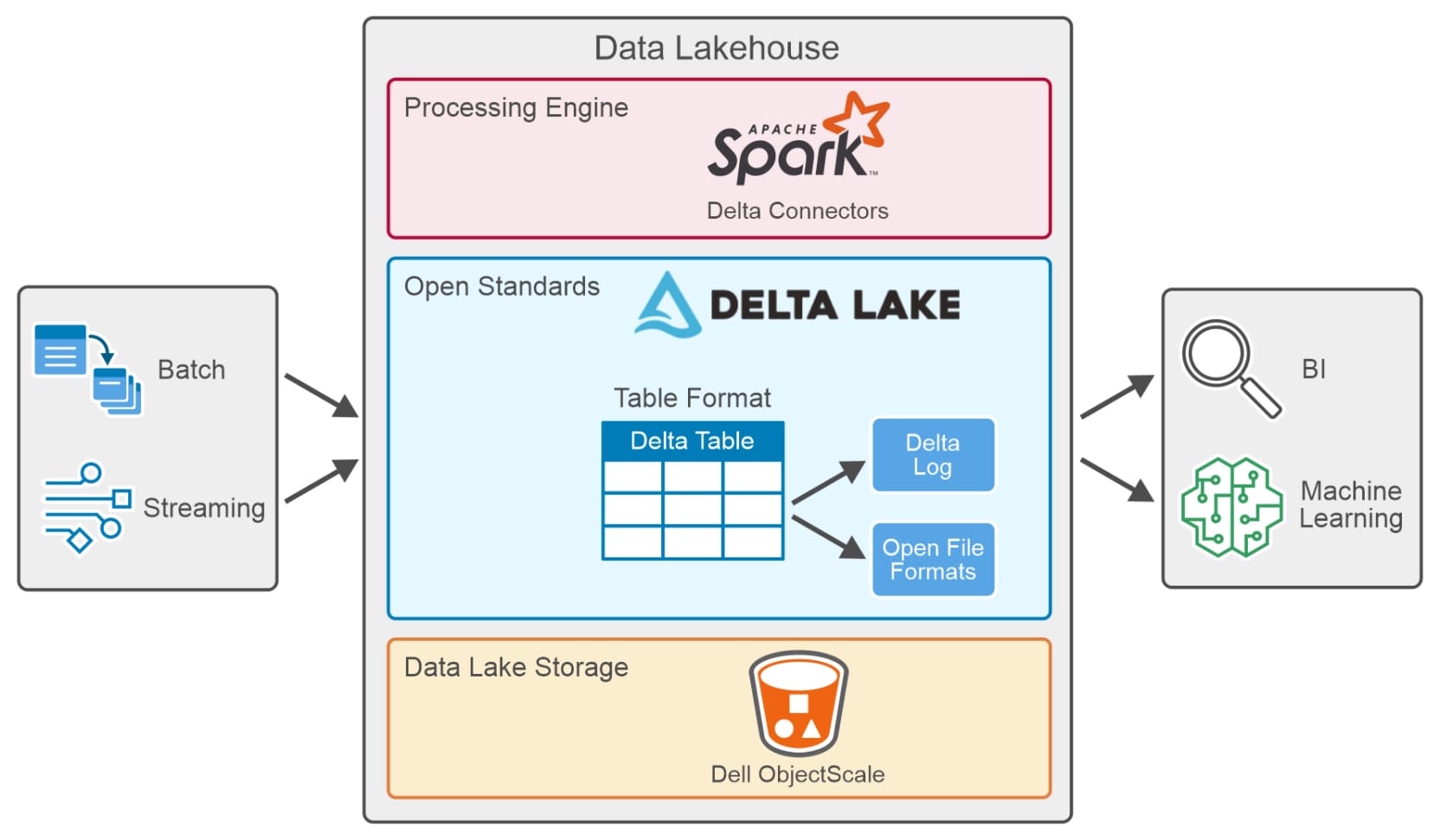 Figure 3. Data Lakehouse data processing
A table in Delta Lake (Delta Table) is stored in open formats such as Parquet files along with a file-based transaction log stored in JSON format, for ACID transactions and scalable metadata handling.
A delta connector is a library that allows external applications to read from and write to Delta tables. Delta connectors are available for various popular big data frameworks, including Apache Spark, Apache Hive, and Apache Flink.
Key features defining Delta Lake include:
- ACID transactions: ACID properties ensure that data never falls into a bad data quality because of a transaction that failed or partially completed and provides data reliability and integrity. Delta Lake keeps track of all the commits made to the delta table in a transaction log to implement ACID Transactions.
- Scalable metadata: Handles terabytes or even petabytes of table data with ease. Metadata is stored just like any other data and handled by Delta Lake.
- Time travel (data versioning): Delta Lake allows users to access and analyze previous versions of data using time travel capabilities for querying, auditing, and rollback. It also enables data exploration and analysis at different points in time, making it easier to identify trends, track changes and perform historical analysis.
- Unified batch and stream processing: Every table in a Delta Lake is a batch and streaming sink. Additionally, with efficient metadata handling, ease of scale, and ACID transactions, near-real-time analytics become possible without using a more complicated two-tiered data architecture.
- Schema enforcement: Delta Lake automatically handles schema variations to prevent insertion of bad records during data ingestion.
- Schema evolution: Delta Lake supports schema evolution, allowing users to evolve the schema of their data over time.
- Audit history: Delta Lake logs all changes to the transaction log and provides historical audit trails.
- DML operations: Delta Lakes supports DML operations like updates, deletes, and merges, which play a crucial role in complex data operations.
- Open source: Community-driven, open standards, open protocol, open file format, and open discussions.
For more information about Delta Lake, see the Delta IO webpage.
Solution Architecture
Physical architecture
Figure 4 provides an overview of the physical architecture that was used in this validation.
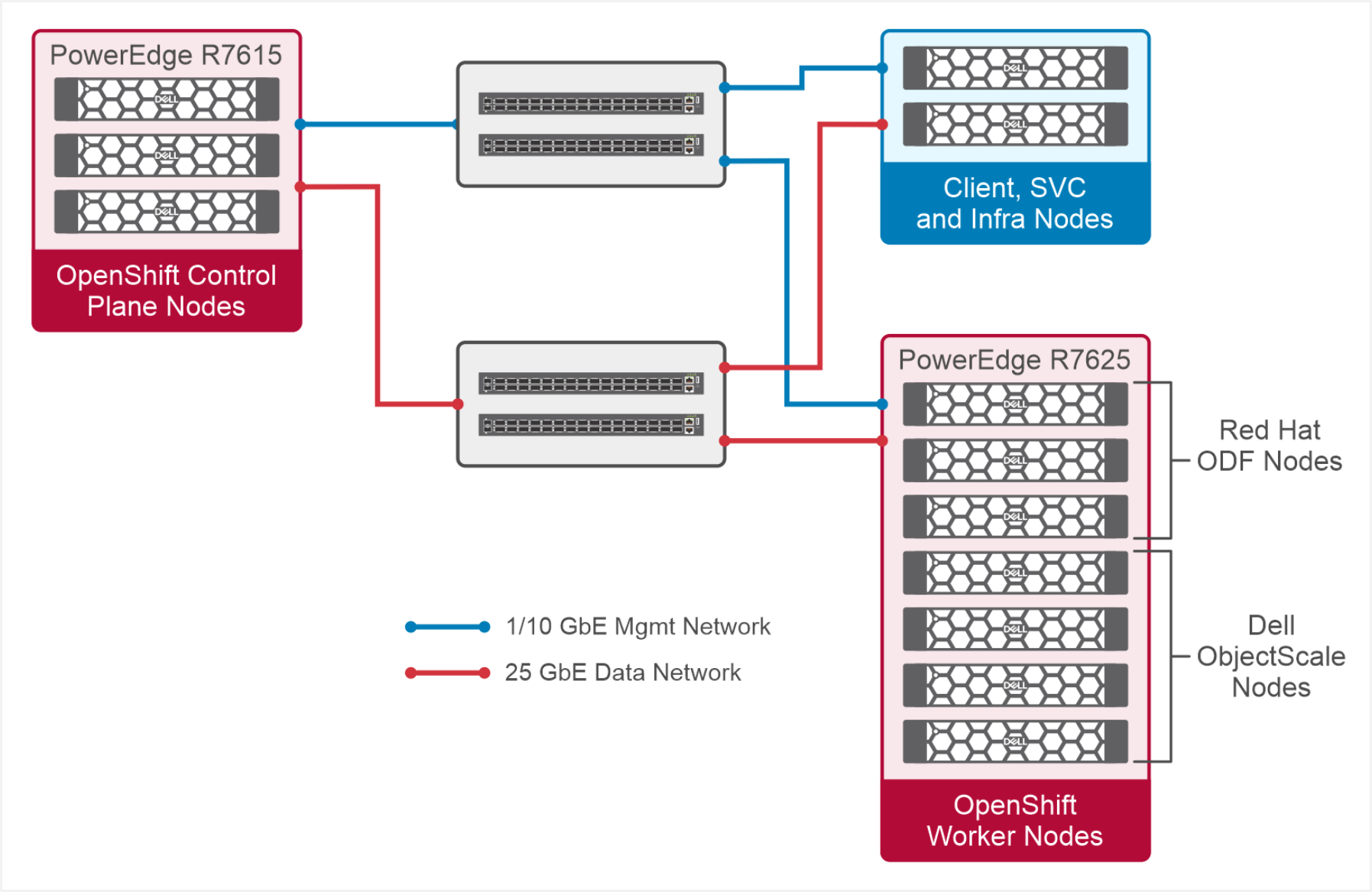
Figure 4. Red Hat OpenShift high level physical architecture
OpenShift Control Plane Nodes
Control plane nodes run the components that are responsible for managing the OpenShift cluster. We used three Dell PowerEdge R7615 Servers as control plane nodes.
Dell PowerEdge R7615 Server is a single socket rack-based server model and powered by AMD EPYC 9124 processor with 16 physical cores. Dell PowerEdge R7615 is designed to be the most economical investment per dollar for the data center and provides better price performance ratio and flexible low-latency storage options. Target workloads include software-defined storage (SDS), virtualization, data analytics.
OpenShift Worker Nodes
Worker nodes run the pods that contain the application and provides compute and storage resources to the applications. We used seven Dell PowerEdge R7625 Servers as worker nodes. Storage of four worker nodes is dedicated for the ObjectScale instance and three worker nodes are dedicated for RHODF.
These worker nodes have enough CPU and memory to handle the compute resources required for SQL analytic workloads. They also provide capacity for both persistent block storage (RHODF) and object storage (Dell ObjectScale).
Dell PowerEdge R7625 is a dual-socket server model and powered by AMD EPYC 9334 processor with 32 physical cores, provides breakthrough performance. Dell PowerEdge R7625 is designed to be the backbone of the data center. These extremely powerful servers provide ample performance and flexible low-latency storage options. Target workloads include High Performance Computing (HPC), Virtual Desktop Infrastructure (VDI), virtualization, and data analytics.
Networking
We used two Dell PowerSwitch S5248F-ON top of the rack (ToR) switches for the data path. The Dell PowerSwitch S5248F-ON provides state-of-the-art, high-density 25 GbE ports and a broad range of functionality to meet the growing demands of today’s data center environment. These switches offer flexible options for changing network configurations and adapt to the deployment in a containerized environment. Additionally, we have used two 1GbE/10 GbE management switches for out-of-band connectivity.
Client, SVC, and Infra node
These nodes hosts VMs which run client applications and tools required to manage the Red Hat OpenShift cluster, ObjectScale, Apache Spark and SQL Server. Also, infra VMs host different services such as AD, DNS, NTP.
Logical architecture
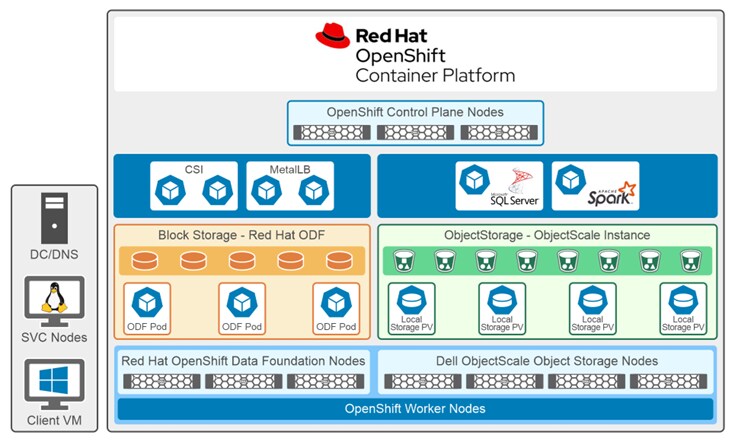 Figure 5. Overview of Red Hat OpenShift logical architecture
Red Hat OpenShift is the foundation of this solution because one of the major focus areas during the development of this solution was to create a cloud-native data analytics solution that could be location agnostic and provide a consistent user experience across on-premises, public, and hybrid cloud, or edge infrastructure.
In this setup, the Microsoft SQL Server 2022 pod will be scheduled by RHOCP in one of the worker nodes. Apache Spark is also deployed as a pod in RHOCP and used in this solution to convert CSV datasets to delta lake format and to store it in Dell ObjectScale. The PolyBase feature in SQL Server facilitates data virtualization and enables SQL Server instances to query data from Dell ObjectScale storage.
SQL instances use RHODF block storage to store Database files. RHODF delivers persistent block storage for Microsoft SQL Server 2022 and supports database availability requirements. RHODF also provides fault tolerant storage to sustain disk and node level failures.
Dell ObjectScale is a S3 compatible object storage, used in this solution to store and access external delta tables. ObjectScale uses various Erasure Coding (EC) schemes for data protection. EC is a method of data protection in which data is broken into fragments, expanded, and then encoded with redundant data pieces. The data pieces are stored across different locations or storage media. The objective of EC is to enable data that becomes corrupted at some point in the disk storage process to be reconstructed by using information about the data that is stored elsewhere in ObjectScale instance.
MetalLB is a layer 2 load balancer and can be deployed as an Operator in OpenShift, when a service of Type Load Balancer is added to the cluster, MetalLB adds a fault-tolerant external IP address for that service.
Data access architecture
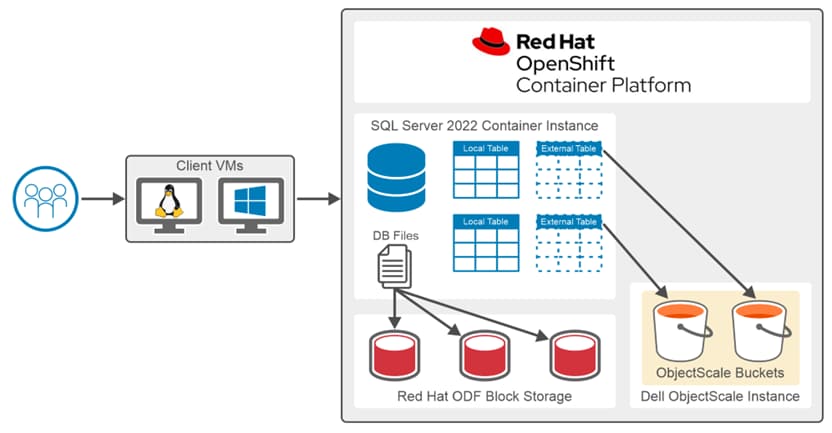 Figure 6. Data access architecture
In this setup, database files for the SQL Server 2022 container instance are stored in RHODF Storage. External Table objects are stored in ObjectScale storage buckets, and PolyBase provides SQL Server the ability to access external tables.
Solution requirements
Solution Deployment
Building the OpenShift cluster
Red Hat OpenShift cluster deployment
The architectural design outlines the utilization of Red Hat OpenShift 4.12 to establish an environment for hosting containerized applications. This section describes the infrastructure that is required for deploying and operating the Red Hat OpenShift Container Platform. This section also provides steps for deploying a production-ready OpenShift Container Platform on Dell 16G AMD-based PowerEdge servers.
The OpenShift cluster is built using ten 16G Dell PowerEdge Servers. This OpenShift Cluster manages SQL Server and Spark Containers, RHODF, and ObjectScale storage.
OpenShift Container Platform installation
There are four types of installation procedures for the OpenShift Container Platform.
- Interactive: Using the web-based Assisted Installer, a cluster deployment can be achieved easily for networks connected to the Internet. The Assisted Installer streamlines the installation process of the OpenShift Container Platform by providing intelligent defaults and conducting pre-flight validations.
- Local Agent-based: For environments that are disconnected or have restricted networks, the Agent-based Installer can be used to set up a local cluster. This installer provides many of the same benefits as the Assisted Installer, but it is necessary to download and configure it beforehand. Configuration is performed using a command-line interface, making it an ideal solution for disconnected environments.
- Automated: Clusters can be deployed on infrastructure provisioned by the installer, using the baseboard management controller (BMC) of each host for provisioning. Deployment of clusters is feasible in both connected and disconnected environments.
- Full control: Deploying a cluster on self-prepared and maintained infrastructure offers the flexibility in customization. Clusters can be deployed in both connected and disconnected environments.
In our validation, we used an agent-based installation. The “oc install agent create image” subcommand generates a bootable ISO image with all the information required to deploy an OpenShift Container Platform.
We have methods to provide inputs about our environment and required cluster configurations in the form of yaml manifests. We used install-config.yaml and agent-config.yaml during our deployment. There are some optional ZTP manifests that can be used to provide inputs. For more information about ZTP and installation workflow, see the Agent-based installer webpage.
To deploy Red Hat OpenShift cluster, download installation and configuration files for bare metal servers.
The following list describes the high-level deployment steps required to set up Red Hat OpenShift cluster:
- Add entry of your hosts and cluster into your DNS.
- Download Custom ISO and pull secret from Red Hat for bare-metal deployment.
- Set and validate node specific networking.
- Set node and cluster specific configurations with the help of install-config.yaml and agent-config.yaml.
- Download and install the client CLI on your service node.
- Bring all the dependent container images to your local container registry.
- Deploy Red Hat OpenShift Cluster Platform using CLI.
Red Hat provides a detailed step by step guideline for the Agent-based installation.
Once Red Hat OpenShift Cluster deployment completes, we can log in to the Red Hat OpenShift cluster dashboard using the temporary “kubeadmin” user credentials.
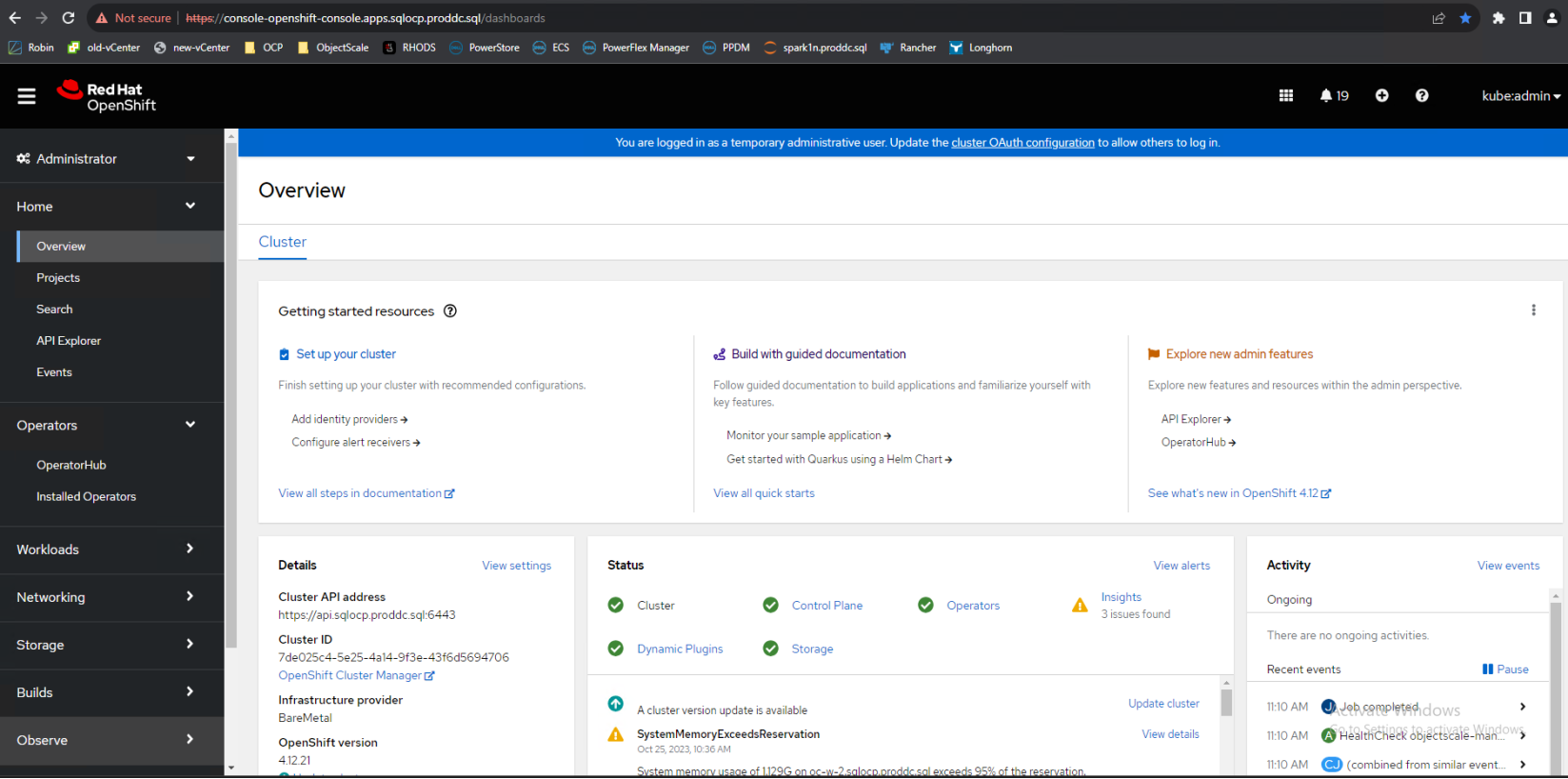 Figure 7. Red Hat OpenShift web console
MetalLB
MetalLB is a LoadBalancer solution designed for bare metal containerized clusters, leveraging widely adopted routing protocols for fault-tolerant external IP address.
Pre-requisites to install MetalLB Operator:
To MetalLB operator in Red Hat OpenShift Cluster using the dashboard, use the following procedure:
1. Log in as a user with cluster-admin privileges.
2. In the OpenShift Container Platform web console, go to Operators → OperatorHub.
3. Type a keyword into the Filter by keyword box or scroll to find the Operator you want. For example, type metallb to find the MetalLB Operator.
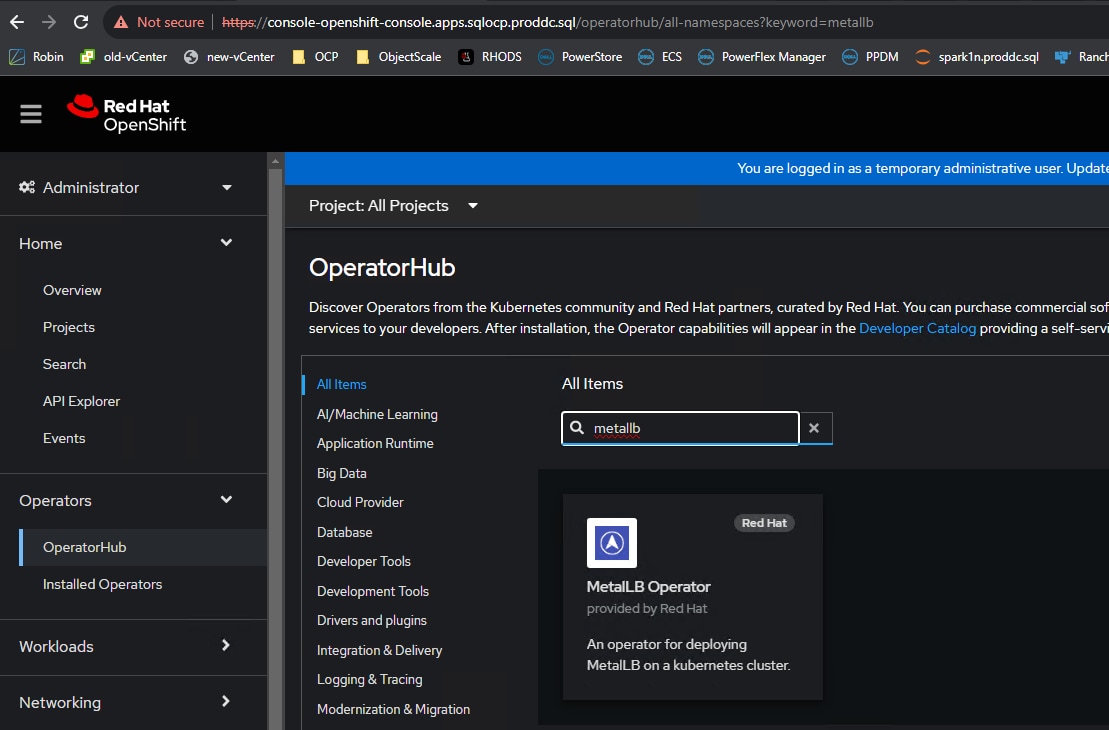
Figure 8. Filtering MetalLB operator in Red Hat OpenShift Cluster using the dashboard
4. On the Install Operator page, accept the defaults, and click Install.
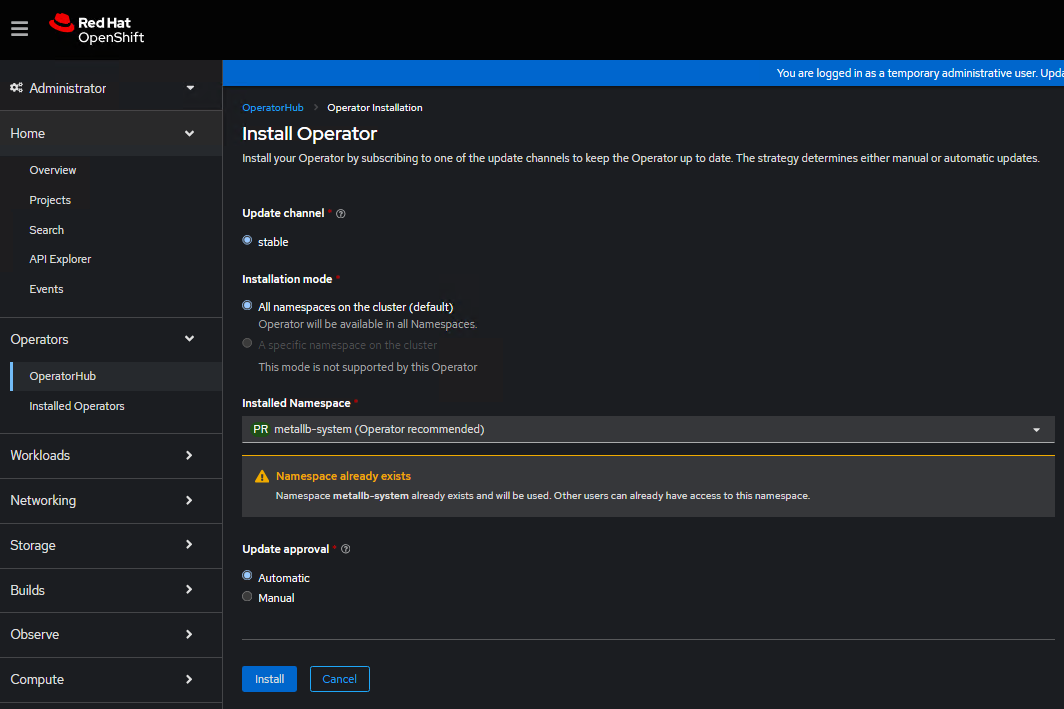
Figure 9. Installing MetalLB operator in Red Hat OpenShift Cluster dashboard
5. Once the operator is installed, you can see the following screen.
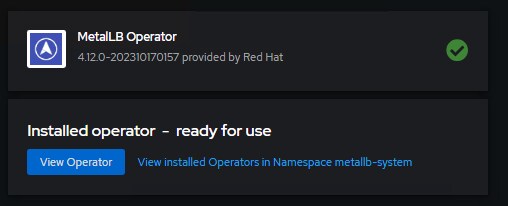
Figure 10. Successful installation of MetalLB operator
6. Create a single instance of a MetalLB custom resource using the Create Instance link for MetalLB as shown below.
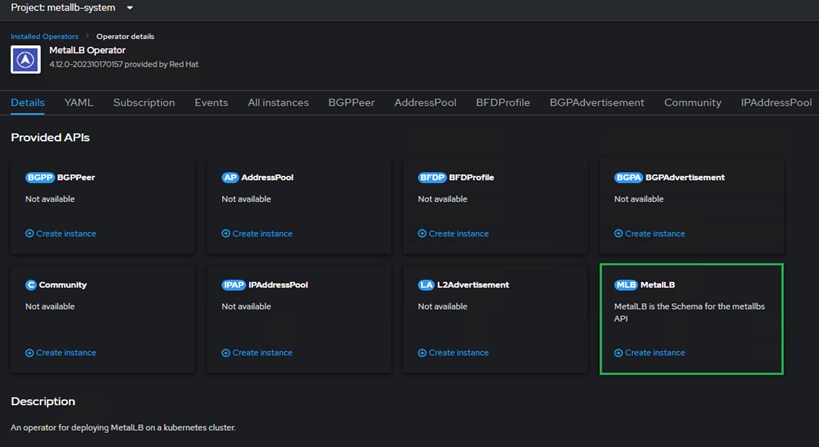
Figure 11. MetalLB custom resource
7. On the MetalLB create instance page, accept the defaults, and click Install.
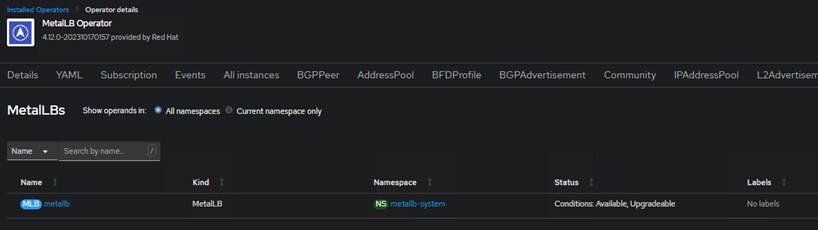
Figure 12. MetalLB create instance
8. Create AddressPool by going to the Create Instance link for the addresspool and specifying the yaml manifests as shown below.
Note: Change the IP address range as per your environment.
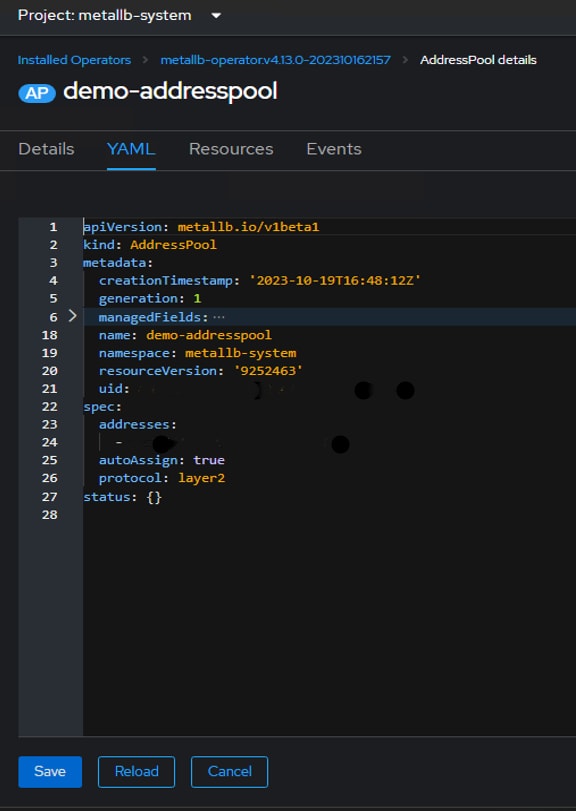
Figure 13. Create adresspool .yaml file
9. Finally the MetalLB setup is complete and ready to serve IP from its IP pool whenever we request LoadBalancer Service type.
For more information about MetalLB operator installation, see the Red Hat OpenShift website.
Red Hat ODF deployment and configuration
Overview
The following section provides an overview of RHODF deployment on bare metal infrastructure with an existing installation of RHOCP.
See Preparing to deploy OpenShift Data Foundation webpage to view the requirements for installing RHODF.
Complete the following steps to successfully deploy RHODF.
- Install the Local Storage Operator.
- Install the Red Hat OpenShift Data Foundation Operator from OperatorHub.
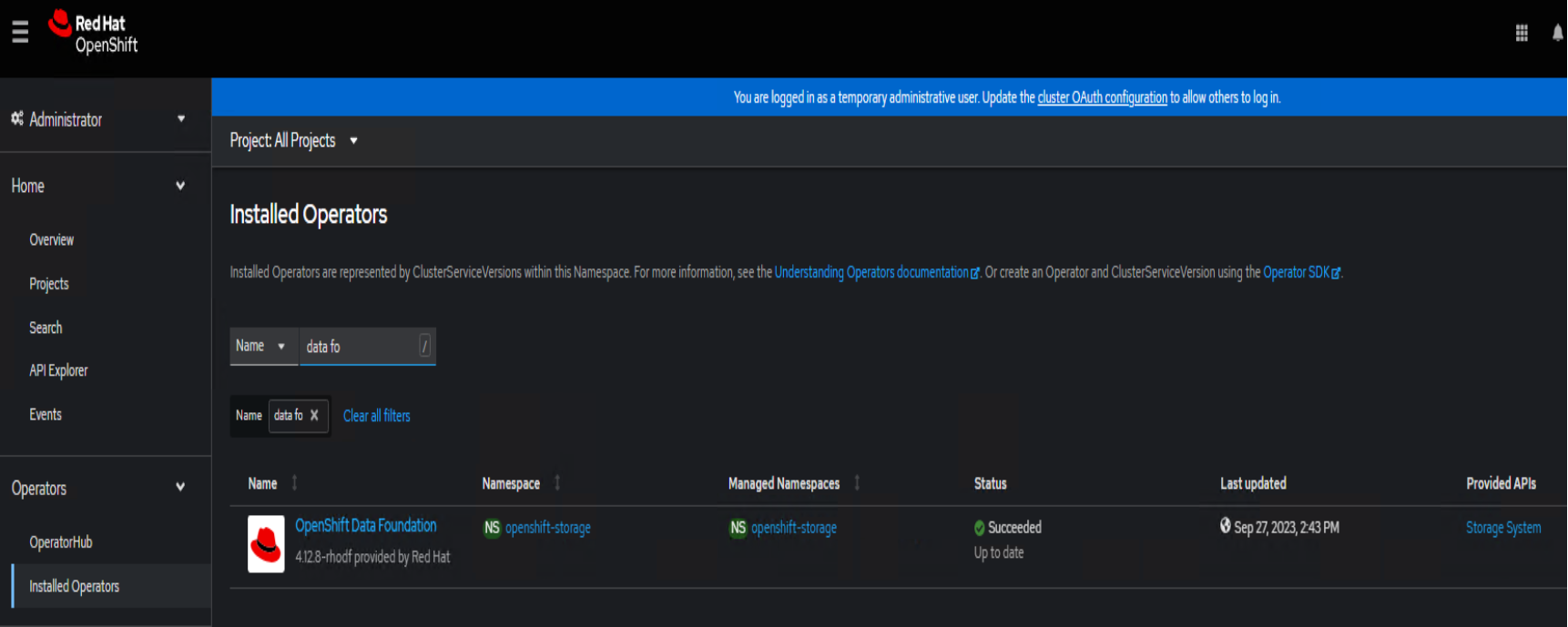
Figure 14. RHODF operator
- Go to create an OpenShift Data Foundation cluster on bare metal.
The step-by-step procedure to install RHODF on bare metal infrastructure is available on RHODF webpage.
- Once the RHODF is configured, we can validate using data foundation dashboard, as shown in Figure 15.
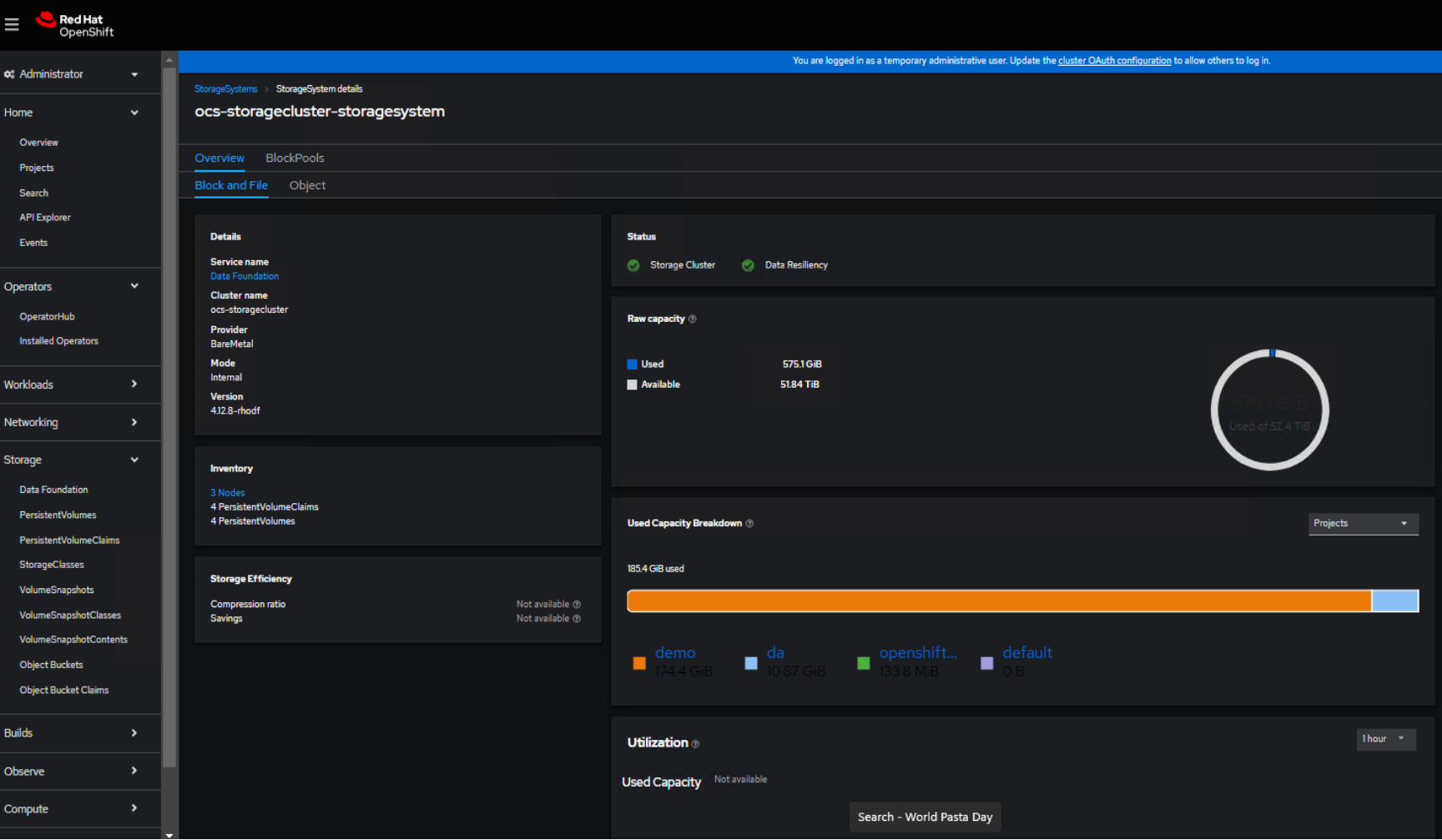
Figure 15. Data foundation dashboard
Verification process for the OpenShift Data Foundation deployment
After the successful installation of RHODF on bare metal, it is essential to verify the provided environment. Verify the following:
- Verify the state of the pods
- Verify that the OpenShift Data Foundation cluster is healthy
- Verify that the Multicloud Object Gateway is healthy
- Verify that the OpenShift Data Foundation specific storage classes exist
- Verify the Multus networking
Building an ObjectScale Storage
Deployment pre-requisites
To successful installation of ObjectScale, it is important to verify that all essential pre-requisites have been fulfilled. This includes:
- Ensure that you have an active account on the Dell Support
- Run the ObjectScale qualification tool to ensure that the target cluster meets the requirements.
- Linux Orchestration Host requirements host that must have connectivity to the cluster and at least have 150 GB free space available.
- Hardware requirements for the cluster
- Operating system requirements for the cluster
- Other installation considerations like ensuring deployment nodes are networked and accessible to all the target nodes
For more information about the ObjectScale qualification tool, hardware, and operating system requirements for the cluster, see the Dell portal.
ObjectScale deployment
There are two deployment alternatives available for ObjectScale. The first option involves installing ObjectScale as a software bundle on bare metal, using SUSE Linux Enterprise Server. Alternatively, ObjectScale can be deployed onto an existing Red Hat OpenShift Cluster environment. The installation procedures for both options include a qualification check to verify that the underlying platform meets the necessary requirements. For more information, see the installation guide available on Dell Support.
A detailed step by step installation procedure for ObjectScale deployment on the Red Hat OpenShift environment is available on Dell ObjectScale Application 1.2.x Installation Guide for Red Hat OpenShift.
Once the ObjectScale is deployed successfully, we can access the ObjectScale dashboard as shown below.
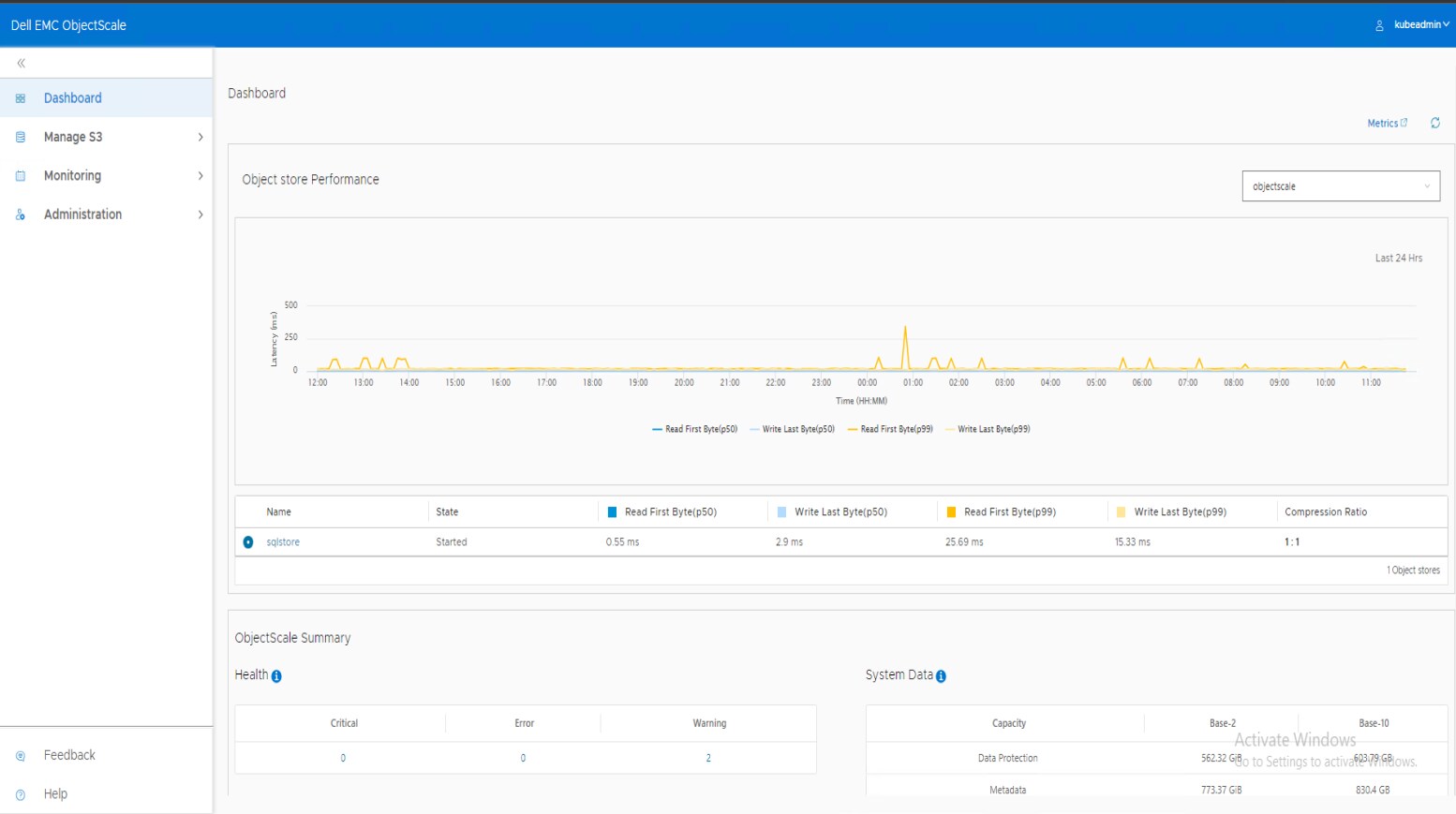 Figure 16. ObjectScale dashboard
Adding ObjectScale License
After ObjectScale deployment completes, it is necessary to apply a valid ObjectScale license to create an object store. To obtain a valid ObjectScale license from Dell, please refer to the Get Dell ObjectScale license page.
To successfully apply and activate the ObjectScale license for your ObjectScale instance, see the ObjectScale activation steps.
Deploying ObjectStore
Overview
The ObjectStore is a conceptual framework that has been implemented in ObjectScale to offer distinct data services to each object store within the ObjectScale. An instance of ObjectScale can accommodate multiple object stores. These stores can be created, updated, and deleted independently from all other objects that are managed by ObjectScale.
While implementing object stores in ObjectScale, it is important to follow the specific naming convention guidelines for the creation of object stores and group labels.
For detailed instructions to create a new object store, see the steps outlined in the Create object store.
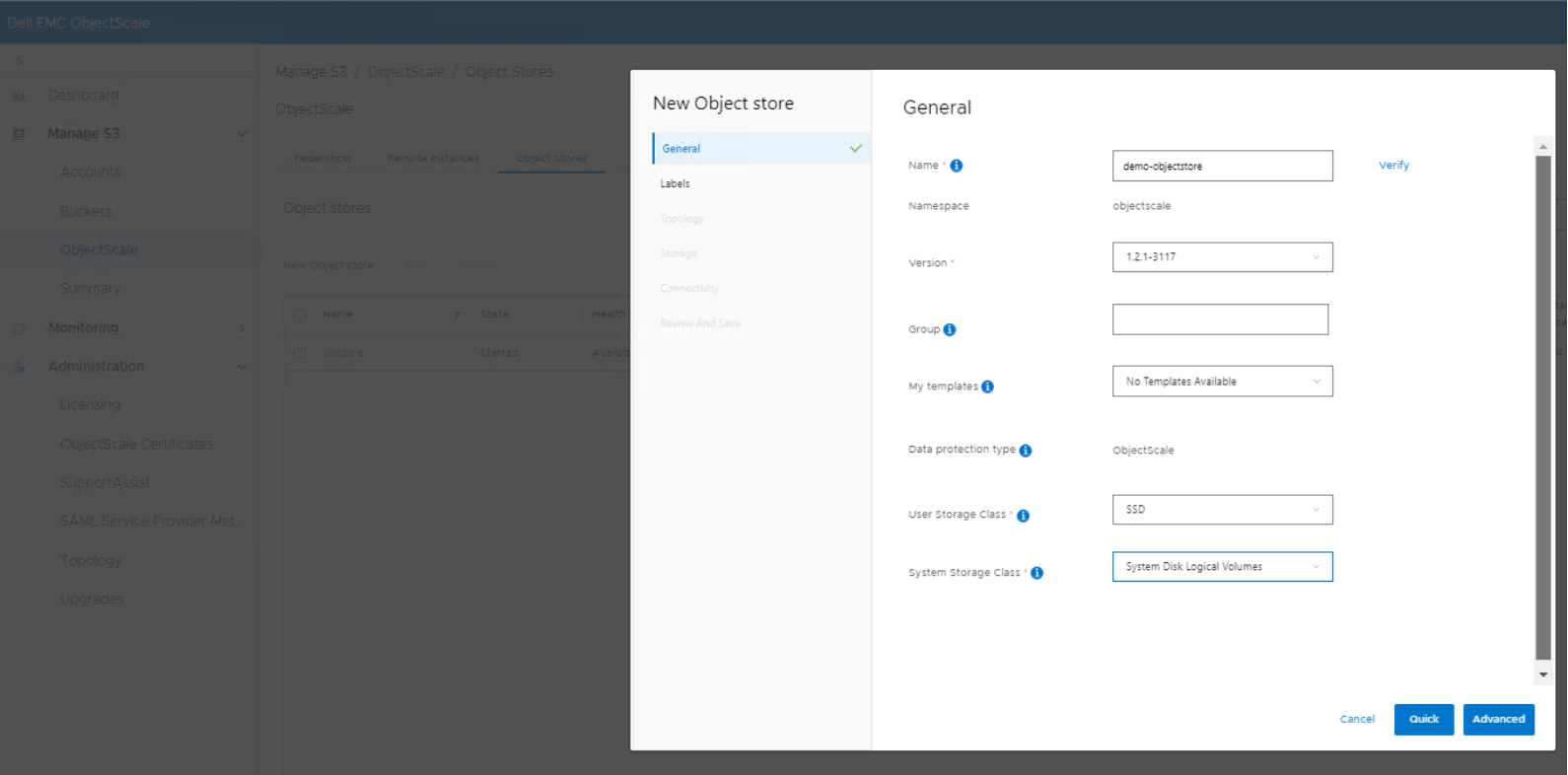 Figure 17. ObjectScale Object storage creation
To enable users within an IAM account for managing various aspects of an object store, it is imperative to associate the IAM account with the object store. Once this association has been established, IAM accounts that are linked to the object store can create new buckets within the store. Additionally, specific compliance settings and retention policies can be configured to meet the wanted requirements.
Buckets are object containers that are used to control access to the objects. For more information, see the Create a bucket page.
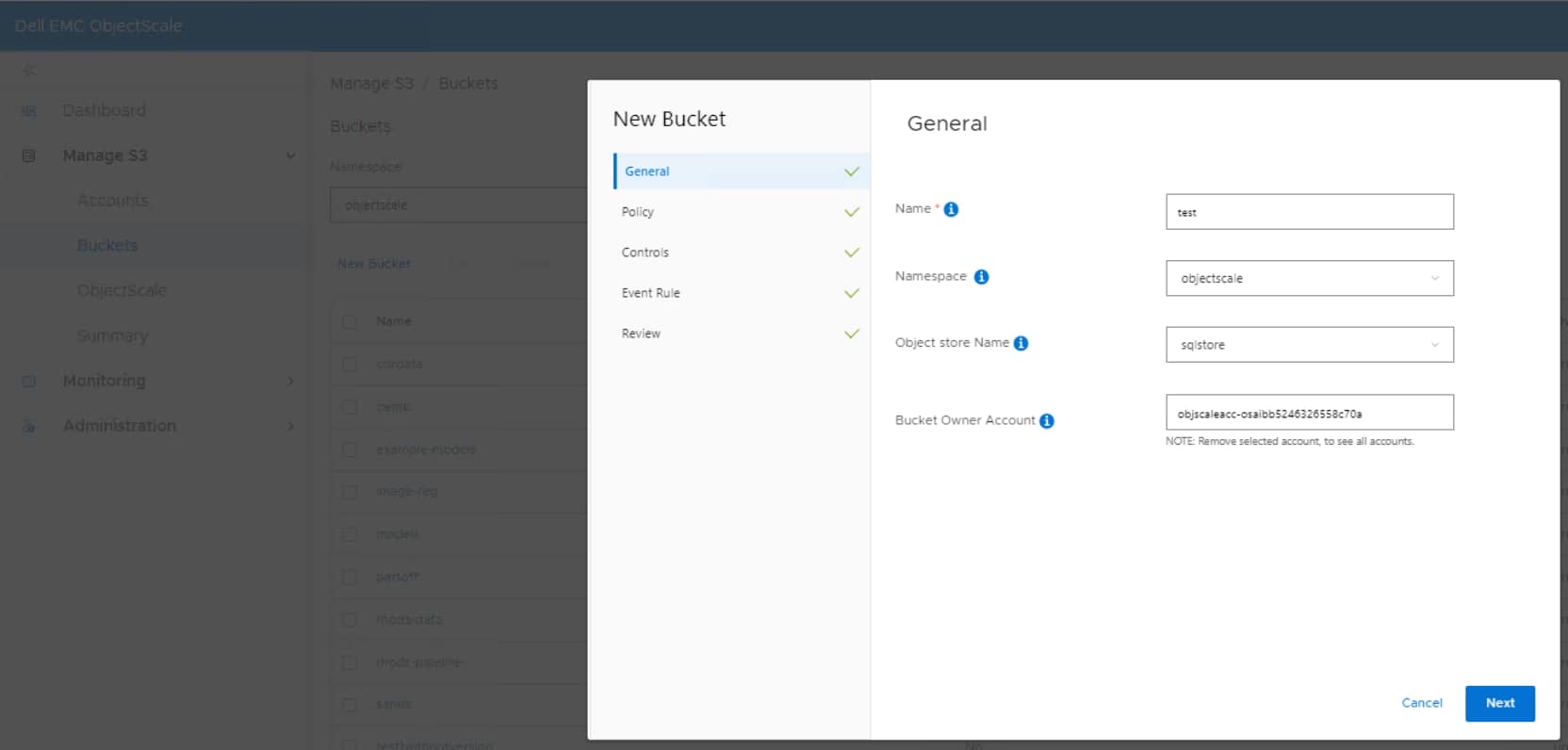 Figure 18. ObjectScale bucket creation
Apache Spark deployment
Overview
To convert data files to the Delta Lake format, we must create an Apache Spark image with Delta Lake drivers.
- The deployment of a Spark pod in OpenShift is facilitated through the utilization of a yaml manifest file. In this scenario, a custom Spark image is used, which is stored within a private image registry.
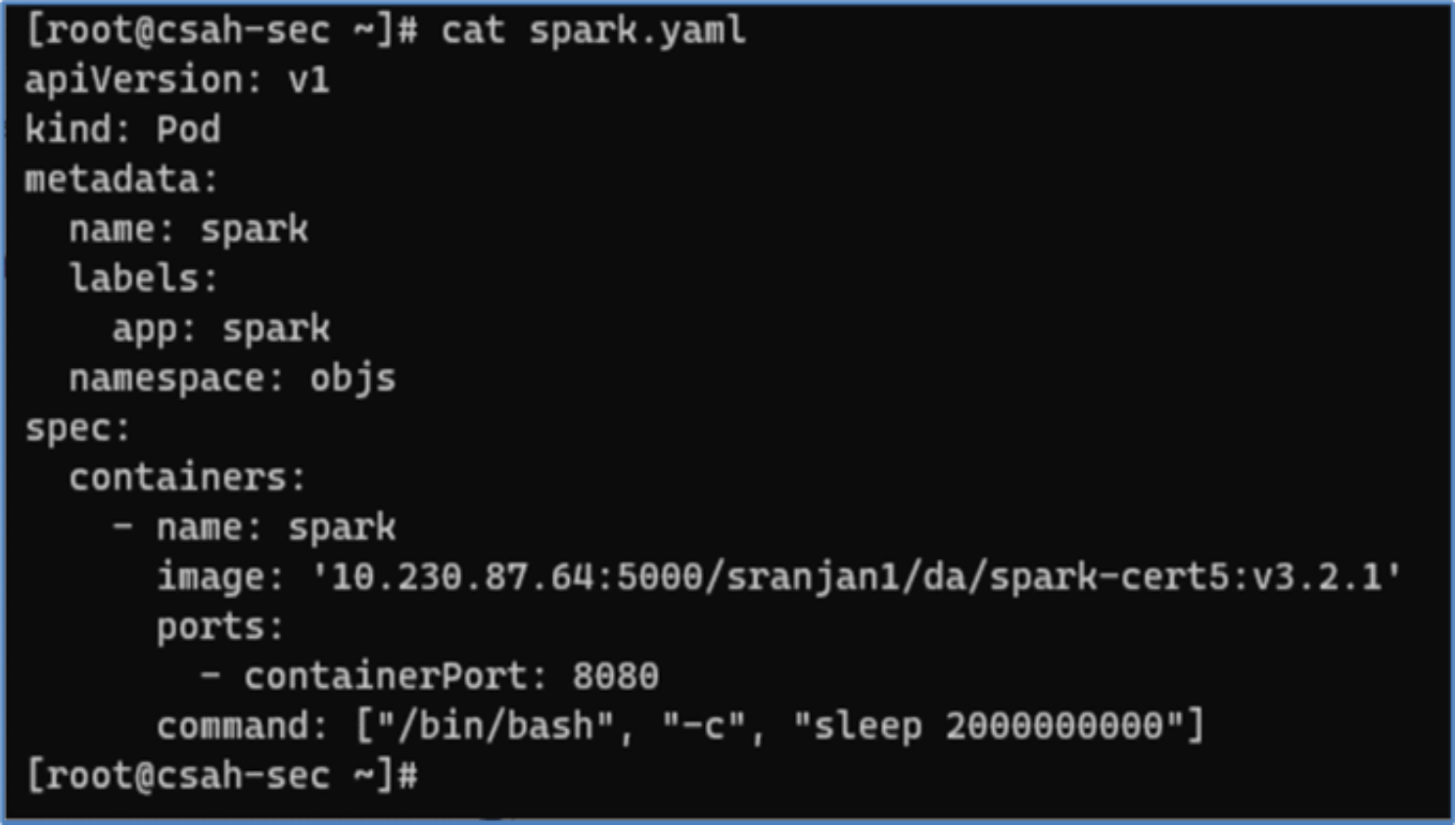
Figure 19. Spark pod yaml manifest
- After the pod has been deployed, it can be verified by using the following oc command.
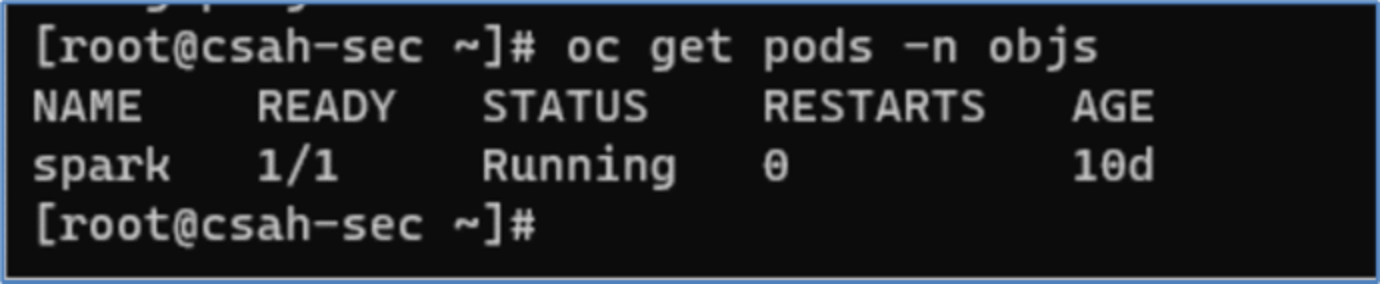 Figure 20. Spark pod status
We can now establish a connection to the Spark pod and commence a PySpark shell by running the pyspark command. In this process, we provide the relevant ObjectScale S3 API endpoints, as well as the access and secret keys.
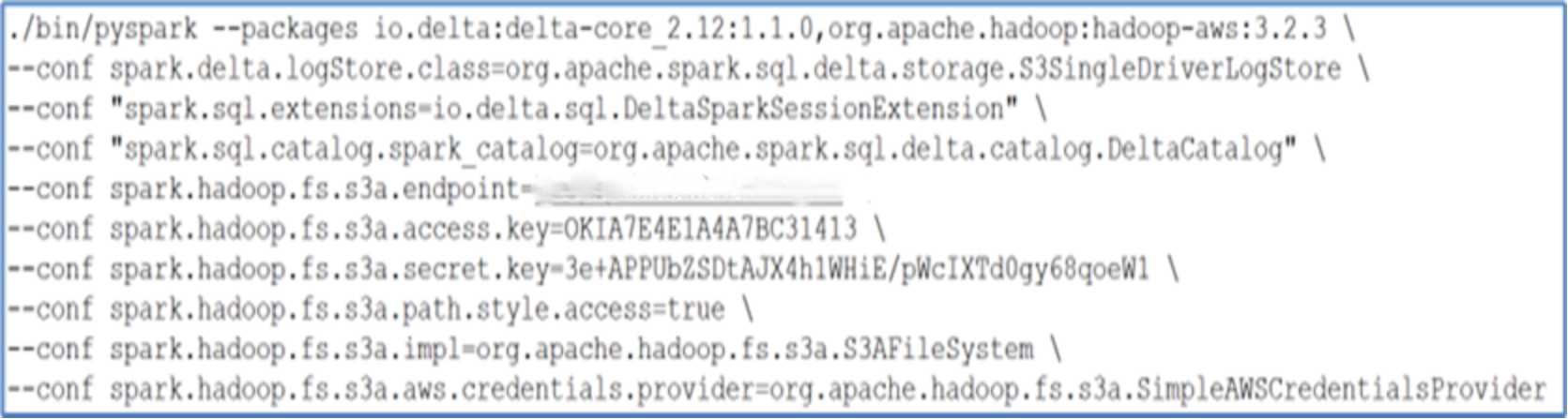 Figure 21. Spark running pyspark commands
When the command is successfully run, the Spark login screen will appear, as depicted in the following image.
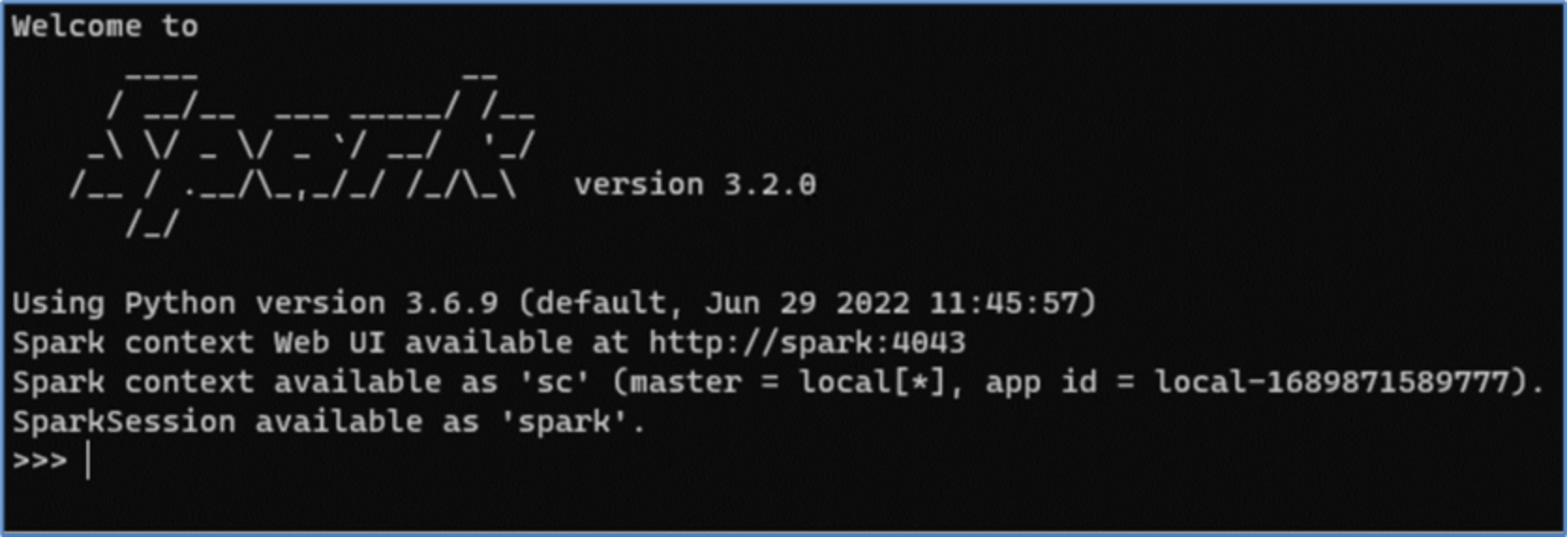 Figure 22. Spark shell
SQL Server 2022 deployment
Overview
The process of implementing SQL Server 2022 within the Red Hat OpenShift cluster is simple and straightforward. The SQL Server 2022 image has been customized to incorporate PolyBase, which facilitates the validation of potential use cases. PolyBase is not enabled by default and has been included in this custom image for data virtualization.
We have developed a customized image that includes the installation of PolyBase along with Microsoft SQL Server 2022 as shown below.
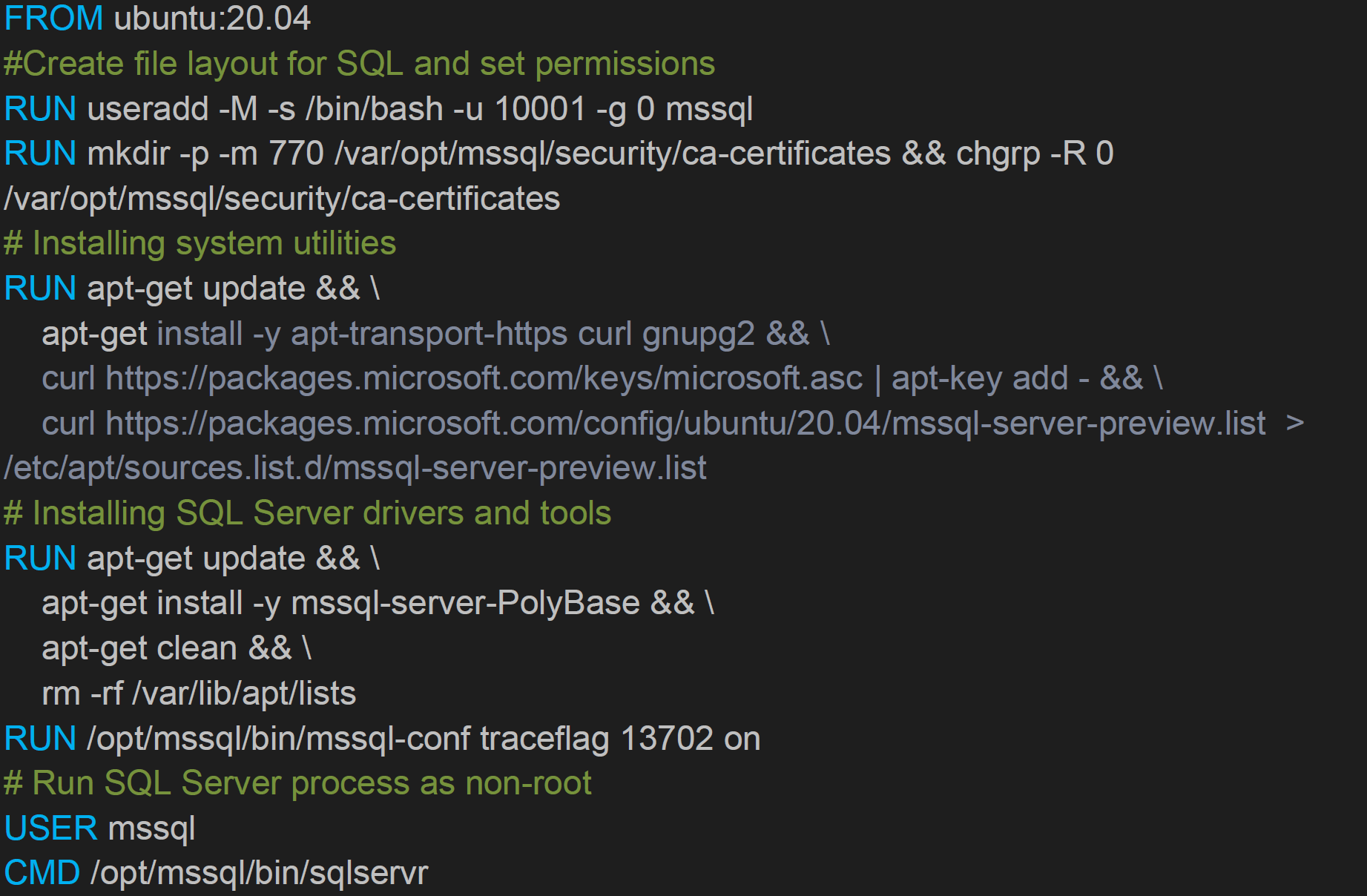 Change the image artifacts using the tag command.

Then push the newly created container image to container registry.

In this command, replace username with your dockerhub.io public container registry username. This container image can be pulled to run SQL Server 2022 with PolyBase pre-installed on any setup.
Mapping storage certificate with Openshift
The certificate must be mapped so that the Kubernetes cluster can communicate with the Elastic Cloud Storage deployment. This can be done using the Kubernetes ConfigMap, which maps the certificate to a SQL container.
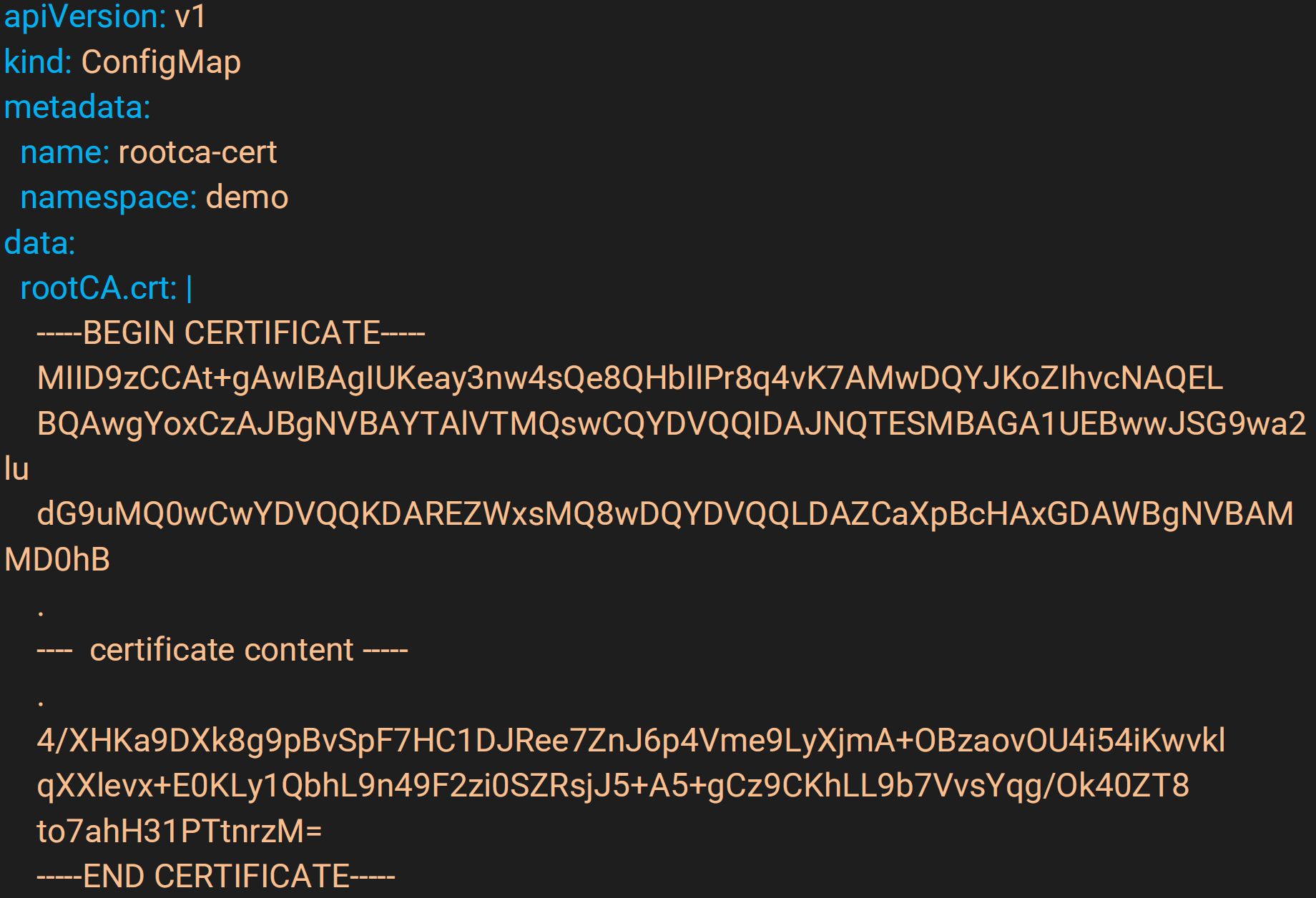
The certificate must be mapped so that the OpenShift cluster can communicate with the Dell ObjectScale storage deployment. This can be done using the OpenShift ConfigMap, which maps the certificate to a SQL container.

Persistent volume claim creation
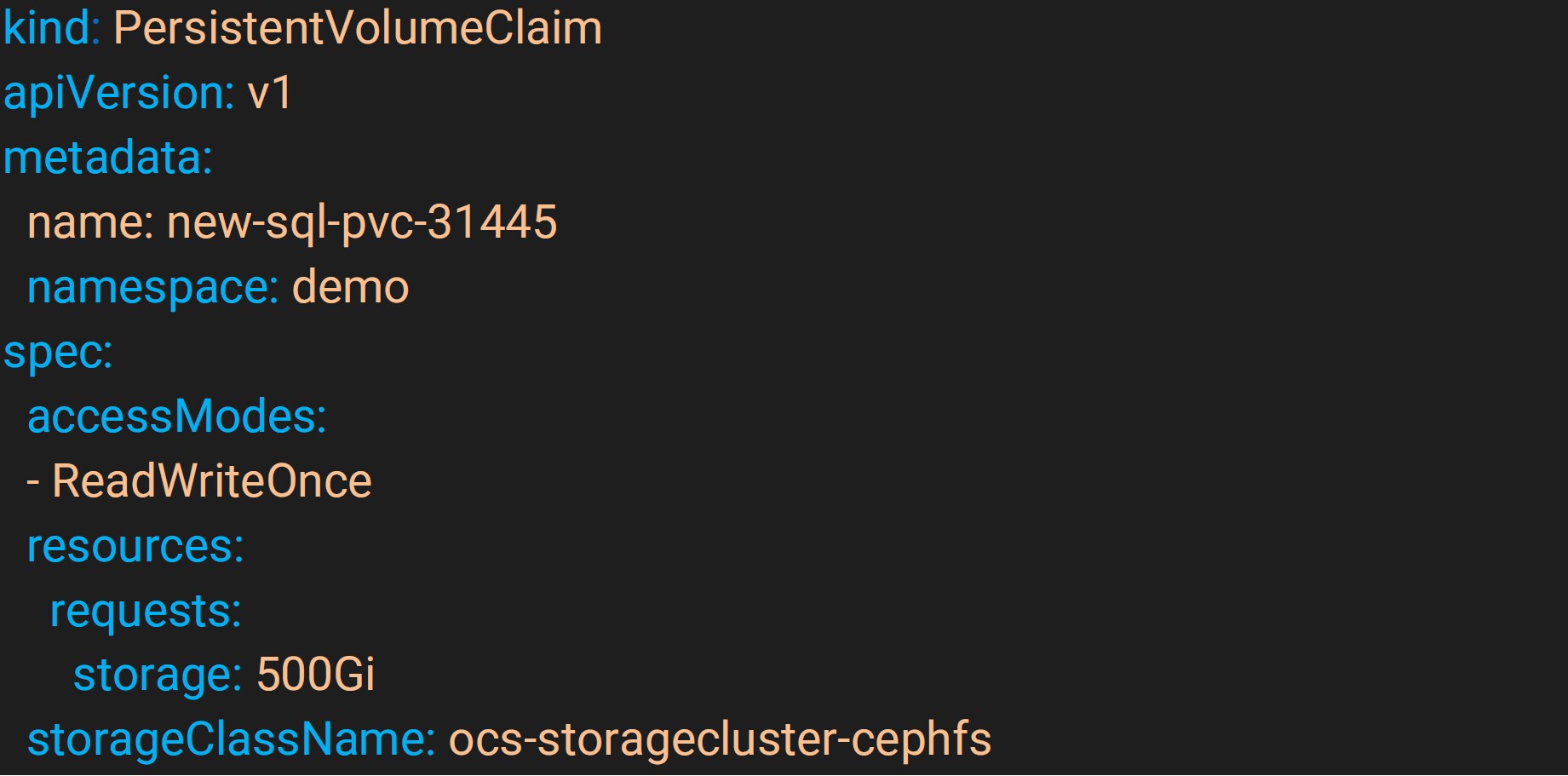
A PersistentVolumeClaim (PVC) is a request for storage by a user. It is like a Pod, as Pods consume node resources and PVCs consume PV resources. Pods can request specific resource amounts (CPU and Memory). Claims can request specific amounts of storage and can be mounted with ReadWriteOnce, ReadOnlyMany or ReadWriteMany access modes.
To provide persistent storage to a container or pod, a persistent volume claim is created using the RHODF storage class “ocs-storagecluster-cephfs”. The following script provides an example of how to create a PVC that will be used by the SQL Server pods. This pvc yaml script creates a 500 GB volume in ReadWriteOnce access mode.
SQL Server 2022 secret creation
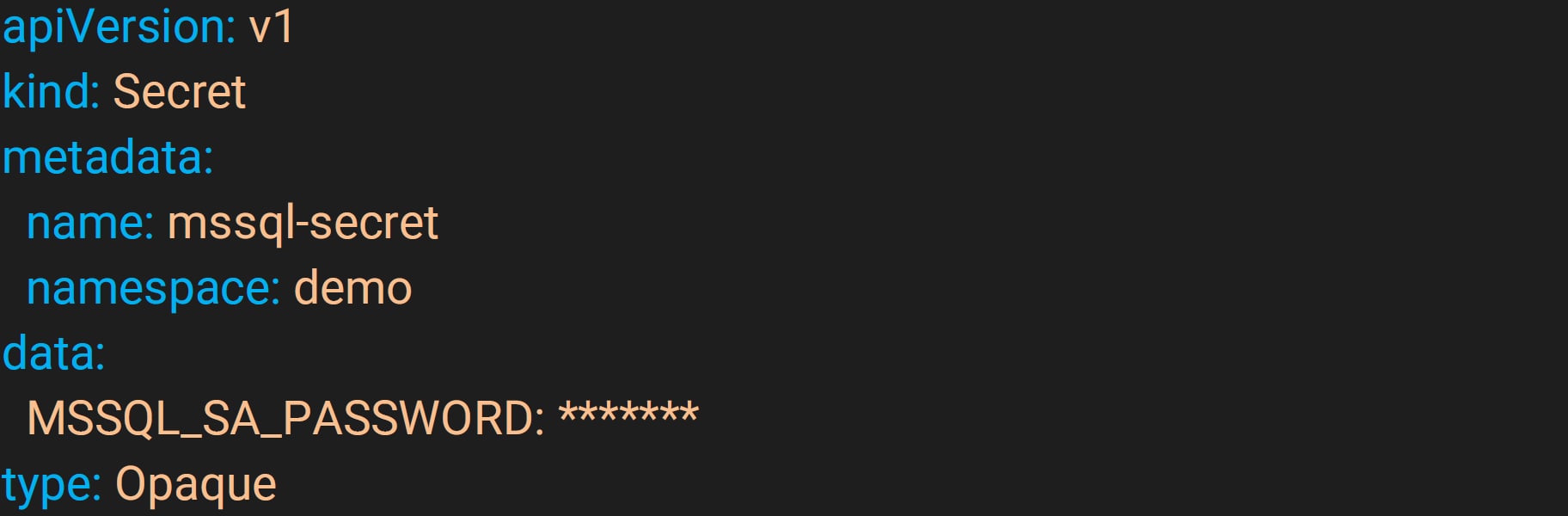
A Secret is an object that contains a small amount of sensitive data like a password, token, or key which might otherwise be put in a Pod specification or container image.
Secrets can be created independently of the Pods that use them, reducing the risk of the secrets data being exposed during the workflow of creating, viewing, and editing Pods.
To provide the SA password within the deployment file for the containers, a secret was created in OpenShift’s cluster environment using a base 64 encryption for the password.
SQL Server 2022 deployment
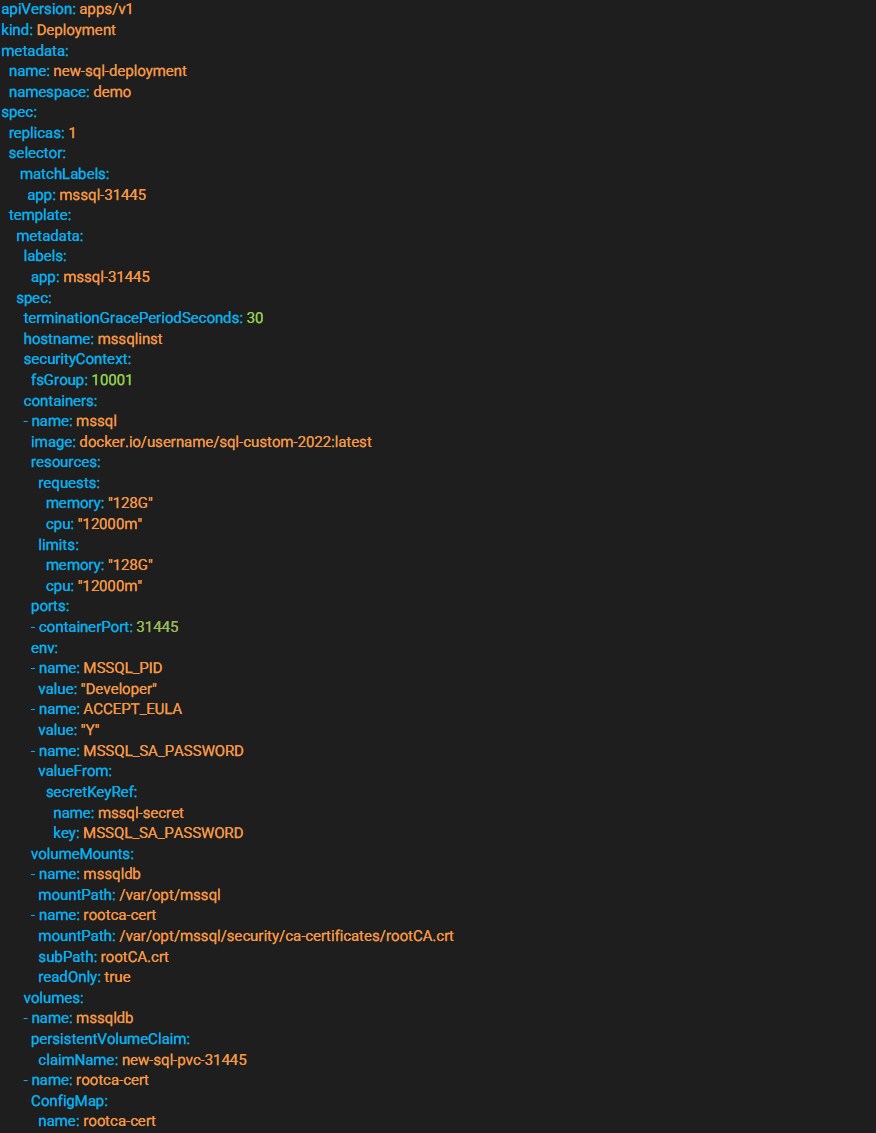
The deployment section provides a declarative update pattern for pods and replica sets. A preferred state is described, and the deployment controller changes the actual state to match the preferred state at a controlled rate. This allows high availability to be maintained, and it is possible to specify when resources should be destroyed, allowing cluster updates to occur without any loss of service in some cases.
This yaml script is used to deploy SQL Server 2022 on a OpenShift cluster.
Service creation
Services are an abstract way to expose an application running on a set of Pods as a network service. With OpenShift there is no need to modify the application to use an unfamiliar service discovery mechanism. Pods are given IP addresses by OpenShift. Pods can be load balanced and can share a single DNS.
A Service is an abstraction which defines a logical set of Pods and their access policy. The set of Pods targeted by a Service is usually determined by a selector (in this case it is “mssql-31445”). Specific ports can be specified for container port mapping.
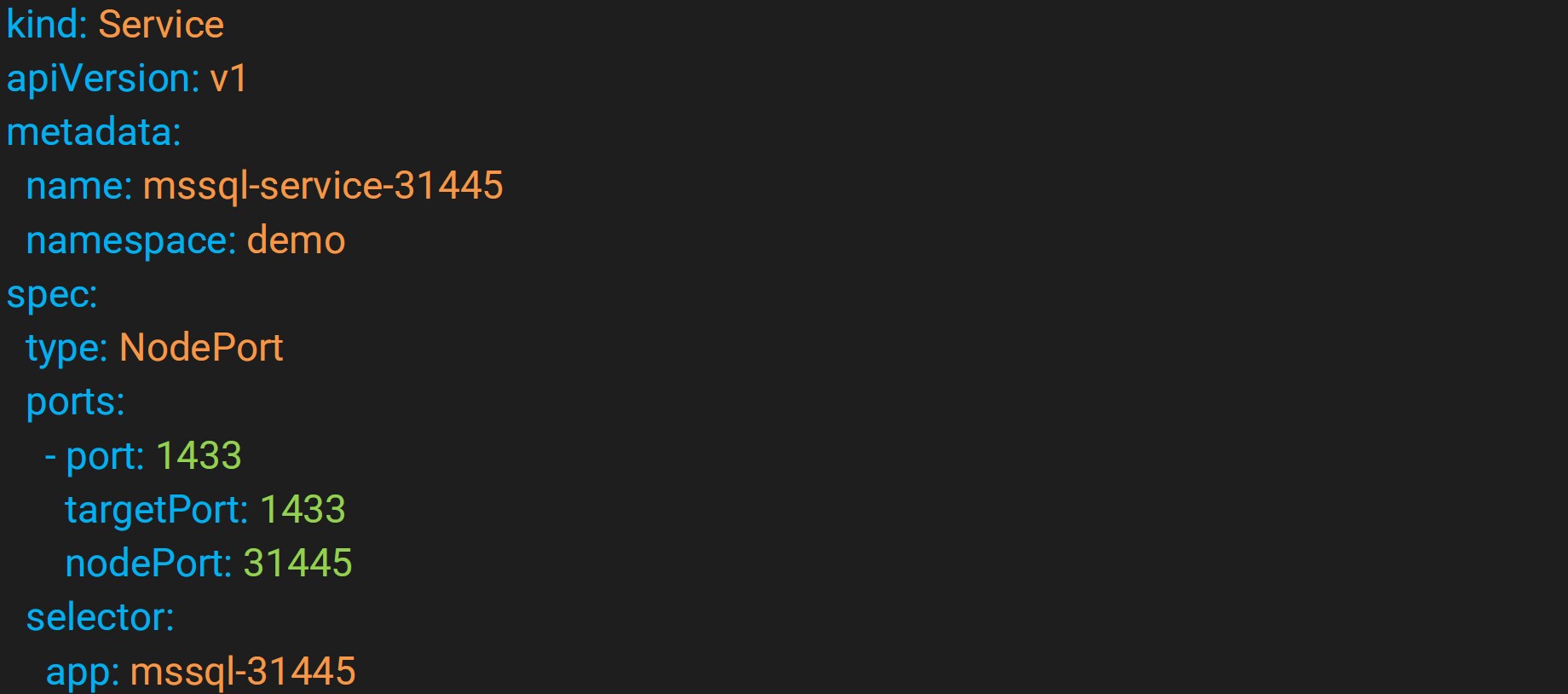
There are several types of services that can be created such as ClusterIP, NodePort, LoadBalancer, and ExternalName. This example creates a service of type NodePort. More details on the service and service types can be found on the OpenShift website.
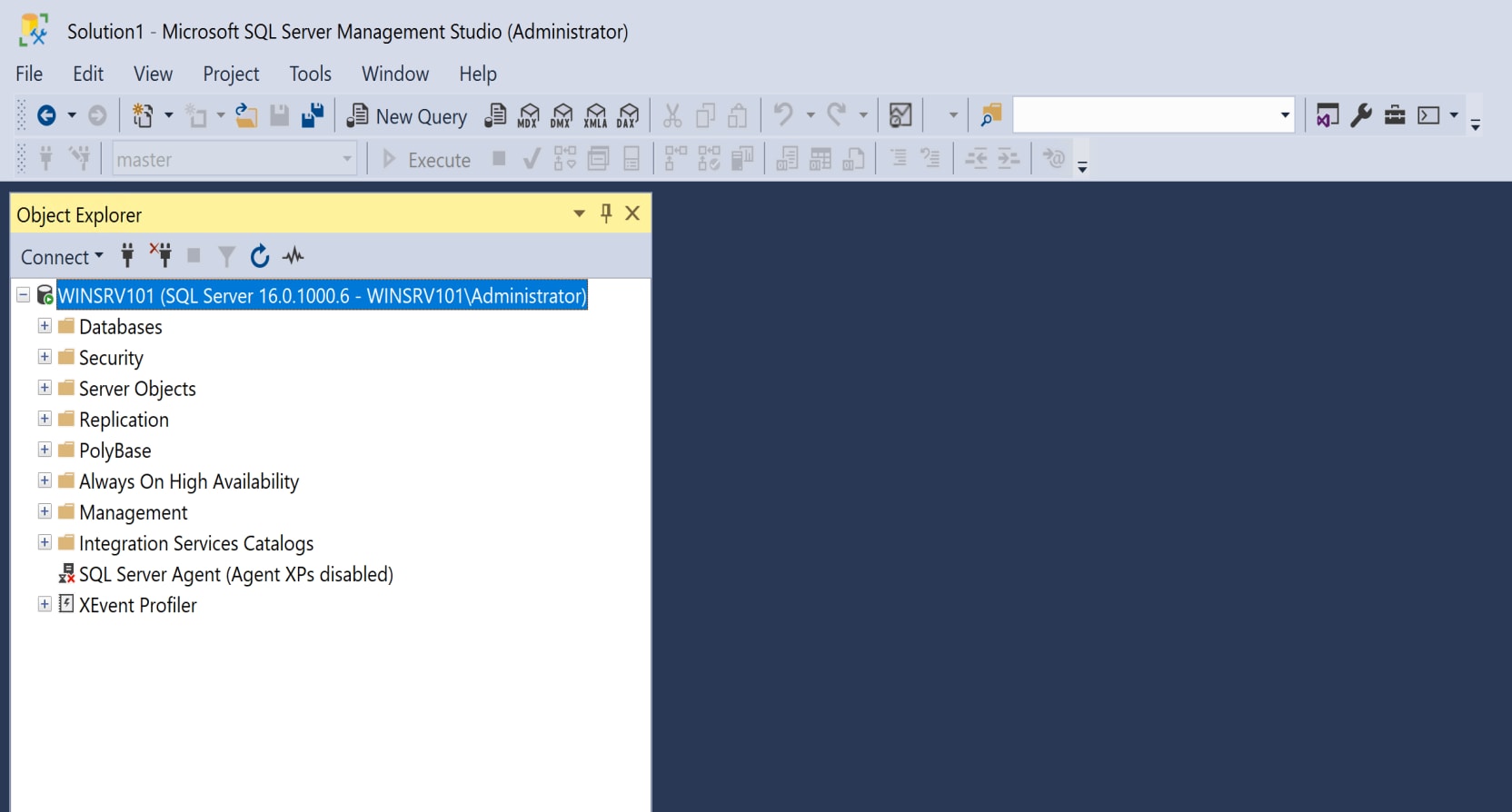
Figure 23. SQL Server SSMS
Once the SQL Server pods are running successfully, these SQL Server pods can be connected to just like any SQL Server instance. The above screenshot shows a connection to a SQL Server 2022 instance running in an OpenShift cluster environment.
Many different tools can be used to connect to a SQL Server instance that is running in a pod. SQL Server Management Studio, PowerShell, Visual Studio, third-party SQL monitoring or development tools and other platforms will connect to the container instance as intended.
Solution Execution
Enable PolyBase
The PolyBase feature of SQL Server 2022 facilitates data virtualization by allowing a SQL Server instance to directly query data using T-SQL from various sources, including SQL Server itself. To ensure seamless functioning of this feature, it is important to install and enable PolyBase on the respective SQL Server instance.
Figure 24 shows how to verify that PolyBase is installed and enabled.
Query:

Results:
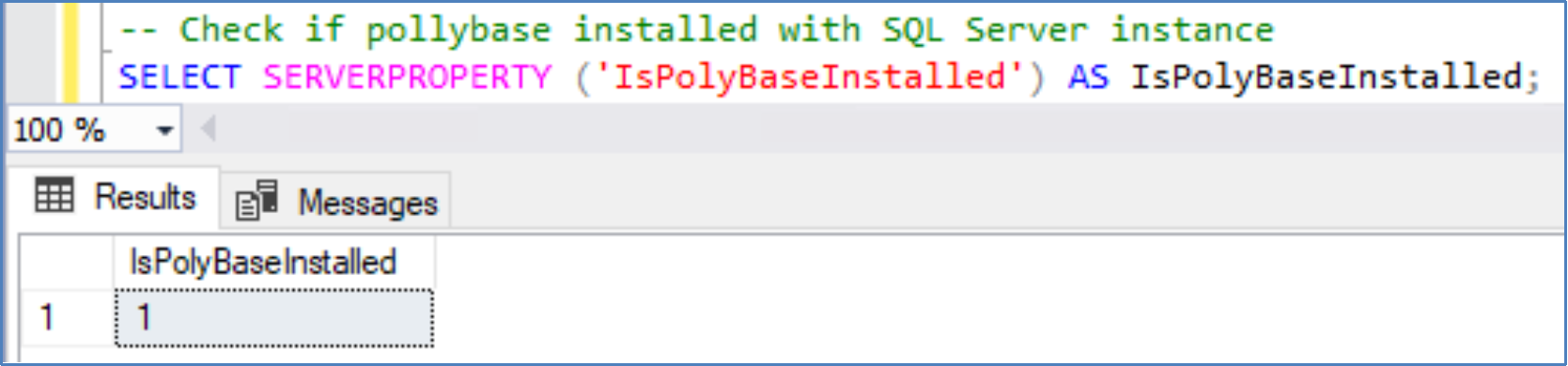
Figure 24. T-SQL Query to verify PolyBase feature installation status
PolyBase feature installation SQL Server instance level verification
Enable the PolyBase functionality at the instance level of the SQL Server, if it is not enabled already.
Query:

Results:
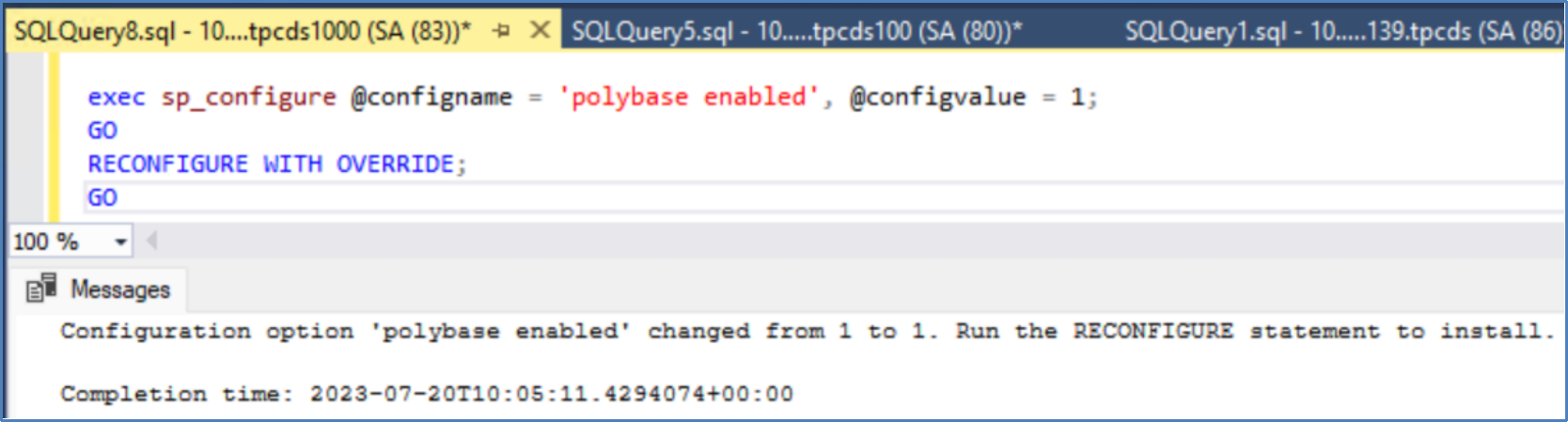 Figure 25. T-SQL Commands to enable PolyBase feature
Verify that PolyBase was enabled successfully.
Query:

Results:
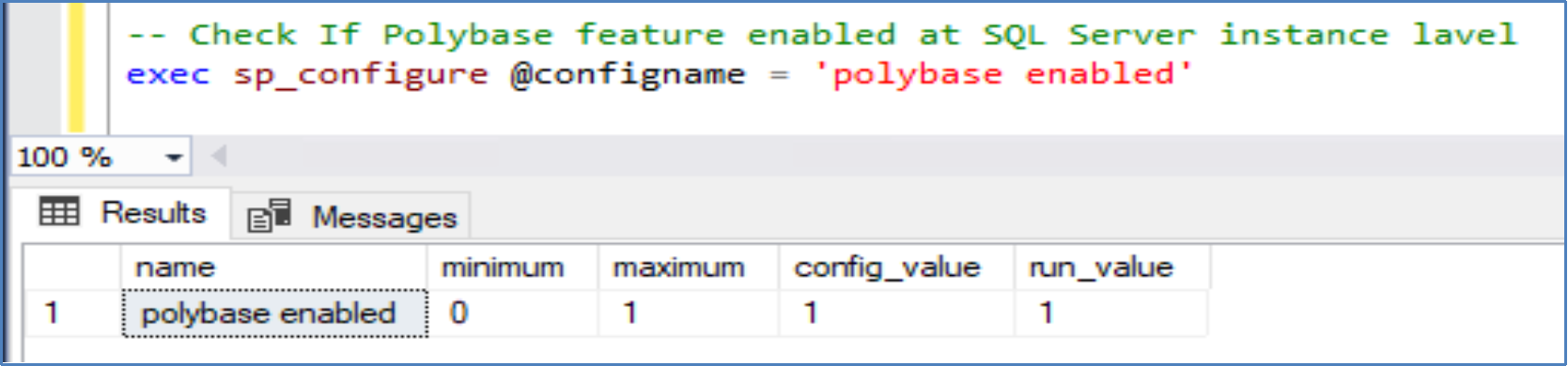
Figure 26. PolyBase feature verification
SQL Server 2022 with S3 ObjectStore integration
TPC-DS
To validate the results, we used the TPC-DS Decision Support Benchmark, which is widely recognized as an industry standard. This benchmark standard is designed to model various relevant aspects of a decision support system, such as data maintenance and queries. The benchmark offers a comprehensive assessment of performance as a versatile decision support system. It encompasses the measurement of query response time in a single user environment, query throughput in a multiuser environment, and data maintenance performance. These measurements are conducted under controlled conditions, involving a complex, multi-user decision support workload. The benchmark is designed to evaluate the performance of a specific hardware, operating system, and data processing system configuration.
For additional information regarding TPC-DS benchmarking, including table structure, query templates, and specifications, see the TPC-Benchmark DS – Standard Specifications.
We can generate the TPC-DS dataset by using the dsdgen.exe cli tool provided by TPC.org. Figure 27 shows an example of a sample datafile.
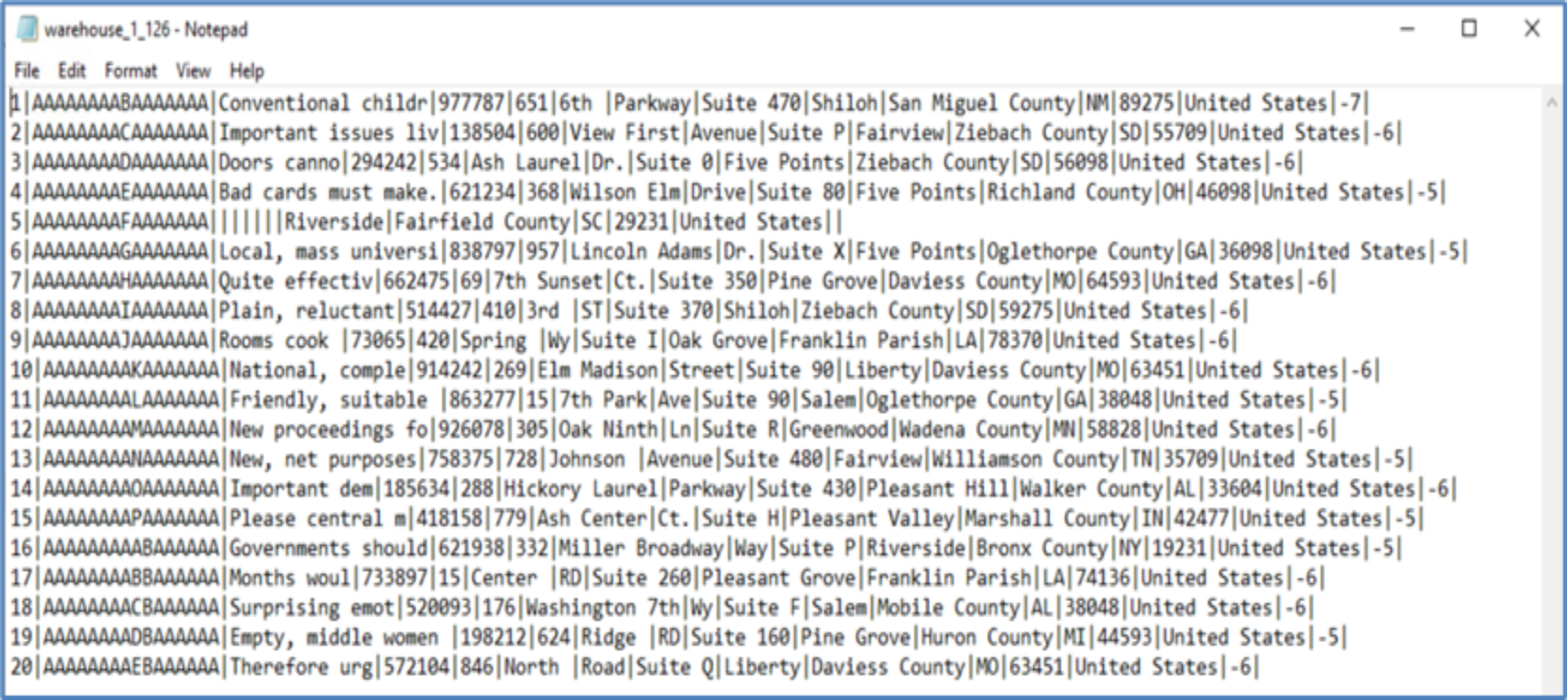 Figure 27. Sample TPC-DS datafile in .dat files with pipe (|) as column separator
Once the datafiles were generated for all tables, they were transferred to the ObjectScale bucket. The aws cli tool was used for file copying process following
aws s3 cp C:\tpcds\sf1000\data\Final\ s3://tpcds/sf1000/dat/ --recursive --endpoint-url https://1X.XXX.X6.XXX --no-verify-ssl
For more information about aws_cli, see the installation or update instructions for the latest version of the AWS CLI.
Figure 28 shows the ObjectScale bucket “tpcds” (under directory /sf1000/dat) using S3 Browser GUI tool. See the S3 Browser webpage for additional information about the S3 Browser GUI tool.
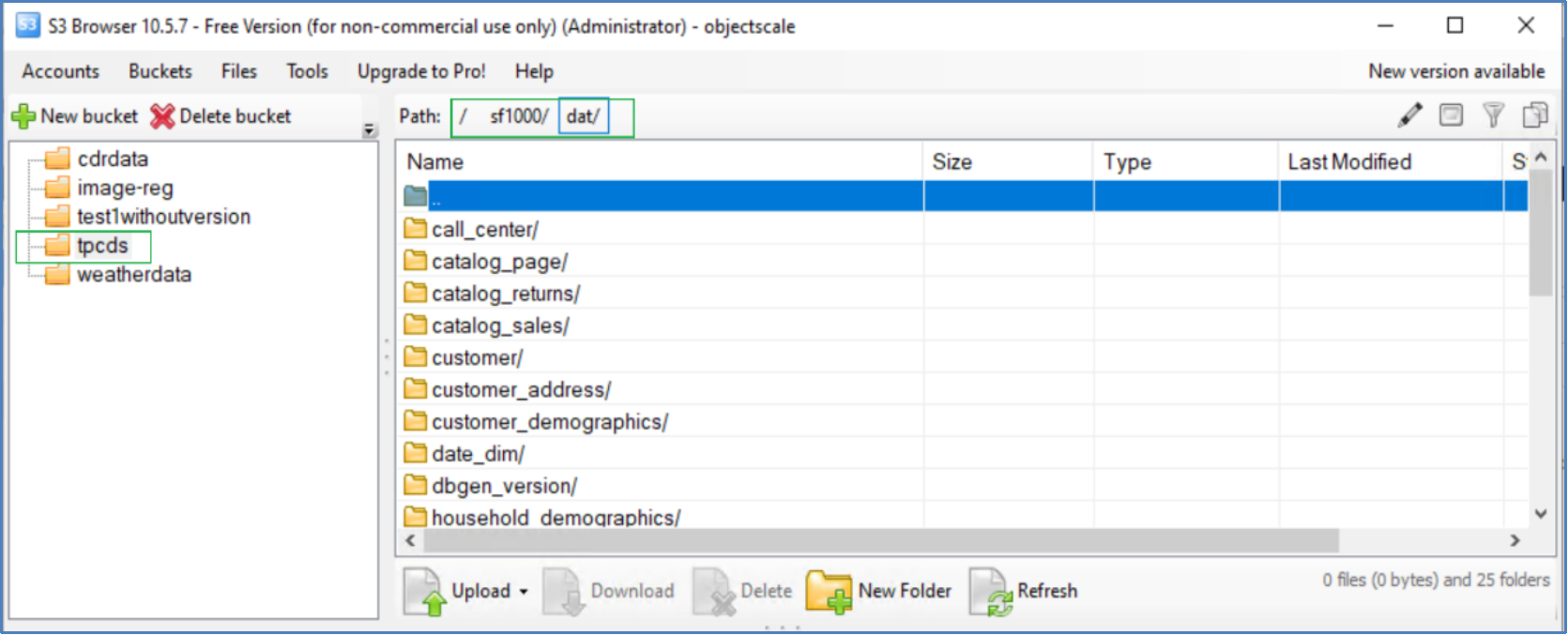 Figure 28. Data present at ObjectScale Bucket
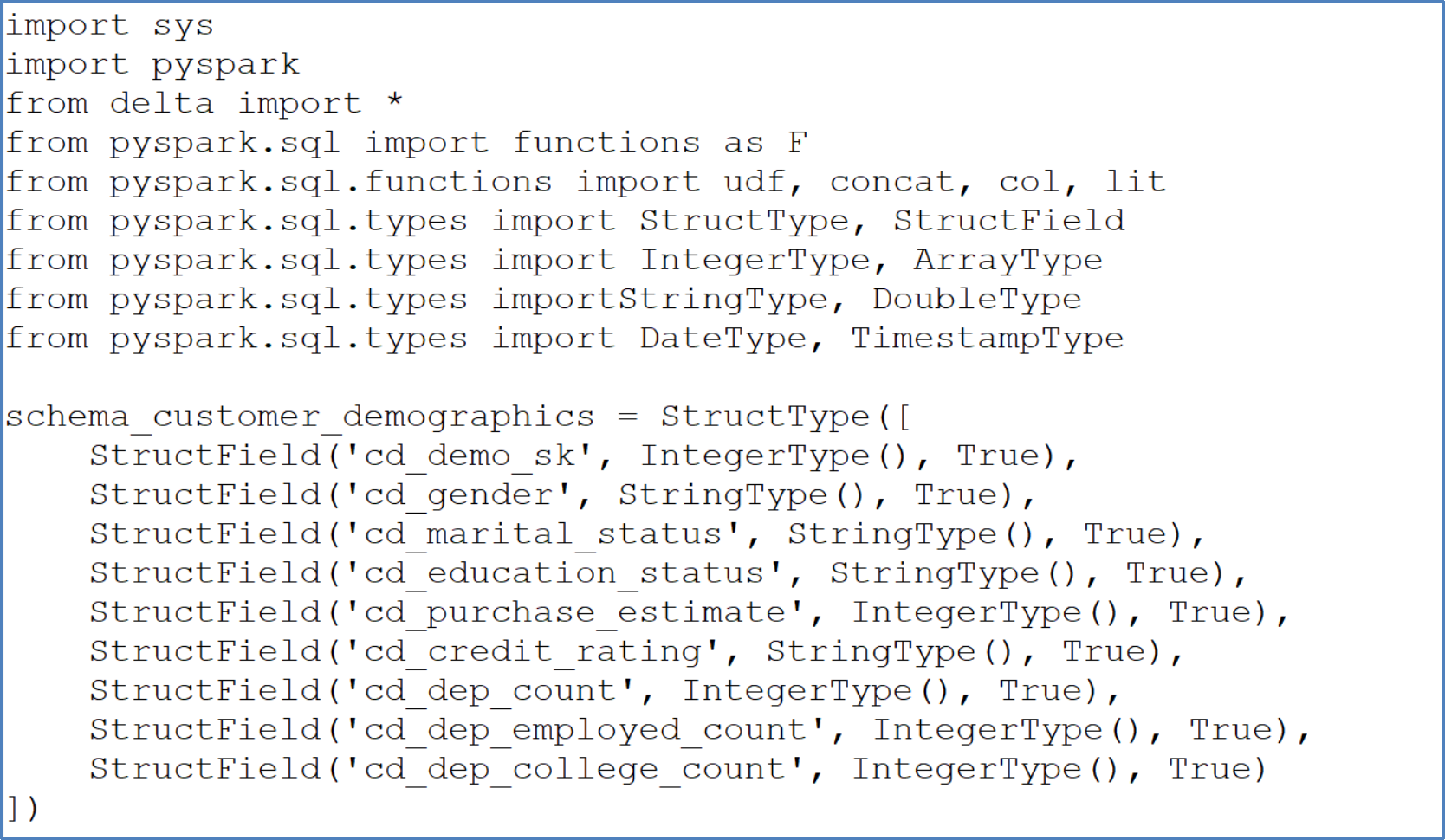
Create TPC-DS table schema in Pyspark
Use the following steps to create a TPC-DS table schema in Pyspark.
- Define a schema based on the data file, as shown in the following sample script:
- After the schema is created, load the data into PySpark data frame as shown in the following script:

- Save this data frame as Delta Lake format on ObjectScale bucket, as shown in the following script:

Verify the data in Delta Lake format by utilizing S3 Browser, as illustrated in Figure 29.
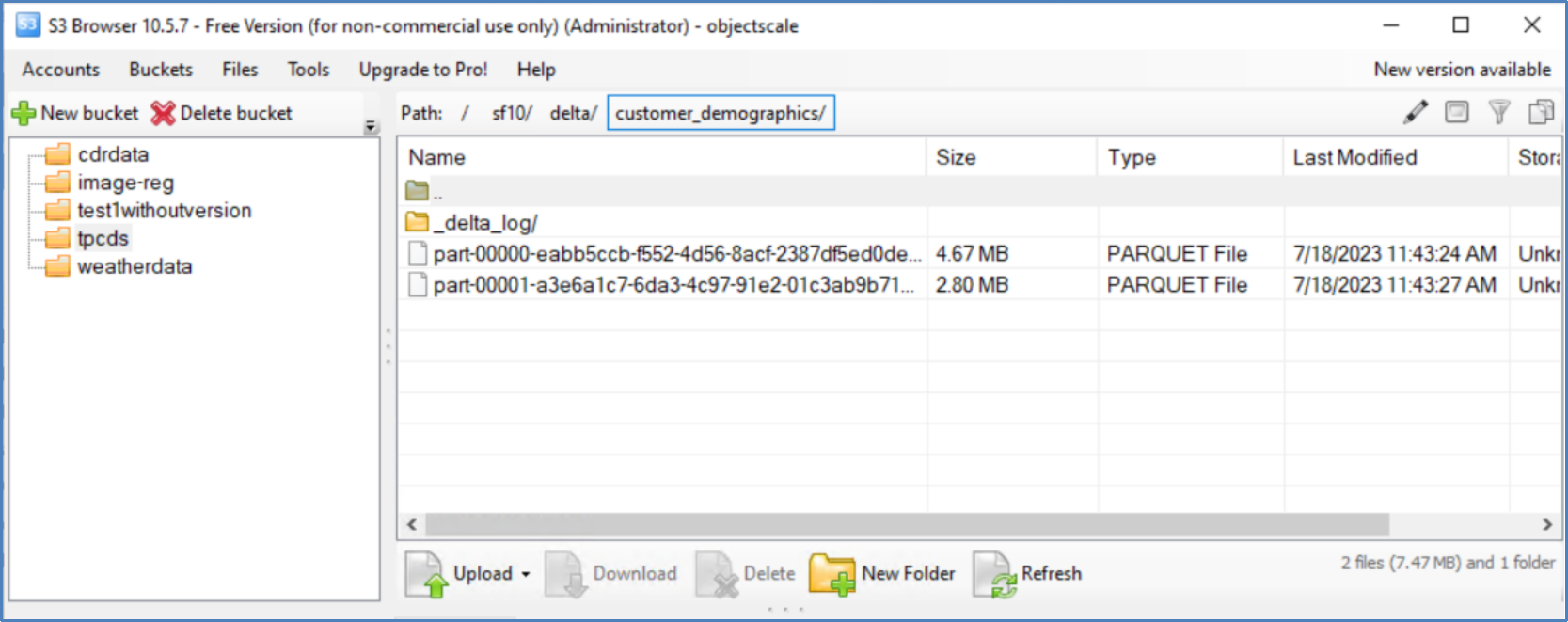 Figure 29. S3 browser bucket view
All the .dat files for each of the 25 tables must be converted in the TPC-DS data set and then ingest them into the ObjectScale bucket.
- After installing and enabling PolyBase, it is recommended to create an external data source. In this exercise, the external source was established on a Dell ObjectScale object storage. To ensure secure communication between the SQL Server instance and the external data source, an encryption key must be provided. Figure 30 provides an example that demonstrates the process of generating an encryption key and validation of the connection between the SQL Server and the Dell ObjectScale instance.
- Create an Encryption key with a password in the desired user database.
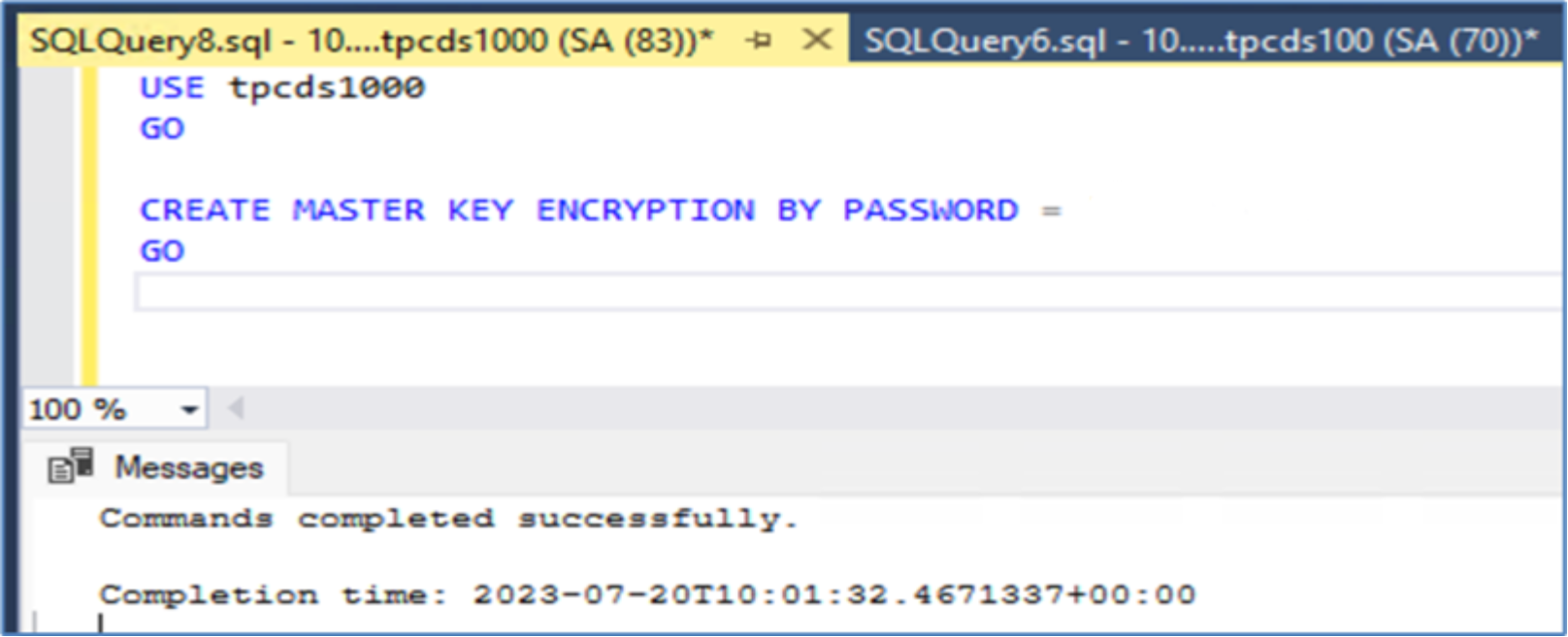 Figure 30. Create encryption key
- Create the database scope credentials within the wanted user database.
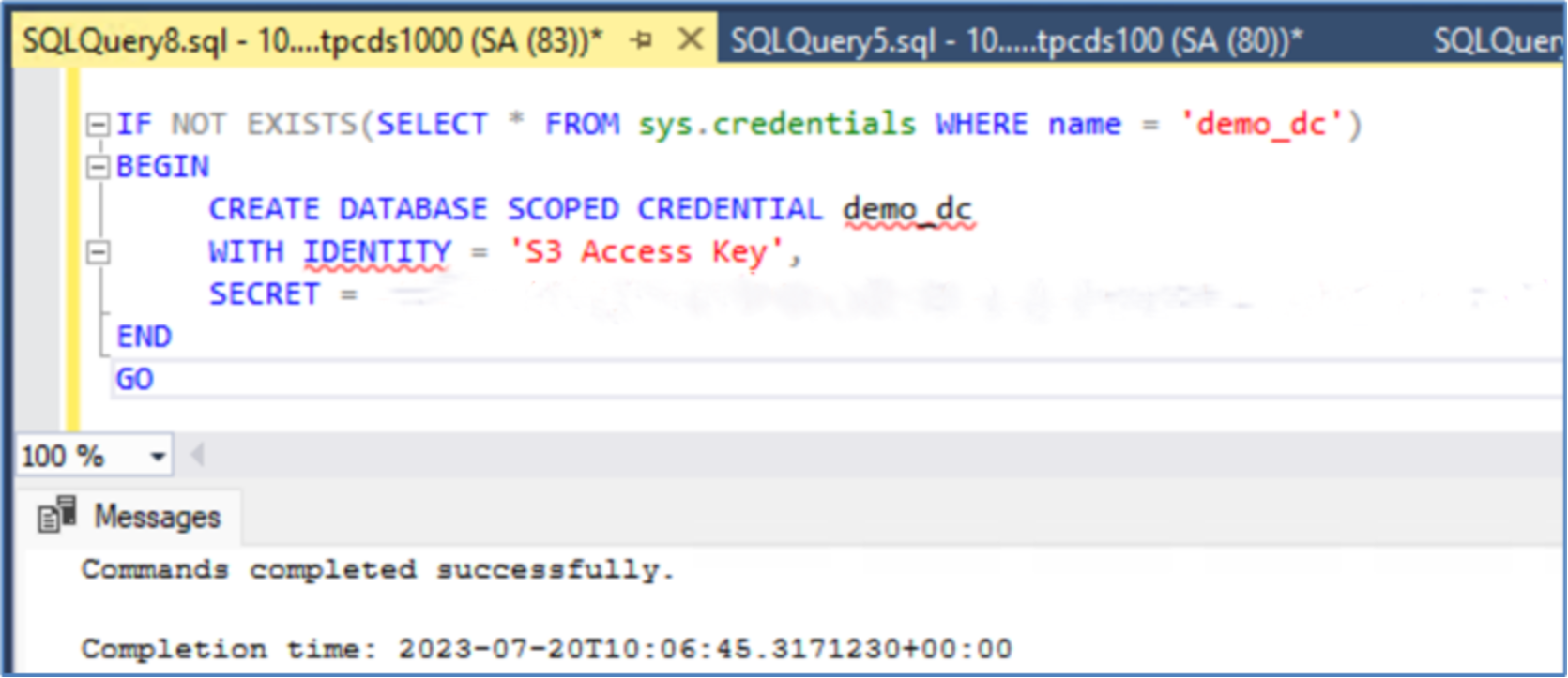 Figure 31. Create database scoped credentials
To establish an external data source, it is necessary to specify the S3 storage URL and the credentials associated with the database.
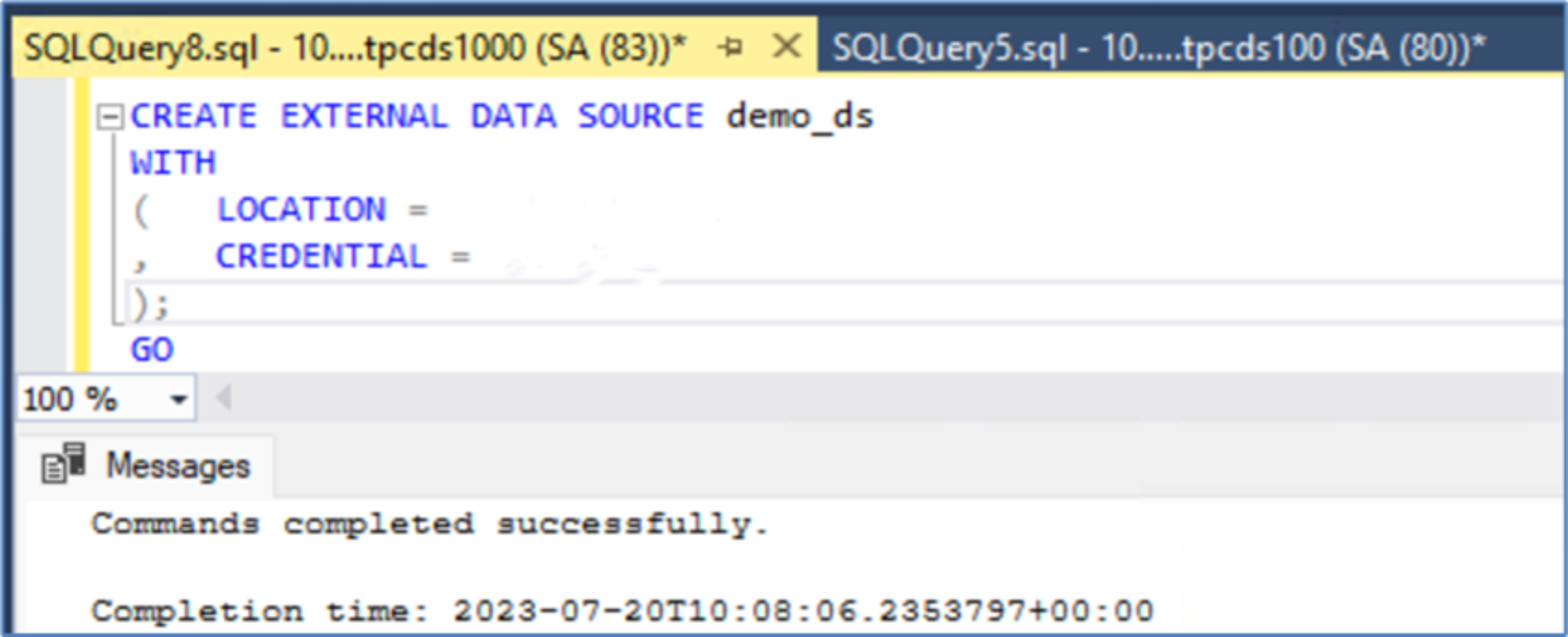 Figure 32. Create external data source
Validate data accessibility in Delta Lake table format within the ObjectScale storage using OPENROWSET.
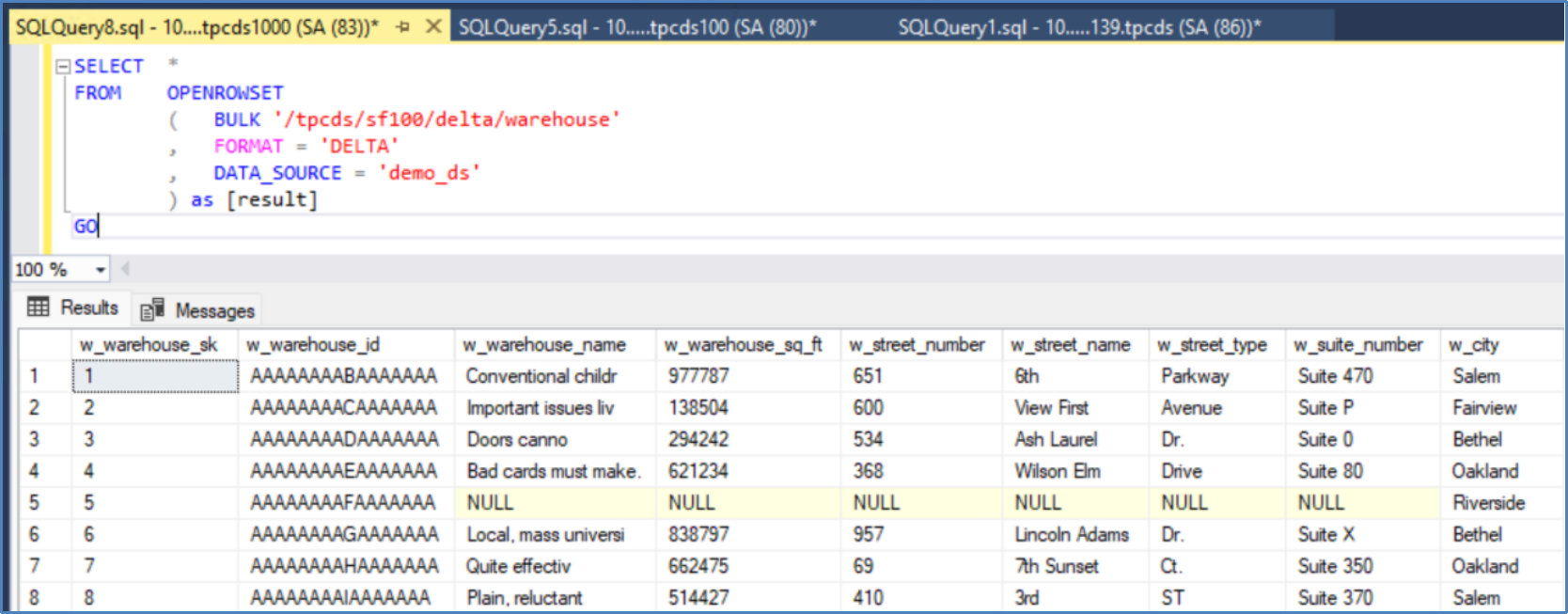 Figure 33. Configure and validate an external data source
SQL Server External Table
The utilization of SQL Server external table streamlines the procedure of handling data beyond the confines of SQL Server. By leveraging PolyBase, the external table can effortlessly retrieve data that is stored externally to SQL Server, such as on ObjectScale object storage in our specific scenario.
Before creating the external table, perform the following steps:
- Create an external file format
- Create an external data source
- Specify the location of the external files
The following figures demonstrate the creation of the external file in Delta Lake file format.
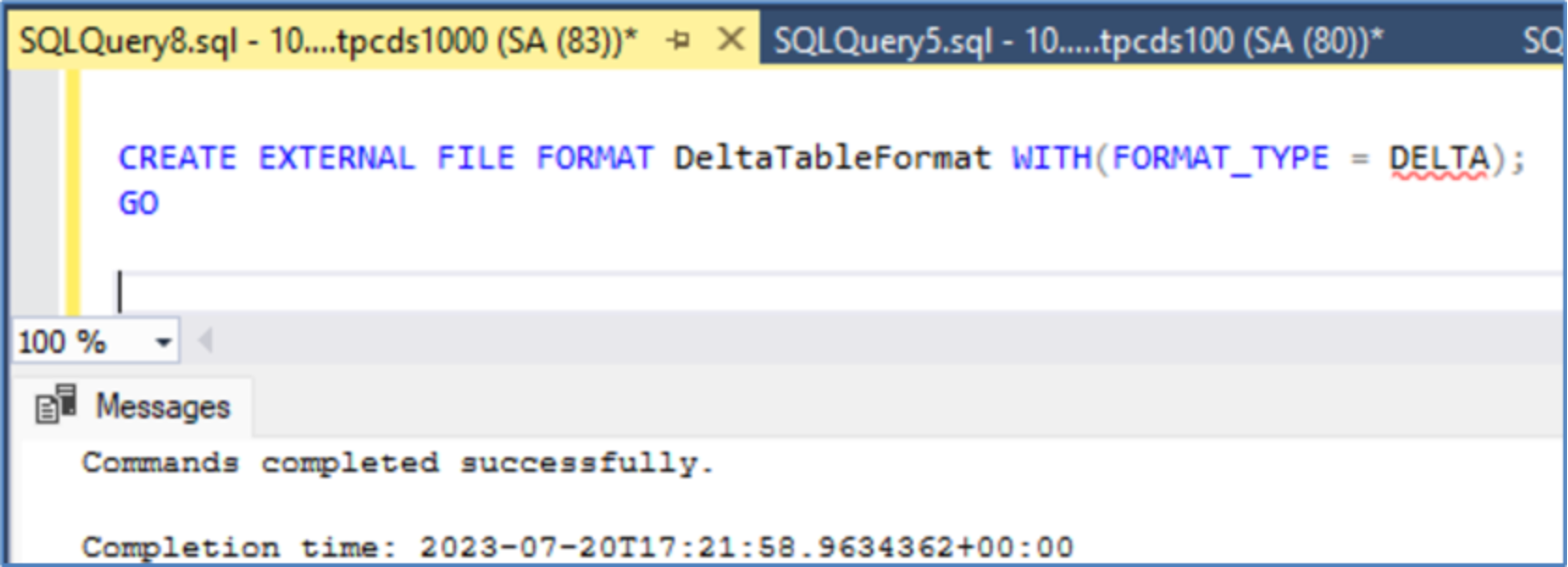 Figure 34. Creating external Delta File Format
After creating the external file in Delta Lake format (DeltaTableFormat), the next step is to create the SQL Server External table. This can be achieved by utilizing the "LOCATION" and "DATA_SOURCE" parameters.
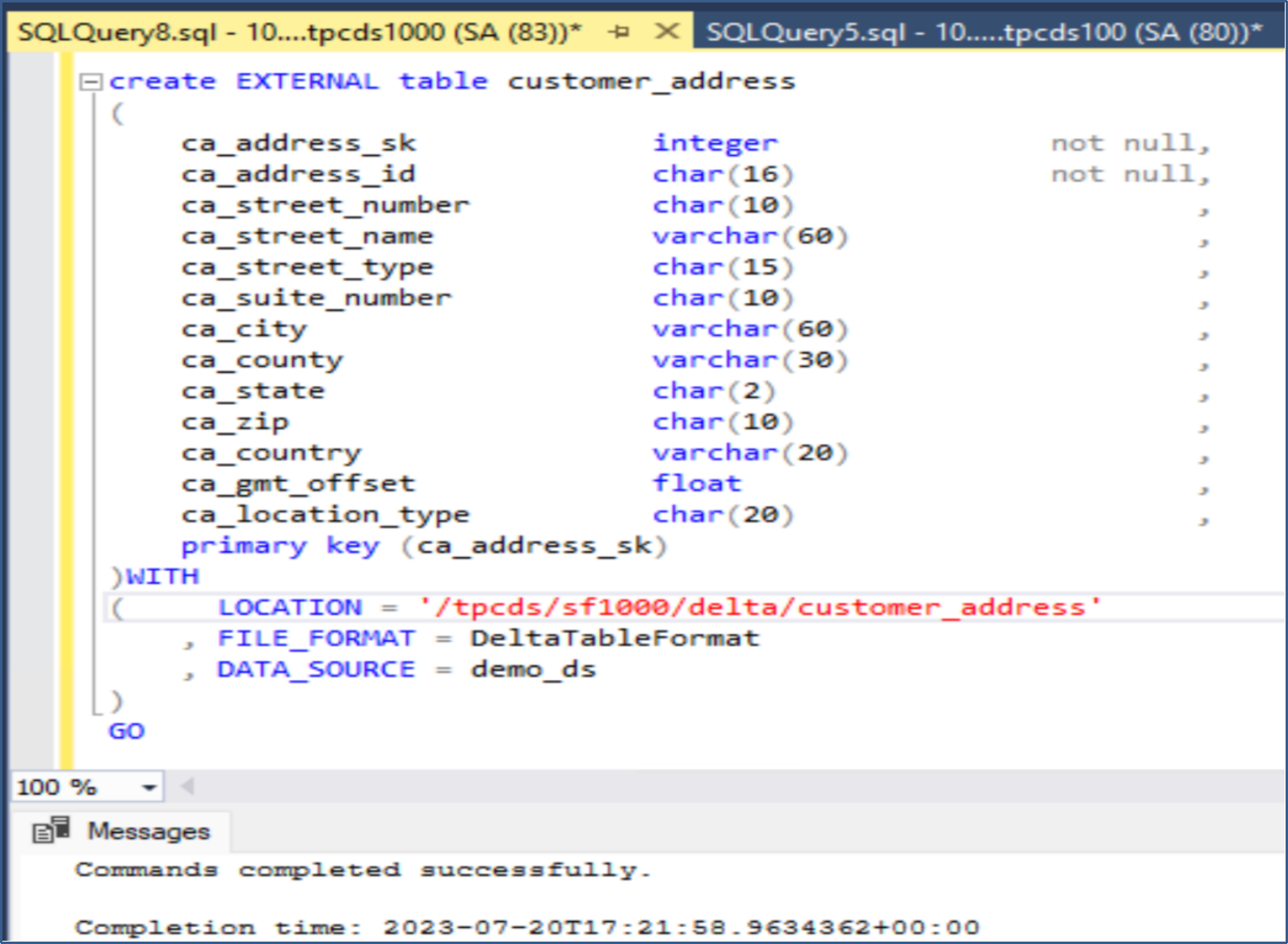 Figure 35. Creating a SQL Server external table
After the successful creation of the external table, a standard SQL Server "select" statement can be executed like any other tables within the SQL Server database. An illustration of running a "select" statement on the "customer_address" table is depicted in Figure 36
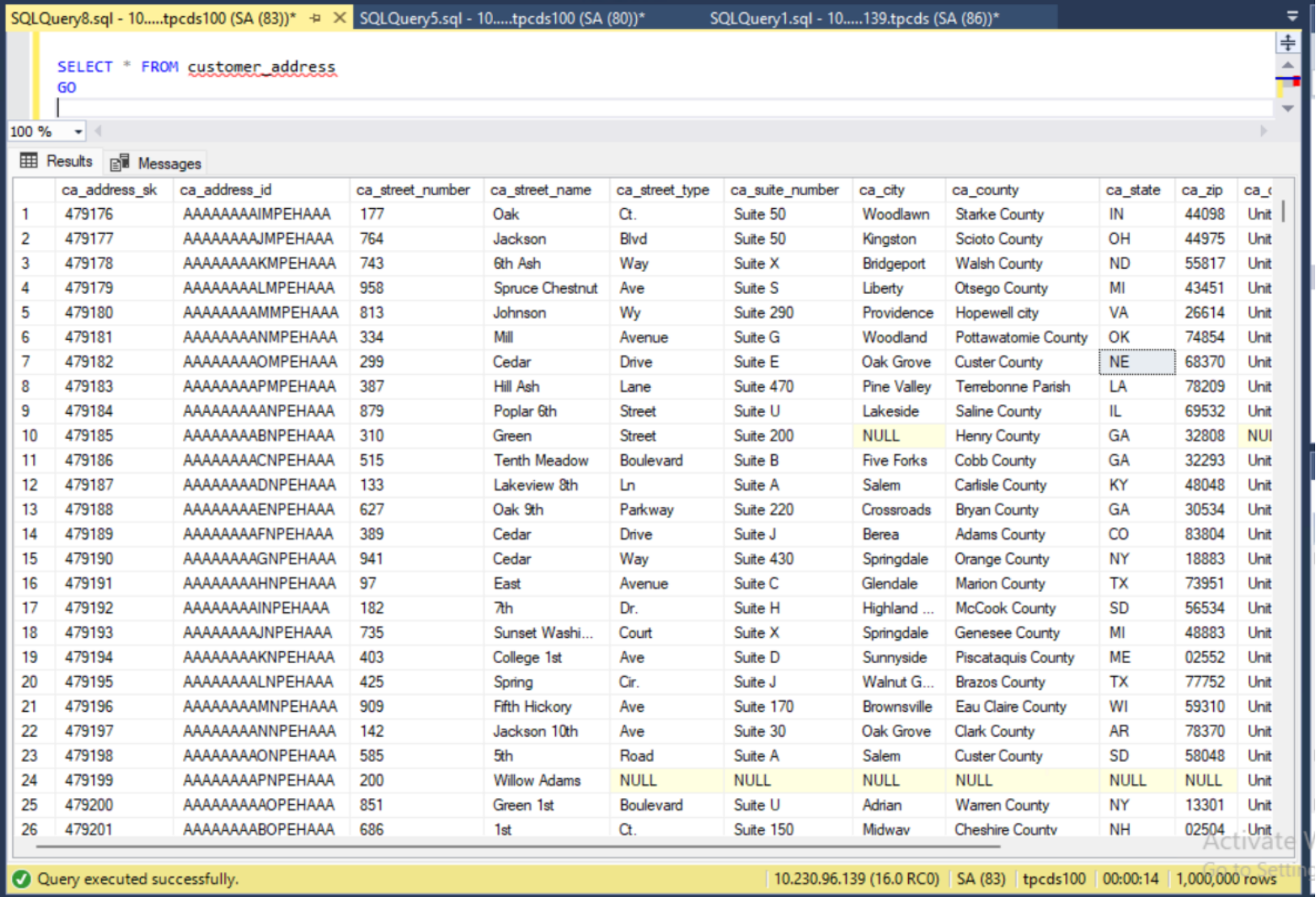 Figure 36. Select data from external table backed by delta table present on ObjectScale
All 25 TPC-DS tables have been established as External tables within SQL Server. Consequently, the TPC-DS data is now stored externally to SQL Server, with solely the metadata for these tables remaining within the SQL Server instance. The next step is to run all 99 standard TPC-DS queries and conducting the necessary data analytics in accordance with the TPC-DS specifications.
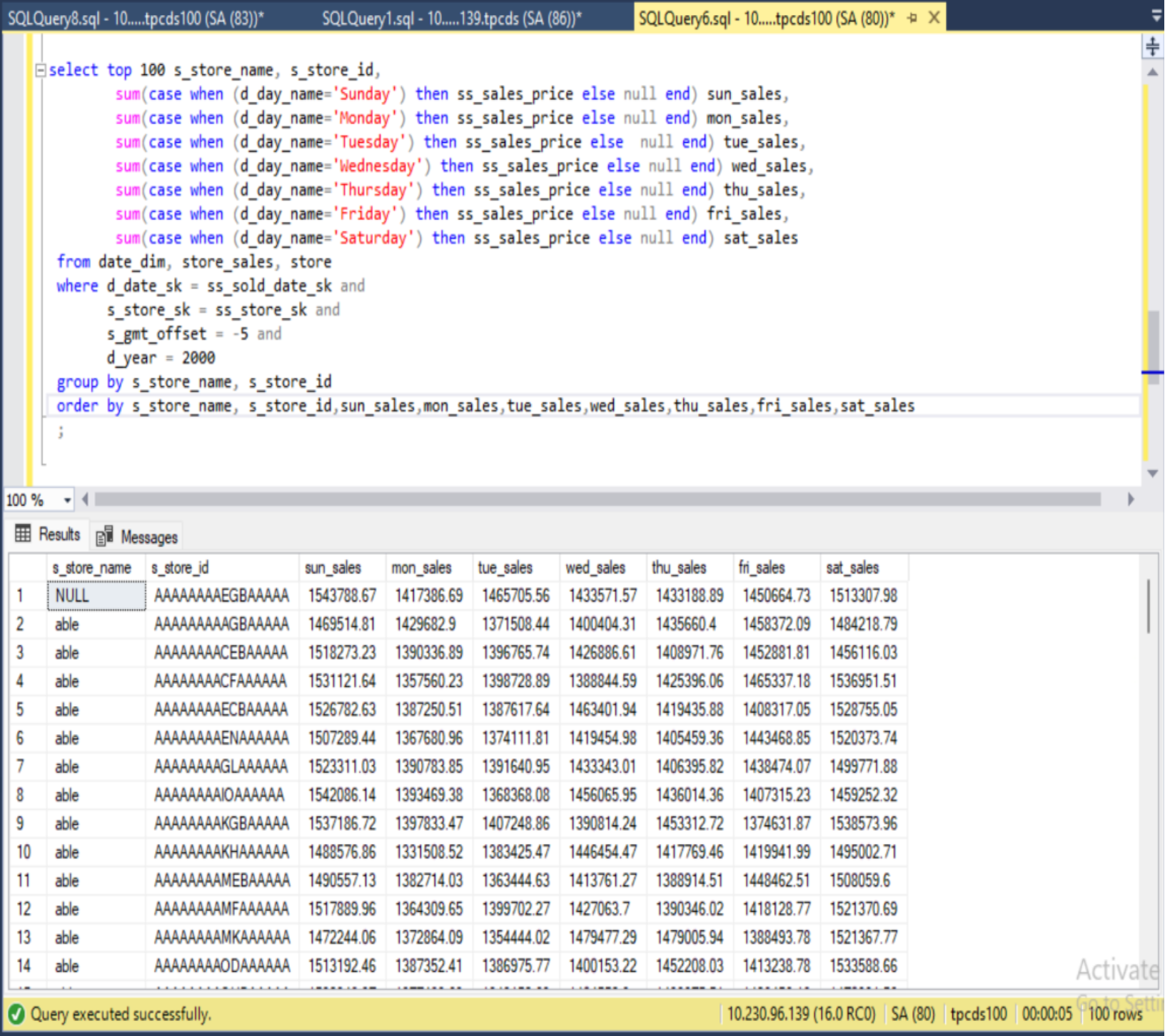 Figure 37. Sample SQL Query
Figure 37 illustrates one of the standard TPC-DS queries, among the 99 queries, along with its corresponding result. The query in question utilizes the date_dim (consisting of 73,049 records), store_sales (comprising 28,79,97,024 records), and store (containing 402 records) tables, all of which are located on ObjectScale.
The execution plan for this query demonstrates that plan includes a "remote scan" operator showcasing actual data coming from outside SQL Server at run time, as indicated in Figure 38.
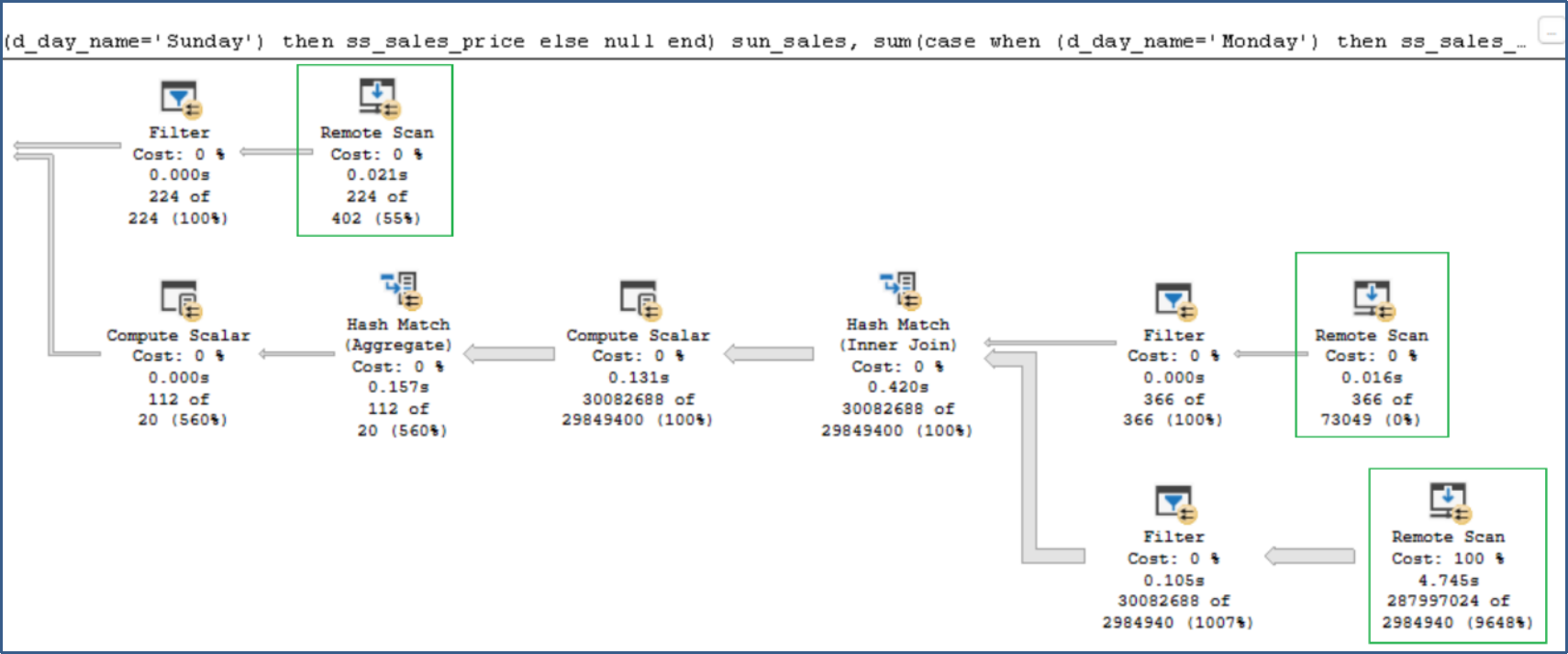
Figure 38. SQL execution plan