
Reference Architecture Guide—Consolidate and Simplify Mixed Database Workloads

Sep 24, 2026
Reference Architecture Guide—Consolidate and Simplify Mixed Database Workloads This guide describes the design and testing of mixed SQL Server and Oracle database workloads on a PowerEdge MX modular infrastructure with PowerMax 2000 storage. It also describes data protection using Data Domain DD9300 for backing up an Oracle database.

Executive Summary

Executive overview

Business challenge

Database workload consolidation has many benefits. Perhaps the greatest single benefit is that it enables the business to increase infrastructure utilization without sacrificing performance while maintaining the elasticity and agility to respond to new requests. However, the greatest challenge to designing and delivering a consolidation solution is the uncertainty of how all the components will integrate and whether they will deliver on the investment. The complexities of integrating, supporting, and optimizing a multi-vendor design could require a significant upfront investment that might not be returned for quite some time.

Converged and hyperconverged infrastructures

Converged infrastructures (CI) and hyperconverged infrastructures (HCI) are designed to reduce the complexities of modern databases by offering a fully engineered solution with life-cycle management. Databases are unique in that licensing and performance considerations are equally important to the business. The positioning of database licensing on converged solutions can represent significant uncertainty or risk to the business. However, many businesses successfully run databases on CI, proving that this approach does work.

A blend of the multivendor and CI approaches offers an integrated and tested solution that is designed for database workloads. This reference architecture for mixed workloads has been designed and tested for SQL Server and Oracle databases running on the same validated infrastructure, which includes Dell EMC PowerEdge and PowerMax products. The Dell EMC PowerEdge MX modular infrastructure enables you to dedicate servers to specific databases. In this solution, we demonstrate how SQL Server and Oracle databases use dedicated servers for simplicity of management, scalability, and efficiencies in licensing while using one Dell EMC PowerMax 2000 storage array to support the mixed workloads.

Mixed database workloads

Mixed database workloads such as online transaction processing (OLTP) and decision support system (DSS) workloads have traditionally been difficult to manage on the same infrastructure. Each of these workloads places different demands on the storage system. The storage system cannot be tuned for one workload or the other; instead, it must support both database loads at performance levels that meet service level agreements (SLAs). The PowerMax 2000 with NVM Express (NVMe) flash drives introduces improvements in performance and parallelism that provide an ideal match for mixed database workloads. NVMe flash drives offer increased speed and the ability to service more requests in parallel.

Key validation testing goal

This guide describes three validation tests that we designed to push the system to realistic service-level limits. One key goal of these tests was to generate the maximum amount of load on the reference architecture without most of the read and write activity exceeding 1 millisecond (ms) in latency. The validation testing exceeded our expectations; especially for an entry-level storage array configuration that was designed to keep a customer’s initial investment low. Chapter 6 summarizes the test results.

Database backup and recovery

Database failures can represent significant risk to the business by stopping operations, thus impacting revenue. Backing up and protecting databases prepares the business to recover from a spontaneous failure.  The Dell EMC Validation Team has tested a backup and recovery solution using DD Boost software and the Data Domain DD9300 backup system that can support the database workloads discussed in this guide.  Chapter 5 discusses the test cases and test results.

Audience and purpose

This guide is intended for anyone who is interested in learning about the benefits of this reference architecture, including solution architects, SQL Server and Oracle DBAs, storage administrators, and Linux administrators. It provides:

  • Physical configuration details
  • Results of SQL Server and Oracle mixed database workload performance tests
  • PowerMax storage configuration and best practices
  • Red Hat Enterprise Linux configuration for optimized performance

Additionally, this guide has value for anyone who wants to evaluate, acquire, manage, maintain, and operate mixed database environments.

Value of validated reference architectures

The Validated Design team at Dell EMC consists of a group of experts with extensive experience in databases. Our goal is to create focused solutions for the most challenging workloads that a business might require. That is uniquely different than most of today’s solutions, which are designed to work with everything. To increase the value to our customers, we validated our solutions by running multiple tests:

  • We ran SQL Server and Oracle OLTP databases on the reference architecture in parallel.
  • We ran OLTP and DSS workloads from both databases on the reference architecture in parallel.
  • We tested the PowerMax snapshot capability by creating snapshots of both databases and running an OLTP workload on the snapshots.
  • We tested DD Boost and the DD9300 system’s performance and capacity for backing up and restoring a 1.8 TB Oracle database.

Key benefits

As part of the validation tests, we tuned and optimized all the software and hardware components of this reference architecture to maximize performance. We documented as best practices in this guide any changes that we made that improved performance.

This reference architecture benefits customers by providing:

  • A specialized database solution—No one size fits all. This reference architecture has been designed, tested, and validated especially for mixed database workloads. 
  • Database validation tests—We ran tests using the executables that customers would use to run their databases. No database I/O was simulated in this testing.
  • Sizing to match requirements—You can customize the tested configuration to meet your mixed database workload needs.
  • Tested, proven backup and recovery solution—Be prepared for unplanned database failures and minimize costly downtime.
  • Less risk—We integrated, tested, and documented this validated system.

We used the HammerDB benchmarking tool to create OLTP and DSS workloads on the new database solution. HammerDB is free and available for anyone to use in conducting their own testing.

We value your feedback

Dell EMC and the authors of this document welcome your feedback on the solution and the solution documentation. Contact the Dell EMC Solutions team by email.

Authors: Oracle and SQL Engineering Teams, Indranil Chakrabarti, Anil Papisetty, Sam Lucido, Reed Tucker

The following pages of the Oracle and SQL Server spaces on the Dell EMC Communities website provide links to additional documentation for this solution:

Solution Architecture and Design Overview

Solution architecture diagram

The following figure provides a design overview of this reference architecture:
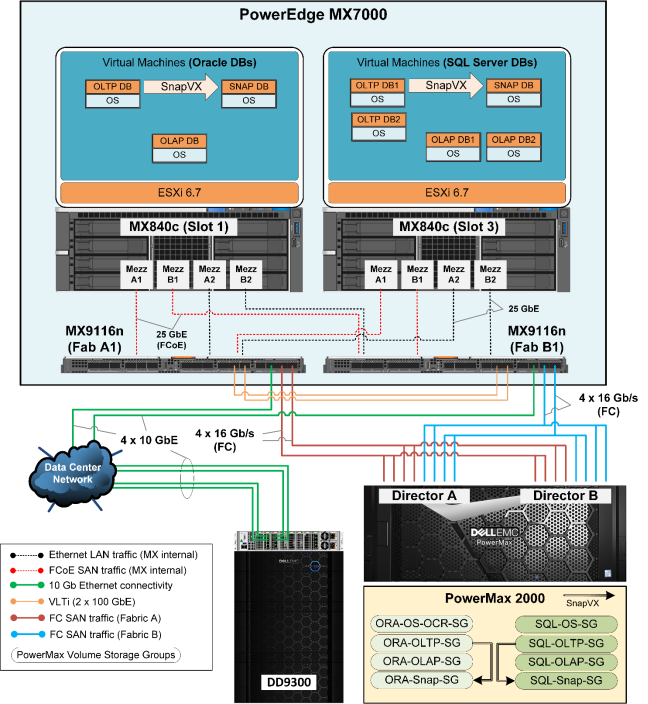
Figure 1.         Solution architecture design overview

As shown, the PowerEdge MX7000 modular chassis infrastructure provides the compute and network resources, the PowerMax 2000 is used as the SAN storage array and the Data Domain DD9300 is used as the backup appliance in this reference architecture.

PowerEdge MX7000 modular chassis

We used the Dell EMC PowerEdge MX7000 modular chassis, which provides high-performance data center infrastructure, for both compute and network resources in this solution. 

Compute or server layer

The compute or server resources for this reference architecture are:

  • One PowerEdge MX840c blade for Oracle databases—We deployed this four-socket blade server with the VMware ESXi 6.7 hypervisor and configured it to run three single-node Oracle database virtual machines (VMs). We deployed each VM with Oracle 18c (18.3.0) Grid Infrastructure (GI) and a standalone Oracle Database 18c (18.3.0) running on Red Hat Enterprise Linux 7.4 as the guest operating system. We configured the VMs as follows:
  • We configured the first VM to run the Oracle OLTP production database workload. 
  • We configured the second VM to run the Oracle DSS database workload. 
  • We configured the third VM to run an OLTP database workload that we created as a snapshot of the OLTP production database on the PowerMax storage array. 

For details about the ESXi host, VMs for Oracle databases, and virtual network configuration, see Appendix B: Design and Configuration Details.

  • One PowerEdge MX840c blade for SQL Server databases—We deployed this four-socket blade server with VMware ESXi 6.7 hypervisor and used it to run five single-node SQL Server database virtual machines (VMs). We deployed a standalone SQL Server 2017 instance on each VM with Red Hat Enterprise Linux 7.6 as the guest operating system. We configured the VMs as follows:
  • We configured the first two VMs to run the OLTP SQL production database workload. 
  • We configured the third and the fourth VMs to run the SQL DSS database workload. 
  • We configured the fifth VM to run an OLTP database workload that we created as a snapshot of the OLTP production database on the PowerMax storage array to simulate a development or test environment, or both. 

For details about the ESXi host, VMs for SQL Server databases, and virtual network configuration, see Appendix B: Design and Configuration Details.

  • MX840c blade subcomponents—Each MX840c blade used for the Oracle and SQL Server databases consists of four Intel Xeon Scalable 20c physical CPUs, 1,536 GB of RAM, and four QLogic QL41262 dual-port 25 GbE mezzanine or converged network adapters (CNAs) for LAN and SAN traffic. We configured two of the mezzanine cards for Fibre Channel over Ethernet (FCoE) or SAN traffic. We configured the remaining two cards for LAN traffic. We created NIC partitioning (NPAR) on all the mezzanine cards. For details about the CNA configuration, see Converged network adapter configuration in Appendix B.

Network layer

We used the PowerEdge MX7000 modular infrastructure to provide the network switching layer in this solution. The network layer consists of:

  • Two MX9116n Fabric Switching Engine (FSE) I/O Modules (IOMs) or switches—We configured two MX9116n IOMs installed in MX fabric slot A1 and MX fabric slot B1 to run converged LAN and SAN traffic in this solution. We configured the two IOMs in Virtual Link Trunking (VLT) mode. We configured the two QSFP28 (100 Gb) external-facing unified ports in four 16 Gb/s Fibre Channel (FC) break-out mode and directly attached them to the PowerMax 2000 storage array. We configured the QSFP28 external-facing port in four 10 GbE break-out mode and uplinked it to spine switches for external LAN connectivity. We configured the 25 GbE internal-facing ports that we connected to the CNA ports in the MX840c blades to carry FCoE traffic and LAN traffic. For details about the LAN and SAN network configuration, including FC zoning, see Compute and network design in Appendix B.
  • Redundant MX management module—We connected redundant 1 GbE MX management modules to 1 GbE switches. We used this management module to manage the MX7000 chassis and MX9116n IOMs, and to connect to the iDRACs on the MX840c blades. For details about MX7000 chassis management, see the Dell EMC OpenManage Enterprise-Modular Edition for PowerEdge MX7000 Chassis User's Guide.

PowerMax 2000 storage array

We used a single PowerMax 2000 storage array as the FC SAN storage to host both Oracle and SQL Server databases. The PowerMax 2000 array in this reference architecture consisted of:

  • One PowerMax 2000 brick or engine, consisting of two directors
  • Sixteen 16 Gb/s front-end FC ports directly attached to separate MX9116n IOMs to provide two SAN fabrics for high availability and load balance
  • Two front-end port groups, one for the Oracle database traffic and one for the SQL Server database traffic, with eight separate FC ports in each
  • Twenty-four 3.8 TB NVMe flash drives in a RAID 5 (7+1) configuration to provide a usable storage capacity of 73.35 TB
  • Separate storage groups for Oracle and SQL Server databases for load balance through different port groups, ease of management, and monitoring

For details about the storage groups and volume configuration, see PowerMax storage configuration in Appendix B.

Data Domain DD9300 backup appliance

We used DD9300 as the backup appliance to test the backup and recovery of an Oracle database in this reference architecture. Four front-end 10 GbE interfaces spread across two NICs installed in the DD9300 were connected to the same spine switches that the MX network switches were connected to. This provided highly available connectivity and sufficient bandwidth between the MX840c database servers and the DD9300 backup appliance. The interfaces configured for public network traffic within the database servers were used for the backup and recovery traffic as well. For this communication to happen, the 10 GbE interfaces on the DD9300 were also configured within this same public IP network address range.

For details about the DD9300 and the database server configuration, backup and recovery test methodology and results, see Chapter 5 Data Domain Backup and Recovery Solution. 

Redundancy

The LAN and SAN design features redundant components and connectivity at every level to ensure that no single point of failure exists. The design enables the application server and the backup system to reach the database server, and the database server to reach the storage array, even if any of the following components fail:

  • One or more CNA or mezzanine card ports within the MX840c compute blades
  • One MX9116n IOM or switch
  • One or more PowerMax front-end ports
  • One PowerMax storage controller
  • One or more 10 GbE front-end interfaces within the DD9300 backup system

Validation Test Goals, Configuration, and Use Cases

Test goals and configuration

Our goal in testing this mixed workload solution was to simulate a consolidated database platform for use by both Oracle and SQL Server teams. Generally, consolidation of database ecosystems is less of a priority than performance and protection because the perceived risks and complexity that are involved in consolidating databases are daunting. However, the introduction of faster, more powerful CPUs and new storage technology in a tested, proven reference architecture enables businesses to consolidate databases without risk concerns.

The PowerMax 2000 storage array uses NVMe flash drives, which are significantly faster than traditional SATA solid-state drives (SSDs). NVMe flash drives provide several enhancements that accelerate storage operations, including greater parallelism and an updated bus that enables faster data transport. In testing this database platform, we created a mixed database environment using Oracle and SQL Server and a mixed workload environment including OLTP and DSS workloads. This combination of different databases and workloads simulates what a customer might encounter during a database consolidation effort. 

Validated infrastructure configuration

The MX7000 modular chassis hosts disaggregated blocks of server and storage, making it ideal for consolidating databases. In the test configuration, we used two PowerEdge MX840c servers in the MX7000 modular chassis. We dedicated one MX840c server to the SQL Server 2017 Enterprise Evaluation Edition RTM-CU13 database and the other to the Oracle 18c Enterprise Edition database. Dedicating an MX840c server to each database optimizes licensing by limiting costs and enables us to test database consolidation. In our tests, we identically configured each MX840c with 4 CPUs and 1.5 TB of memory. Each CPU had 20 cores, so 80 cores were available to each database. 

We deployed both SQL Server and Oracle database VMs with Red Hat Enterprise Linux 7 as the guest operating system. Microsoft enables SQL Server customers to move their database licenses from Windows to Linux for free. We standardized the operating system, using Linux on both databases, to simplify management. In terms of the mixed database tests, using the same operating system streamlined execution and enabled faster analysis of the performance findings.

We configured the PowerMax 2000 storage array with 24 NVMe flash drives, which represents an entry-level storage configuration. Using an entry-level configuration for our tests demonstrates that customers can start with a minimal investment and scale-up to match growing demands. The following table shows the size of the storage configuration that we used and the maximum sizes for the PowerMax 2000 array as detailed in the PowerMax Family Specification Sheet:

Table 1.           PowerMax 2000 maximum supported configuration versus tested configuration

PowerMax 2000 components

Maximum supported configuration

Tested configuration

Number of bricks or engines

2

1

Cache-system (raw)

4 TB (with 2 TB engine)

1 TB

Number of front-end I/O modules per array

16

4

16 Gb/s FC host ports per array

64

16

Number of NVMe flash drives

96

24

While testing the storage performance of the PowerMax 2000 array, we had the following goals:

  • Generate a significant mixed database workload to challenge the PowerMax 2000.
  • Drive a combination of IOPS and submillisecond latency that is representative of the demand on a mixed workload ecosystem.
  • Capture test findings and transform our analysis into best practices for customers.

NVMe

The PowerMax 2000 array supports NVMe flash drives. NVMe flash drives enable large-scale block storage to support existing network adapters and host bus adapters. One of the primary advantages of NVMe flash drives is enhanced performance. Other benefits of NVMe-based storage include:

  • Lower latency and higher IOPS
  • Support for deep queues: 64 commands per queue, up to 64K queues
  • Streamlined register interface that minimizes the CPU utilization required to manage I/O operations 
  • Transparency to databases, so you can realize the benefits of NVMe performance without extra steps 

Note: Dell EMC also offers the PowerMax 8000 system, which has even higher scaling and performance capabilities than the PowerMax 2000 that we used in our tests of this solution.

VMware vSphere

We used VMware vSphere in this reference architecture to drive greater consolidation, accelerate database provisioning, and simplify management. Virtualization lets you pool compute and storage resources to drive greater hardware efficiencies. In this mixed workload solution, we used vSphere to virtualize both the SQL Server and Oracle databases and to assign CPU and memory resources. 

In our testing, the CPU and memory resources were not the same between SQL Server and Oracle, nor were the number of databases. Our goal was not to compare SQL Server to Oracle, but to place mixed databases and database workloads on the MX840c servers and PowerMax 2000 array to show how this single-infrastructure solution accelerates consolidated databases. The following table shows the Oracle and SQL Server VM configurations:

Table 2.           Virtualization configuration for databases

Workload type

Database type

Virtual machine number

vCPU allocation

vMem allocation (GB)

DB memory reservation (GB)

OLTP

Oracle

VM 1

10

150

56 (48 SGA + 8 PGA)

OLTP

SQL Server

VM 1

6

64

8

OLTP

SQL Server

VM 2

6

64

8

DSS

Oracle

VM 1

8

256

96 (32 SGA + 64 PGA)

DSS

SQL Server

VM 1

8

256

32

DSS

SQL Server

VM 2

8

256

32

Snapshot OLTP 

Oracle

VM 1

6

150

36 (28 SGA + 8 PGA)

Snapshot OLTP 

SQL Server 

VM 1

4

64

8

Each virtualized database used a subset of the available compute cores on the MX840c servers. We assigned 24 compute cores to Oracle VMs, leaving 136 cores for additional database consolidation on the MX840c server that was dedicated to Oracle. Similarly, we assigned 32 compute cores to the SQL Server VMs, leaving 128 cores available for other databases. 

We used memory reservations to dedicate memory to each virtualized database. We set low memory reservations for each database to generate activity on the PowerMax 2000 storage array. If these databases were actual customer production applications, we would recommend reserving more memory, because in-memory operations are faster than storage operations. Like the CPU configurations, the memory configurations used a subset of the available memory on the server. Across all the Oracle virtualized databases, the amount of used memory was 188 GB and the total available memory on the MX840c server was 1.5 TB. For all the SQL Server virtualized databases, the amount of used memory was 88 GB and the total available memory on the MX840c server was 1.5 TB.

Compute cores could be limited at the database layer using Oracle CPU caging or SQL Server resource governor, or at the Linux operating system layer with cgroups. However, vSphere virtualization simplifies resource management, making it the best choice for assigning compute cores and memory. 

The PowerMax 2000 storage array supports vSphere Native Multipathing Plug-In (NMP) technology. Multipathing increases the efficiency of sending data over redundant hardware paths that connect PowerEdge servers to PowerMax storage. Benefits include alternating I/O using round-robin to optimize use of the hardware paths and more evenly distribute the data. Another benefit is that if any component along the storage path fails, then NMP resets the connection and passes I/O using an alternate path. 

Test performance metrics

We tested three incremental use cases:

  • Use case 1: OLTP workload using TPC-C–like benchmark
  • Use case 2: DSS workload using TPC-H–like benchmark
  • Use case 3: Snapshot OLTP workload using TPC-C–like benchmark

The performance metrics for these tests included:

  • CPU cores—We generated production-like workloads using as few CPU cores as possible. Oracle and SQL Server databases use core-based licensing. As the number of cores increase, so does the licensing cost. Using the combination of the MX840c servers and the PowerMax 2000 storage array enabled us to generate a significant database workload with fewer compute cores.
  • CPU utilization—We captured CPU utilization at the Linux layer using dstat. The CPU utilization values that we captured represent the sum of all the work that was supported by the cores assigned to the VMs. Reporting CPU utilization provides an understanding of the processing load that was carried by the CPU cores in these tests. There were no target goals for CPU utilization because using fewer cores in each VM was a higher priority; however, we captured this metric to provide insight into the processing workload. 
  • TPM—We captured the number of transactions per minute (TPM) to show how fast an OLTP database was processing transactions. A higher TPM value indicates that the database was processing more business transactions. In testing the mixed workload solution, the goal was to generate sufficient TPM to support a typical production workload. This metric applies to OLTP workloads only and is captured in the HammerDB report. 
  • NOPM—New Orders per Minute (NOPM) is a throughput measurement in the TPC-C benchmark. Each transaction consists of the following transaction types: new-order, payment, order status, delivery, and stock-level transactions. Thus, NOPM indicates how many order transactions were completed in one minute as part of a serial business process. This metric applies to OLTP workloads only and is captured in the HammerDB report.
  • IOPS—The number of IOPS indicates the load on a storage system. You can use IOPS to understand the amount of load that each database and application is placing on the array and if they are approaching the maximum load on the storage array. IOPS together with latency provides a comprehensive picture of storage performance. In these tests, the goal was to show IOPS that is appropriate for the support of production databases. 
  • Latency in submilliseconds—Latency indicates how fast data is read and written to the storage array. Storage latency is an important metric for OLTP applications because the faster the storage system can respond to read and write requests, the more responsive the application experience is for the users. The storage latency goal for this solution was 1 ms or less for reads and writes to all data and log files on OLTP workloads that were simulating production workloads. 
  • Throughput in megabytes per second (MB/s)—Throughput is a metric that is used for DSS workloads to indicate how fast the system can process large amounts of data using complex queries. The greater the throughput of a system, the more data it can process and the faster it can perform complex data analysis. Our goal was to generate a moderate level of throughput on the solution to show that customers can have both DSS workloads and OLTP workloads running in parallel.
  • Compression and deduplication—We disabled PowerMax compression and deduplication at the storage group level for all use cases. Therefore, we did not observe data reduction in this validation testing.  In the stress-testing phase, we ran the worst-case test scenarios with 100 percent active data on the PowerMax 2000.  This workload profile does not take advantage of the PowerMax data reduction performance features. A typical database production environment with mixed workloads does benefit from the PowerMax compression and deduplication engine, which provides performance and consolidation advantages. You might prefer to use these features when you deploy the solution.

Use case 1: OLTP workload using TPC-C–like benchmark

The first test established a baseline by running an OLTP database workload that we generated by using a TPC-C-like benchmark on both the Oracle and SQL Server databases. Note that a “TPC-C–like” benchmark means that the test results are not certified. The TPC-C Benchmark is a complex OLTP workload. OLTP workloads simulate enterprise applications that businesses use to manage all operational processes. We used the popular HammerDB tool to generate the TPC-C-like workload.

For the OLTP use case test, we ran one Oracle database and two SQL Server databases in parallel to generate an OLTP workload on the system. The performance metrics we captured serve as a baseline to determine how other workloads impact the OLTP workload. The configuration of the TPC-C OLTP workload is shown in the following table:

Table 3.           TPC-C–like benchmark configuration for OLTP workload use case

HammerDB TPC-C–like parameter

SQL Server

Oracle

Total

Database scale factor

10,000

15,000

25,000

Database size (TB)

2 (VM1 + VM2)

1.5

3.5

Number of virtual users

400

500

900

Test duration (min)

30

30

Use case 2: DSS workload using TPC-H–like benchmark

The second test adds a DSS workload to the system by generating TPC-H-like workloads. Note that a “TPC-H–like” workload means that the test results are not certified. The TPC-H benchmark consists of ad-hoc queries and concurrent data modification across large sets of data. Businesses might use a DSS to analyze a large volume of data to generate reports that facilitate evidence-based business decisions. We monitored throughput and storage metrics only as part of running a DSS workload. Therefore, we do not review metrics such as TPC-H Composite Query-per-Hour (QphH@Size) in this document.

For the DSS use case, we ran one Oracle database and two SQL Server databases in parallel to generate throughput on the PowerMax 2000 storage array. The DSS workload ran in parallel with the OLTP workload, creating a combined workload on the system.

The following table details the configuration of the TPC-H–like tests:

Table 4.           TPC-H-like benchmark configuration for DSS workload use case

HammerDB TPC-H–like parameter

SQL Server

Oracle

Total

Database scale factor

1,000

3,000

4,000

Database size (TB)

2 (VM1 + VM2)

3

5

Number of virtual users

2

1

3

Test duration (min)

30

30

Use case 3: Snapshot OLTP workload using TPC-C–like benchmark

The third test creates storage snapshots of the Oracle and SQL Server databases running a light OLTP workload. The PowerMax 2000 storage array can take fast, write-consistent snapshots of databases using SnapVX. The DBA can then configure the snapshot databases and open them to the business. This database cloning approach enables the IT organization to quickly provision copies of production databases for test and development. In the snapshot OLTP database workload use case, we created snapshots of one Oracle and one SQL Server database from the baseline OLTP test database.

We ran the snapshot workload in parallel with the OLTP and DSS workloads to show the cumulative load that was placed on the database infrastructure. Because most test and development databases generate a lighter workload compared to production databases, we configured our snapshot database OLTP workload with low-level resources and load profiles as compared to the previous two use cases.

Table 5.           TPC-C–like benchmark configuration for snapshot database use case

HammerDB TPC-C–like parameter

SQL Server

Oracle

Total

Database scale factor

10,000

15,000

25,000

Database size (TB)

1

1.5

2.5

Number of users

25

25

50

Test duration (min)

30

30

PowerMaxOS service levels

The PowerMax storage operating system, PowerMaxOS, uses the service level that is associated with each storage group to maintain system performance. Each service level corresponds to a target response time, which is the average response time expected for the storage group based on the selected service level.  

PowerMaxOS defines the following service levels:

  • Diamond
  • Platinum
  • Gold
  • Silver
  • Bronze
  • Optimized (default)

In our use case scenarios, we assigned different service levels to achieve the essential range of performance for the OLTP and DSS workloads:

  • We assigned the Diamond level to the OLTP storage group because OLTP applications require an immediate response to each I/O operation.
  • We assigned the Bronze level to the DSS storage group, which has a less stringent requirement for response times.

The following table shows the service levels that are associated with the three use case tests that we conducted:

Table 6.           PowerMaxOS service levels implemented in the three use cases

Use case

PowerMax service level

OLTP workload

Diamond

DSS workload

Bronze

Snapshot OLTP workload

Diamond

Dell EMC Live Optics for data collection

We used Dell EMC Live Optics for collecting data and validating the use case tests that are described in this document. Live Optics is a free, agentless software used for collecting data from PowerEdge servers. In just minutes, any user can set up Live Optics to collect a wealth of information for configuration and resource utilization analysis. The intuitive Live Optics dashboard enables DBAs to monitor and collect data across the server and VMware virtualization layers.

The following figure shows a Live Optics dashboard. The left side shows performance at the project, hypervisor, virtual server, and shared disk levels. The right side shows the collected data and graphs that can assist with quick visual analysis.
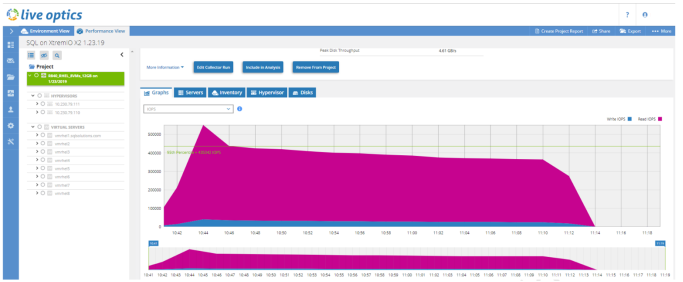
Figure 2.         Live Optics dashboard

We used Live Optics during the validation testing to gather the data shown in tables and graphs throughout this guide. The following table lists the data source for each performance metric in our validation tests.

Table 7.           Performance metric sources

Performance metric

Source (report)

CPU utilization

Dstat

TPM

HammerDB

NOPM

HammerDB

IOPS

Unisphere

Storage latency in milliseconds

Unisphere

Throughput in megabytes per second

Unisphere

Validation Test Results

Overview

In this chapter, we review each test finding in its entirety.  Each section provides performance metrics for all three use cases to show how each workload in the solution performed in terms of each performance metric.

We have combined the SQL Server and Oracle metrics in one graph where possible to show the impact of the workload on the system. This information is important because our incremental validation tests increase in complexity and load on the system for all use cases.

Average CPU utilization

The OLTP use case test demonstrates two SQL Server databases and one Oracle database running on the system with no other workloads. This is the baseline test, and we use the results to understand if average CPU utilization on the MX840c servers is affected when the computational load increases in the subsequent tests. We gathered the average CPU utilization metrics using Linux dstat. Each SQL Server VM had a reservation of 6 vCPUs and the Oracle VM had a reservation of 10 vCPUs. The following figure shows the average CPU utilization: 
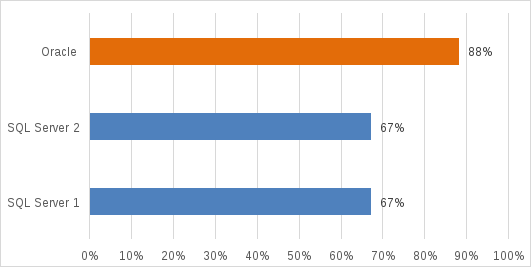

Figure 3.         Average CPU utilization during OLTP use case test
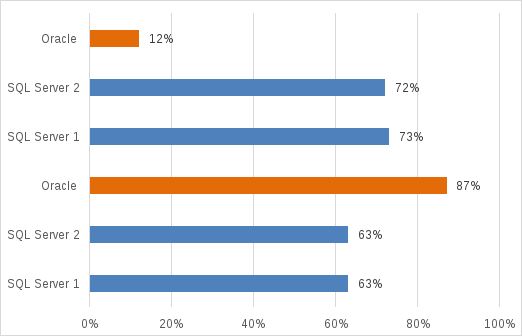

The DSS use case test adds a workload to the system that scans large datasets using complex queries to provide business analytical reports. Each DSS SQL Server VM had a reservation of 8 vCPUs and the Oracle VM had a reservation of 8 vCPUs. The following figure shows the average CPU utilization for the OLTP and DSS workloads:

Figure 4.         Average CPU utilization for two use cases

In the snapshot OLTP use case test, we created PowerMax SnapVX snapshots and repurposed copies of our production OLTP databases for a light OLTP workload. The snapshot SQL Server VM had a reservation of 4 vCPUs, and the snapshot Oracle VM had a reservation of 6 vCPUs.
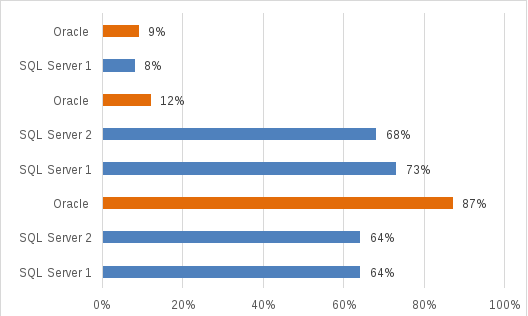

Figure 5.         Average CPU utilization across all three use cases

Workload increases had minor impact on the CPU utilization. For example, in the baseline OLTP use case test, the SQL Server database’s average CPU utilization was 67 percent (see Figure 3). With all three workload use cases (OLTP, DSS, and snapshot OLTP) running in parallel, the average CPU utilization was only 64 percent, as shown in Figure 5, with a minimal impact of 3 percentage points. This CPU utilization reduction occurred due to the reduction in IOPS handling in the mixed workload case, as compared to that in the baseline case. Minor changes in CPU utilization despite workload additions prove that the mixed workload system delivers consistent performance.

TPM

In the TPC-C–like order entry benchmark, TPM indicates the total number of transactions per minute for the database. This means TPM includes transactions from the TPC-C–like benchmark and other transactions in the database. For example, TPM includes both commits and rollbacks. TPM is not a metric that we can use to compare database performance because databases implement transaction tracking differently. Because TPM is pulled from memory-based tables in the database, it does not impact the benchmark performance.

The following figure shows the TPM in the baseline OLTP use case test.
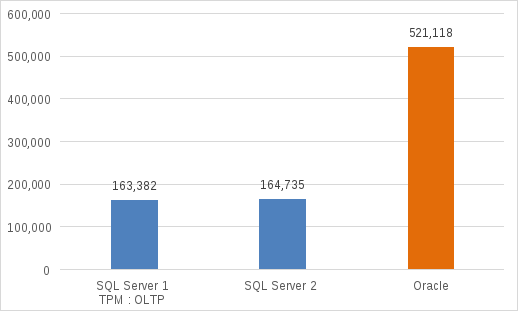

Figure 6.         TPM of baseline for OLTP databases

Because no other workloads were running on the system, the expectation is that these TPM values for the OLTP SQL Server databases and Oracle database would be the highest achieved. When we added the DSS workload, these TPM values showed a minor drop from these maximum values.

In the DSS use case test, the goal was to determine what impact the DSS workload would have on the TPM metrics for the OLTP databases. The following figure shows the TPM of the baseline with OLTP databases and the DSS workload running in parallel.
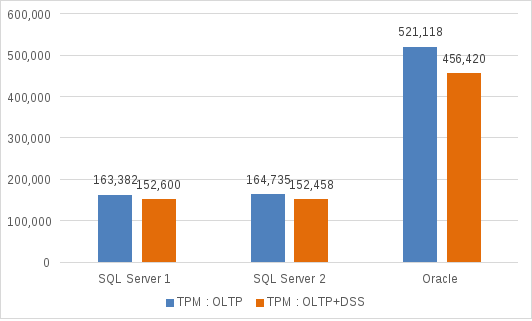

Figure 7.         TPM of baseline OLTP databases with DSS workload running in parallel

The DSS workload running in parallel with the OLTP databases did have an impact on TPM for both the baseline SQL Server and Oracle databases:

  • SQL Server OLTP 1 achieved 152,600 TPM—a difference of 10,782 from the OLTP use case test maximum of 163,382.
  • SQL Server OLTP 2 achieved 152,458 TPM—a difference of 12,277 from the OLTP use case test maximum of 164,735.
  • Oracle OLTP achieved 456,420 TPM—a difference of 64,698 from the OLTP use case test maximum of 521,118.

Customers need to know if creating a snapshot of a database using PowerMax SnapVX will impact production performance. We ran the snapshot databases with a light OLTP workload using the TPC-C–like benchmark to analyze the impact on the baseline OLTP databases. The following figure shows the TPM results from all three use cases:

  • Baseline OLTP workload only
  • OLTP + DSS workloads
  • OLTP + DSS + snapshot (SNAP) workloads

The figure also shows how the increasing workloads from each incremental use case affected the TPM performance of the baseline OLTP databases.
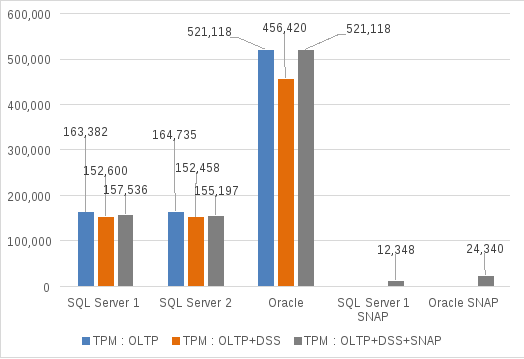
Figure 8.         TPM results with all three use case workloads running in parallel

In the final use case test, adding the snapshot database workload on top of the OLTP and DSS workloads had very little impact on the baseline OLTP TPM performance:

  • SQL Server OLTP 1 achieved 157,536 TPM—a difference of 5,846 or 4 percent from the baseline maximum of 163,382.
  • SQL Server OLTP 2 achieved 155,197 TPM—a difference of 9,538 or 6 percent from the baseline maximum of 164,735.
  • Oracle OLTP achieved 521,118 TPM—equal to the baseline maximum of 521,118.

During this final use case test, the snapshot OLTP databases ran a light TPC-C–like workload and achieved the following TPM levels:

  • 12,348 TPM for SQL Server snapshots
  • 24,340 TPM for Oracle snapshots

In most mixed workload environments, minor variances in performance occur daily, but the key success factor is overall performance consistency. For example, the Oracle database showed the most significant drop in TPM with the DSS workload running. However, the Oracle database performance in the third test was equal to the performance in the OLTP baseline test. Minor changes in performance are expected, but this reference architecture for mixed workloads demonstrated consistent performance throughout the tests.

NOPM

NOPM is a metric that is queried from the district table at the start and end of the TPC-C-like benchmark. Some constraints qualify whether a NOPM transaction can be recognized and counted. For example, the new order, payment, and order status transactions must have a response time of 5 seconds or less to be counted in the NOPM metric.

In this guide, we examine NOPM because it has value to the customer. NOPM indicates how fast a database can process transactions across databases and different infrastructures. In the context of these validation tests, the NOPM metrics apply to an enterprise entry-level storage array such as the PowerMax 2000.

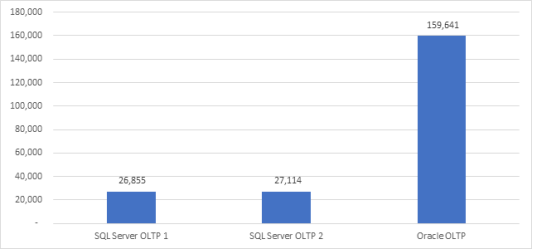
The following figure shows the NOPM metrics for the OLTP use case baseline test.
cid:image004.png@01D505D2.E00C9650

Figure 9.         NOPM results for OLTP use case baseline test

We configured the two SQL Server OLTP databases identically for the TPC-C–like test, so their performance is very close in terms of NOPM. The Oracle OLTP database had four more vCPUs and 48 GB more memory allocated to the database, so its NOPM score is higher.

The DSS test does not involve running order-entry transactions. Therefore, we examine how this workload affects NOPM for the OLTP databases. The following figure shows the NOPM metrics for the OLTP and DSS tests running in parallel:
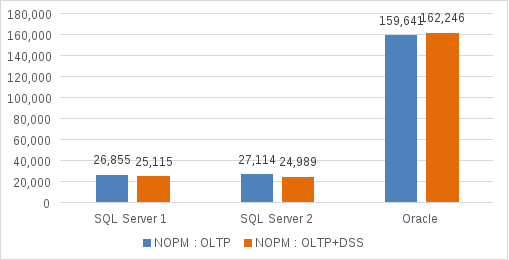
Figure 10.     NOPM for OLTP workload with DSS workload running in parallel

Both SQL Server OLTP databases showed a minor loss in NOPM:

  • SQL Server OLTP 1 achieved 25,115 NOPM—a difference of 1,740 from the first OLTP test.
  • SQL Server OLTP 2 achieved 24,989 NOPM—a difference of 2,125 from the first OLTP test.
  • The Oracle OLTP database NOPM value showed a performance improvement when the DSS workload was running in parallel. The Oracle database achieved 162,246 NOPMs—a gain of 2,605.

The snapshot OLTP databases simulated test and development activity by running a light OLTP workload on the system. The following figure shows the results:
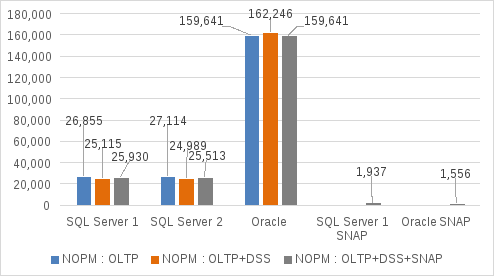
Figure 11.     NOPM with OLTP, DSS, and snapshot OLTP workloads running in parallel

With all the workloads running in parallel both the OLTP SQL Server databases showed a positive performance difference:

  • SQL Server OLTP 1 achieved 25,930 NOPM—a gain of 815 over the previous test.
  • SQL Server OLTP 2 achieved 25,513 NOPM—a gain of 524 over the previous test.
  • The Oracle OLTP database showed a slight loss of 2,605 NOPM from the previous test. (Coincidentally, that NOPM value matches that of the first test.)

The two snapshot databases on which we ran a light OLTP workload generated the following NOPM results:

  • The SQL Server snapshot database achieved 1,937 NOPM.
  • The Oracle snapshot database achieved 1,556 NOPM.

In terms of NOPM, the MX840c servers and PowerMax 2000 array showed consistent performance. Minor fluctuations, both positive and negative, occurred, but they did not indicate any significant performance impact. Overall, the reference architecture for mixed workloads demonstrated the consistent performance that is required for database and workload consolidation.

Storage IOPS

The number of IOPS demonstrates the load on a storage system. Innovations like SSDs and NVMe flash drives have increased IOPS densities, enabling storage arrays to support more databases and a greater diversity of workloads.

We structured the incremental tests for this solution so that, in terms of storage load, the most intensive IOPS workload—the OLTP databases—were the first to be tested. All other incremental workloads would then have a minimal impact on the OLTP databases. A slight loss in IOPS does not represent a significant impact to database performance.

The OLTP use case test findings show that the OLTP SQL Server databases 1 and 2 generated 16,627 and 17,304 IOPS, respectively, on the PowerMax 2000 storage array, and the single Oracle database generated 42,145 IOPS. Because these three databases have the entire infrastructure dedicated to their performance during the first test, the expectation was that these IOPS values would be the maximum achieved during testing.

The following table summarizes the IOPS for each OLTP database:

Table 8.           IOPS for OLTP databases

Workload

Database

IOPS

OLTP

SQL Server 1

17,304

SQL Server 2

16,627

Oracle

42,145

Total

76,076

The addition of DSS workloads places an additional IOPS load on the storage arrays. However, we must also consider the average read I/O size and write I/O size. The following table shows the average read I/O size and write I/O size for each of the databases:

Table 9.           Average read and write I/O sizes for each database in the OLTP and DSS workloads

DSS database

Read I/O size (KB)

Write I/O size (KB)

SQL Server 1

180.17

64.2

SQL Server 2

157.97

63.99

Oracle

127.82

184.70

OLTP database

Read I/O size (KB)

Write I/O size (KB)

SQL Server 1

12.95

8.90

SQL Server 2

13.04

8.98

Oracle

10.48

10.94

Although the IOPS numbers for the DSS workloads seem low when compared to the IOPS numbers for the OLTP databases, the larger I/O read/write sizes mean that more data is transferred for each storage operation. Thus, in the case of DSS, the number of IOPS is lower than that for OLTP, but the load on the storage array is significant because the data transferred is larger. Therefore, DSS workload performance, in general, is measured in terms of throughput captured as MB/s instead of IOPS.

The following table summarizes the numbers of IOPS for the OLTP and DSS workloads:

Table 10.        IOPS for OLTP and DSS workloads

Workload

Databases

IOPS

OLTP

SQL Server 1

16,417

SQL Server 2

16,410

Oracle

40,387

DSS

SQL Server 1

6,783

SQL Server 2

6,720

Oracle

13,842

  Total

100,559

Comparing the IOPS numbers for the two OLTP database workloads, a slight loss of an average of 3.5 percent in IOPS occurred when we added the DSS workload. As is expected and reasonable, placing more load on a storage array has a slight impact across database workloads. The key point is that performance remains in a range that meets the SLA for the business.

The snapshot OLTP database workloads represent test and development databases. The following table shows the IOPS results of all three databases with mixed workload use cases running in parallel:

Table 11.        IOPS results with all three workload use cases running in parallel

Workload

Database

IOPS

OLTP

SQL Server 1

15,643

SQL Server 2

16,177

Oracle

42,234

DSS

SQL Server 1

6,375

SQL Server 2

7,587

Oracle

13,688

Snapshot OLTP

SQL Server 1

1,332

Oracle

3,103

Total

106,139

Comparing the new workload combination to the previous combination, a slight loss of about 4 percent in IOPS for the OLTP databases occurred when the workload increased. The test findings show that as the workload increased on the PowerMax array, the IOPS performance remained stable (see Table 8, Table 10, and Table 11). The capability of the storage array to sustain IOPS performance as the workload increased demonstrates the strength of the PowerMax platform for mixed database and workload consolidation.

The treemap in the following figure shows the distribution of IOPS for each database across all three workload use cases running in parallel. As indicated by the blue tiles, of the three OLTP databases, Oracle generated the greatest number of IOPS, while the two SQL Server databases generated IOPS ranging from 15,643 to 16,177. The orange tiles represent the addition of the DSS databases, and the gray tiles represent the addition of the snapshot OLTP database.
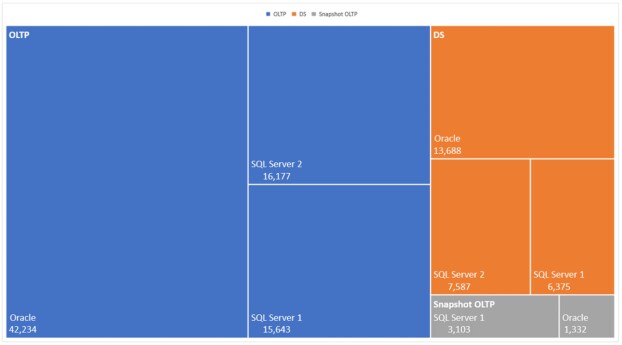
Figure 12.     Treemap of IOPS based on test results for all three workload use cases

Storage latency

Storage latency is the time that a storage array takes to complete a read request or acknowledge a write to the database. Innovations in storage media have driven storage latency lower. For example, before flash SSDs, storage latencies were typically measured in milliseconds. Flash drives, which drove latencies below 1 ms, represented a significant advancement. NVMe drives offer greater efficacies, further lowering latencies for reads and writes. The overall goal for the testing of this reference architecture was for all average storage latencies to be 1 ms or less for both reads and writes.

For OLTP workloads, physical reads from storage are generally random, small-block I/O operations. Database and application performance depend on how quickly data can be read from storage. Thus, the lower the read latency, the faster the application users can access critical data. SQL Server and Oracle databases commonly perform thousands or millions of reads per hour, depending on the business load. In the OLTP baseline validation test, we expected that the SQL Server and Oracle databases would demonstrate the lowest tested latency because there were no other workloads on the PowerMax 2000 array during that test. The following tables show the average read and write latencies for the OLTP workload:

Table 12.        Average read latencies for the OLTP workload

Workload

Database

Average read latencies (ms)

Data LUNs

Log LUNs

OLTP

SQL Server 1

.47

.21

SQL Server 2

.47

.23

Oracle

.47

.29

Table 13.        Average write latencies for the OLTP workload

Workload

Database

Average write latencies (ms)

Data LUNs

Log LUNs

OLTP

SQL Server 1

.20

.18

SQL Server 2

.20

.16

Oracle

.35

.64

The average read latency for the data and log LUNs for the SQL Server databases and the Oracle database remained under .5 ms. The average write latency for the data and log LUNs was under .4 ms, except for the Oracle log LUN with an average of .64 ms.  Some exceptionally low average latencies stood out during testing:

  • The average read latencies for both the SQL Server and Oracle databases on the log LUNs were .29 ms or less.
  • The average write latencies for the SQL Server databases on the data LUNs were .2 ms or less.
  • The average write latencies for the SQL Server databases on the log LUNS were .18 ms or less.

In the DSS use case testing, throughput is the key performance metric because the database was scanning large tables and requesting large blocks of data from the PowerMax 2000 array. The following tables document our test findings, showing the impact of the added DSS workload on the latencies of the baseline OLTP workloads.

Table 14.        Average read latencies for the OLTP workload with the DSS workload running in parallel

Workload

Database

Average read latencies (ms)

Data LUNs

Log LUNs

OLTP

SQL Server 1

.79

.27

SQL Server 2

.79

.28

Oracle

.60

.47

Table 15.        Average write latencies for the OLTP workload with the DSS workload running in parallel

Workload

Database

Average write latencies (ms)

Data LUNs

Log LUNs

OLTP

SQL Server 1

.23

.20

SQL Server 2

.23

.19

Oracle

.31

.69

The addition of the DSS workload did cause our average read latencies to increase, but this was expected because the load on the array increased. All the average read latencies remained under the goal of 1 ms.

The addition of the DSS workload had a minor impact on average write latencies for both data and log. The average write latencies remained consistently low because the PowerMax cache accelerates all writes to storage. In this case, the write latencies remained under .24 ms for all SQL Server databases, and for Oracle they remained under .35 ms for data LUNs and .69 for log LUNs.

For the final use case, we added the snapshot OLTP workloads on top of the OLTP and DSS workloads. The test findings show a minor increase in average read latencies for data. For example, latency increased by .08 ms for SQL Server and Oracle data LUNs. Average read latencies for the SQL Server log LUNs did not increase, while the Oracle log LUN increased by .08 ms. For the OLTP workload, all average read latencies remained under the 1 ms goal, as shown in the following table:

Table 16.        Average read latencies for the OLTP and snapshot OLTP workloads with the DSS workload running in parallel

Workload

Database

Average read latencies (ms)

Data LUNs

Log LUNs

OLTP

SQL Server 1

.87

.26

SQL Server 2

.87

.27

Oracle

.68

.55

Snapshot OLTP

SQL Server 1

1.10

.83

Oracle

.82

.51

As shown, the snapshot OLTP SQL Server database did have an average read latency of 1.10 ms for data, but, because this database was simulating a test and development environment, the latency goal was less critical. For the same database, the log latencies were .83 ms, which is under the goal of 1 ms.

The snapshot OLTP Oracle database showed low average read and write latencies of .51 ms and .26 ms respectively for log LUNs. Also, all the average read and write latencies for Oracle were under the 1 ms performance goal.  

These test findings show the capability of the PowerMax cache to accelerate most writes to the storage array. All average write latencies for both SQL Server and Oracle were .31 ms or under except for .75 ms for the Oracle log LUNs, as shown in the following table:

Table 17.        Average write latencies for the OLTP and snapshot OLTP workloads with the DSS workload running in parallel

Workload

Database

Average write latencies (ms)

Data

Log

OLTP

SQL Server 1

.24

.22

SQL Server 2

.24

.20

Oracle

.31

.75

Snapshot OLTP

SQL Server 1

.26

.24

Oracle

.25

.26

During the testing, a pattern of very low latencies for write I/O to the array emerged. We observed that write latencies were considerably lower than read latencies. This is expected because the PowerMax array has a large cache that accelerates I/O and is weighted towards caching all write requests. Also, all writes to the PowerMax cache are immediately acknowledged back to the database application.

Throughput

In addition to running OLTP workloads, we ran a DSS workload using the HammerDB TPC-H–like benchmark.

Note: The “TPC-H-like” test means that the results are not certified.

The DSS workload test simulates ad-hoc queries that are designed to assist the business with decision analysis. In addition, the test also simulates concurrent data modifications, in which multiple sets of data are modified in parallel. The queries are complex, reflecting that the database must join and aggregate (filter or group) large sets of data to assist the business with decisions analysis.

We used a Scale Factor (SF) of 1,000 for the SQL Server and 3,000 for Oracle DSS testing. SF defines the database size. For example, an SF of 1 indicates 1 GB. Because we used an SF of 1,000 in our test, the database size was 1,000 GB for SQL and 3,000 GB for Oracle. The SF also defines the minimum number of query streams. For example, it specifies a minimum of seven query streams for an SF of 1,000 and a minimum of eight query streams for an SF of 3,000. A query stream is a set of queries that must be executed serially, one after another. In the case of each SQL Server database, we ran only one query stream and executed 17 of the 22 queries. For each Oracle database we ran one query stream that executed a subset of queries.

We did not gather formal TPC-H–like metrics such as Throughput@Size because the validation test scope focused only on storage throughput.

Our focus in running the DSS workload was to generate throughput on the PowerMax 2000 array. Throughput is the amount of sustained data that is transferred as supported by the infrastructure.

The following table shows the throughput test results that came from the PowerMax storage report for the data LUNs of SQL Server and Oracle:

Table 18.        Throughput test results

DSS database

OLTP and DSS in parallel

OLTP, DSS, and snapshot OLTP in parallel

IOPS

Host MB/s

IOPS

Host MB/s

SQL Server 1

6,783

631

6,375

644

SQL Server 2

6,720

625

7,587

714

Oracle

13,842

1,731

13,688

1,712

Both SQL Server and Oracle databases showed stable or improved throughput and IOPS as the workload increased and became more complex. Hence, our tests prove that the throughput level improves with the increased size and complexity of the workload. 

Combined performance of IOPS, latency, and throughput

IT organizations and DBA teams typically deal with tradeoffs between IOPS and latency. For example, the greater the number of databases, the more IOPS on the storage array and the greater the latency. This tradeoff between IOPS and latency happens over time. Initially, storage performance is good, and databases have low latency times. With time, more applications are added to the array and the tradeoff is weighted toward IOPS, thus adversely impacting database and application performance.

In testing this architecture with mixed databases and workloads, we consolidated eight databases (five SQL Server databases and three Oracle databases) to determine where the tradeoff between IOPS and latency occurred on the PowerMax 2000 array. With eight databases running in parallel, we generated a total of 106,139 IOPS for 24 NVMe flash drives. The following table combines the IOPS, latencies, and throughput test results for all mixed workloads in the validation tests:  

Table 19.        IOPS, average read latencies, and throughput across all workloads

Workload

Database

IOPS

Average read latencies (ms)

Host throughput (MB/s)

Data

Log

OLTP

SQL Server 1

15,643

.87

.26


SQL Server 2

16,176

.87

.27


Oracle

42,234

.68

.55


DSS

SQL Server 1

6,375


631

SQL Server 2

7,587


625

Oracle

13,688


1,712

Snapshot OLTP

SQL Server 1

1,332

1.10

.26


Oracle

3,103

.83

.51


With all the workloads running in parallel, the PowerMax array supported over 105,000 IOPS and maintained average read latencies under 1 ms for all databases except the snapshot OLTP SQL Server 1 database. We allocated minimum memory to the databases to force more physical reads from storage. For example, we allocated only 8 GB to the SQL Server databases. Most customers will provide more memory to their databases, so their average read latencies will be shorter.

Average write latencies across all workload use cases were consistently low with most under .31 ms. The only exception is the average write latency for the OLTP Oracle database which is .75 ms for the log LUN. All average write latencies were well under the goal of 1 ms or less for storage performance, as shown in the following table:

Table 20.        IOPS, average write latencies, and throughput across all workloads

Workload

Database

IOPS

Average write latencies (ms)

Host throughput (MB/s)

Data

Log

OLTP

SQL Server 1

15,643

.24

.22


SQL Server 2

16,176

.24

.20


Oracle

42,234

.31

.75


DSS

SQL Server 1

6,375


631

SQL Server 2

7,587


625

Oracle

13,688


1,712

Snapshot OLTP

SQL Server 1

1,332

.26

.22


Oracle

3,103

.25

.26


Our findings show that there was no tradeoff between IOPS and storage latencies despite the entry-level PowerMax 2000 configuration with 24 NVMe flash drives having to support eight databases and a mixture of OLTP and DSS workloads. Customers can be confident that a properly sized mixed database/mixed workload solution based on PowerEdge MX840c servers and PowerMax 2000 arrays can scale while providing strong storage performance.

Data Domain Backup and Recovery Solution

Introduction

Database infrastructures store and manage essential company data. Any downtime of these databases negatively impacts the business and customer experience in many ways. Therefore, it is essential to provide optimal backup and recovery solutions that can handle any unforeseen circumstances that could stall business operations. You can also use backup and recovery solutions to build test environments that simulate production systems for a variety of purposes such as upgrades and sizing determination.  The Dell EMC Validated Design team has tested a backup and recovery solution that can support the database workloads discussed in this guide.

Backup and recovery solution for Oracle

Design considerations

DD Boost technology

During the database backup operation with Oracle RMAN, the Oracle database sends backups to the Data Domain system through the Fibre Channel or Ethernet network. We selected DD Boost over Ethernet protocol to take advantage of the proven performance and deduplication features of DD Boost technology. In this configuration, both the DD Boost feature and distributed segment processing (DSP) are enabled. DD Boost software runs on both the Oracle database server and the Data Domain system. As shown in the following figure, for each backed-up segment, the DD Boost software determines if the segment is unique (that is, it has not been previously stored in the Data Domain system). When DD Boost confirms that the segment is unique, the segment is compressed and transferred over the network and stored on the Data Domain system. The deduplication and compression processes ensure that only unique data is compressed and sent over the network and stored in the Data Domain system.

During the first full database backup, because no data from this database has been stored in the Data Domain system, all the data segments from the backup are unique. As a result, each data segment from the first full backup is compressed, sent over the network, and stored in the Data Domain system. Starting with the second full backup, DD Boost software backs up only those unique data segments that have not been previously stored in the Data Domain system.
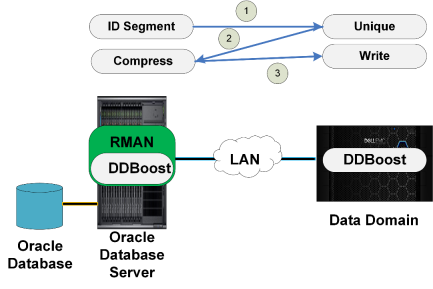
Figure 13.     DD Boost software determining if segment is unique

Storage and file system

The Data Domain system includes a set of disks for storing database backups. During the initial Data Domain configuration, we assigned these disks to disk groups so that they can be used to create file systems for storing database backups.

The Data Domain DD9300 system used in our testing has one head unit with 12 disks, and four disk enclosures (DS60) with 60 disks each. In the head unit, four disks are used as the system disks and eight disks are used as cache tier. From the four disk enclosures, we created 15 disk groups, each with 14 disks plus one spare disk. Each disk group has a 38.21 TiB usable storage capacity. All 15 disk groups provide a total of 573.15 TiB usable physical storage capacity that can be used to store the database backup images.

During the Data Domain system initialization process, we enabled the file system by running a file-system-enabling command on the Data Domain system command line. The following command shows an example of the space usage of the file system in a DD9300.

Figure 14.     Example of space usage of file system in DD9300

Mtree and storage unit

We created one storage unit on the Data Domain system to use with the database application agent on the database server to back up the database files, as shown in the following example:
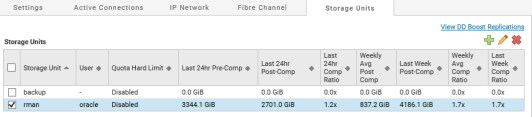
Figure 15.     Storage unit rman created on DD9300 for backup and recovery testing

The storage units are shown as a logical partition of the Mtree file system:

Figure 16.     Storage units seen as logical partitions of Mtree file system

To implement the Oracle optimized deduplication feature in a Data Domain system, we set the value of the app_optimized-compression option to <user_name> on the Mtree with this command:

mtree option set app-optimized-compression <user_name> mtree <storage_unit_name>

For example, we ran these commands in the command line on the Data Domain system for storage unit rman:

$mtree option set app-optimized-compression oracle1 mtree rman

IP network design

The Data Domain appliance connects to the Oracle database server within the MX7000 infrastructure chassis of this reference architecture via four front-end 10 GbE interfaces spread across two NICs installed in the DD9300 system. These four front-end 10 GbE interfaces within the DD9300 connect to the same spine switches to which the MX9116n network IOMs within the MX7000 chassis connect.

Within the DD9300, we created a new network interface group and added these four front-end interfaces to this group as shown in the following figure. So that the Oracle database server could communicate with the backup appliance, we configured these DD9300 front-end interfaces within the same IP network address range as the Oracle database public network IP addresses.
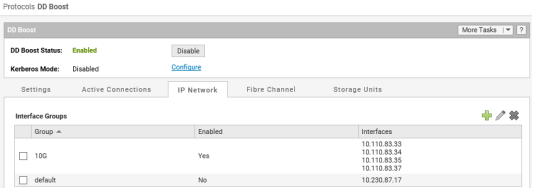
Figure 17.     DD9300: IP network setup using interface groups

Note: Under Protocols -> DD Boost -> IP Network as shown above, we added the Oracle database hostname under Configured Clients and ensured that it used the 10 GbE Interface Group we had created.

To register and connect the database server as a client with the Data Domain system, we selected the static IP address assigned to one of the interfaces on the Data Domain. By internally enabling load balance and failover capability among the network interfaces configured within a group, the interface group configuration provided a robust network bandwidth and a highly available backup network between the database servers and the Data Domain system.

RMAN backup and restore parameters

To test backup and recovery, we used the Use Case 1 - Oracle OLTP database setup described in Chapter 3 Validation Test Goals, Configuration, and Use Cases. We used the following Oracle RMAN settings in our backup and restore tests of the Oracle OLTP database.

Table 21.        Oracle RMAN settings

Operation

Parameter

Setting

Oracle OLTP database backup

PARALLELISM

8

Oracle OLTP database backup

SECTION SIZE

4 GB

Oracle OLTP database backup

BLKSIZE

1,048,576

Oracle OLTP database recovery

PARALLELISM

32

Oracle OLTP database recovery

BLKSIZE

1,048,576

Test methodology and results

We performed various backup and recovery tests on the DD9300 system using the Use Case 1 - Oracle OLTP database setup described in Chapter 3 Validation Test Goals, Configuration, and Use Cases. The following descriptions provide the details of three such backup and recovery test cases or use cases that were conducted in this reference architecture.

Use Case 1: First full backup of standalone OLTP database

We performed a full backup of a 1.8 TB Oracle database using DD Boost software.  DD Boost integrates with RMAN and enables host-based deduplication of database backups to the Data Domain appliance. A full backup eliminates reliance on other backups, simplifying backup management and restoration after an unplanned failure.

In this use case, we used the DD Boost appliance to perform the first full backup of the production database. In the tested configuration, we used a 4 x 10 GbE LAN connection to the DD9300, as shown in the following figure.
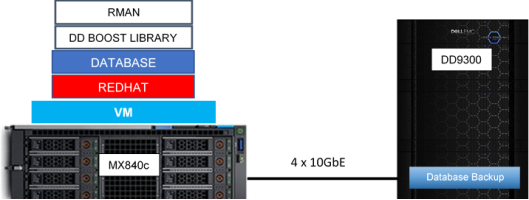
Figure 18.     Use case 1: First full backup architecture diagram

The first full backup of an Oracle database is entirely unique; therefore, all the data is protected on the DD9300. The value of host-based deduplication begins with the second full backup. In the second backup, only the new or modified data is unique; therefore, the DD Boost software sends only a small subset of information to the Data Domain system for protection. Although the first full backup is unique, after the data has been protected on Data Domain, it then is compressed.

The figure below shows the local compression factor savings based on the default algorithm (maximized throughput) on the Data Domain system. A relationship exists between the amount of unique data and the local compression factor: The greater the amount of unique data, the more opportunity for compression, and the higher the compression factor. For example, the first backup consists of entirely unique data and has the largest compression factor.
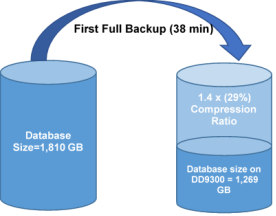
Figure 19.     First full backup compression ratio

This compression saves significant space on the Data Domain system. Dell EMC engineering test results show the compression factor was 1.4x:  a 29.9 percent space savings for the first full backup. The reference architecture setup achieved this full 1.8 TB backup and compression in 38 minutes, exhibiting a backup throughput of 815 MB/s.

Use Case 2: Second full backup of the standalone OLTP database

The goal of this use case was to perform a second full backup of the same Oracle database to show the value of DD Boost host-based deduplication. Host-based deduplication means DD Boost software communicates with the Data Domain system to determine if a data block is unique. If the block is unique, it is sent to Data Domain system for protection. If the block is not unique, then it is not sent to Data Domain. The value of host-based deduplication is that it saves network utilization and space on the Data Domain appliance. DD Boost technology works transparently with RMAN, which means that RMAN sees a full database backup on the DD9300. 

Before running second full backup, we modified the existing data by running a few transactions. To simulate real-world conditions, we used HammerDB and ran OLTP transactions for 10 minutes to create roughly five percent modified data. This modified data consisted of one percent inserts and four percent updates to ensure that the DD Boost software backed up new and modified data.

The following figure shows the use case 2 architecture.
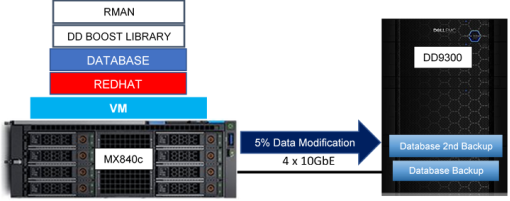
Figure 20.     Use case 2: Second full backup with 5% data modification

The following figure shows the local compression factor savings that are derived from the default algorithm (maximized throughput) on the Data Domain system for the second full backup. Tests show that only unique data was sent to Data Domain, and after local compression the final size was 109 GB. DD Boost host-based deduplication combined with local compression on Data Domain saves a significant amount of space. Performing daily full backups is easy because the space that is used on the Data Domain system is a small subset of the actual database size.
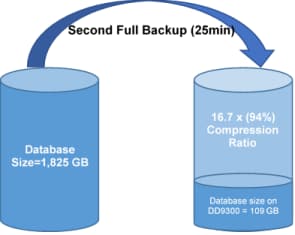
Figure 21.     Second full backup compression ratio

Compression and deduplication save significant space on the DD9300. Dell EMC engineering test results show the compression factor was 16.7x:  a 94 percent space savings for the second full backup.

The second full backup took significantly less time as compared to the first full backup. The second full backup of a 1.8 TB Oracle database took just 25 minutes—13 minutes less than the first full backup (38 minutes) and exhibited backup throughput of 1,191 MB/s. It is important that the time required for database backups remains predictable and minimized to reduce the impact to the business.

Use Case 3: Restore and recovery of the OLTP database from full backup

Unplanned failures can represent significant risk to the business by stopping back-office operations, thus impacting revenue. Backing up and protecting databases prepares the business to recover from an unplanned failure. In this test, we performed a restore from the Data Domain system backed up to the Oracle Database servers. The goal of this use case was to test how fast and how successfully this reference architecture can restore and recover a 1.8 TB Oracle database that was protected using the Data Domain system.

The following figure shows the use case 3 architecture:

Figure 22.     Use case 3: Restore fully backed up database architecture diagram

In this use case, the total time captured includes:

  • The time taken to ‘restore’ which includes copying the fully backed up database files from the DD9300 back to the primary Oracle database, and
  • The time taken to ‘recover’ which includes the application of online and archived redo logs on the restored data using RMAN and opening the database for processing.

In this test, our 1.8 TB Oracle database was fully restored and successfully recovered from backup in 25 minutes with just 15 percent average CPU utilization on the Oracle database server.

Backup and recovery solution for SQL Server

The Data Domain Boost for Enterprise Applications (DDBEA) agent integrates with the applications native management utility and enables efficient backups and restores between the application host and the DD9300 using the DD Boost protocol. The DDBEA agent SQL Server on Windows is supported and available for download.  For further inquiries, contact your local account representative.

Conclusions from Test Results

Performance at scale

This mixed database/mixed workload system, which uses two PowerEdge MX840c servers and an entry-level PowerMax 2000 storage array with 24 NVMe flash drives, is a powerful and cost-effective solution. The system delivered over 105,000 IOPS with latencies under 1 ms. The PowerMax configuration can scale to 96 NVMe flash drives, which is four times larger than the configuration that we used in our testing.

PowerEdge MX840c performance findings

Performance highlights of the PowerEdge MX7000 modular chassis with MX840c servers include:

  • One MX840c server was dedicated to Oracle databases. Of the 160 logical processors that were available, the three Oracle databases used 24 cores or 15 percent of the computational resources. Thus, 85 percent or 136 cores were available for additional database consolidation.
  • The MX840c server that was dedicated to SQL Server had 160 logical processors. Of the available processors, the five SQL Server databases used 32 cores or 20 percent of the available computational resources. This leaves 128 cores or 80 percent of the computational resources available for additional SQL Server database consolidation.
  • On the MX840c server that was dedicated to Oracle, the three databases used 188 GB in memory reservations. Of the 1.5 TB of available memory, the databases used 12.5 percent, leaving 87.5 percent or 1,312 GB of memory for additional database consolidation.
  • On the MX840c server that was dedicated to SQL Server, the five databases used a combined total of 88 GB of memory or 6 percent. This leaves 1,412 GB or 94 percent of memory available for additional database consolidation.
  • The MX840c servers consistently delivered fast compute performance. CPU utilization across all three tests for SQL Server and Oracle VMs remained consistent, with no significant impacts on performance.
  • We achieved the performance results that are documented in this guide by using the converged LAN and SAN MX network design. This design realizes greater savings in terms of TCO because it does not require dedicated LAN and SAN MX IOMs or top-of-rack LAN and SAN switches.

PowerMax 2000 performance findings

The PowerMax 2000 storage array’s performance highlights include:

  • The PowerMax 2000 storage array generated 106,139 IOPS using a small 24 NVMe flash drive configuration.
  • IOPS performance remained consistent between the baseline OLTP test and testing with all workloads running. When all workloads were running in parallel, IOPS remained within 4 percent of the baseline.
  • Average read latency for all the databases remained under 1 ms with one exception: Snapshot OLTP SQL Server 1. Because this database was simulating a test and development workload, the slightly higher latency was not significant in evaluating overall performance.
  • Average write latency for all databases remained under 1 ms. Most of the write latencies were under .31 ms. The exception was the OLTP Oracle database with .75 ms average writes for logs (still under 1 ms).

Data Domain backup and recovery findings

  • During the first full backup, DD Boost compressed a 1,810 GB Oracle database to 1,269 GB in 38 minutes: a savings of 29.9 percent.
  • In the second full backup with 5 percent modified data, DD Boost further compressed the data and stored just 109 GB on the DD9300 in 25 minutes:  a 94 percent space savings.
  • A 1.8 TB Oracle database was fully restored and successfully recovered in 25 minutes while using just 15 percent of the available CPU capacity in the Oracle database server.

Results summary

Highlights of validation test findings include:

  • TPM remained consistent as load increased. The SQL Server databases remained within 6 percent of the baseline TPM performance, even with all workloads running in parallel.

The Oracle database displayed the same TPM performance during the baseline test and during testing with all the workloads running. No performance loss resulted from the increased workload.

  • NOPM for the SQL Server databases remained within 6 percent of the baseline NOPM performance with all the workloads running.

The Oracle NOPM baseline value was the same as the NOPM value with all workloads running in parallel, meaning that no performance loss occurred, even with the increased workload.

  • Throughput and IOPS were directly correlated: When the IOPS or the workload increases, the throughput also increases. In our findings, we observed that throughput improved with the scaled complexity of the mixed workloads. For example, when the IOPS (OLTP + DSS) was 6,720, the throughput was 625 MB/s, and when the IOPS (OLTP + DSS + SNAP) was 7,587, the throughput was 714 MB/s.
  • Increasing workloads did not affect Oracle database throughput.

References

Dell EMC documentation

The following Dell EMC web pages and documentation provide additional and relevant information. Access to these documents depends on your login credentials. If you do not have access to a document, contact your Dell EMC representative. 

Solution Hardware and Software

Hardware components

The reference architecture for this solution includes the following primary hardware components:

  • Dell EMC PowerEdge MX7000 modular chassis with:
    • 1 PowerEdge MX840c compute sled for an Oracle database
    • 1 PowerEdge MX840c compute sled for a SQL Server database
    • 2 PowerEdge MX9116n I/O modules for LAN and SAN converged traffic
  • Dell EMC PowerMax 2000 storage array
  • Data Domain DD9300 backup appliance

Compute and network components

The following tables list the details of the hardware, firmware, and driver components of the compute servers and the network I/O modules that we used in the tested configuration of this reference architecture. 

Table 22.        Compute and network components

Component

Description

Modular chassis

1 x Dell EMC PowerEdge MX7000 modular chassis

Power supplies

6 x 3,000 W redundant power supplies

Compute sleds

Database ESXi hosts

  • 1 x Dell EMC PowerEdge MX840c for Oracle database
  • 1 x Dell EMC PowerEdge MX840c for SQL Server database

Subcomponents in each compute sled

Chassis[1]

2.5 in. chassis with up to 8 SAS/SATA/NVMe hard drives 

Processor

4 x Intel Xeon Scalable Gold 6148 20c/40T HT 2.4 GHz 

Memory

1,536 GB (24 x 64 GB QR DDR4 2,666 MT/s LRDIMMs)

Local disks in server

3 x 1.2 TB 10 K SAS 12 Gb/s 2.5 in. HDDs (includes one hot spare)

RAID controller

PERC H730P MX

iDRAC

iDRAC9 Enterprise

I/O cards for fabrics A/B

4 x QLogic FastLinQ 41262HMKR DP 10/25 GbE mezzanine cards or CNAs with storage offloads (iSCSI, FCoE)

Network or I/O modules within the MX7000 modular chassis

I/O modules (converged LAN and SAN) (fabric slots A1 and B1)

2 x Dell EMC MX9116n 25 GbE Fabric Switching Engine, 12 x QDD28, 2 x Q28, 2 x Q28/32Gb FC

Note: Newer and updated BIOS and firmware versions are supported, if available. For the latest version, go to Dell EMC Online Support.

Table 23.        PowerEdge MX7000 component firmware and drivers

Component

Firmware/operating system

Driver[2] 

Modular chassis-level

Management module

1.00.01

N/A

Power supplies

00.36.6B

N/A

Compute sleds (applies to both MX840c sleds) 

BIOS 

1.6.11

N/A

Lifecycle Controller and iDRAC9 Enterprise

3.20.21.20

N/A

QLogic FastLinQ 41262HMKR DP 10/25 GbE mezzanine card or CNA

14.07.07

  • 3.7.9.2 (qedentv Ethernet driver)
  • 1.2.24.6 (qedf FCoE driver)

PERC H730P MX

25.5.5.0005

7.705.10.00 (lsi-mr3)

Network I/O modules

MX9116n FSE

10.4.0E.R3S.268

N/A

Storage array

The following table lists the hardware details of the storage array that we used in the tested configuration of this reference architecture:

Table 24.        PowerMax 2000 storage array components

Storage array component

Details

Operating system version

PowerMaxOS

Number of bricks

1

Front-end I/O modules

4 x QP 16 Gb/s FC (two I/O modules per director)

Cache per engine

1 TB (512 GB per director)

Number of disks

24 NVMe flash drives

RAID type

RAID 5 (7+1)

Raw/usable capacity

88.69 TB/73.35 TB

DD9300 backup system

The following table lists the hardware details of the DD9300 backup system that we used in the tested configuration of this reference architecture:

Table 25.        DD9300 backup system components

Backup system component

Details

Operating system version

6.1.0.1-560996

Number of head units

1 (with 12 disks)

Number of enclosures (DS60)

4 (with 60 disks in each)

Number of front-end network adapters

2 x Quad port (QP) 10 GbE adapters

Number of front-end network ports (in use)

4 x 10 GbE (two from each QP adapter)

System disks

3 x 3.64 TiB SAS HDDs + 1 x 3.64 TiB SAS HDD (spare)

Cache disks

8 x 0.728 TiB SAS-SSDs

Active tier disks (in use)

210 x 2.73 TiB SAS HDDs

Active tier disks (spare)

15 x 2.73 TiB SAS HDDs

Software components

The following table specifies the versions of the software components of this reference architecture as deployed in the tested configuration.

Note: The ESXi version applies to both the Oracle and the SQL Server ESXi database hosts.

Table 26.        Software components

Software

Version

Hypervisor operating system

VMware ESXi 6.7 U1 [Dell EMC-customized ISO image (Dell version: A03, Build# 10764712)]

Guest operating systems

Oracle DB VM—Red Hat Enterprise Linux 7.4 kernel 3.10.0-693 x86_64

SQL Server DB VM—Red Hat Enterprise Linux 7.6 kernel 3.10.0-957 x86_64

Oracle Grid and Oracle Database on Linux

Oracle Grid Infrastructure 18c (18.3.0)

Oracle Database 18c (18.3.0) (standalone)

Microsoft SQL Server database on Linux

SQL Server 2017 (RTM-CU13)

Dell EMC Unisphere for PowerMax (includes embedded CloudIQ stat collector and Database Storage Analyzer)

9.0.2.7

Dell EMC Live Optics

2.5.16.467045

DD Boost database application agent

4.7.1.0-1

Design and Configuration Details

Compute and network design

ESXi host configuration

We installed and configured both the PowerEdge MX840c database servers—one for Oracle and one for SQL Server—with ESXi 6.7 U1 by using the Dell EMC customized ISO image (Dell Version: A03, Build# 10764712). This image is available on Dell EMC Online Support at VMware ESXi 6.7 U1.

Converged network adapter configuration

In this solution, the LAN and SAN traffic were converged within the blade servers by using four QLogic QL41262 dual-port 25 GbE CNAs. These CNAs support multiple network traffic protocols (Ethernet, FCoE offload, and iSCSI offload) and provide plenty of bandwidth to support the various LAN and SAN network functionalities in this solution. We partitioned these CNAs using NPAR, the network partitioning feature of the adapter, which enabled us to use the combined high network bandwidth available across the CNAs while also providing high availability. We partitioned the CNAs in both the Oracle and SQL Server hosts with the following functionality and bandwidth assignments:

Table 27.        CNA configuration within MX840c database hosts

Mezz/CNA slot

Port number

Partition number

Partition type

Percentage bandwidth assigned

Application function

Mezz 1A

Port 1

Partition 1

NIC

0% (0 Gb)

None (initial ESXi management)

Partition 2

FCoE

100% (25 GbE)

Database SAN/FCoE 1

Mezz 1B

Port 1

Partition 1

NIC

0% (0 Gb)

None

Partition 2

FCoE

100% (25 GbE)

Database SAN/FCoE 2

Mezz 2A

Port 1

Partition 1

NIC

20% (5 Gb)

ESXi management and VM network uplink 1

Partition 2

NIC

20% (5 Gb)

Oracle/SQL vMotion uplink 1

Partition 3

NIC

60% (15 Gb)

Oracle/SQL public network uplink 1

Mezz 2B

Port 1

Partition 1

NIC

20% (5 Gb)

ESXi management and VM network uplink 2

Partition 2

NIC

20% (5 Gb)

Oracle/SQL vMotion uplink 2

Partition 3

NIC

60% (15 Gb)

Oracle/SQL public network uplink 2

Note: The NPAR feature, by default, creates four partitions on each port of the adapter. The partitions that are not listed in the table were disabled.

For detailed steps on how to create partitions on the QLogic CNAs, see one of the following documents:

Note: The MX I/O fabric slots A2 and B2 were not populated with any IOMs because they were not needed in this solution. As a result, the second port of each mezzanine or CNA card that internally connects to these fabric slots was unavailable or unused.

As shown in Table 25, we configured both database hosts with the following LAN and SAN design and best practices:

  • LAN and SAN (FCoE) traffic on separate CNAs 
  • Two 25 Gb/s FCoE partitions (total 50 Gb/s) across two separate CNAs for high bandwidth and highly available SAN network connectivity
  • Two 15 GbE NIC partitions (total 30 GbE) across two separate CNAs for high bandwidth and highly available LAN or database public network connectivity
  • Two 5 GbE NIC partitions (total 10 GbE) across two separate CNAs for high bandwidth and highly available vMotion connectivity
  • Two 5 GbE NIC partitions (total 10 GbE) across two separate CNAs for high bandwidth and highly available ESXi host management and VM network connectivity

The following figure shows how the CNAs that are used for the LAN traffic (mezzanines in slots 2A and 2B within each of the MX840c blade servers) are connected internally to the MX9116n IOMs within the MX chassis. It also shows how the IOMs are connected to uplink switches for external LAN connectivity and access.
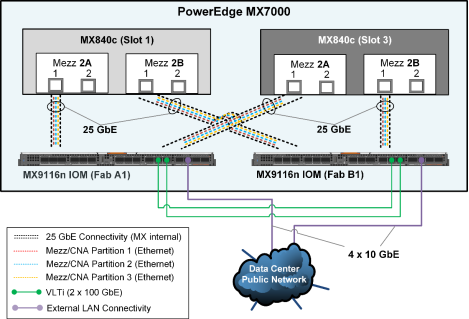
Figure 23.     LAN network: Internal and external connectivity

As shown in the preceding figure, the first (5 GbE) NIC partition that was created on each of the mezzanine or CNA cards was used for ESXi host and VM management traffic, the second (5 GbE) NIC partitions were reserved for vMotion traffic, and the third (15 GbE) NIC partition on each of the CNAs was used for the database public traffic. To provide external connectivity and to provide sufficient Ethernet bandwidth for all three NIC functions across both the database ESXi hosts, we configured one external-facing QSFP28 (100 GbE) port on each MX9116n in 4 x 10 GbE mode. We uplinked the ports to spine switches in the data center using QSFP+ to SFP+ breakout cables (purple connectivity).

ESXi virtual network design

The following diagram shows the virtual switch design topology that we implemented on the ESXi hosts for the network connectivity that was required for both the Oracle and SQL Server databases. The vmnics in the following diagram are the respective NIC partitions that were created on the CNAs that appear as physical adapters within the ESXi hosts.
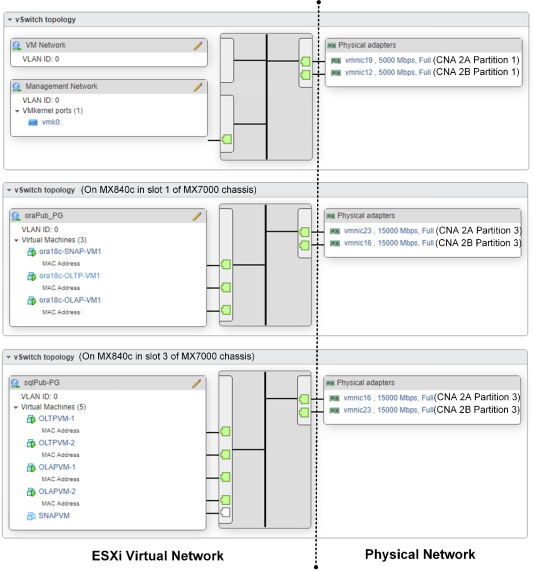
Figure 24.     Virtual network design in the ESXi hosts

As shown in Figure 14, the virtual network design on the two MX840c database servers consists of:

  • VM and management traffic—The VM network and ESXi management traffic uses the default standard virtual switch (vSwitch), which contains two default standard ports groups. The Management Network port group provides the VMkernel port vmk0 to manage the ESXi host from VMware vCenter Server Appliance. The VM Network port group provides the virtual interfaces for in-band management of the database VMs. For high availability and bandwidth, two 5 GbE uplink ports (partition 1) on two separate CNAs (in slots 2A and 2B) in the MX840c ESXi database servers were used for routing the management traffic. 
  • Public traffic—We created an additional dedicated standard vSwitch for the database public traffic on each of the ESXi database hosts for the Oracle and SQL Server databases. For high bandwidth, availability, and load balance, we used two 15 GbE uplink ports (partition 3) on two separate CNAs (in slots 2A and 2B) in the MX840c ESXi database servers for routing the database public traffic. Within each public vSwitch, we created one standard port group (oraPub-PG and oraSQL-PG, respectively) that provides the virtual network interfaces for the Oracle and SQL Server databases’ public traffic within their respective database VMs.

The Dell EMC customized ESXi 6.7 ISO image that we used contains the qedf FCoE driver for the QLogic QL41262 CNA. This driver ensures that the FCoE partition that we created on the QLogic CNAs for the SAN traffic was automatically recognized as FCoE virtual HBAs (vmhba64 and vmhba65) or storage adapters within the ESXi hosts, as shown in the following figure:
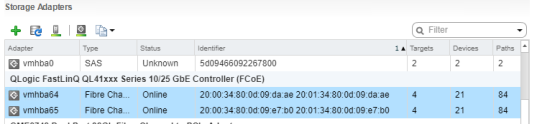
Figure 25.     FCoE virtual HBAs or storage adapters recognized in ESXi hosts

FCoE-to-FC connectivity and zoning

The following figure shows the internal FCoE connectivity between the CNAs or mezzanine cards within the MX840c blade servers and the MX9116n FSE IOMs. It also shows the external direct-FC connectivity between the MX9116n FSE IOMs and the PowerMax storage array.
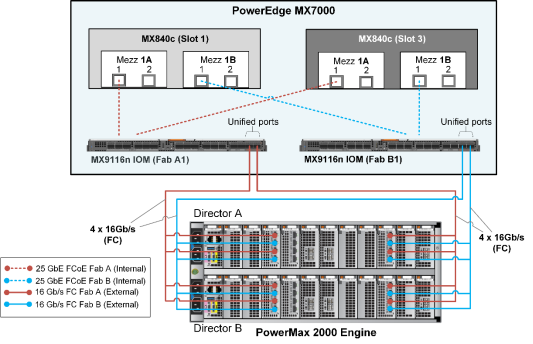
Figure 26.     FCoE-to-FC SAN fabric connectivity design

As shown in the preceding figure, we configured the first port on both the mezzanine cards in slots 1A and 1B of each MX840c server for FCoE traffic over 25 GbE internal connectivity to the respective MX9116n IOMs in MX fabric slots A1 and B1. We configured the two external-facing QSFP28 (100 Gb) unified ports on the MX9116n IOMs in 4 x 16 Gb/s FC breakout mode. The ports are directly attached to the PowerMax front-end FC ports using Multi-fibre Push On (MPO) breakout cables. This recommended SAN connectivity design ensures high bandwidth, load balance, and high availability across two FCoE-to-FC SAN fabrics—SAN Fabric A (red connectivity) and SAN Fabric B (blue connectivity).

Dell EMC recommends single-initiator (FCoE partition on the CNA in this case) zoning of zone sets on the FC switches (MX9116n in this case). For high availability, bandwidth, and load balance, each initiator or CNA FCoE partition on the ESXi host is zoned with four front-end PowerMax storage ports that are spread across the two SLICs and the two storage directors, as shown in the following logical representation of zone sets:
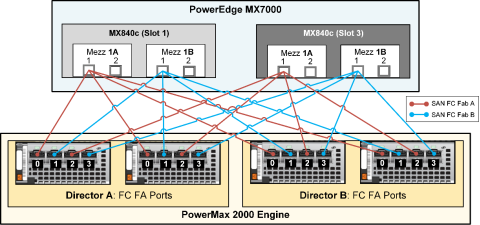
Figure 27.     FC zoning: Logical representation

As illustrated in the preceding figure, to provide the same high availability and equal storage front-end bandwidth access to both the Oracle and the SQL Server databases, we zoned each initiator with a unique front-end port distributed across the array. This design ensured that both the Oracle database ESXi host and the SQL Server database ESXi host had eight unique paths to the storage array.

For detailed steps on how to configure the FCoE-to-FC connectivity between the PowerEdge MX7000 and the PowerMax storage array, including best practices, see the following guides.

Note: Although the following FCoE-to-FC deployment guides use different Dell EMC storage arrays (Unity) and Dell EMC networking (unified) switches (S4148U), the concepts and network configuration steps are applicable to the PowerMax array and to the MX9116n IOMs that are used in this solution.

Apply the recommended QoS (DCBx) configuration steps as specified in either of the two guides to ensure that the FCoE configuration is lossless. The QoS configuration is automatically applied when the two MX9116n IOMs are configured in Smart Fabric mode (Dell EMC PowerEdge MX Series Fibre Channel Storage Network Deployment with Ethernet IOMs). However, the configuration must be applied manually in Full Switch mode (Dell EMC Networking FCoE-to-Fibre Channel Deployment with S4148U-ON in F_port Mode). In this solution, we configured the FCoE-to-FC connectivity on the two MX9116n IOMs manually.

Multipath configuration

We configured multipathing on the ESXi 6.7 host according to the following best practices:

  • Used vSphere Native Multipathing (NMP) as the multipathing software.
  • Retained the default selection of round-robin for the native path selection policy (PSP) on the PowerMax volumes that are presented to the ESXi hosts.
  • Changed the NMP round-robin path-switching frequency of I/O packets from the default value of 1,000 to 1. For information about how to set this parameter, see the Dell EMC Host Connectivity Guide for VMware ESX Server. 

In vSphere 6.7, the administrator can add latency to the NMP configuration as a subpolicy to direct vSphere to monitor paths for latency. By default, the latency setting in vSphere 6.7 is disabled, but it might be enabled in vSphere 6.71 Update 1. Setting the path selection subpolicy to latency enables the round-robin policy to dynamically select the optimal path for latency to achieve better results. To learn more, see vSphere 6.7 U1 Enhanced Round Robin Load Balancing.

PowerMax storage configuration

Hosts and port groups

For ease of management and monitoring, we created two storage hosts on the PowerMax array—one containing the two initiators from the Oracle database ESXi host (MX840c in MX slot 1) and the other containing the two initiators from the SQL Server ESXi host (MX840c in MX slot 3).

As described in FCoE-to-FC connectivity and zoning, the FC connectivity and zoning design ensures that both the Oracle ESXi host and the SQL Server ESXi hosts are connected to eight unique front-end ports on the PowerMax array. As a result, we created two storage port groups on the PowerMax array—one containing the eight front-end ports that were zoned with the Oracle database host initiators and the second containing the other eight front-end ports that were zoned with the SQL Server database host initiators. This design ensures equal bandwidth, high-availability, ease of management and monitoring, and security for both the Oracle and the SQL Server databases.

Storage groups and volumes
for Oracle workloads

To consolidate the mixed workloads of Oracle and SQL databases in the single PowerMax storage array, we adapted the following principles for the storage group and storage volume design for three Oracle databases—Oracle OLTP database, Oracle DSS database, and Oracle snapshot database. These design principles simplify the management and performance monitoring of the storage volumes.

  • Created the parent storage group for each database such as ORA-OLTP-SG for the Oracle OLTP database.
  • Created a separate child group for each type of volumes, such as DATA, REDO, FRA, and TEMP volumes, within each parent storage group. The numbers of corresponding volumes were created in each child group; for example, we created four data volumes in the ORA-OLTP-DATA child group.
  • Created a special parent storage group, ORA-OS-OCR, that consolidates the operating system virtual disks for all Oracle database guest VMs and for Oracle Clusterware OCR and voting disks. The child groups within this parent group were created for each VM operating system volume and each Oracle Clusterware OCR and voting disk volume.

With these design principles in mind, we developed the following storage groups and volumes for these mixed workload Oracle databases.

For the Oracle OLTP database, we created the ORA-OLTP-SG parent storage group and the following child storage groups within the parent group:

  • ORA-OLTP-DATA for DATA files
  • ORA-OLTP-REDO for REDO logs
  • ORA-OLTP-FRA for FRA
  • ORA-OLTP-TEMP for TEMP files

We also created the ORA-OLTP-OS and ORA-OLTP-OCR child groups within the common ORA-OS-OCR parent group. The following table shows the storage groups and the number of volumes and volume sizes for this Oracle OLTP database:

Table 28.        Storage groups and volumes for the Oracle OLTP database

Parent SG

Child SG

Each volume size (GB)

Number of volumes

Total size (GB)

ORA-OS-OCR

ORA-OLTP-OS

500

1

500

ORA-OLTP-OCR

50

3

150

ORA-OLTP-SG

ORA-OLTP-DATA

500

4

2,000

ORA-OLTP-REDO

25

4

100

ORA-OLTP-FRA

100

2

200

ORA-OLTP-TEMP

500

1

500

Similarly, for the Oracle DSS database, we created the ORA-DSS-SG parent storage group and the following child storage groups:

  • ORA-DSS-DATA for DATA files
  • ORA-DSS-REDO for REDO logs
  • ORA-DSS-FRA for FRA
  • ORA-DSS-TEMP for TEMP files

We also created the ORA-DSS-OS child group and ORA-DSS-OCR child group within the common ORA-OS-OCR parent group. The following table shows these storage groups, the number of volumes, and the size of the volumes for this Oracle DSS database:

Table 29.        Storage groups and volumes for the Oracle DSS database

Parent SG

Child SG

Volume size (GB)

Number of volumes

Total size (GB)

ORA-OS-OCR

ORA-DSS-OS

500

1

500

ORA-DSS-OCR

50

3

150

ORA-OLAP-SG

ORA-DSS-DATA

500

8

5,000

ORA-DSS-REDO

25

4

100

ORA-DSS-FRA

100

2

200

ORA-DSS-TEMP

2,000

1

2,000

Storage groups and volumes for SQL Server workloads

In this reference architecture design, we adapted the following principles for the storage group and storage volume design for five SQL Server databases—two OLTP databases, two DSS databases, and one snapshot database:

  • Created the parent storage group for each database, such as SQL_OLTP_VM1_SG for the SQL Server OLTP database.
  • Created a separate child group for each type of volume, such as data, log, and tempdb data and tempdb log volumes within each parent storage group. We created the number of corresponding volumes in each child group—for example, two data volumes in the SQL_OLTP_VM1_Data child group.
  • Created a special parent storage group, SQL_OS_SG, that consolidates the operating system virtual disks for all SQL Server database guest VMs. We created the child groups within this parent group for each VM’s operating system volumes.

These design principles simplify the management and performance monitoring of the storage volumes, including the volumes that were created through snapshots for the SQL Server workload running along with the Oracle workload.

The following table shows the storage groups and volumes for the SQL Server OLTP database workloads.

Table 30.        Storage groups and volumes for the SQL Server OLTP databases

Parent SG

Child SG

Volume size (GB)

Number of volumes

Total size (GB)

SQL_OS_SG

SQL_OLTP_OS1

500

1

500

SQL_OLTP_OS2

500

1

500

SQL_OLTP_VM1

SQL_OLTP_VM1_Data

1,024

2

2,048

SQL_OLTP_VM1_Log

300

1

300

SQL_OLTP_VM1_TempData

400

1

400

SQL_OLTP_VM1_TempLog

300

1

300

SQL_OLTP_VM2

SQL_OLTP_VM2_Data

1,024

2

2,048

SQL_OLTP_VM2_Log

300

1

300

SQL_OLTP_VM2_TempData

400

1

400

SQL_OLTP_VM2_TempLog

300

1

300

For the SQL Server DSS database, we created a similar storage layout. The following table shows the storage groups, the number of volumes, and the volume sizes for the two SQL Server DSS databases:

Table 31.        Storage groups and volumes for the SQL Server DSS databases

Parent SG

Child SG

Each volume size (GB)

Number of volumes

Total size (GB)

SQL_OS_SG

SQL_DSS_OS1

500

1

500

SQL_DSS_OS2

500

1

500

SQL_DSS_VM1

SQL_DSS_VM1_Data

1,024

2

2,048

SQL_DSS_VM1_Log

300

1

300

SQL_DSS_VM1_TempData

400

1

400

SQL_DSS_VM1_TempLog

300

1

300

SQL_DSS_VM2

SQL_DSS_VM2_Data

1,024

2

2,048

SQL_DSS_VM2_Log

300

1

300

SQL_DSS_VM2_TempData

400

1

400

SQL_DSS_VM2_TempLog

300

1

300

Snapshot database volumes

The following figure illustrates the architecture of SnapVX snapshots of the production (source) database volumes. It shows how these snapshots are linked to another set of target devices, which are accessed by the snapshot database host, to form a snapshot database such as a development or test database.
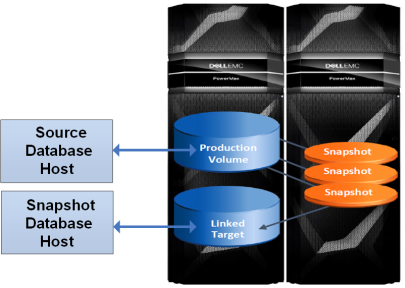
Figure 28.     SnapVX snapshot creation and snapshot database mounting

For snapshot databases, we created two types of storage groups:

  • New storage groups—We created new volumes in these storage groups for the snapshot database. These storage groups include the guest operating system volumes, Oracle OCR/voting disks, Oracle TEMP volumes, and the SQL Server guest operating system and TEMP volumes, as shown in the following table:

Table 32.    New storage groups for snapshot databases

New storage group

Volumes

Parent name

Child name

Size (GB)

Quantity

Total size (GB)

ORA-OS-OCR

ORA-SNAP-OS

500

1

500


ORA-SNAP-OCR

50

3

50

ORA-SNAP-TEMP

NONE

500

1

500

SQL_OS_SG

SQL_SNAP_OS

500

1

500

SQL_OLTP_SNAP_VM

SQL_OLTP_SNAP_VM_TEMPDATA

400

1

400


SQL_OLTP_SNAP_VM_TEMPLOG

300

1

300

  • Snapshot or SnapVX storage groups—These storage groups are snapshots of existing database storage groups. The volumes in these storage groups include snapshots of the corresponding Oracle DATA, REDO, and FRA, and SQL Server DATA and LOG source volumes. We created two SnapVX snapshots: one of the existing Oracle OLTP database and another of the existing SQL Server OLTP database. The host database servers, however, access the snapshot storage groups or volumes using the SnapVX link target storage groups that we created for the respective Oracle and SQL Server snapshots. The following table shows the source, snapshot, and SnapVX link target storage groups that we created for both Oracle and SQL Server snapshot databases:

Table 33.    Source, snapshot, and link target storage groups for snapshot databases

Source storage group

Snapshot name

SnapVX link target storage group

Volumes

Parent

Child

Parent

Child

ORA-OLTP-SG


ORA-OLTP-SNAP-SG

ORA-OLTP-SG_LNK_SG_001


ORA-OLTP-SG-DATA

snapshots


ORA-OLTP-SG-DATA-SG_001

4


ORA-OLTP-SG-REDO

snapshots


ORA-OLTP-SG-REDO_SG_001

4


ORA-OLTP-SG-FRA

snapshots


ORA-OLTP-SG-FRASG_001

2

SQL-OLTP-VM1


SQL-OLTP-VM1-SNAP

SQL-OLTP-VM1_LNK_SG_001


SQL-OLTP-VM1_Data

snapshots


SQL_OLTP_VM1_Data_SG_001

2


SQL-OLTP-VM1_Log

snapshots


SQL_OLTP_VM1_Log_SG_001

1

Note: Unisphere storage management automatically creates the SnapVX link target storage group structure to be the same as that from which it is created. Hence, the number and the size of the snapshot volumes is identical to the source database volumes.

We then mapped all the new storage groups and the SnapVX link target storage groups that were created for the snapshot databases to their respective database ESXi hosts by creating the appropriate masking views. Within the respective ESXi hosts, we manually added all the volumes to the appropriate VM that was created for the snapshot database. Within the respective database guest VMs, we mounted these volumes to the snapshot database.

The following figure illustrates the snapshot creation, linking, and mounting process, using the Oracle OLTP database and its snapshot database as an example.
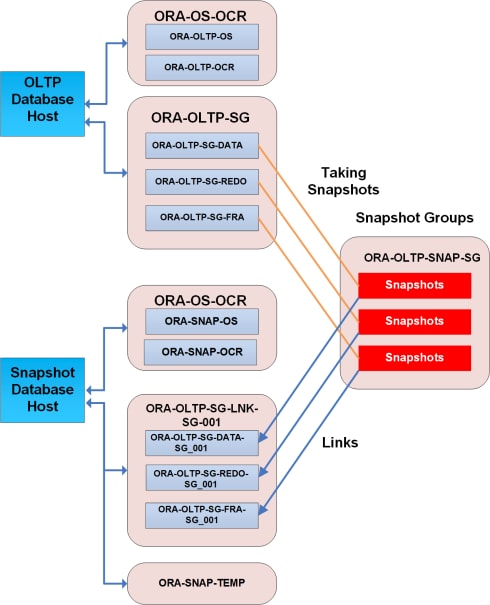
Figure 29.     Snapshot creation, linking, and mounting process

Oracle VMs and guest operating system configurations

VM design and configuration

We used the following design principles and best practices to create the database VMs for the Oracle databases.

SCSI controllers and virtual hard disks

We recommend multiple SCSI controllers of type VMware Paravirtual to optimize and balance the I/O for the different Oracle database hard disks, as described in this section.

The following table shows the recommended SCSI controller design for the OLTP and snapshot database VMs. The DATA and REDO disks are distributed across separate dedicated SCSI controllers because in an Oracle OLTP workload both these types of disks generate a high level of I/O to the storage. In contrast, the OCR, FRA, and TEMP disks generate relatively little I/O and, hence, can exist together on a separate dedicated SCSI controller.

Table 34.        SCSI controller properties in the OLTP and snapshot database VMs

Controller

Purpose

SCSI bus sharing

Controller type

SCSI 0

Guest operating system disk

None


VMware Paravirtual


SCSI 1

Oracle DATA disks

SCSI 2

Oracle REDO disks

SCSI 3

Oracle OCR, FRA, and TEMP disks

The following table shows the recommended SCSI controller design for the DSS database VM. DSS workloads generate mostly read I/O to the DATA disks with little I/O to the REDO disks. Therefore, as shown in the following table, the 10 DATA disks are distributed across the three dedicated SCSI controllers for load balance, while the rest of the light I/O type disks (the guest operating system, OCR, REDO, FRA, and TEMP disks) exist together on the first SCSI controller.

Table 35.        SCSI controller properties in the DSS database VM

Controller

Purpose

SCSI bus sharing

Type

SCSI 0

Guest operating system, OCR, REDO, FRA, and TEMP disks

None


VMware Paravirtual


SCSI 1

3 Oracle DATA disks

SCSI 2

3 Oracle DATA disks

SCSI 3

4 Oracle DATA disks

The virtual hard disks for the VMs’ guest operating system are created as a VMFS6 datastore. All the volumes or virtual hard disks for the Oracle databases (DATA, REDO, FRA, TEMP, and OCR disks) are directly added to their respective VMs as raw devices or through raw device mapping (RDM). For these raw devices, although ESXi creates a mapping file with the .vmdk extension and saves it on a VMFS datastore, the mapping file contains only mapping information, while the data itself is stored directly on the storage LUN.

vCPU, vMem, and vNIC configuration

We left all the vCPU and vMem properties in all the Oracle database VMs at their default values except for Memory Reservation. We allocated different quantities of vCPUs, vMems, and memory reservations to the different types of database VMs. For details about the allocated values during the testing of each of the test cases, see Table 2 and Table 7.

We added two virtual network adapters to each of the database VMs: one for in-band VM management and one for Oracle public traffic. We configured the two adapters with the recommended type setting of VMXNet 3. For details about the configuration of virtual switches and physical adapters, see Compute and network design in Appendix B.

Enable disk UUID

For each VM, under VM Options advanced settings, we added the disk.enableUUID configuration parameter and set its value to TRUE. This setting ensures that the VMDK always presents a consistent disk UUID to the VM.

Guest operating system and Oracle ASM configuration

In this reference architecture, we used the following best practices to deploy and configure Red Hat Enterprise Linux 7.4 as the guest operating system in the VMs that were running the standalone Oracle databases:

We also followed these important best practices:

  • Within the guest operating system, for each Oracle virtual disk, we created a single partition that spanned the entire disk and had a starting offset of 2,048 sectors.
  • We used UDEV rules to establish ownerships and permissions on the Oracle disks within the VM. The following example shows a UDEV rule set for one of the Oracle disks (REDO disk) within the custom /etc/udev/rules/60-oracle-asmdevices.rules UDEV rules file:

KERNEL=="sd[a-z*[1-9", SUBSYSTEM=="block", PROGRAM=="/usr/lib/udev/scsi_id -g -u -d /dev/$parent", RESULT=="3600601600f004300accaed5bd9741db5", SYMLINK+="oracleasm/disks/ora-redo1", OWNER="grid", GROUP="asmadmin", MODE="0660"

As described in VM design and configuration, we mapped all Oracle database related LUNs that were presented to the ESXi host from the PowerMax storage array directly as raw devices to their respective database VMs using raw device mapping (RDM). In compliance with the Oracle database requirements, we assigned the ownership of the raw devices to the grid user that owns the Oracle GI and Oracle Automatic Storage Management (ASM). The device link for these Oracle related raw devices is /dev/oracles’/disks/oral-XXX. For example, /dev/oracle’s/disks/ora-redo1 is the device link for REDO1 LUN/raw device.

The following table shows the Oracle disk groups that we created for the OLTP database using the raw devices or the virtual disks presented to the VM from the storage array. Except for the OCR disk group that uses the normal redundancy (with triple mirroring), all other disk groups used the external redundancy setting. The coarse striping setting is recommended for DATA, FRA, and OCR disk groups, and the fine-grain striping setting is recommended for REDO1, REDO2, and TEMP disk groups.

Table 36.        ASM disk group design for the OLTP database

ASM disk group

Purpose

Redundancy

ASM striping

ASM disk group size (GB)

LUN

LUN size (GB)

DATA

Data files, control files, undo tablespace

External redundancy

Coarse

2,000

DATA00

500

DATA01

500

DATA02

500

DATA03

500

FRA

Archive log files

External redundancy

Coarse

200

FRA0

100

FRA1

100

REDO1

Online redo logs

External redundancy


Fine-grain

50

REDO0

25

REDO1

25

REDO2


Online redo logs

External redundancy


Fine-grain


50

REDO2

25

REDO3

25

TEMP


Temp files

External redundancy


Fine-grain


500

TEMP


500


OCR

OCR, voting disk, GIMR

Normal redundancy

Coarse


50

OCR0

50

OCR1

50

OCR3

50

Note: The ASM disk group design for the DSS database and the snapshot database is identical to the OLTP database ASM disk group design that is shown in the table with the following exception: In the DSS disk group design, the DATA disk group has eight 500 GB disks for a total disk group size of 4 TB and the TEMP disk group has one 2 TB disk.

Oracle ASM includes a feature through which you can move the data to higher performance tracks of the spinning disks in the compact phase at the end of ASM disk rebalancing. This feature has no benefit for Dell EMC PowerMax storage when physical storage is being virtualized and flash devices are being used. You can disable the rebalancing feature by running the alter diskgroup command for all the disk groups. The following example shows the command for the DATA disk group:

SQL> alter diskgroup DATA set attribute '_rebalance_compact' = 'FALSE';

For more information about ASM compact rebalancing, see Oracle Support note 1902001.1.

SQL Server VMs and guest operating system configurations

VM design and configuration

We used the following design principles and best practices to create the database VMs for the SQL Server databases.

SCSI controllers and virtual hard disks

We recommend using multiple SCSI controllers of type VMware Paravirtual to optimize and balance the I/O for the different SQL Server database hard disks, as described in this section.

The following table shows the recommended SCSI controller design for the OLTP and snapshot database VMs. The DATA and LOG disks are distributed across separate dedicated SCSI controllers because in a SQL Server OLTP workload both types of disks generate a high level of I/O to the storage.  On the other hand, the TEMP database disks generate relatively little I/O and can, therefore, exist together with the operating system volume on a separate dedicated SCSI controller.

Table 37.        SCSI controller properties in the OLTP and snapshot database VMs

Controller

Purpose

SCSI bus sharing

Type

SCSI 0

Guest operating system disk, tempdb data and log disks

None


VMware Paravirtual


SCSI 1

SQL DATA disk 1

SCSI 2

SQL DATA disk 2

SCSI 3

SQL log disk

The following table shows the recommended SCSI controller design for the DSS database VM. DSS workloads generate mostly read I/O to the DATA disks, with little I/O to the log disks. Also, tempdb usage increases significantly during DSS workload and can generate a significant amount of I/O. Because of this, as shown in the following table, the DATA disks and tempdb volumes are distributed across the three dedicated SCSI controllers for load balance, while the operating system, tempdb log, and DSS database log disks are located together on the first SCSI controller.

Table 38.        SCSI controller properties in the DSS VMs

Controller

Purpose

SCSI bus sharing

Type

SCSI 0

Guest operating system disk, DSS database log, tempdb log disk

None


VMware Paravirtual


SCSI 1

SQL data disks 1

SCSI 2

SQL data disks 2

SCSI 3

Tempdb data disks

All virtual hard disks for the VMs were created as VMFS6 datastores. Each datastore was then assigned to its respective VMs.

vCPU, vMem, and vNIC configuration

We left all the vCPU and vMem properties in all the SQL Server database VMs at their default values except for Memory Reservation. We allocated different quantities of vCPUs, vMems, and memory reservations to the different types of database VMs. For details about the values that we allocated during the testing of each of the use cases, see Table 2 and Table 7.

We added two virtual network adapters to each of the database VMs: one for in-band VM management and one for SQL Server public traffic. We configured the two adapters with the recommended type setting of VMXNet 3. For details about the configuration of virtual switches and physical adapters, see Compute and network design in Appendix B.

Enable disk UUID

For each VM, under VM Options advanced settings, we added the disk.enableUUID configuration parameter and set its value to TRUE. This setting ensures that the VMDK always presents a consistent disk UUID to the VM.

Guest operating system and SQL Server installation and configuration

To install and configure the Red Hat Enterprise Linux 7.6 guest operating systems, see the VMware document Installing and Configuring Linux Guest Operating Systems.

While configuring the Red Hat Enterprise Linux 7.6 guest operating system for SQL Server, we performed the following tasks:

  • Used the tuned-adm command-line tool to set the latency-performance profile for an OLTP workload.
  • Used the tuned-adm command-line tool to set the throughput-performance profile for a DSS workload.
  • Followed Microsoft’s Performance best practices and configuration guidelines for SQL Server on Linux. Also, we added the Microsoft-recommended performance-related configuration parameters for the Red Hat Enterprise Linux operating system to the latency performance profile. Additionally, for our OLTP workload, we set vm.dirty_background_ratio to 20.
  • Changed the disk label (DOS, by default) to GPT.
  • Created disk partitions using the fstab or parted utility on storage devices. We chose the EXT4 file system while formatting the disks.
  • Kept all the mounted file entries in /etc/fstab to enable automatic mounting when the server reboots.

To install and configure the SQL Server 2017 standalone database, see the following instructions from Microsoft: Quickstart: Install SQL Server and create a database on Red Hat.

After we installed SQL Server 2017 on Red Hat Enterprise Linux 7.6, we performed these configuration changes: