Solution Guide—Agentic AI Platform with DataRobot
Sep 27, 2026
Introduction
Introduction
Executive summary
DataRobot and Dell Technologies have joined forces to accelerate secure, enterprise-grade AI transformation for modern organizations. This partnership integrates DataRobot’s advanced agentic AI and MLOps platform with the robust, on-premises capabilities of Dell AI Platforms, uniting technical leadership with practical solutions that deliver measurable business impact.
DataRobot serves as the enterprise AI control plane within the Dell AI Factory—governing how predictive, generative, and agentic AI is built, deployed, monitored, and scaled. While Dell provides the validated infrastructure foundation and NVIDIA delivers accelerated AI software and GPUs, DataRobot is the system of control for AI lifecycle, policy enforcement, and operational control across the enterprise.
The Dell AI Factory provides a validated, enterprise-ready foundation engineered to manage even the most demanding AI workloads. Its comprehensive approach—spanning compute, storage, networking, and software—ensures high performance, scalability, and data sovereignty, so sensitive information remains safely within your boundaries. This streamlined architecture allows organizations to focus on innovation and outcomes, not on managing infrastructure complexities.
By bringing DataRobot’s customizable generative AI and workflow automation directly to your data, this integration removes common adoption barriers such as security, privacy, and complexity. DataRobot’s platform empowers teams with intelligent AI agents that work seamlessly within your existing data ecosystem—enhancing productivity, driving automation, and supporting faster, more confident decision-making across every department.
The business value is clear: organizations can automate repetitive tasks, unify fragmented data, and accelerate complex workflows, freeing up teams for high-impact work that drives strategic growth. Combining DataRobot’s state-of-the-art AI with the Dell AI Factory’s secure and scalable framework turns proprietary enterprise data into actionable insights and long-term competitive advantage.
Now is the time to move from AI aspiration to execution. With DataRobot on Dell Technologies AI Platform, you have a trusted, secure solution ready to unlock new heights of efficiency, innovation, and business value—empowering your organization to confidently lead in a data-driven world.
About this document
This guide provides a comprehensive overview of the DataRobot Agent Workforce Platform solution on the Dell AI Platform, designed to help your organization harness the power of enterprise AI with confidence. Its purpose is to detail how this powerful collaboration drives business value by combining advanced AI capabilities with secure, on-premises infrastructure.
Inside, you will find a clear description of the solution and its key business cases, followed by practical guidance on implementation and basic operational procedures. The document also outlines the robust security measures and support systems in place, ensuring you have the information needed to deploy and manage this transformative technology effectively. We created this guide to empower your team with the knowledge to put AI to work, simplifying adoption and accelerating your path to innovation.
Audience
This solution guide is designed for the key technology leaders responsible for driving AI innovation within their organizations. It speaks to the strategic needs of IT decision-makers by providing the high-level insights necessary to evaluate and champion secure, on-premises AI solutions. For platform and operations managers, it offers a clear operational framework, detailing how this integrated solution enhances system management, ensures scalability, and maintains robust security protocols. Finally, it addresses the practical requirements of implementors and administrators by providing specific guidance for seamless deployment, integration, and day-to-day management—enhanced by the Dell Automation Platform, which streamlines routine tasks, accelerates implementation, and simplifies ongoing operations. This empowers every level of your technology team to confidently put powerful AI to work with greater efficiency and ease.
Revision history
The following table shows the revision history of this document.
| Date | Version | Change summary |
| February 2026 | H04654 | Initial release. |
| April 2026 | H04654.1 | Added detailed prerequisite steps. |
Solution overview
Solution overview
Business challenges
In today’s fastmoving business landscape, leaders grapple with three key barriers to data driven growth: securing sensitive data amid tightening regulations, untangling fragmented legacy workflows that choke experimentation, and scaling AI initiatives to keep pace with ever expanding data volumes. These hurdles stall innovation, bog down productivity, and keep teams locked in maintenance mode rather than unlocking new value streams.
The Dell AI Factory serves as a foundation for harnessing the full potential of artificial intelligence within your organization. By offering a seamless, scalable, and secure platform, the Dell AI Factory removes the traditional obstacles associated with AI adoption, such as fragmented workflows and infrastructure complexity. It is designed to integrate effortlessly into your existing systems, enabling teams to optimize processes, enhance efficiency, and innovate without the burden of technical roadblocks. With the Dell AI Factory, businesses can confidently scale AI initiatives, unlocking new levels of productivity and competitive advantage.
Built on the Dell AI Platform with NVIDIA, NVIDIA AI Enterprise delivers powerful AI building blocks, while DataRobot operationalizes them for enterprise use by adding production-grade governance, cross-model lifecycle management, and business-aligned deployment workflows. DataRobot enables organizations to move from experimentation to production with confidence by coordinating model and agent deployment, enforcing safety and compliance, and providing deep observability across AI workloads.
With automated modeling for multimodal data—including structured data, text, images, geospatial data, and time series—DataRobot helps teams transform complex and unstructured data into actionable insights and rapidly prototype high-performing predictive and agentic solutions. Its no- and low-code experiences empower business users to build, deploy, and monitor AI quickly, while code-first teams retain full flexibility and control.
Built-in governance—spanning systematic evaluation, testing, and side-by-side comparison, real-time guardrails, approval policies, audit trails, role-based access control, and continuous performance monitoring—ensures every model and agent is rigorously validated, compliant, reliable, and aligned with business objectives throughout its lifecycle.
Together, the Dell AI Platform with NVIDIA and DataRobot form a secure, scalable, and enterprise-ready AI ecosystem, enabling organizations to focus on high-impact innovation and unlock the full value of AI across the enterprise.
As AI systems evolve from individual models to autonomous agents, the primary enterprise challenge shifts from model accuracy to operational control. Enterprises need a unified way to govern agent behavior, tool access, data usage, and cost—especially in regulated and on-premises environments. This requires more than infrastructure or model tooling; it requires a centralized AI control plane.
Use cases
Transforming financial analysis
Transforming financial analysis begins with DataRobot’s AI Platform, a secure and unified foundation that empowers finance teams to work smarter and faster. By seamlessly ingesting, cleaning, and governing data from legacy ERP, trading, and risk systems, the platform eliminates silos and creates a single source of truth. Its automated feature engineering and hyperparameter search capabilities accelerate the development of high-fidelity credit risk models, fraud detection classifiers, and regulatory-compliant scorecards.
Building on that strong foundation, Agentic AI empowers your teams to turn static models into dynamic, autonomous financial workflows. With pre-built "business agents" ready to assist, your analysts can seamlessly automate critical tasks like real-time portfolio stress tests, compliance monitoring, and risk mitigation without the need for manual intervention. These intelligent agents work alongside your people to orchestrate complex data pipelines across SAP, Snowflake, and on-premises databases, ensuring you have the right information at the right time. This collaboration enables finance leaders to respond instantly to market shifts and regulatory changes, maintain full governance and traceability, and focus on higher tasks like strategic decision-making.
Finally, Agentic AI empowers finance professionals to look past the raw numbers and tell the story that matters. By harnessing large language models, DataRobot enables teams to automatically summarize earnings reports, generate executive-level insights, and produce clear, natural language explanations for complex risk models. This capability transforms dense analytics into actionable, stakeholder-friendly reports that drive understanding. From board presentations to investor communications, you can streamline decision-making cycles and ensure your insights lead to confident action.
Enhancing supply chain and operations
DataRobot’s AI Platform gives supply chain teams a single, secure foundation for ingesting and governing data from ERP, WMS, and IoT sensors. Its automated feature engineering and hyperparameter search rapidly produce high accuracy forecasting models for demand, inventory, and logistics. Because every model run is logged, audited, and versioned, organizations can satisfy regulatory and audit requirements while driving more precise planning and reduced safety stock levels.
Building on that foundation, Agentic AI turns static models into autonomous workflows that operate across the entire supply chain lifecycle. Prebuilt business agents can schedule real-time demand signal updates, trigger automated rerouting of shipments when disruptions are detected, and automatically adjust production plans in response to changing supplier lead times. These agents orchestrate data, models, and actions across SAP, Snowflake, and edge devices, enabling teams to respond instantly to disruptions while keeping governance and monitoring in place.
Finally, Agentic AI adds a narrative layer that turns complex analytics into actionable insights. Large language model-based agents can autogenerate executive summaries of supply chain performance, produce natural language explanations for why a particular shipment was delayed, or draft proactive recommendation emails to suppliers. By turning raw data into human-readable reports and alerts, these capabilities help decision makers act faster and more confidently, closing the loop between predictive insight and operational execution.
Streamlining healthcare
In the rapidly evolving field of healthcare, DataRobot’s AI Platform serves as a secure, governed foundation that unifies patient records, imaging data, and clinical trial datasets from disparate EHRs, HL7 interfaces, and cloud warehouses. The platform’s automated feature engineering and hyperparameter search accelerate the creation of high precision risk prediction models for readmission, sepsis, and adverse drug events—all while maintaining audit trails, role-based access, and compliance with HIPAA, GDPR, and other healthcare regulations.
Building on that foundation, Agentic AI transforms static clinical models into autonomous, workflow driven agents that can triage patients, recommend evidence-based treatments, or trigger real-time alerts to care teams. For example, an agent can ingest streaming vital sign data, compare it against a predictive sepsis model, and automatically notify the bedside nurse with a recommended intervention, all without manual intervention. These agents orchestrate data, models, and actions across SAP, FHIR, and on premises PACS systems, ensuring that every decision is traceable, auditable, and compliant.
Finally, Generative AI brings natural language understanding and creation to the clinical environment. Large language model-based tools can automatically summarize lengthy discharge notes, generate patient friendly explanations of test results, or draft clinical documentation templates. By turning raw clinical data into clear, actionable narratives, these generative agents help clinicians reduce administrative burden, improve documentation quality, and enhance patient communication—key drivers of better outcomes and cost savings.
Solution description
Unlock the full potential of your enterprise data by deploying a private, secure instance of DataRobot Agentic Workforce Platform on the Dell AI Platform powered by NVIDIA. This partnership brings advanced, agentic AI safely to your on-premises infrastructure, enabling you to transform finance, supply chain and operations, and healthcare with the same secure, scalable foundation.
By marrying DataRobot’s state-of-the-art Agentic AI and search capabilities with the high-performance Dell AI Factory, you can finally put your proprietary data to work without compromising security or control. The solution removes the primary barriers to AI adoption so your teams can focus on creating real value: in finance, automated risk scoring and fraud detection agents free analysts to refine strategies; in supply chain, autonomous agents forecast demand, optimize inventory, and reroute shipments in real time; and in healthcare, agentic agents summarize clinical notes, predict readmission risk, and accelerate care pathway compliance. All of this is achieved behind your own firewall, ensuring compliance while delivering faster, data driven decisions.
The integrated platform delivers tangible operational impact. Custom AI agents automate routine tasks across the enterprise, accelerating complex workflows and freeing people for high impact work. Realtime insights are generated from fragmented data, giving decisionmakers a unified view of finance, logistics, and patient outcomes. This is more than a technology stack; it’s a catalyst for progress, giving every employee powerful AI tools that foster a culture of innovation, elevate customer experiences, and unlock new growth opportunities. With DataRobot on Dell’s AI Platform and NVIDIA’s GPU acceleration, your organization can not only compete but lead in a data driven world.
Benefits
The solution for DataRobot Agentic Workforce Platform includes the following benefits:
Empowering financial analysis
DataRobot empowers finance teams to move from raw data to confident action with a complete, end-to-end AI workflow. By transforming transaction and customer data into real-time insights, organizations can build high-accuracy models for credit risk, fraud detection, and anti-money laundering in a fraction of the time it used to take. With Agentic AI, these models become active partners in your operations—automatically flagging suspicious activity, adjusting credit limits, and publishing risk dashboards so analysts can focus on strategy instead of manual reviews. This all happens within a secure framework, where role-based access and comprehensive audit trails ensure every decision is traceable and compliant with critical regulations like SOX and PCI DSS.
Beyond risk management, DataRobot empowers your finance team to achieve new levels of efficiency. By automating essential tasks like invoice processing, cash flow forecasting, and regulatory filings, the platform frees your people to focus on high-impact strategy. Agentic AI enhances this capability by turning complex data into clear, actionable insights. It can summarize lengthy financial reports, draft audit narratives, and provide natural language explanations for model outputs so every stakeholder understands the big picture. Together, these tools significantly reduce errors and accelerate cycle times, helping you make faster, smarter decisions that drive higher returns and keep your organization ahead of the competition.
Transforming supply chain and operations
DataRobot helps your supply chain and operations teams achieve real financial and operational results. By using predictive models for demand forecasting, inventory optimization, and disruption planning, companies can unlock production cost savings, accelerate time-to-market, and reduce forecast errors. The platform integrates directly into core ERP systems like SAP, embedding these powerful insights into your existing planning workflows. This creates a resilient, data-driven supply chain that helps you adapt quickly to market shifts and supplier risks, turning challenges into opportunities for growth.
Beyond efficiency, DataRobot gives your supply chain teams the tools they need to enhance customer experience and automate routine decisions. With features like lead time estimation, stock-out risk reduction, and predictive maintenance, you can improve service levels and free your people to focus on more strategic work. The agentic AI framework allows for rapid deployment across different regions and industries, from manufacturing to retail. This helps you build a scalable, intelligent supply chain workforce that delivers consistent and measurable impact.
Unlocking healthcare potential
DataRobot’s AI platform is designed to meet the unique needs of the healthcare sector, providing transparent and auditable models that remove the risks associated with "black-box" AI. The platform's built-in governance framework helps ensure every model is fair, unbiased, and compliant with important regulatory standards. By using time-aware modeling, healthcare organizations can improve prediction accuracy for clinical outcomes, supply chain logistics, and operational workflows. This focus on clear and responsible AI translates into real results, empowering organizations to deploy more models, achieve higher adoption rates, and ultimately improve patient care while reducing costs.
Beyond predictive accuracy, DataRobot offers an end-to-end AI lifecycle that scales from data ingestion to deployment. The platform integrates seamlessly with existing EHR systems and other hospital software, allowing your teams to deploy custom AI applications within days instead of months. With tools for appointment forecasting, readmission risk scoring, and inventory optimization, your staff can make a bigger impact. The platform's agentic AI capabilities automate routine decision-making, which frees clinicians to focus on high-value patient care while ensuring real-time monitoring and governance across the entire healthcare ecosystem.
Solution design
Solution design
Solution architecture
The Dell AI Platform with NVIDIA delivers enterprise-grade infrastructure for accelerated AI workloads, while DataRobot provides the AI control plane that makes agentic AI production-ready. Running on top of NVIDIA-powered infrastructure, DataRobot enables organizations to deploy, govern, and observe models and agentic workflows at scale without replacing existing data platforms or infrastructure.
By integrating with on-premises and cloud data sources, DataRobot applies agentic workflows and intelligent models to private data without forcing data movement or lock-in. Through built-in evaluation, guardrails, tracing, and lifecycle controls, DataRobot turns agent and model outputs into trusted, operational results.
Together, Dell and NVIDIA handle infrastructure and acceleration, while DataRobot manages AI operations and governance—allowing each layer to evolve independently and ensuring enterprises can scale agentic AI securely and efficiently over time.
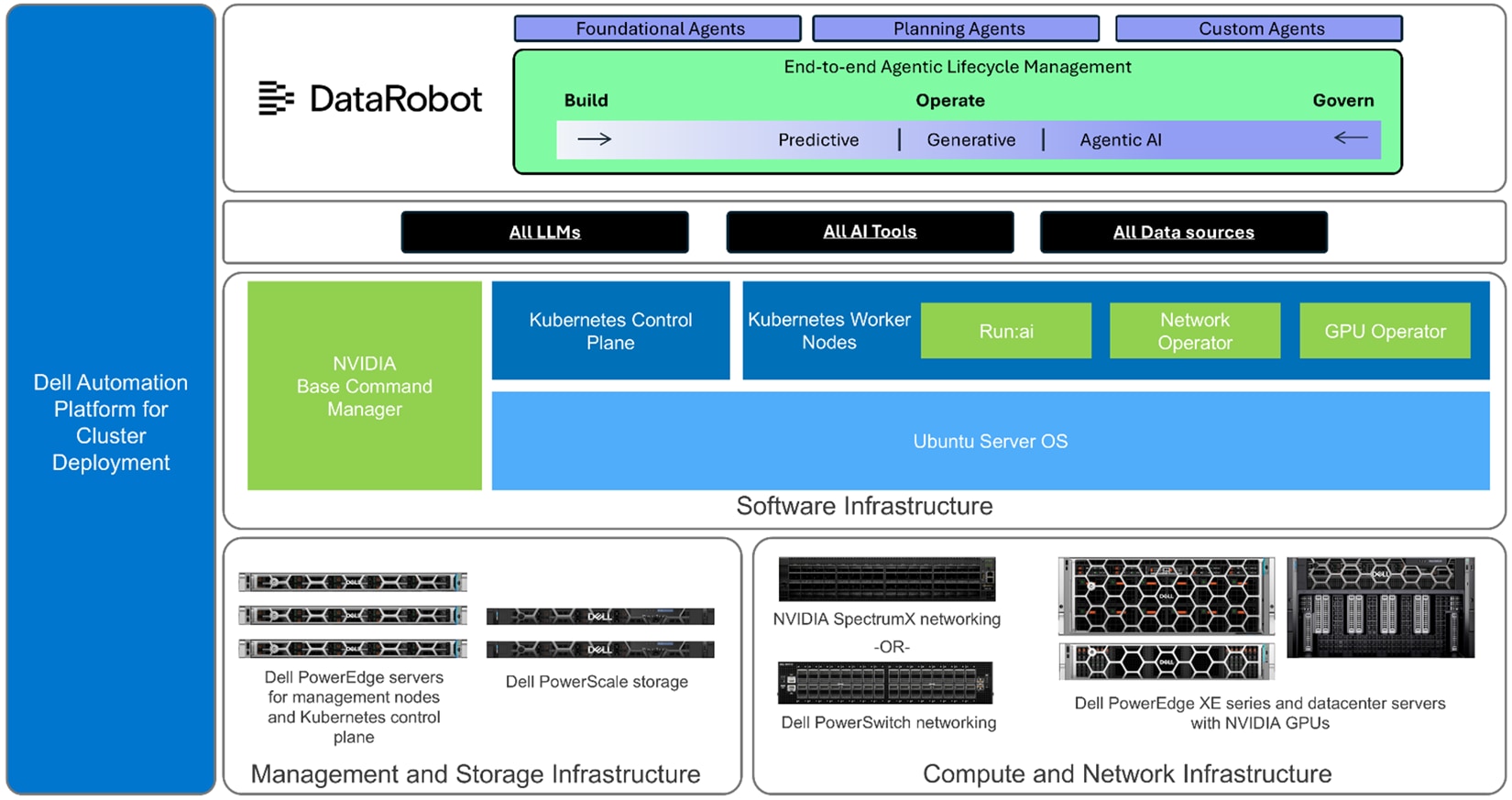
The following diagram represents the Dell AI Platform with NVIDIA components serving as the foundation to run the DataRobot Agentic Workforce Platform workload. This diagram shows Ubuntu/Kubernetes installation; RHEL/OpenShift is also available.
Supported Dell AI Platform infrastructure designs
The Dell AI Platform, powered by NVIDIA, provides a highly-available and validated foundation engineered to accelerate your AI initiatives. This powerful combination brings together Dell's leading infrastructure with NVIDIA's advanced AI software and hardware, empowering you to develop and deploy agentic AI applications with greater speed and confidence. We believe in providing solutions that help you turn complex data into real-world progress, and this platform is designed to do just that.
At the heart of the solution is NVIDIA AI Enterprise (NVAIE), an end-to-end, cloud-native software platform that simplifies the development and deployment of production-ready AI. NVAIE provides enterprise-grade support, security, and stability, ensuring your AI workloads run smoothly and efficiently. This allows your teams to focus on innovation and creating value, rather than managing complex software stacks.
We understand that every organization has unique needs. That’s why the Dell AI Platform offers a range of choices to build an environment that works for you. For organizations that require maximum flexibility, the platform supports an open software stack. This option allows you to build a customized environment using your preferred open-source tools and frameworks, giving you complete control over your AI development lifecycle. To handle the demanding traffic of AI and machine learning workloads, the platform offers advanced networking solutions. NVIDIA Spectrum-X is an Ethernet fabric built specifically for AI, designed to deliver consistent, high-performance networking. Alternatively, Dell PowerSwitch options provide reliable, high-speed connectivity to ensure your data moves quickly and efficiently across your infrastructure.
Recommended Dell AI Platform configurations:
- Dell AI Platform with NVIDIA with NVIDIA Spectrum-X Networking and NVIDIA Software Stack (NVAIE)
- Dell AI Platform with NVIDIA with Dell PowerSwitch Networking and NVIDIA Software Stack (NVAIE)
- Dell AI Platform with NVIDIA with Dell PowerSwitch Networking and Open-Source AI Software Stack
The DataRobot Agentic Workforce Platform Solution can also be deployed to existing Dell AI Platforms or Custom Dell AI clusters, provided the blueprint pre-requisites are met and the target cluster is inventoried by the Dell Automation Platform.
Key components
Dell AI Platform with NVIDIA
PowerEdge servers
The Dell PowerEdge XE7740 and XE7745 servers are engineered to accelerate performance and drive progress for your most demanding enterprise workloads. These servers provide a powerful foundation for AI and machine learning, with exceptional processing capabilities and ample memory to handle large datasets. By bringing together advanced compute and storage in a dense, efficient design, the XE7740 and XE7745 help you turn complex data into actionable insights, empowering your teams to achieve their goals with confidence and speed.
For organizations looking to scale their AI initiatives, the PowerEdge R760xa and XE9680 servers deliver breakthrough performance and massive scalability. The hardware is designed to excel at AI model training and inferencing, combining powerful GPU acceleration with flexible storage options to move your projects from pilot to production. The XE9680 offers immense processing power for large-scale databases and mission-critical applications, ensuring you have the resources needed to support your most ambitious goals. Together, these servers provide a robust and reliable platform to help you unlock new opportunities and drive your business forward.
NVIDIA GPUs
The NVIDIA H200, H100, and RTX 6000 GPUs are engineered to power the next wave of AI and data analytics, helping you turn ambitious ideas into reality. The H200 and H100 stand at the forefront of large-scale AI, offering exceptional performance for training and inferencing the most complex models with speed and efficiency. The GPUs provide a versatile solution for a wide range of workloads, from data analytics to graphics-intensive applications, delivering the reliable acceleration needed to drive progress. By integrating these powerful GPUs into your infrastructure, you can unlock new capabilities, accelerate discovery, and confidently tackle your most demanding computational challenges.
NVIDIA Spectrum-X switches
The NVIDIA Spectrum-X switch is designed to accelerate AI and data center performance, providing the speed and efficiency needed to drive your most ambitious projects forward. It delivers exceptional bandwidth and ultra-low latency, creating a powerful networking foundation that optimizes data flow for demanding workloads. By ensuring seamless and efficient communication, Spectrum-X helps you unlock the full potential of your AI infrastructure, enabling faster insights and more reliable outcomes. This advanced switch empowers you to build a robust, high-performance Ethernet fabric that can confidently handle the complexities of modern data environments and propel your organization's progress.
PowerSwitch with Enterprise SONiC
AI workloads in data centers and network fabrics present unique challenges due to their demanding traffic patterns and infrastructure requirements. These workloads involve large volumes of data exchange, high-rate data transfers during model training, and latency-sensitive feedback loops, often characterized by diverse traffic patterns and bursty datasets. To support these needs, fabrics for agentic AI compute clusters must deliver high bandwidth, low latency, and lossless data transfer to avoid retransmission delays and ensure synchronized parallel compute jobs. Traditional Ethernet falls short in meeting these requirements due to congestion, high latency, and unfair bandwidth distribution, necessitating advanced Ethernet fabrics designed specifically for AI workloads.
Modern Ethernet fabrics for AI, such as those supported by Dell PowerSwitch and NVIDIA technologies, incorporate key features like interoperability, high performance, scalability, and lossless data transfer. These fabrics leverage open standards like Ethernet for flexibility and include advanced capabilities such as GPUDirect RDMA for GPU acceleration, RoCE Adaptive Routing for load balancing, and congestion control through the Enterprise SONiC platform. Additionally, the NVIDIA Collective Communication Library (NCCL) optimizes GPU communication in distributed environments, ensuring efficient data transfer across nodes. Together, these innovations enable AI fabrics to handle the massive data volumes and complex traffic patterns of AI workloads, ensuring optimal performance and scalability for enterprise AI applications.
NVAIE
NVIDIA AI Enterprise (NVAIE) is a secure, end-to-end software platform that empowers organizations to accelerate their AI journey from pilot to production. It provides a comprehensive suite of tools and frameworks, optimized and supported to run on common data center infrastructure, streamlining the development and deployment of AI applications. By offering compatibility with leading AI frameworks and simplifying complex workflows, NVAIE helps your teams harness the full potential of AI with greater confidence and efficiency. This powerful platform provides the stability and performance needed to build and scale data science and AI workloads, helping you turn innovative ideas into real-world progress.
While NVIDIA AI Enterprise simplifies development and deployment of AI software components, enterprises still require a platform to standardize governance, monitoring, and lifecycle management across teams and use cases. DataRobot fulfills this role by providing a consistent operational layer that spans models, agents, tools, and users—ensuring AI systems remain compliant, observable, and scalable over time.
DataRobot Agentic Workforce Platform
The DataRobot platform is a complete AI solution designed to help your business turn data into real-world value. It simplifies the entire AI lifecycle, automating everything from data preparation and model building to deployment and management. This approach helps you get actionable insights into the hands of your teams faster, no matter their technical skill level. By providing a user-friendly experience for both business experts and data scientists, DataRobot makes it possible for everyone to collaborate and drive meaningful progress across your organization.
The platform's advanced features help organizations build and scale AI with confidence. Automated machine learning (AutoML) and time-aware modeling capabilities allow you to create highly accurate models for any use case, from finance to healthcare. Built-in MLOps tools provide the governance and compliance needed to manage your AI solutions across the entire enterprise. This adaptability gives your teams the power to solve unique challenges and drive progress, no matter the industry.
DataRobot integrates seamlessly with your existing systems, making it easy to support real-time decision-making across your business. This allows you to respond faster to market changes, optimize your operations, and deliver better customer experiences. Whether you are just starting your AI journey or scaling solutions across the enterprise, the platform is built to support organizations of all sizes, helping you turn your data into a powerful engine for progress.
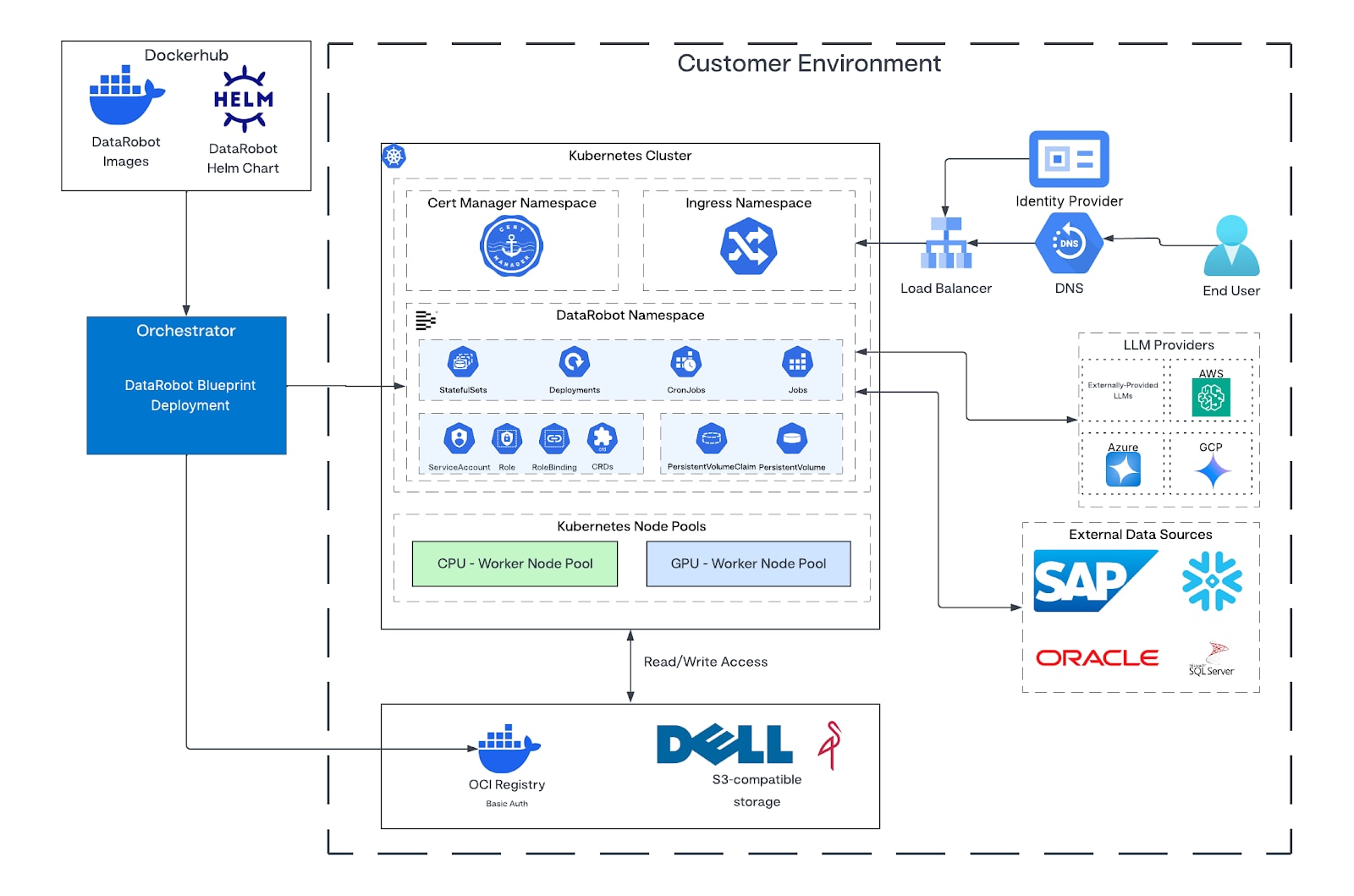
The diagram illustrates the high-level architecture of the DataRobot Agentic Workforce Platform and how it unifies identity, tools, and model workflows under a secure, modular architecture. A unified authentication layer connects internal, custom, and external tools, while integrated components like Compass Vector Search and DataRobot’s model integration, including 3rd-party models, enable advanced retrieval and domain-tuned model performance—all within a single, extensible deployment framework.
As enterprises move beyond predictive models to autonomous agents, traditional MLOps is no longer sufficient. DataRobot extends MLOps into AgentOps—governing how agents reason, which tools they can invoke, how actions are audited, and how behavior is evaluated and corrected in production. This enables enterprises to deploy agentic AI with the same rigor as mission-critical systems.
Core architecture layers
- Application Layer
- Includes frontend, backend, and storage services running as a collection of Kubernetes deployments and stateful sets.
- Designed for scalable operations via HPA rules.
- Authentication and Access
- SAML SSO support with available RBAC control mapping for integrated access to the DataRobot Agentic Workforce Platform while leveraging existing security and compliance stacks.
- Integrated credentials management system to allow for secure connections to external data stores.
- Supports simplified integration for external tools for data stores such as Google Drive, Snowflake, SharePoint, and SAP.
- Platform Assets
- Platform assets include datasets, vector databases, predictive experiments, agenting playgrounds, codespaces, applications, registered assets, deployment endpoints
- Integrates with DataRobot VectorDB, Pinecone, Elasticsearch, Milvus, and eExternal sources for state-of-the-art retrieval, powering embedding and RAG pipelines.
- Tools Ecosystem
- First-Party Internal Tools: prebuilt Python interpreter, file uploader, data connector clients.
- Custom Tools: user-defined via MCP standard, enabling integration of customer code or APIs.
- External Tools: authenticated through the same unified access layer — all compliant with Open MCP standard.
- Model Layer
- Flexible plug-in model for embedding, reranking, and generation.
- Supports Command, Custom, or OAI-spec compatible models, with optional Model Customization for domain-specific tuning.
- Designed for multi-model compatibility to support hybrid or specialized workloads.
Connectivity
The DataRobot application can utilize one or two container registries for its workloads. By default, DataRobot utilizes Docker Hub as its primary container registry for images needed to run the DataRobot Agent Workforce Platform. It also supports the option to use a dedicated private container registry if required.
DataRobot also needs a container registry that is used for storing images built within the platform to run user-defined workloads. This same registry can also be used to host the core DataRobot images if desired.
DataRobot can be run in a fully unconnected environment. In an unconnected environment, the container images and Helm charts are first mirrored from public registries to the customer's private registry via the Software Download Blueprint. During deployment, the DAPO orchestrator configures the Kubernetes cluster to pull all images exclusively from the private registry, enabling fully unconnected operation.
| Domain | Access Time | Purpose |
| Registry-1.docker.io | Install-time/runtime | Pulling the DataRobot platform helm charts and runtime container images |
| DNS setup | Install-time | The web portal will require a fully qualified domain name (FQDN). This will be the webpage that the users will connect to via the web user interface. |
TLS
The registry and web portal both require valid TLS certificates, signed by a publicly known certificate authority.
Using cert-manager to facilitate the acquisition of valid certificates is also supported. For detailed guidance on configuring ingress settings, refer to the Ingress Settings section of the DataRobot Installation and Configuration Guide. The termination section of this guide also includes. Additionally, for comprehensive instructions on configuring cert-manager, using LetsEncrypt.
Ingress
Ingress in Kubernetes is an API object that manages external access to the services in a cluster, typically for HTTP(S). For the ingress resource to work, the cluster must have an ingress controller running. Cluster administrators are expected to select ingress controllers according to their requirements. There are dozens of ingress controllers available. Some controllers are maintained by the Kubernetes team (for example, AWS, GCE, and Nginx controllers), while others are provided by third-party vendors.
DataRobot is compatible with a wide range of ingress controllers. Nginx Ingress, HAProxy Ingress, and OpenShift Ingress have been fully validated by the DataRobot team, but other controllers will also work as long as some basic requirements are met. These requirements are documented below.
If you don't know which ingress controller to pick, we recommend using Nginx Ingress.
For other ingress controllers, administrators must ensure the following requirements are met:
- The ingress controller must support the websockets protocol.
- The apigateway ingress should support requests up to 1124M in size that take up to 600 seconds.
- The core ingress should support requests up to 20G in size that take up to 600 seconds.
- The nbx-ingress ingress should support requests up to 1124M in size.
- The nbx-websockets ingress should support requests up to 15M in size that take up to 3600 seconds.
- If the nbx-websockets-notebooks-deployment deployment is configured with two or more replicas (default: 1), "sticky sessions" should be implemented at the ingress side.
The DataRobot Agentic Workforce Platform installation uses a cluster load balancer. We set up a load balancer and point a DNS CNAME record to it. Then, that load balancer sends traffic to the ingress-nginx. The registry and web portal both require valid TLS certificates, signed by a publicly known certificate authority.
For organizations that require an unconnected deployment, the DataRobot Agentic Workforce Platform solution can be implemented using the Dell Automation Platform. This approach uses a local software repository blueprint and specific DataRobot Agentic Workforce Platform input settings to enable a secure, unconnected environment. To help you navigate this process with confidence, Dell Professional Services is available to provide guidance and execution support, ensuring a smooth and successful deployment.
DataRobot Agentic Workforce Platform exposes following service endpoints:
| Service | Default Ingress Path | Service Port | Pod Port |
| DataRobot UI URL (FQDN-based HTTPS endpoint) | / | 443 | 30003 |
For additional information, see DataRobot Agentic Workforce Platform Networking.
Sizing and scaling
Sizing the infrastructure for an on-premises deployment of DataRobot Agentic Workforce Platform depends on the number of concurrent users and their activity. The sizing recommendations below are based on a chat-heavy workload and account for the resource requirements of the primary components of a DataRobot Agentic Workforce Platform deployment:
- Predictive models
- Generative AI Models
- Notebooks and GenAI Applications
- Backend services
The Dell AI Factory and DataRobot Agentic Workforce Platform are both designed to scale up as additional capacity is needed. The overall capacity of the Dell AI Factory can be increased by adding additional nodes. The DataRobot Agentic Workforce Platform deployment can be scaled by adding additional replicas of the generative models, compass data nodes, and backend services. These DataRobot Agentic Workforce Platform services can also be scaled independently to account for variations in load on specific components.
Kubernetes control plane sizing
On-premises deployments of DataRobot Agentic Workforce Platform require a Kubernetes cluster with a control plane and compute nodes. The recommended three Kubernetes control plane nodes included in Dell AI Platform with NVIDIA configurations meet the control plane requirements for the Kubernetes cluster.
Compute sizing
The following table provides Dell’s guidance for the size of the DataRobot Agent Workforce Platform use cases. Actual performance depends on the workload mix, datasets, and run-time parameters. DataRobot suggests the LLM Inference: VRAM & Performance Calculator. Builder Seats are licenses for users who create agents, and the number of Builder Seats guides the recommended cluster size. Anyone in the organization can use the published agents without needing a Builder Seat license.
Pilot – 5 Builder Seats
- 2 - 2 x RTX 6000 BSE GPU worker with 2 x 64 core processors each, 384 GB memory each, 8 TB each
- 1 – Head plane node 4+ cores, 16+ GB memory, 1 TB+ disk
X-Small – 25 Builder Seats
- 3 Head plane node 4+ cores, 16+ GB memory, 1 TB+ disk
- 3 Worker nodes – 4 H100 GPUs, 384+ GB memory each, 8TB+ disk each
Small – 35 Builder Seats
- 3 Head plane node 4+ cores, 16+ GB memory, 1 TB+ disk
- 3 Worker nodes – 8 H100 GPUs, 384+ GB memory each, 8TB+ disk each
Medium – 70 Builder Seats
- 3 Head plane node 4+ cores, 16+ GB memory, 1 TB+ disk
- 6 Worker nodes – 8 H100 GPUs, 384+ GB memory each, 8TB+ disk each
Large – 105 Builder Seats
- 3 Head plane node 4+ cores, 16+ GB memory, 1 TB+ disk
- 9 Worker nodes – 8 H100 or H200 GPUs, 384+ GB memory each, 8TB+ disk each
Kubernetes version must be 1.32 or above
OpenShift
- Version must be 4.20
- Minimum 3-node cluster configured as both control plane and worker node with NVIDIA GPU
Storage sizing
The standard Dell AI platform configurations include enough local storage to meet the runtime storage requirements for DataRobot Agentic Workforce Platform.
If DataRobot is used for unstructured data search, additional storage is required for the indexes stored. The amount of storage depends on the number of documents indexed. This storage is allocated using Kubernetes storage classes, and the underlying storage can be provisioned from the Dell PowerScale storage included in the supported Dell AI platforms.
Pilot
The pilot is designed to run the solution on the minimum resources. To run efficiently, the models leverage both GPU and CPU resources. The DataRobot Agentic Workforce Platform pilot leverages the Dell PowerEdge R770 or R7725 Servers with Dual RTX 6000 BSE GPUs, enabling teams to validate the workload quickly and establish a clear path to scale. Delivered as the DataRobot Agentic Workforce Platform Pilot Dell Automation Platform (DAP) blueprint, it’s deployed using the same process as a standard deployment using DAP. Starting from this baseline, organizations can fully validate the solution for their environment and then expand to higher-capacity configurations as adoption grows, with Dell Professional Services available to assist with planning and execution. This approach shortens time-to-value, reduces deployment risk, and standardizes the transition from pilot to production.
This standardized deployment model allows organizations to expand from a single lighthouse use case to an enterprise-wide AI Factory without redesigning infrastructure, governance, or operational processes.
This pilot configuration is dedicated to the DataRobot Agentic Workforce Platform workload. The Dell Automation Platform Orchestrator (DAPO) must run on separate infrastructure with its own resources.
Security and access control
Dell believes that trust is the foundation of progress, which is why security is at the core of this powerful solution. To protect your most valuable asset, your data, this solution employs a zero-trust security framework that safeguards information at every turn. All data is protected with robust encryption, both while at rest and in transit, ensuring it remains secure across your entire ecosystem. This solution is designed to support your data sovereignty needs and is built to adhere to the highest global standards, giving you the confidence to innovate while maintaining compliance. By default, cert-manager can manage the deployment and lifecycle of certificates.
Cert-manager automatically issues, renews, and rotates TLS certificates within the cluster with zero downtime.
Application-level TLS is required for service-to-service communications within the DataRobot application, in order for authentication materials to be transmitted over a securely encrypted channel.
This includes gRPC-based Service API calls, but does not include TLS for Ingress, Persistent Critical Services (PCS), or connections to external resources outside the cluster.
When configured, TLS certificates will be generated at deploy time for clients and servers, stored as secrets in Kubernetes and mounted into each service's containers. The CA certificate used for signing these keys will be provided and configured to support both Public CA and Private CA use cases.
Alternatively, it is possible to configure application-level TLS without cert-manager. This is suitable for customers who wish to avoid installing and managing cert-manager and would like extra control over managing the CA and TLS certificates within the cluster. When using a custom CA issuer, some manual steps are required to set up the CA certificate bundle, but generation of TLS certificates is automated as part of the Helm release of DataRobot. Note that certificate renewal and rotation is not automated and is the customer's responsibility to manage, which will require cluster downtime.
Empowering your teams with AI requires a system you can manage with precision and clarity. Granular, role-based access controls allow you to define exactly who can use specific tools, data, and AI agents, ensuring the right people have the right permissions. The platform provides complete visibility into system operations through detailed audit logs, creating a clear record of all activities for monitoring and verification. With flexible deployment options, including on-premises or unconnected environments, you have complete control over where your data lives, allowing you to put powerful AI to work securely and responsibly.
General security considerations
AI solutions exist at the intersection of rapidly evolving AI technology and the ever-challenging security landscape. This unique position brings both incredible opportunities and significant risks. The security of any system exists in relation to the system’s threat profile: the value of a system's assets, the likelihood of an attempted attack, and the nature of potential attackers in terms of their resources, capabilities, and incentives. Furthermore, there is often a tension between security and convenience. Extra security measures might interfere with desirable use cases or lead to false-positive results. Therefore, Dell Technologies advises customers and architects to consider their specific operational contexts and conduct appropriate analysis to validate the applicability of the recommendations in this guide. Depending on the threat profile, additional services and security measures might be advisable.
Note that the recommendations in the security best practices guide are not a complete security evaluation of the Dell AI Platform in its entirety or its individual components, nor a complete threat and risk analysis. You can also find additional information at the Dell Security and Trust Center.
DataRobot emphasizes robust security measures to protect enterprise data and ensure compliance with global standards. Their platform incorporates multi-layered protection, including encryption at rest and in transit, customizable data handling, and private deployment. For more detailed information, you can explore their Security Page and Trust Center, which provide insights into their security protocols, certifications, and compliance resources.
Deployment
Deployment
Dell Automation Platform
The Dell Automation Platform is a comprehensive infrastructure management and orchestration solution created to streamline and automate the deployment and lifecycle management of your IT environments. It empowers your organization to move forward with confidence by simplifying how you manage infrastructure and workloads across private cloud, AI-driven solutions, and edge environments. This unified platform gives you a consistent and scalable operational model, simplifying everything from initial deployment to ongoing management and freeing your teams to focus on innovation.
Putting your solutions to work is made simpler with the platform's Infrastructure-as-Code (IaC) approach, which provides a reliable and repeatable process for deploying workloads. This method reduces operational complexity and ensures consistent performance and governance across all your systems. By centralizing operations, the Dell Automation Platform helps you accelerate progress and get the most from your technology investments. It integrates smoothly with your existing enterprise systems, providing a solid foundation to deploy and manage powerful solutions, including advanced AI workloads, with greater speed and control.
While this document focuses on deploying DataRobot Agentic Workforce Platform with the Dell Automation Platform (DAP), Dell also provides the flexibility to deploy DataRobot Agentic Workforce Platform without DAP to suit different operational preferences. In addition, customers have the option to bring their own license to the Dell AI platform, enabling a deployment model that aligns with their unique needs and existing investments.
Pre-deployment tasks
Before proceeding with the installation of DataRobot Agentic Workforce Platform workload, ensure that the underlying environment is properly configured. The prerequisites are categorized into three main areas: target cluster, DAP Orchestrator (DAPO), and DataRobot Agentic Workforce Platform-specific requirements.
For organizations that prefer an unconnected deployment, you must ensure that the necessary infrastructure components are in place. This includes access to a Docker registry with credentials securely stored in DAPO and all required images properly pushed to the registry and formatted using the required structure. Additionally, an accessible Nginx server is required to host Helm charts, binaries, and post-installation files. For a detailed breakdown of these requirements, please refer to the appendix.
Target cluster prerequisites
To ensure compatibility and optimal performance, the target Kubernetes cluster must meet the following requirements. DataRobot supports deployment on both Kubernetes and Red Hat OpenShift Container Platform.
The following prerequisites apply for both platforms:
- Supported platform: Confirm that the target platform is supported. Refer to offer blueprint description for detailed compatibility information.
- Cluster inventory: Add the target cluster to the inventory using DAPO.
- NVIDIA GPU drivers: For nodes equipped with GPUs (typically worker nodes), install NVIDIA GPU driver version 580.107.02 or later.
- CUDA toolkit: Ensure that CUDA version 13.0 compatible is installed on GPU-enabled nodes.
- Container registry: A container registry that supports username/password authentication and has read/write permissions is required for DataRobot to build containers for agentic workflows. Optionally this registry can also be used to host the images required to run the DataRobot Agent Workforce Platform. This operator must be deployed on the cluster to manage GPU resources.
- NVIDIA GPU operator: Deploy this operator on the cluster to manage GPU resources.
- Cert-manager: Install cert-manager to manage internal and external-facing certificates. Refer to Appenix D for detailed steps.
- Secure the local Docker registry setup for DataRobot images. This step is mandatory for both connected and unconnected cluster setup. Refer to Appendix E for detailed steps.
- Distribute the downloaded certificate bundle to all nodes. Refer to Appendix J for detailed OpenShift CA trust and cluster configuration steps.
sudo cp <CA_CERT_NAME.crt> /usr/local/share/ca-certificates/<CA_CERT_NAME.crt>
sudo update-ca-certificates - Sync DataRobot images from the Docker registry and to the local registry. Refer to Appendix F for detailed steps.
- NTP synchronization: All worker nodes in the cluster must synchronize their system time with a common, authorized NTP server. The time on every node must remain consistent within an accuracy of less than a second (standard NTP accuracy).
- PersistentVolumeClaims
- For pilot/small clusters, increase the max number of pods per node from 100 to 250.
- To avoid "Too many open files" issues, increase the kernel parameters:
- fs.inotify.max_user_watches=524288 or 1048576
- fs.inotify.max_user_instances=8192
Kubernetes
- Supported platform: Red Hat OpenShift Container Platform v4.20 or later.
- Install MetalLB to enable load balancing capabilities and configure with a public IP address pool.
- Kubernetes version: Kubernetes version 1.33.5 or later (bundled with OCP v4.20 ).
- Operating system: Install Ubuntu 24.04 OS on the control plane and the worker nodes.
- DataRobot version: DataRobot Prime v11.7.0.
- Ingress configuration: Configure NGINX Ingress Controller for all network traffic. Refer to Appendix C for detailed steps to deploy ingress controller.
- DNS Entries: On the client system, update your hosts file to point to the ingress IP. Refer to Appendix G for detailed steps.
- TLS Configuration: TLS termination is handled at the NGINX Ingress Controller level. TLS is enabled in Helm values for DataRobot deployment.
- Security: Standard Kubernetes RBAC.
- Storage class: Configure a default storage class and enable it within the Kubernetes cluster. Refer to Appendix H for detailed steps.
-
- Create and bind Role and ClusterRole objects.
- Create Kubernetes Custom Resource Definition (CRD).
- Create ServiceAccounts, Secrets, and ConfigMaps.
- Create Deployments, Jobs, DaemonSets, and PodDisruptionBudgets.
- Create HorizontalPodAutoscalers and PersistentVolumeClaims.
OpenShift
- Supported Platform: Red Hat OpenShift Container Platform v4.20 or later.
- Kubernetes Version: Kubernetes version 1.33.5 or later (bundled with OCP v4.20 ).
- Operating System: Red Hat CoreOS (RHCOS) on control plane and worker nodes (default for OCP).
- DataRobot Version: DataRobot Prime v11.7.0 (includes PowerScale S3 HTTPS support fix for Tileserver pod).
- Ingress Configuration: OpenShift Routes are used instead of NGINX Ingress Controller for all network traffic. Ingress class is set to openshift-default. TLS termination is handled at the OpenShift Router level using edge termination (route.openshift.io/termination: edge). TLS is disabled in Helm values since OpenShift Routes handle certificate management.
- DNS configuration: DNS record must be configured to point the FQDN to the OpenShift router's LoadBalancer IP.
- Security Context Constraints (SCC): The default restricted SCC prohibits privileged containers. Refer to Appendix I for detailed SCC configuration steps.
- Wildcard certificate: The OpenShift cluster should have a wildcard certificate configured for the cluster ingress domain.
- Storage class: Configure a default storage class and enable it within the OpenShift cluster.
OpenShift prerequisite workflow
For OpenShift deployments, complete the prerequisites in the following order to ensure proper cluster configuration:
- Install cert-manager and trust-manager (Appendix D).
- Obtain and install enterprise CA certificate on registry host (Appendix J).
- Set up private container registry and generate certificates (Appendix E).
- Install CA certificate on all remaining cluster nodes (Appendix J).
- Configure OpenShift pull secret for registry authentication (Appendix J).
- Configure cluster-wide CA trust (Appendix J).
- Create DataRobot namespace, TLS secrets, registry secrets, and trust-manager bundle (Appendix J).
- Configure ingress, DNS, and TLS (Appendix G).
- Configure storage (Appendix H).
- Synchronize DataRobot images to private registry (Appendix F).
- Apply OpenShift SCC configuration (Appendix I).
Note:
Registry and certificate setup must be completed before trust configuration.
CA trust and pull-secret configuration must be completed before image synchronization.
Skipping these steps may result in image pull failures or TLS errors during deployment.
Configurations for small clusters
If you are deploying on a pilot or small cluster, use following configuration:
- Update Kubelet. Increase the maximum number of pods per node from 100 to 250.
- Edit kubelet config - /var/lib/kubelet/config.yaml and change maxpods from 100 to 250.
- Edit systemd kubelet arguments (optional) - /etc/systemd/system/kubelet.service.d/10-kubeadm.conf and change from 100 to 250.
- sudo systemctl daemon-reload
- Update the CNI plugin to support enough pod IPs.
Most CNIs default to /26 per node (approximately 64 IPs). This limits pods even if kubelet allows more.
- Restart kubelet - sudo systemctl restart kubelet.
- Increase the kernel max user and max instances to these values. With lower values "Too many open files" issues might occur.
- fs.inotify.max_user_watches=524288 or 1048576
- fs.inotify.max_user_instances=8192
DAPO prerequisites
The DAP Orchestrator must have the following plugins installed to support the DataRobot Agentic Workforce Platform blueprint:
- Kubernetes Plugin (v3.4.1.0): Required for Kubernetes-related operations.
- Utilities Plugin (v3.1.4.0): Used for scaling and general utilities.
- Helm Plugin (v1.2.3.0): Facilitates deployment of DataRobot Agentic Workforce Platform via Helm charts.
DataRobot Agentic Workforce Platform-specific requirements
Before initiating the installation process, gather the following credentials and licensing information:
- DataRobot Agentic Workforce Platform license key: Required to activate the service.
Deployment procedures
The following deployment process provides a clear path to get your solution up and running. These instructions are based on using the Dell Automation Platform and its certified workload blueprint, which offers a streamlined and repeatable path to deployment.
For those looking to install this solution on an existing or custom environment, deployment outside of the Dell Automation Platform is also an option. You can find detailed guidance for this process in the DataRobot documentation.
While the solution can be deployed on other AI platforms, this configuration with the Dell Automation Platform is the tested, recommended, and fully supported path. It is designed to provide the most reliable and optimized experience, helping you move forward with confidence.
Download the blueprint
Solution AI blueprints are available in the Dell Automation Platform catalog and can be directly downloaded to the DAP Orchestrator for streamlined deployment. Access requires a valid Dell Automation Platform license and any applicable software licenses for the specific AI solution.
Note: Dell Automation Platform offers several Dell Technologies-validated solution blueprints that Dell Technologies supports. However, Dell Technologies cannot support user-created blueprints or blueprints that a third party creates.
CAUTION: Through blueprints, plug-ins, and/or other means (collectively,
Blueprints), the Dell Automation Platform, may deploy and/or manage hardware, software, products, or services that are provided by a third-party manufacturer or supplier and are not
Dellor
Dell EMCbranded (collectively,
Third-Party Products). Notwithstanding any other provisions: (1) such Third-Party Products are subject to the standard license, services, warranty, indemnity, and support terms of the third-party manufacturer/supplier (or an applicable direct agreement between you and such manufacturer/supplier), to which you must adhere; (2) Blueprints are provided
as isand without warranties or conditions; and (3) any warranty, damages, or indemnity claims against Dell in relation to such Third-Party Products and/or Blueprints are expressly disclaimed and excluded.
- On the Dell Automation Platform home tab, select Go to Catalog from the Catalog tile.
- On the Dell AI Solutions tile, click Explore Offers.
- In the list of available AI Solution offers, select View Details from the DataRobot Agentic Workforce Platform tile.
- On the DataRobot Agentic Workforce Platform offer detail page, click Download to Orchestrator.
The downloaded blueprint now appears in the Dell Automation Platform Orchestrator under Inventory > Blueprints.
Configure secrets
This section outlines the required secrets that must be created and configured to support DataRobot Agentic Workforce Platform workload deployment.
Users can use the DAP Administration Module to configure these secrets by following the steps below:
- Navigate to Administration > Security.
- Select the Secrets tab.
- Click Create and proceed to define each of the required secrets individually, using the specifications provided in the following table.
Figure 3. Create Secrets in Dell Automation Platform 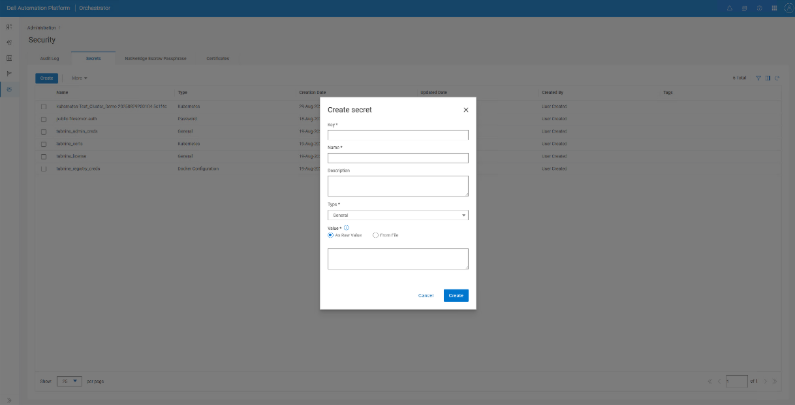
Table 4. Secret details Secret Name Secret Type Sample Value datarobot_license General license_string datarobot_portal_login_credentials Basic Authentication Credentials username: admin@datarobot.com
password: DataRobot#1234
datarobot_docker_credentials Basic Authentication Credentials username: datarobotprovisional
password: password
datarobot_demo_image_registry Basic Authentication Credentials username: privateuser
password: ChangeMe@!
datarobot_build_registry Basic Authentication Credentials username: privateuser
password: ChangeMe@!
datarobot_https_certificate Kubernetes Secret value: TLS Authentication
Host: IP/FQDN
Port: na
Ssl Ca Cert: na
Key File: contents of ca.key
Cert File: contents of webbundle.crt
Verify Ssl: na
MinIO root credentials Basic Authentication Credentials - Root admin credentials for MinIO.
- Only required when using MinIO object storage.
- Password must exceed 14 characters.
MinIO user credentials Basic Authentication Credentials - Application user credentials for MinIO.
- Only required when using MinIO object storage.
PowerScale S3 credentials Basic Authentication Credentials - S3 credentials for PowerScale object storage.
- Only required when using PowerScale.
Deploy the DataRobot Agentic Workforce Platform blueprint
Once all prerequisite steps are completed, deploy the DataRobot Agentic Workforce Platform workload blueprint by following these steps using the minimum mandatory configuration settings. Refer to the chart in Appendix A for full deployment configuration options.
- Navigate to Inventory > Blueprint in the DAP Orchestrator.
- In the list of available offers, select DataRobot Agentic Workforce Platform and click Deploy.
- Enter a name for your deployment and click Next.
- In the Configuration section, provide the following details:
- Target Kubernetes Cluster
- Select Target Kubernetes type
- Kubernetes Deployment ID
- Kubernetes Cluster Secret
- DataRobot Namespace
- Nginx Ingress Class Name (default: nginx) for Kubernetes deployment
- DataRobot Image Registry
- DataRobot Image Registry Credentials Secret
- Total GPU allocation to DataRobot
- DataRobot Configuration
- DataRobot Agentic Workforce Platform license Secret
- DataRobot UI Login Credentials Secret
- DataRobot FQDN TLS Certificate Secret
- Root Certificate Configmap Secret
- Object store deployment configuration options
- MinIO
- PowerScale
- Target Kubernetes Cluster
- Click Next to review the configuration on the summary page.
- Click Deploy to begin the deployment process.
- From the Inventory > Deployments list, click the name of the deployment to view the deployment details.
- Select the Logs tab to view the deployment progress and related information.
Figure 4. Progress view of DataRobot deployment 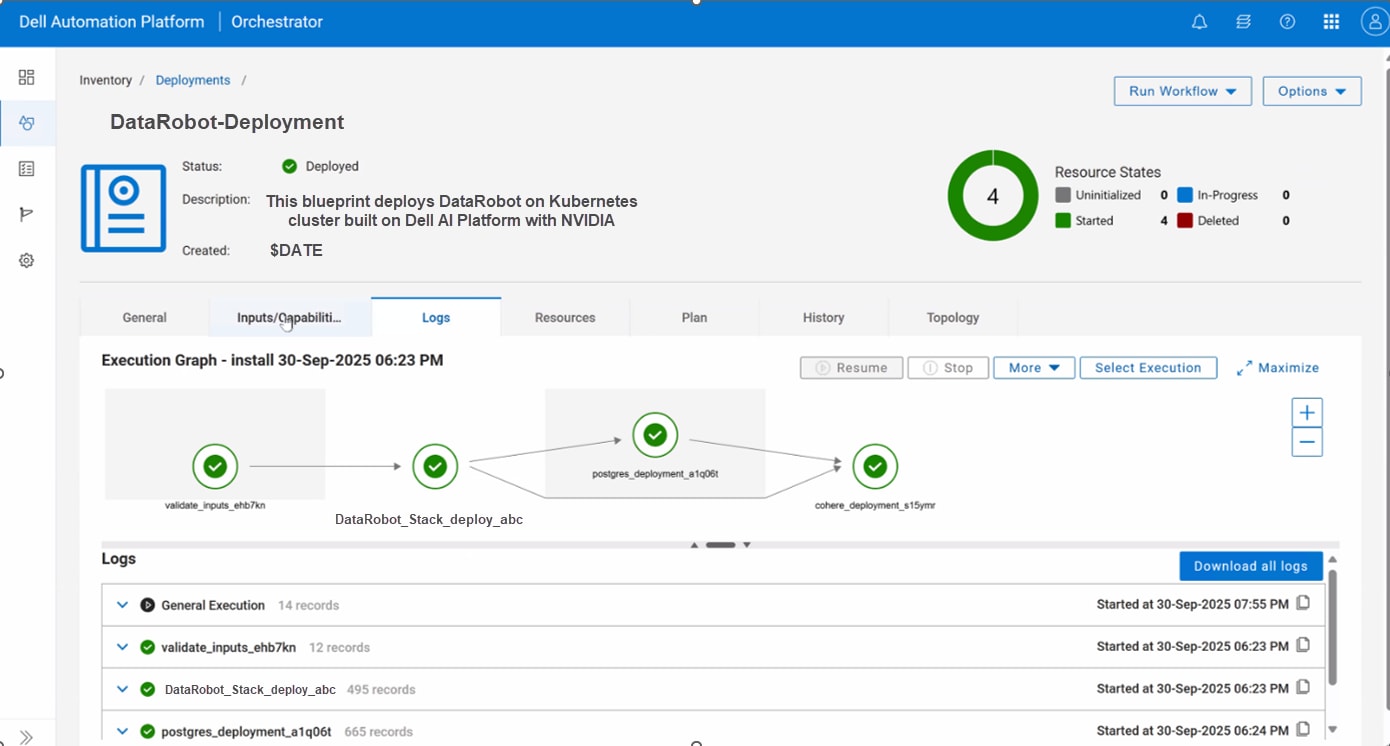
Note: For DAP versions 1.2 and 2.0, users might encounter a memory error during deployment. If this occurs, follow the steps described in Dell Support article 00461813.
Post-deployment verification
After successfully deploying the DataRobot Agentic Workforce Platform solution using the blueprint, it is important to validate the deployment by performing the following steps. First, confirm the status of DataRobot Agentic Workforce Platform pods to ensure all components are running as expected. Then, verify accessibility of the DataRobot Agentic Workforce Platform Web UI interface by navigating to the designated URL. Last, complete initial administrative tasks within DataRobot Agentic Workforce Platform to finalize setup and configuration.
Confirm DataRobot Agentic Workforce Platform pod status
Confirm that all DataRobot Agentic Workforce Platform components are running Pod Status via DAP Orchestrator.
- Open the DAP Orchestrator.
- Navigate to Inventory > Infrastructure.
- Select the cluster where the DataRobot Agentic Workforce Platform workload was deployed.
- Click the Pods tab.
- Ensure that all pods within the DataRobot Agentic Workforce Platform namespace are in a Running state.
Verify DataRobot Agentic Workforce Platform Web UI interface accessibility
- In the Inventory > Deployments list, select the name of the deployment to view the deployment details.
- To view the Access Gateway and Access Endpoint, do one of the following:
- Click the Input/Capabilities tab.
- Alternatively, use the following command from the target Kubernetes or OpenShift cluster to determine the DataRobot Access Gateway IP for the deployed solution:
- For Kubernetes: kubectl get svc -n DataRobot | grep nginx
- For OpenShift: oc get routes -n datarobot` and `oc get svc -n datarobot
- Create the fqdn input (example: DataRobot.example.com) in DNS for the DataRobot Access Gateway IP.
- Retrieve the generated administrator password from the capabilities:
- To view the deployment details, select Inventory > Deployments and then click the name of the deployment.
- Make note of the DataRobot_admin_password_secret_base64_encoded file name in the Input/Capabilities tab.
- From Administration > Security, select the Secrets tab.
- Scroll to the DataRobot_admin_password_secret_base64_encoded file name or use the filter to quickly find the entry.
- Check the box next to the file then use More > Update and find the Value section.
- Retrieve the portion: {"bootstrapAdminPassword": "encoded-string”}.
- Decode the encoded sting value using the following command on a Linux host:
echo "encoded-string" | base64 -d
- Alternatively, you can retrieve the password from the Kubernetes or OpenShift cluster by using the following command to retrieve the initial administrator login password for the DataRobot Agentic Workforce Platform Admin Portal:
- For Kubernetes: kubectl -n DataRobot get secret bootstrap-admin-password -o jsonpath="{.data.bootstrapAdminPassword}" | base64 -d
- For OpenShift: `oc -n DataRobot get secret bootstrap-admin-password -o jsonpath="{.data.bootstrapAdminPassword}" | base64 -d`
- In a web browser, navigate to the DataRobot admin portal and log in with the following information:
- Email: admin@DataRobot.com
- Password: decoded password from the previous step
The initial Home page for DataRobot Admin shows the DataRobot Agentic Workforce Platform Access Gateway for users and allows the administrator to check status and configure additional services and integrations.
Perform initial DataRobot Agentic Workforce Platform administrative tasks
Post deployment, the following tasks are recommended to complete the configuration of the DataRobot Agentic Workforce Platform Solution:
- Set up users and permissions:
- Create and register applications:
- Refer to the following resources for more information:
Uninstall a DataRobot Agentic Workforce Platform deployment
Uninstall a DataRobot Agentic Workforce Platform deployment
To remove an existing DataRobot Agentic Workforce Platform deployment:
- In the DAP Orchestrator, click Inventory > Deployment.
- Select the DataRobot Agentic Workforce Platform deployment you want to uninstall.
- Click Runworkflow > Default workflow > Uninstall.
- Click Next, then click Run to initiate the uninstallation process.
Services and support
Services and support
Overview
To ensure your AI initiatives are successful, Dell provides comprehensive support for your AI Workload.
- ProSupport is the minimum required, and it includes technical assistance.
- Dell provides technical support for Dell Intellectual Property and/or Dell entitled assets, (Dell Automation Platform, and associated Dell AI Platform Infrastructure) when utilized according to published best practices and compatibility matrices.
- Vendor Software can be resold through Dell, but is considered non-OEM. AI Workload Software is entitled through the vendor whereby support is obtained through the vendor utilizing the end user's license agreement with the vendor. Customers must maintain an active vendor contract and vendor software administrative capability.
More information about the Dell Pro Support offerings can be viewed here: Dell Pro Support Offerings.
Support for Dell Automation Platform
We are committed to helping you succeed with the Dell Automation Platform. Our comprehensive support provides you with expert guidance, resources, and tools to ensure a seamless deployment and management experience from day one. We believe in building trusted partnerships, and our support is designed to help you maximize the value of your investment. This allows you to confidently leverage the full power of automation to achieve your business goals and drive progress. For more information, visit the Dell Support site.
Professional services
Dell Professional Services play an integral role in driving measurable value from the AI solutions powered by the Dell Automation Platform. This includes:
- Delivering strategic guidance and expertise essential to defining and planning AI solution requirements.
- Accelerating time to value of a production-ready AI environment that will drive measurable outcomes.
- Quickly deploy, integrate, and operate the automation framework for maximized ROI.
- Improve adoption of the AI solution to propel innovation.
Services experts bring deep technical experience and best practices, providing guidance and hands-on assistance at any stage of the AI lifecycle. Businesses rely on Dell Services to deliver measurable business impact quickly, in a way that is secure and scalable.
Conclusion
Conclusion
Summary
The Dell AI Platform with DataRobot Agentic Workforce Platform provides a complete, enterprise-ready solution designed to help your organization turn the promise of AI into tangible progress. By combining DataRobot’s advanced AI agents, workflow automation and expertise with Dell's robust infrastructure and professional services, you get a secure and streamlined path to production. This integrated platform simplifies deployment and management, allowing your teams to focus on building innovative applications that solve real-world challenges. It provides the tools and confidence you need to harness the power of generative AI within your own secure environment.
This collaboration empowers you to unlock new levels of productivity and insight, driven by a foundation of trusted, proven technology. The solution is built to scale with your ambitions, ensuring that as your AI needs grow, your infrastructure can grow with them. With the Dell AI Platform and DataRobot Agentic Workforce Platform, you can accelerate your AI journey, empower your workforce with powerful new capabilities, and confidently drive your business forward into a new era of innovation.
By positioning DataRobot as the AI control plane on top of the Dell AI Factory and NVIDIA acceleration, enterprises gain a repeatable, governed path from pilot to production to scale—without locking themselves into a single model, toolchain, or infrastructure decision.
We value your feedback
Dell Technologies and the authors of this document welcome your feedback on this document and the information that it contains. Contact the Dell Technologies Solutions team by email.
References
References
Dell Technologies documentation
DataRobot documentation
NVIDIA documentation
Deployment configuration options
Deployment configuration options
| Input field | Description | Type | State-mandatory/optional | Default |
| Select Target Kubernetes type | Choose whether you're deploying to Dell's AI-optimized cluster or an external Kubernetes cluster you manage yourself | dropdown | Mandatory | AI |
| Target Kubernetes Deployment ID | The unique ID of the Kubernetes cluster where DataRobot will be installed. This links to an existing cluster deployment in the system | deployment id | Mandatory | Empty |
| Kubernetes Configuration Secret Name | Name of a stored secret that contains connection information (such as kubeconfig) to access your Kubernetes cluster | secret | Mandatory | Empty |
| Namespace | Kubernetes namespace where all DataRobot components will live | string | Mandatory |
Default: datarobot Namespace datarobot should be pre-existing. The user must create registry and domain secrets and certificate bundles under the datarobot namespace as part of prerequisites. |
| Helm Binary Checksum | SHA256 checksum for the Helm binary archive | string | Mandatory | 759c656fbd9c11e6a47784ecbeac6ad1eb16a9e76d202e51163ab78504848862 |
| Docker Credentials | Credentials to pull the DataRobot Helm chart from Docker Hub OCI registry. | Basic Authentication | Optional | Provided by the DataRobot team. |
| DataRobot Image Registry | The server address where DataRobot's software images are stored, similar to a download location for the app. Format: <registry-host>:<port>. | string | Mandatory | Empty |
| DataRobot Image Registry Credentials | Login credentials (username/password) to download DataRobot images from the registry. Stored securely as a secret. | secret (docker type) | Mandatory | Empty |
| Build Registry Name | A separate registry where DataRobot saves custom images it creates when users build models. Format: <registry-host>:<port>. | string | Mandatory | Empty |
| Build Registry Credentials | Login credentials to push/pull images to/from the build registry. | secret (docker type) | Mandatory | Empty |
| Total GPU allocation to DataRobot | The number of GPUs DataRobot is allowed to use for training AI models. | string | Optional | Empty |
| Object Store |
Choose where DataRobot stores its files. MinIO = deploy new storage. PowerScale = use existing Dell storage |
dropdown | Mandatory | minio |
| MinIO Object Storage Deployment Configuration |
Settings for MinIO storage: memory, CPU, and disk space. Only needed if you chose MinIO. |
Dictionary | Conditional (if minio selected) | Empty |
| MinIO Root Credentials | Root admin credentials for MinIO | secret (basic authentication) | Mandatory | Only shown when MinIO is selected; DAPO secret (basic authentication) |
| MinIO User Credentials | Application user credentials for MinIO | secret (basic authentication) | Mandatory | Only shown when MinIO is selected; DAPO secret (basic authentication) |
| PowerScale object storage configuration |
Connection details for existing PowerScale storage. Only needed if you chose PowerScale. |
Dictionary | Conditional (if PowerScale is selected) | Empty |
| GPU Resource Specifications |
Describes the GPU type (e.g., NVIDIA H200), its memory, and CPU cores. Eg: |
Dictionary | Optional | Empty |
| Jupyter Notebook Resource Specification | Defines compute resources (CPU, memory, GPU) for Jupyter notebooks in DataRobot. | Dictionary | Optional | Empty |
| DataRobot License Key | Your DataRobot software license key. Required to activate the platform. | secret | Mandatory | Empty |
| DataRobot UI Login Credentials | The admin username/password for logging into the DataRobot web interface. | secret (basic authentication) | Mandatory | Empty |
| DataRobot FQDN TLS Certificate | SSL/TLS certificate to enable secure HTTPS access to DataRobot. | secret | Mandatory | Empty |
| Root Certificate Configmap | Name of a ConfigMap holding trusted root certificates for internal secure connections. | string | Mandatory | Empty |
| Software sources for DataRobot |
URLs/locations for downloading DataRobot Helm charts and tools. Usually left as defaults. |
Dictionary | Optional | Default URLs |
| Enable Migration Jobs | Control whether to run migration jobs for GenAI, execution environments, and tile server. | boolean | Mandatory | Default: true; set to false for unconnected deployments |
| Software Blueprint Deployment ID | Optional. ID of a deployment that pre-downloads required software. | deployment id | Optional | Empty |
| PIP Index URL | URL for the Python Package Index (PyPI) mirror in air-gapped environments. | string | Conditional (if air gap enabled) | Empty |
| UV Index URL | URL for the UV package index mirror in unconnected environments. | string | Conditional (if air gap enabled) | Empty |
| NPM Config Registry | URL for the NPM registry mirror in unconnected environments. | string | Conditional (if air gap enabled) | Empty |
Requirements for an unconnected environment
Requirements for an unconnected environment
The DataRobot Agentic Workforce Platform Blueprint supports unconnected environments, meaning DAPO has no internet access, with the Helm charts, Helm binary, and container images hosted on the local private infrastructure accessible from the target cluster.
In an unconnected deployment, the user is responsible for setting up and populating a private image registry, an internal HTTP server (for the Helm binary and post-install files), and a local Helm repository (for MinIO and DataRobot Helm charts).
The following inputs are required for unconnected deployment:
- Migration jobs
- enable_migration_jobs: Make sure this is false (toggled off) to ensure migration jobs are not run. GenAI static files, execution environments, and tile server data must be migrated manually post-deployment.
- Registry URLs
- pip_index_url: You can update to point to your internal PyPI mirror.
- uv_index_url: You can update to point to your internal PyPI mirror for uv installations.
- npm_config_registry: You can update to point to your internal NPM registry.
- Software sources
- datarobot_helm_repo: Update to your local Helm repo URL hosting the DataRobot chart (e.g., http://<http-server-ip>/charts).
- minio_helm_repo: Update to your local Helm repo URL hosting the MinIO chart (e.g., http://<http-server-ip>/charts).
- helm_binary_url: Update to your HTTP server URL hosting the Helm binary (e.g., http://<http-server-ip>/helm-binary/helm-v3.18.4-linux-amd64.tar.gz).
- Post-deployment manual actions
- GenAI Static Files Migration — Refer to the Static Files Migration section in the DataRobot Installation Guide.
- Execution Environments Installation — Refer to the Migration of Execution Environments section in the DataRobot Installation Guide.
- Tile Server Data Migration — Refer to the Tile Server section in the DataRobot Installation Guide
Installing NGINX Ingress Controller
Installing NGINX Ingress Controller
This appendix provides step-by-step instructions to install and configure NGINX Ingress Controller on a Kubernetes cluster and verify ingress configuration on an OpenShift cluster. An ingress controller is a prerequisite for the DataRobot blueprint.
NGINX Ingress Controller installation and verification prerequisites
Prerequisites for both Kubernetes and OpenShift:
- Cluster administrator access is required.
- Network connectivity must be established.
For Kubernetes only, an external load balancer (MetalLB) must be installed and configured.
Install NGINX Ingress Controller on a Kubernetes cluster
- Create an ingress namespace.
kubectl create namespace ingress-nginx
kubectl get namespace ingress-nginx
Expected Output:
NAME          STATUS   AGE
ingress-nginx Active 3m57s - Install Nginx Ingress Controller.
helm repo add ingress-nginx https://kubernetes.github.io/ingress-nginx
 helm repo update
helm install nginx-ingress ingress-nginx/ingress-nginx
--namespace ingress-nginx
--set controller.ingressClassResource.default=true
--set controller.service.type=LoadBalancer - Verify IngressClass was created.
kubectl get ingressclassExpected output:
NAME CONTROLLER PARAMETERS AGE nginx k8s.io/ingress-nginx 5m - Verify the Ingress External IP.
kubectl get svc -n ingress-nginx
Verify OpenShift Router
OpenShift uses built-in OpenShift Routes instead of NGINX Ingress Controller. No additional installation is required, but verification is necessary.
- Verify OpenShift Router Configuration:
oc get ingresscontroller default -n openshift-ingress -o jsonpath='{.status.endpointPublishingStrategy.type}'Expected Output:
HostNetwork - Verify IngressClass:
oc get ingressclassExpected Output:
NAME              CONTROLLER                        PARAMETERS   AGE
openshift-default <openshift-default-controller> <none> 10m - Verify OpenShift Router LoadBalancer:
oc get svc -n openshift-ingress
Install Cert Manager
Install Cert Manager
This section explains how to install cert-manager on a Kubernetes cluster. This is a prerequisite for the DataRobot blueprint.
- If cert-manager is not installed, install it using Helm.
helm repo add jetstack https://charts.jetstack.io --force-update
helm repo update

helm upgrade --install cert-manager jetstack/cert-manager \
  	--namespace cert-manager \
  	--create-namespace \
--set installCRDs=true - Install or upgrade Trust Manager.
Trust Manager depends on cert-manager, so perform this step only after cert-manager is healthy.
helm upgrade --install trust-manager jetstack/trust-manager \
  	--namespace cert-manager \
--create-namespace - Verify Trust Manager installation.
kubectl get pods -n
cert-manager
Output:
trust-manager-xxxxx   Running
cert-manager-xxxxx    Running
cert-manager-webhook  Running
cert-manager-cainjector Running
Platform-specific certificate configuration
For Kubernetes: NGINX Ingress TLS Configuration
- TLS termination is handled at the NGINX Ingress Controller level (not at the load balancer).
- The load balancer forwards HTTPS traffic to the Kubernetes Ingress Controller.
- The Ingress Controller (for example, NGINX) decrypts HTTPS using certs stored in Kubernetes Secrets.
- Backend services can receive HTTP or HTTPS (optional re-encryption).
- End-to-end encryption to the cluster.
- Easier to manage multiple domains with cert-manager.
- Certificates are managed using cert-manager with standard Kubernetes TLS secrets.
- Configure TLS secrets in the NGINX Ingress Controller.
- TLS is enabled in Helm values for DataRobot deployment.
For OpenShift: OpenShift Router TLS Configuration
- TLS termination is handled at the OpenShift Router level using edge termination.
- Wildcard certificate is configured at the cluster level for the ingress domain.
- TLS is disabled in Helm values for DataRobot deployment (handled by OpenShift Routes).
- Certificates are managed through OpenShift's built-in certificate management.
- OpenShift Router handles certificate management with edge termination.
- No additional TLS configuration required in Helm values.
Set up a registry on the cluster nodes
Set up a registry on the cluster nodes
This section explains how to set up a registry on the cluster nodes. This is a prerequisite for the DataRobot blueprint.
- Create the directory structure on the host where the registry will run:
sudo mkdir -p /opt/registry/certs
sudo nano /opt/registry/csr.cnf - Create a CSR configuration file and add your organizational details:
[req]
 default_bits = 4096
 prompt = no
 default_md = sha256
 distinguished_name = dn
 req_extensions = req_ext

 [dn]
 C = US
 ST = StateName
 L = CityName
 O = YourOrganization
 OU = YourDepartment
 CN = registry-node.example.com

 [req_ext]
 subjectAltName = @alt_names

 [alt_names]
 DNS.1 = registry-node.example.com
 DNS.2 = registry.example.com
IP.1 = <REGISTRY_HOST_IP> - Generate a private key and CSR.
cd /opt/registry/certs
sudo openssl req -new -newkey rsa:4096 -nodes -keyout registry.key -out registry.csr -config /opt/registry/csr.cnf - Obtain a signed certificate cat /opt/registry/certs/registry.csr and do the following:
- Submit the CSR to your internal Certificate Authority.
- Select Web Server or Nginx certificate template.
- Download the signed certificate and rename to registry.crt.
- Copy the certificate to the folder that contains the registry.
- Copy the signed certificate to /opt/registry/certs/.
- Verify the certificate SANs.
sudo openssl x509 -in registry.crt -noout -text | grep -A 1 "Subject Alternative Name" - Create authentication.
For a Kubernetes cluster, create a Docker Compose file:
cat <<EOF | sudo tee /opt/registry/{NAME}/docker-compose.yml
version: '3.8'
services:
  registry:
    image: registry:2
    container_name: {REGISTRY_NAME}
    restart: always
    ports:
      - "{HOST_PORT}:5000"
    environment:
      REGISTRY_HTTP_TLS_CERTIFICATE: /certs/{CERT_FILE}
      REGISTRY_HTTP_TLS_KEY: /certs/{KEY_FILE}
      REGISTRY_AUTH: htpasswd
      REGISTRY_AUTH_HTPASSWD_REALM: "Registry Realm"
      REGISTRY_AUTH_HTPASSWD_PATH: /auth/htpasswd
      REGISTRY_HTTP_SECRET: "{SECRET_KEY}"  -< paste the rand-hex you generated earlier
    volumes:
      - ./{REGISTRY_DIR}/certs:/certs:ro
      - ./{REGISTRY_DIR}/auth:/auth
      - ./{REGISTRY_DIR}/data:/var/lib/registry
EOF
For an OpenShift cluster, run the following command:
sudo mkdir -p /opt/registry/auth /opt/registry/data
 sudo docker run --rm --entrypoint htpasswd httpd:2 -Bbn <USER> <PASS> | sudo tee /opt/registry/auth/htpasswd
openssl rand -hex 32 - Start the registry.
For Kubernetes:
sudo docker compose -f /opt/registry/<REGISTRY_NAME>/docker-compose.yml up -dNVIDIA Base Command Manager (BCM)–provisioned Kubernetes clusters do not include Docker as the default container runtime. Instead, BCM deploys the cluster using a containerd-based runtime environment.
sudo nerdctl compose -f /opt/registry/<REGISTRY_NAME>/docker-compose.yml up -dFor OpenShift Podman Runtime:
# Start the registry using Podman
sudo podman run -d \
  --name ocp-registry \
  --restart=always \
  --net=host \
  -e REGISTRY_HTTP_ADDR=0.0.0.0:5000 \
  -e REGISTRY_HTTP_TLS_CERTIFICATE=/certs/registry.crt \
  -e REGISTRY_HTTP_TLS_KEY=/certs/registry.key \
  -e REGISTRY_AUTH=htpasswd \
  -e "REGISTRY_AUTH_HTPASSWD_REALM=Registry Realm" \
  -e REGISTRY_AUTH_HTPASSWD_PATH=/auth/htpasswd \
  -e "REGISTRY_HTTP_SECRET=<SECRET_KEY>" \
  -v /opt/registry/certs:/certs:ro,z \
  -v /opt/registry/auth:/auth:ro,z \
  -v /opt/registry/data:/var/lib/registry:z \
docker.io/library/registry:2 - Verify the registry.
For Kubernetes:
sudo docker psor
sudo nerdctl psFor OpenShift:
sudo podman logs ocp-registry - Test registry access.
curl -u <USER>:<PASS> https://<REGISTRY_HOST>:<PORT>/v2/_catalog - Configure a private registry.
- Update the host file on each node into /etc/hosts to include the IP of the cluster it is located on and the host name it will resolve to.
Then, update the config.toml on each node and add this block and edit to match your registry name.
[plugins."io.containerd.grpc.v1.cri".registry]
      # config_path = "/etc/containerd/certs.d"

[plugins."io.containerd.grpc.v1.cri".registry.auths]

[plugins."io.containerd.grpc.v1.cri".registry.configs."falconnode1.ai.lab:5001".auth]
        # "auth" is the base64-encoded "username:password" string you generated earlier
        auth = "<AUTH_TOKEN>"

[plugins."io.containerd.grpc.v1.cri".registry.configs."falconnode1.ai.lab:5001".tls]
        # Path to the specific CA certificate file used by your registry
        ca_file = "/etc/ssl/certs/my-org-ca.crt"
#insecure_skip_verify = false - Replace with your registry name. The auth should be the base64 you generated in your Docker Compose file earlier. Also, update the file path to where the ca cert is. In our example, we have located inusr/local/share/ca-certificates. Copy this into /etc/ssl as follows: sudo scp myorg-ca.crt /etc/ssl/certs.
Run this command:
sudo systemctl restart containerd
check status
sudo systemctl status containerd - Configure CoreDNS.
kubectl edit configmap coredns -n kube-system - For each node, add the hosts block to the Corefile to include your registry hostname.
coredns ConfigMap Collapse source

apiVersion: v1
data:
Corefile: |
.:53 {
errors
health {
lameduck 5s
}

hosts {
<Registry IP> <HOSTNAME>
fallthrough
}

ready
kubernetes cluster.local in-addr.arpa ip6.arpa {
pods insecure
fallthrough in-addr.arpa ip6.arpa
ttl 30
}

prometheus :9153
forward . /etc/resolv.conf {
max_concurrent 1000
}
cache 30 {
disable success cluster.local
disable denial cluster.local
}
loop
reload
loadbalance
}
kind: ConfigMap
metadata:
name: coredns
namespace: kube-system

kubectl rollout restart deployment coredns -n kube-system - Add the registry certificates to the hosts.
sudo mkdir -p /etc/containerd/certs.d/<REGISTRY_HOST>:<PORT>
 sudo cp myorg-ca.crt /etc/containerd/certs.d/<REGISTRY_HOST>:<PORT>/ca.crt
Synchronize container images
Synchronize container images
Perform the following steps from a node that has internet access and connectivity with a local registry:
- Using a CLI, log in with your Docker credentials.
Note: This requires permission to pull the DataRobot Helm chart on the CLI.
For Kubernetes:
echo -n "${DOCKERHUB_PASSWORD}" |
helm registry login registry-1.docker.io -u "${DOCKERHUB_USERNAME}"
--password-stdin
For OpenShift:
echo -n "<dockerhub-password>" | podman login registry-1.docker.io \
-u "<dockerhub-username>" --password-stdin
--password-stdin - Authenticate to the private container registry:
podman login <private-registry-host>:<port> \
  -u <registry-username> \
-p <registry-password> - Pull the official DataRobot Helm chart:
helm pull oci://registry-1.docker.io/datarobot/datarobot-prime --version <datarobot-version>For example:
helm pull oci://registry-1.docker.io/datarobot/datarobot-prime --version 11.7.0 - Install the DataRobot Helm plug-in.
This step is required for DataRobot-specific operations.
helm plugin install https://github.com/datarobot-oss/helm-datarobot-plugin.git - Push all required images for deployment under the private image repository.
- Sync the DataRobot images from the DataRobot public image registry to a private image registry.
helm datarobot sync <downloaded tar> -r<image registry url> -u <image registry username> -p <image registry password>For example:helm datarobot sync datarobot-prime-11.2.0.tgz -r node1.ai.lab:5000 -u username -p password - Push the MinIO and Kubectl images in the same private registry.
For Kubernetes:
# MinIO Server
docker pull quay.io/minio/minio:RELEASE.2024-12-18T13-15-44Z
docker tag quay.io/minio/minio:RELEASE.2024-12-18T13-15-44Z <image registry url>/minio/minio:RELEASE.2024-12-18T13-15-44Z
docker push <image registry url>/minio/minio:RELEASE.2024-12-18T13-15-44Z

# MinIO Client
docker pull quay.io/minio/mc:RELEASE.2025-02-21T16-00-46Z
docker tag quay.io/minio/mc:RELEASE.2025-02-21T16-00-46Z <image registry url>/minio/mc:RELEASE.2025-02-21T16-00-46Z
docker push <image registry url>/minio/mc:RELEASE.2025-02-21T16-00-46Z

# kubectl Image for Stack Verification
docker pull dtzar/helm-kubectl:3.19
docker tag dtzar/helm-kubectl:3.19 <image registry url>/dtzar/helm-kubectl:3.19
docker push <image registry url>/dtzar/helm-kubectl:3.19
For OpenShift:
# MinIO Server
podman pull quay.io/minio/minio:RELEASE.2024-12-18T13-15-44Z
podman tag quay.io/minio/minio:RELEASE.2024-12-18T13-15-44Z {PRIVATE_REGISTRY}/minio/minio:RELEASE.2024-12-18T13-15-44Z
podman push {PRIVATE_REGISTRY}/minio/minio:RELEASE.2024-12-18T13-15-44Z

# MinIO Client
podman pull quay.io/minio/mc:RELEASE.2025-02-21T16-00-46Z
podman tag quay.io/minio/mc:RELEASE.2025-02-21T16-00-46Z {PRIVATE_REGISTRY}/minio/mc:RELEASE.2025-02-21T16-00-46Z
podman push {PRIVATE_REGISTRY}/minio/mc:RELEASE.2025-02-21T16-00-46Z

# Helm-Kubectl Image
podman pull dtzar/helm-kubectl:3.19
podman tag dtzar/helm-kubectl:3.19 {PRIVATE_REGISTRY}/dtzar/helm-kubectl:3.19
podman push {PRIVATE_REGISTRY}/dtzar/helm-kubectl:3.19 - Perform the following verifications:
For Kubernetes:
Verify images in private registry.
curl -u <USER>:<<PASS> https://<<REGISTRY_HOST>:<<PORT>/v2/_catalogFor OpenShift:
- Verify images in private registry.
curl -u <USER>:<<PASS> https://<<REGISTRY_HOST>:<<PORT>/v2/_catalog - Verify OpenShift can access the registry.
oc image mirror <REGISTRY_HOST>:<<PORT>/<IMAGE>:<<TAG> <DESTINATION_REGISTRY>/<IMAGE>:<<TAG>
- Verify images in private registry.
Configure ingress and DNS
Configure ingress and DNS
Follow the steps below to configure ingress and DNS to access the DataRobot platform.
Ensure the environment meets the following common platform prerequisites:
- A load balancer (for example, MetalLB) is required for external access.
- Set up a Fully Qualified Domain Name (FQDN) for DataRobot (for example, datarobot.company.net).
- A DNS record must be configured to point the FQDN to the load balancer IP. The network administrator must create an external DNS entry or update the core DNS directly.
- The pods must be able to resolve to the FQDN and server where the registry is setup.
- A TLS certificate (trusted by a public or private CA) must be provided for HTTPS access.
- The FQDN must be resolvable by the Ingress controller.
Note: Unlike some applications, DataRobot uses a single domain. No subdomains are required.
For Kubernetes: Configure DNS and load balancer
- Configure the load balancer IP:
- MetalLB provides the external IP address for the NGINX Ingress Controller.
- Obtain the load balancer IP: kubectl get svc -n ingress-nginx.
- Create a DNS record and point the FQDN to the load balancer IP.
- Configure DNS on the client systems:
# Edit /etc/hosts on client systems
sudo nano /etc/hosts
# Add entry: <LOADBALANCER_IP> datarobot.example.com
For OpenShift: Configure DNS and router
- Configure the OpenShift Router load balancer IP address:
- OpenShift Router provides the external IP address.
- Obtain the router load balancer IP:oc get svc -n openshift-ingress-operator.
- Configure the DNS record to point the FQDN to the OpenShift router's load balancer IP.
- Configure OpenShift Router:
- OpenShift Routes are used instead of NGINX Ingress Controller for all network traffic.
- Ingress class is set to openshift-default.
- TLS termination is handled at the OpenShift Router level using edge termination.
- TLS is disabled globally in the Helm values since OpenShift Routes handle certificate management.
- The FQDN must be resolvable by the OpenShift Router.
- Configure DNS on the client systems:
# Edit /etc/hosts on client systems
sudo nano /etc/hosts
# Add entry: <OPENSHIFT_ROUTER_IP> datarobot.example.com
Once ingress and DNS are configured, follow these steps to access DataRobot:
- Navigate to your deployment in the DAP portal.
- In the panel on the right side of the window, select the Inputs/Capabilities section. The deployed URL will be available.
- On any client system, update your hosts file to point to the ingress IP.
- Edit /etc/hosts.
Storage class
Storage class
You must have a storage class installed on your Kubernetes cluster before deploying the DataRobot platform,. PowerScale CSI or NFS are recommended. If you use NFS, see the local storage class section below. NFS storage class is not recommended for Prometheus.
Local storage class
If your default storage class is NFS and you do not have any other classes available on your cluster, you must create a custom local storage class.
For the configuration of the Prometheus pod, you will need to configure a custom storage class and persistent volume (PV) on the cluster before deploying as follows. First you will need to create a local storage class, and second a PV off the storage class.
prometheus-sc.yaml:
apiVersion: storage.k8s.io/v1
kind: StorageClass
metadata:
  name: prometheus-local-manual
provisioner: kubernetes.io/no-provisioner
volumeBindingMode: WaitForFirstConsumer
allowVolumeExpansion: false
reclaimPolicy: Retain
Then, you must ssh into the worker node of your choice to verify that the folder directory you specify in the PV creation exists. In our example, our hostPath.path="/mnt/prometheus-data", so we ssh onto our worker node and mkdir for this directory before creating the PV below.
Get the namespace UID range:
oc get namespace datarobot -o jsonpath='{.metadata.annotations.openshift\.io/sa\.scc\.uid-range}'On node1:
sudo mkdir -p /mnt/prometheus-data
sudo chown -R 1000790000:4093 /mnt/prometheus-data
sudo chmod -R 775 /mnt/prometheus-data
sudo chcon -R -t container_file_t /mnt/prometheus-data
Verify:
ls -laZ /mnt/prometheus-data
Expected output: drwxrwxr-x. 1000790000 4093 unconfined_u:object_r:container_file_t:s0
prometheus-pv.yaml:
apiVersion: v1
kind: PersistentVolume
metadata:
  name: prometheus-local-pv
spec:
  capacity:
    storage: 50Gi
  accessModes:
    - ReadWriteOnce
  persistentVolumeReclaimPolicy: Retain
  storageClassName: prometheus-local-manual
  hostPath:
    path: /mnt/prometheus-data
    type: DirectoryOrCreate
  nodeAffinity:
    required:
      nodeSelectorTerms:
      - matchExpressions:
        - key: kubernetes.io/hostname
          operator: In
          values:
          - <your worker node label>
After creating these two files, run:
kubectl apply -f prometheus_sc.yaml
kubectl apply -f prometheus_pv.yaml
After redeploying, release the Prometheus PersistentVolume (if needed).
When using a PersistentVolume with reclaimPolicy: Retain, the PV may enter a Released state after a helm uninstall followed by a helm install. This occurs because the previous claim reference is preserved. If the Prometheus PV is in a Released state, clear the existing claim reference so that a new PVC can bind to the PV.
kubectl patch pv prometheus-local-pv --type=json -p='[{"op":"remove","path":"/spec/claimRef"}]'Verify the PV status:
kubectl get pv prometheus-local-pvOpenShift-specific storage considerations:
- OpenShift provides better integration with storage operators.
- Dynamic provisioning is native to OpenShift.
- Consider OpenShift Container Storage (OCS) for production deployments.
- OpenShift storage classes are managed through OpenShift's storage operators.
- Verify available storage classes:
oc get storageclass - Identify default storage class:
oc get storageclass -o jsonpath='{.items[?(@.metadata.annotations.storageclass\.kubernetes\.io/is-default-class=="true")].metadata.name}' - Create a custom storage class if needed (similar to Kubernetes but using oc commands):
oc apply -f prometheus-sc.yaml
oc apply -f prometheus_pv.yaml - Consider OpenShift-specific storage solutions:
- OCS provides enterprise-grade storage.
- Ceph RBD storage classes for high-performance workloads.
- NFS storage classes for standard deployments (not recommended for Prometheus).
Configure OpenShift Security Context Constraints
Configure OpenShift Security Context Constraints
This appendix covers OpenShift-specific Security Context Constraints (SCC) configuration, which is required only for OpenShift deployments. Kubernetes does not use SCC.
OpenShift uses SCC instead of standard Kubernetes pod security policies. The default restricted SCC prohibits privileged containers, which DataRobot workloads may require to run correctly.
- Create a custom SCC for DataRobot:
cat <<EOF | oc apply -f -
apiVersion: security.openshift.io/v1
kind: SecurityContextConstraints
metadata:
  name: datarobot-scc
allowPrivilegedContainer: true
allowHostDirVolumePlugin: true
allowedCapabilities:
- "*"
runAsUser:
  type: RunAsAny
seLinuxContext:
  type: RunAsAny
fsGroup:
  type: RunAsAny
supplementalGroups:
  type: RunAsAny
volumes:
- "*"
EOF - Verify SCC creation:
oc get scc datarobot-sccExpected output:
NAME            PRIV    CAPS      SELINUX    RUNASUSER   FSGROUP    SUPGROUP   PRIORITY   READONLYROOTFS   VOLUMES
datarobot-scc true ["*"] RunAsAny RunAsAny RunAsAny RunAsAny <none> false ["*"] - Describe SCC configuration:
oc describe scc datarobot-scc - Grant SCC access to the DataRobot service account:
oc adm policy add-scc-to-user datarobot-scc -z default -n datarobot - Verify SCC assignment:
oc get scc datarobot-scc -o yaml
Alternative: modify an existing SCC
If you prefer to modify an existing SCC instead of creating a new one:
Edit the restricted SCC (not recommended for production)
oc edit scc restrictedOr create a custom SCC based on restricted:
oc get scc restricted -o yaml > datarobot-scc.yaml
Edit the file to allow required privileges:
oc apply -f datarobot-scc.yamlSCC verification for DataRobot pods
After DataRobot deployment, verify that pods are using the correct SCC:
oc get pods -n datarobot -o yaml | grep securityContext -A 5 Important SCC Considerations
-
SCC modifications affect security posture. Review with your security team.
-
Test SCC configuration in a non-production environment first.
-
Document any SCC modifications for compliance and audit purposes.
-
Regular SCC audits are recommended for security compliance.
-
Following manual exploration, verify if SCC prerequisite steps are required for each DataRobot component.
Integrate OpenShift CA trust and registry
Integrate OpenShift CA trust and registry
This section provides the required steps to configure OpenShift cluster trust and registry authentication.
- Install the CA certificate on all nodes.
sudo mkdir -p /etc/pki/ca-trust/source/anchors
sudo cp <ca-cert>.crt /etc/pki/ca-trust/source/anchors/
sudo update-ca-trust
Repeat this step on all OpenShift nodes (control plane and worker nodes).
Verify:curl https://<registry-host>:5000/v2/Expected behavior:
-
Successful TLS connection: returns authentication error
-
TLS failure: indicates CA trust is not configured correctly
Dependency: This step is required after registry setup and ensures OpenShift nodes can authenticate and pull images from the private registry.
-
- Configure OpenShift pull secret.
oc get secret/pull-secret -n openshift-config -o jsonpath='{.data.\.dockerconfigjson}' | base64 -d > current-pull-secret.json

oc set data secret/pull-secret -n openshift-config --from-file=.dockerconfigjson=updated-pull-secret.json - Configure cluster CA trust.
kubectl create configmap custom-ca-bundle --from-file=ca-bundle.crt=<ca-cert> -n openshift-config

oc patch proxy/cluster --type=merge --patch='{"spec":{"trustedCA":{"name":"custom-ca-bundle"}}}' - Create DataRobot namespace and secrets.
kubectl create ns datarobot

kubectl create secret tls datarobot-tls --cert=<cert-file> --key=<key-file> -n datarobot

apiVersion: v1
kind: Secret
metadata:
  name: datarobot-registry-secret
  namespace: datarobot
type: kubernetes.io/dockerconfigjson - Create the trust-manager bundle.
- Create the registry and PowerScale certificate secrets in the cert-manager namespace.
kubectl create secret generic registry-cert \
  --namespace=cert-manager \
  --from-file=registrybundle.crt=registrybundle.crt
kubectl create secret generic powerscale-cert \
  --namespace=cert-manager \
--from-file=powerscalebundle.crt=powerscalebundle.crt - Apply the trust-manager bundle to distribute trusted certificates into the DataRobot namespace.
apiVersion: trust.cert-manager.io/v1alpha1
kind: Bundle
metadata:
name: ca-cert-bundle
spec:
sources:
- useDefaultCAs: true
- configMap:
name: kube-root-ca.crt
key: "ca.crt"
- secret:
name: "registry-cert"
key: "registrybundle.crt"
- secret:
name: "powerscale-cert"
key: "powerscalebundle.crt"
target:
configMap:
key: "pem_formatted"
additionalFormats:
jks:
key: "jks_formatted"
pkcs12:
key: "pkcs12_formatted"
namespaceSelector:
matchExpressions:
- key: "kubernetes.io/metadata.name"
operator: In
values:
- datarobot - Verify that the trust-manager bundle is synchronized.
kubectl get bundle ca-cert-bundle
Expected output
SYNCED = True - Verify the generated ConfigMap in the DataRobot namespace.
kubectl get configmap ca-cert-bundle -n datarobot
# Expected output:
DATA = 3 (pem_formatted, jks_formatted, pkcs12_formatted)
Verify:
kubectl get secrets -n datarobot
kubectl get configmap -n datarobot
- Create the registry and PowerScale certificate secrets in the cert-manager namespace.
DataRobot common issues and solutions
DataRobot common issues and solutions
CSI Driver Permission Denied - FSGroup Error
Symptoms
- Pod fails to mount volumes with permission denied errors.
- Error message:
MountVolume.SetUp failed for volume "csivol-XXXX" : applyFSGroup failed for vol csivol-XXXX=...=permission denied - Pod events show FailedMount warnings repeatedly.
Root Cause
The CSI driver's FSGroup policy is causing permission issues when trying to set file system group ownership on mounted volumes.
Solution
- Patch the CSI driver to set FSGroup policy to None.
kubectl patch csidriver csi-isilon.dellemc.com -p '{"spec":{"fsGroupPolicy":"None"}}' - Restart the CSI driver pods to pick up the new configuration.
kubectl delete pod -n isilon isilon-controller-c44445458-bt49n5. kubectl delete pod -n isilon isilon-controller-c44445458-fhblm - Clean up affected pods that were created with the old CSI driver configuration.
kubectl delete pod -n datarobot datarobot-otel-collector-exporter-0 --force --grace-period=08. kubectl delete pod -n datarobot modmon-requeue-messages-29607540-q9lck - Verify that the pods are now running successfully.
PCS-Mongo Pod Not Running
Symptoms- PCS-mongo pod is stuck and not reaching running state
- Pod may show 0/1 in running state
The pod may not be properly registered in the replica set, preventing it from joining the cluster and reaching running state.
Solution
Delete any stuck PCS-mongo pods that are in 0/1 running state:
kubectl delete pod -n datarobot <pcs-mongo-pod-name>If needed, increase the replica set to ensure proper pod creation and registration.
Verify the pod is now running and properly registered in the replica set.