XPS 7590 and Precision 5540 UHD Panel May Flicker at Low Brightness
Summary: Resolving an issue seen on XPS 7590 & PRecision 5540 mobile workstations where the UHD LCD panel flickers when the LCD brightness is under 15% and the AC adapter is unplugged.
This article applies to
This article does not apply to
This article is not tied to any specific product.
Not all product versions are identified in this article.
Symptoms
The UHD (Ultra High Definition) panel on XPS 7590 & Precision 5540 systems may flicker when the brightness setting is lower than 15%.
The flickering is usually seen to occur right after the AC adapter is disconnected from the system.
Affected systems
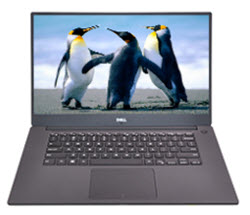
(Figure.1 XPS 7590 and Precision 5540)
Cause
No cause information
Resolution
You can use any of the following three methods in windows 10 to ensure the LCD brightness is above 15% on your PC:
-
Open the Settings window from the Start Menu
-
Click on Display
-
Use the Brightness slider to set the brightness
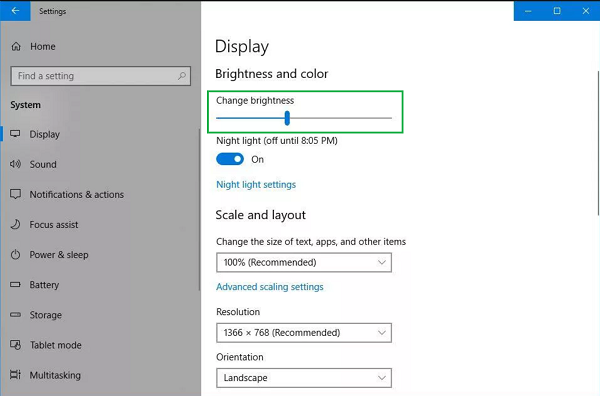
(Figure.2 Display Settings)
-
If you hold down the Fn key and press the F12 key on your keyboard a slider will appear onscreen showing the LCD brightness going up
-
Open the Control Panel
-
Go to Hardware and Sound or straight to Power Options (depending on how control panel is being viewed)
-
Open Power Options
-
Click on Change Plan Settings to Edit the Plan Settings
-
You can use the sliders to set the brightness here
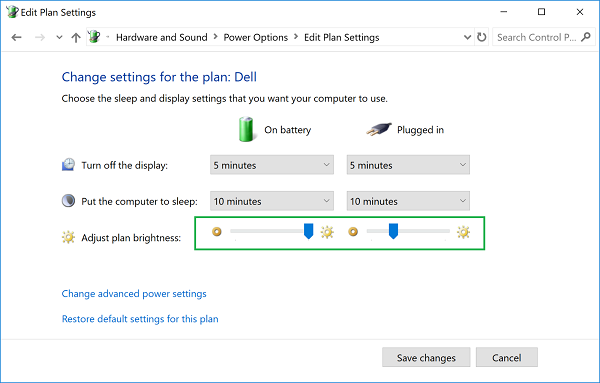
(Figure.3 Edit Plan Settings)
-
Or you can click on the Advanced Settings link
-
you can set the brightness levels here
-
Click ok and close the open windows
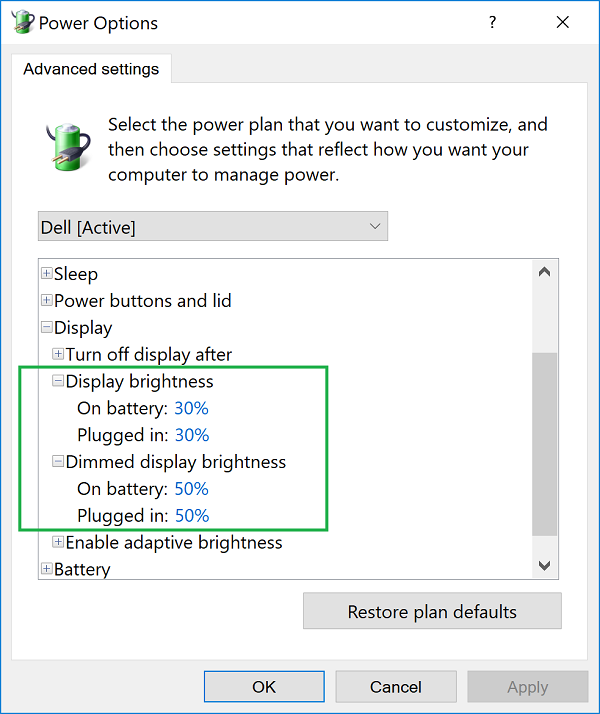
(Figure.4 Advanced Settings)
Affected Products
Precision 5540, XPS 15 7590Article Properties
Article Number: 000133359
Article Type: Solution
Last Modified: 24 Apr 2025
Version: 7
Find answers to your questions from other Dell users
Support Services
Check if your device is covered by Support Services.