Dell Laptops with Ubuntu 20.04 Exhibiting No Display on External Monitor through a WD19 or WD19S Dock
Summary: The following article takes you through upgrading Ubuntu 20.04 to resolve an external monitor display issue on Dell Laptops using the WD19 or WD19S docking station.
This article applies to
This article does not apply to
This article is not tied to any specific product.
Not all product versions are identified in this article.
Symptoms
No Display on External Screens on WD19 or WD19S Docks Connected to Dell Laptops Using Ubuntu 20.04
Dell Laptop owners using the Ubuntu 20.04 Operating System have reported that they see no video output to any external monitor which is connected through the Dell WD19 or WD19S Docking Station.
Impacted Systems:
- Latitude 5320
- Latitude 7320
- Latitude 3420
- Latitude 5420
- Latitude 7420
- Latitude 3520
- Latitude 5520
- Latitude 7520
- Latitude 9520
- Precision 3560 Mobile Workstation
Cause
Dell Engineering identified that the version of Ubuntu being run, did not include the support needed for these hardware configurations.
Resolution
Update Ubuntu
You can resolve this by updating your version of Ubuntu 20.04 to the most recent revision using the following steps:
- Open up a Terminal window in Ubuntu:
- You can run Terminal from the Dash by searching for Terminal.
- You can use a keyboard shortcut - Pressing the CTRL, ALT, and T keys together.
- Input the following command:
sudo apt updatesudo apt upgrade
- Reboot your computer and test that the issue is resolved.
- Open the Software Updater application in Ubuntu:
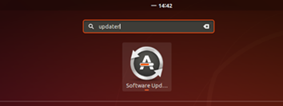
- The new patch is pushed automatically if there is a network connection available.
- Click Install Now:
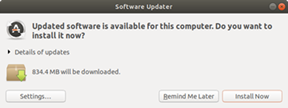
- Reboot the computer and test that the issue is resolved.
Affected Products
Dell Dock WD19, Dell Dock – WD19S, Latitude 5320, Latitude 7320, Latitude 3420, Latitude 7420, Latitude 3520, Latitude 5520, Latitude 7520, Latitude 9520, Latitude 5420, Precision 3560Article Properties
Article Number: 000182775
Article Type: Solution
Last Modified: 03 Apr 2025
Version: 5
Find answers to your questions from other Dell users
Support Services
Check if your device is covered by Support Services.