PowerFlex 4.x After restore browser shows "Kubernetes Ingress Controller Fake Certificate" for UI
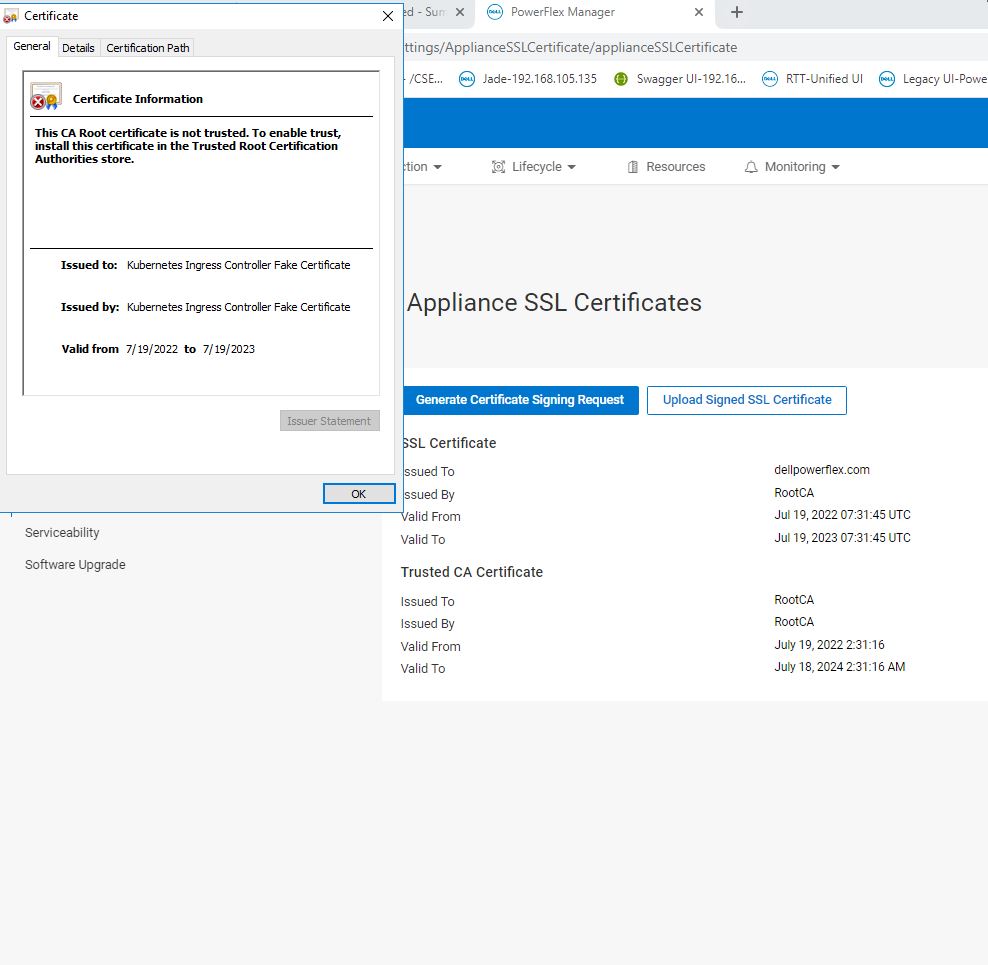
Summary: After a restore operation, the PowerFlex Manager UI settings page shows Appliance SSL Certificate and Root CA, but the browser shows " Kubernetes Ingress Controller Fake Certificate."
This article applies to
This article does not apply to
This article is not tied to any specific product.
Not all product versions are identified in this article.
Symptoms
PowerFlex Manager UI under Settings > Security > Appliance SSL Certificates appears to show the correct certificate, but the browser is showing Kubernetes Ingress Controller Fake Certificate.
Cause
If the ingress IP is different when performing an existing restore cluster for a system that has appliance certs configured, you will see this issue.
Resolution
User has to regenerate the appliance certs and upload them under the settings page.
- Go to Settings > Security > Appliance SSL Certificates.
- Click Generate Certificate Signing Request and fill out the required fields and click Generate
- Click Download Certificate Signing Request and copy the text that is displayed.
- Submit the CSR to the Certificate Authority to get the SSL certificate.
- To upload the SSL certificate to PowerFlex Manager, go to Settings > Security > Appliance SSL Certificates.
- Click Upload Signed SSL Certificate and upload the required SSL Certificate file and Trusted CA Certificate file.
- Click Save.
- The appliance SSL certificate is now updated and should display correctly in the browser.
Affected Products
PowerFlex rack, PowerFlex ApplianceArticle Properties
Article Number: 000202167
Article Type: Solution
Last Modified: 27 May 2025
Version: 3
Find answers to your questions from other Dell users
Support Services
Check if your device is covered by Support Services.