Connectrix Brocade B-Series: Bulk Deletion of zones are grayed out on SANnav
Summary: Unable to perform Bulk Deletion of Zone Aliases or Zones on the SANnav Dashboard.
This article applies to
This article does not apply to
This article is not tied to any specific product.
Not all product versions are identified in this article.
Symptoms
Unable to perform Bulk Deletion of Zone Aliases or Zones on the SANnav Dashboard.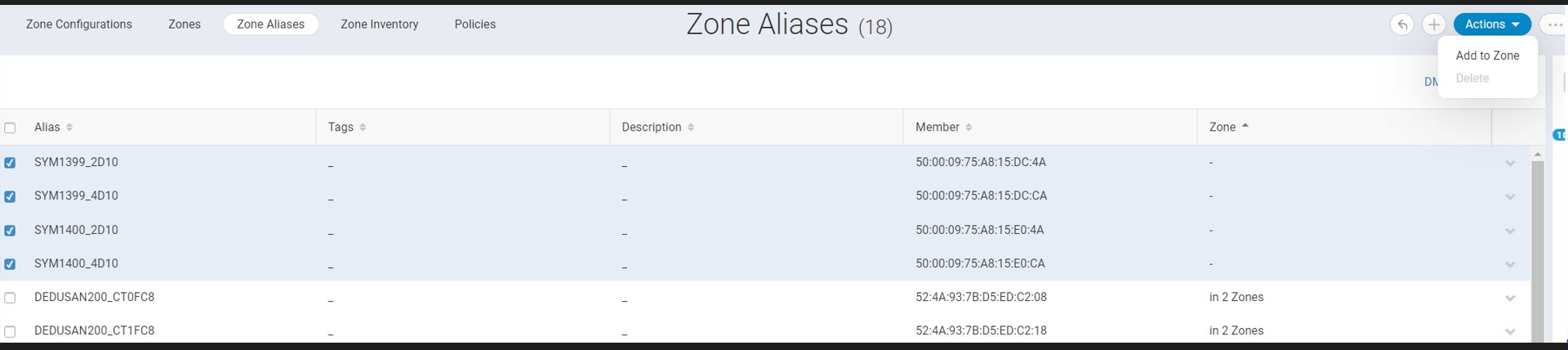
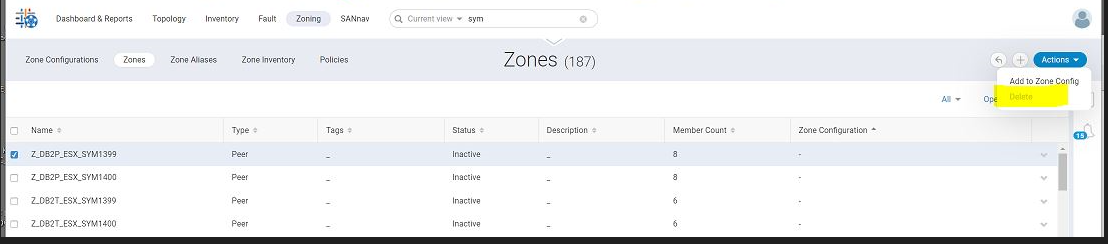
Cause
The Bulk Deletion of Zones, Zones Aliases, and Zone Inventory was introduced in 2.2.x.
Below are the criteria that should be met to perform the Bulk Deletion.
Below are the criteria that should be met to perform the Bulk Deletion.
- The bulk delete operation is enabled only for zone and zone alias entity types.
- For a single SANnav instance, a user can perform a maximum of 10 member replacements or bulk deletion of zones or zone aliases operations.
- SANnav supports deleting zones and zone aliases with mixed member types.
- The bulk delete operation is supported only when the seed switch of the fabric is running with Fabric OS (FOS) version 9.0.x or higher.
- From the Zone Inventory page, the user cannot select both zones and zone aliases for bulk deletion.
- It is recommended that the user must limit the number of zones or zone aliases to 500 for bulk deletion.
Resolution
Kindly check the above listed criteria's are met.
Also the deletion of the zones/ zone Aliases must be done on the Defined Configuration (Zones/ Zone Aliases marked as Inactive are a part of Defined Configuration).
Also the deletion of the zones/ zone Aliases must be done on the Defined Configuration (Zones/ Zone Aliases marked as Inactive are a part of Defined Configuration).
NOTE: Zones/ Zone Aliases marked as Active are a part of Effective Configuration.
Affected Products
Connectrix B-Series Fabric OS 9.XArticle Properties
Article Number: 000208493
Article Type: Solution
Last Modified: 30 May 2025
Version: 5
Find answers to your questions from other Dell users
Support Services
Check if your device is covered by Support Services.