RecoverPoint for VMs: 共有VMDKサイズを増やした後、コンシステンシー グループがエラー状態になりました。
概要: 共有VMDKサイズを増やした後、コンシステンシー グループがエラー状態になりました。RecoverPointプラグイン アラートに次のエラーが表示されます。「実際のサイズとユーザー ボリュームの保護されたサイズの間に不一致があります。」
この記事は次に適用されます:
この記事は次には適用されません:
この記事は、特定の製品に関連付けられていません。
すべての製品パージョンがこの記事に記載されているわけではありません。
現象
共有VMDKサイズを増やした後、コンシステンシー グループがエラー状態になりました。次のエラーがRecoverPointプラグイン システム アラートに表示されます。「実際のサイズとユーザー ボリュームの保護されたサイズの間に不一致があります。」

注:警告には、 説明 にカーソルを合わせると、影響を受けるボリュームが 表示されます。
注:警告には、 説明 にカーソルを合わせると、影響を受けるボリュームが 表示されます。
原因
Kdriver ログ(/scratch/log/kdriver.log.0000x):
RecoverPointログ:
制御ログ(/home/kos/control/result.log.x):
共有VMDKボリューム サイズは50 GBに増やされましたが、RecoverPointは古いサイズ(25 GB)を引き続き確認します。
RecoverPointで保護されている共有ディスクを増やすプロセスは、非共有ディスクとは異なります。非共有ディスクでは、RecoverPointはサイズの変更を検出し、それらの変更をレプリカVMにレプリケートします。共有ディスクでは、保護するために共有ディスクに特別な構成があるため、RecoverPointはこれらの変更をレプリカVMにレプリケートできません。
2023/02/01 05:07:06.425 - #2 - 2099698/2099645 - SplitterController: getHostWarnings:
splitter has warnings on site 2340d60313191c68 m_GenericWarningMap = Map([2340d60313191c68 => Vector((genericWarningID=WarnID_SPLITTER,problemSeverity=ProblemSeverity_WARNING,genericWarningCategory=WarnCategory_SPLITTER,siteUID=NoOption,boxRole=[],hostID=Option(ESX 0x10c71e58f25fe269),globalLinks=[],groupCopies=Vector(),groups=Vector(),links=Vector(),
devices=Vector(0xf0226ebf4afdb37b,0xf1d2c75138b26fcc),hostVolumes=Vector(),vms=Vector(),arrays=Vector(),contents=There is a mismatch between the actual size and the protected size of the user volume.),(genericWarningID=WarnID_SPLITTER,problemSeverity=ProblemSeverity_WARNING,genericWarningCategory=WarnCategory_SPLITTER,siteUID=NoOption,boxRole=[],hostID=Option(ESX 0x10c71e58f25fe269),globalLinks=[],groupCopies=Vector(),groups=Vector(),links=Vector(),
RecoverPointログ:
制御ログ(/home/kos/control/result.log.x):
Log collector entry(5744-1): Finished computing HM_hostVolumeStates. ShortTermGoals HM_hostVolumeStates diff from TargetState=[(hostID=ESX 0x10c71e58f25fe269,gUDeviceID=0x21875399cce283fb)=>(state=TRACK-META-DATA(trackingInfo= (trackingReason=TR_UNDEFINED)), reason=CAR_ESX_VOLUME_RESIZED)]制御ログ(/home/kos/control/settings_state.log.x):
0xb5c9592bf3bac380: (siteDeviceName=(gUDeviceID=0xb5c9592bf3bac380,sharedDeviceId=NoOption,sharedDeviceVmGuids=[0x21875399cce283fb,0xf0226ebf4afdb37b,0xf1d2c75138b26fcc],
boxRole=KBox1,scsiCommonInfo=id=0xb5c9592bf3bac380,vendor=Virtual,product=VDisk,size=26843545600,vendoreUnique=0xb5c9592bf3bac380,
rawGuid=Vector(96,0,194,159,219,114,129,230,167,209,222,80,229,84,111,249),creationID=(creationID=NoOption),name=scsi2:8,
arrayID=Option(ARRAY_VC_NAME),maskingGroupUID=NoOption,dataStoreUuid=Option((uuid=datastore-111111)),vMUuid=Option((vcUuid=(uuid=c9de17fe-1111-1111-111-f7f09554e352),uuid=ee866978-4018-a62e-de12-cdd16ff70dc6)),
rpvsLunID=NoOption), size=26843545600, deviceRoleInfo=volumeType=USER_VOLUME(groupCopyID= GroupCopy(1321230354 SiteUID(0x2340d60313191c68) 0),replicationSetUID= 4409400419568205188))


0x21875399cce283fb: (siteDeviceName=(gUDeviceID=0x21875399cce283fb,sharedDeviceId=Option(0xb5c9592bf3bac380),sharedDeviceVmGuids=[],boxRole=KBox1,scsiCommonInfo=id=0x21875399cce283fb,
vendor=Virtual,product=VDisk,size=26843545600,vendoreUnique=ee866978-4018-a62e-de12-cdd16ff70dc6:scsi2:8,
rawGuid=Vector(101,101,56,54,54,57,55,56,45,52,48,49,56,45,97,54,50,101,45,100,101,49,50,45,99,100,100,49,54,102,102,55,48,100,99,54,58,115,99,115,105,50,58,56),
NAAGuid=Vector(101,101,56,54,54,57,55,56,45,52,48,49,56,45,97,54,50,101,45,100,101,49,50,45,99,100,100,49,54,102,102,55,48,100,99,54,58,115,99,115,105,50,58,56),
creationID=(creationID=NoOption),name=scsi2:8,arrayID=Option(ARRAY_VC_NAME),maskingGroupUID=NoOption,dataStoreUuid=Option((uuid=datastore-111111)),
vMUuid=Option((vcUuid=(uuid=c9de17fe-1111-1111-111-f7f09554e352),uuid=ee866978-4018-a62e-de12-cdd16ff70dc6)),rpvsLunID=NoOption), size=26843545600,
deviceRoleInfo=volumeType=USER_VOLUME(groupCopyID= GroupCopy(1321230354 SiteUID(0x2340d60313191c68) 0),replicationSetUID= 4409400419568205188))
共有VMDKボリューム サイズは50 GBに増やされましたが、RecoverPointは古いサイズ(25 GB)を引き続き確認します。
RecoverPointで保護されている共有ディスクを増やすプロセスは、非共有ディスクとは異なります。非共有ディスクでは、RecoverPointはサイズの変更を検出し、それらの変更をレプリカVMにレプリケートします。共有ディスクでは、保護するために共有ディスクに特別な構成があるため、RecoverPointはこれらの変更をレプリカVMにレプリケートできません。
解決方法
回避 策:
上記の問題を回避するには、次の手順を使用して共有ディスク/秒のサイズを増やします。
- RecoverPoint for Virtual Machines(RecoverPoint for Virtual Machines)プラグインにアクセスします。
- Protected VM を選択します。
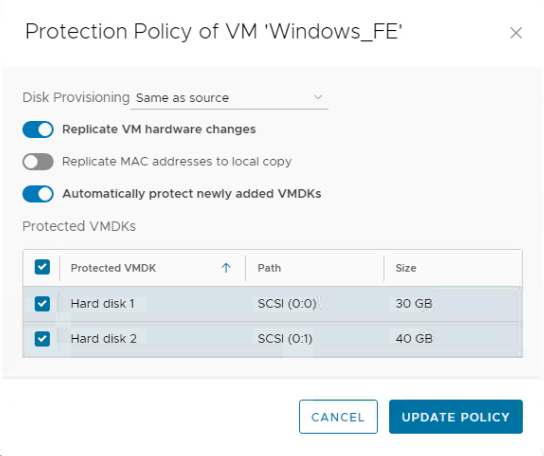
- 共有ディスクを持つVMを検索し、[ 保護ポリシー ]を押 します。
- 共有ディスクをクリアして、レプリケーションとアップデート ポリシーを停止します。(サイズ変更するディスクを共有するすべての保護されたVMに対して実行する必要があります)。
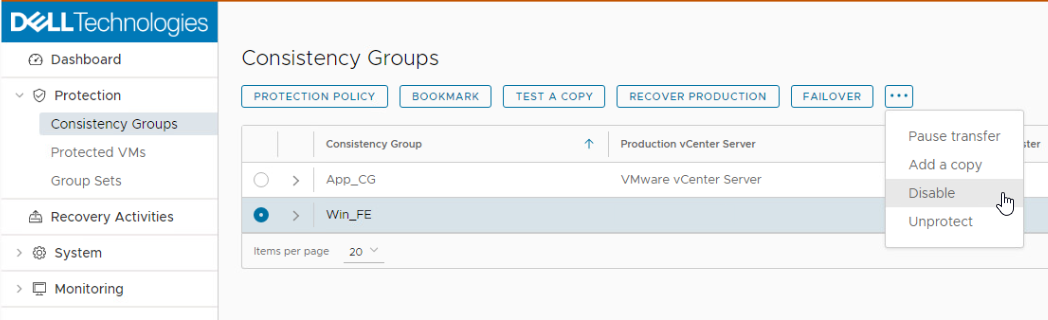
5.VMを保護しているコンシステンシー グループ(CG)を無効にします。
6.共有ディスク/秒のサイズを増やします。
7.保護されたVMの下のRecoverPoint for Virtual Machines Pluginに戻ります。
8.共有ディスクを持つVMを検索し、[ 保護ポリシー ]を押 します。
9.サイズを増やした共有ディスクのレプリケーションを有効にします。
10 ポリシー
の更新 11 CGを有効にして 、INITプロセスが完了するまで待ちます。
7.保護されたVMの下のRecoverPoint for Virtual Machines Pluginに戻ります。
8.共有ディスクを持つVMを検索し、[ 保護ポリシー ]を押 します。
9.サイズを増やした共有ディスクのレプリケーションを有効にします。
10 ポリシー
の更新 11 CGを有効にして 、INITプロセスが完了するまで待ちます。
解像 度:
RecoverPoint for Virtual Machinesは設計どおりに動作しています。
文書のプロパティ
文書番号: 000210929
文書の種類: Solution
最終更新: 19 9月 2023
バージョン: 4
質問に対する他のDellユーザーからの回答を見つける
サポート サービス
お使いのデバイスがサポート サービスの対象かどうかを確認してください。