Newly deployed SRM cannot discover previously discovered XtrmIO
Summary: Newly deployed SRM cannot discover previously discovered XtrmIO
This article applies to
This article does not apply to
This article is not tied to any specific product.
Not all product versions are identified in this article.
Symptoms
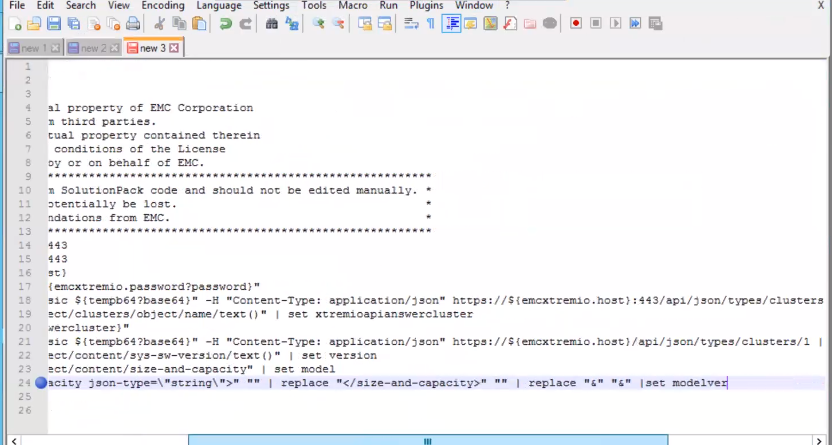
Issue shown below:

Cause
The discovery script was trying to replace substring "& ;" with "&" even though it was not present in model property.
Resolution
Workaround:
Replace substring "&" with "&". This way, it will replace the substring only if it contains "& ;"
Procedure:
1. Log into the SRM collector VM running the SolutionPack for Dell EMC XtremiO in question
2. Go to this directory /opt/APG/Tools/Script-Engine/Default/data/emc-xtremio-collect-emc-
xtremio
3. Backup a copy of emc-xtremio-collect.sc1
cp emc-xtremio-collect.sc1 emc-xtremio-collect.sc1-backup
4. Edit this file emc-xtremio-collect.sc1 as followed:
Replace line:24
print ${model} | replace "<size-and-capacity json-type=\"string\">" "" | replace "</size-and-capacity>" "" | replace "&" "&" |set modelver
with this new line:
print ${model} | try replace "<size-and-capacity json-type=\"string\">" "" | try replace "</size-and-capacity>" "" | try replace "&" "&" |set modelver
Contents of a correctly modified script emc-xtremio-collect.sc1 looks like this:
# Copyright (c) 2023, EMC Corporation.
# All Rights Reserved.
#
# This software contains the intellectual property of EMC Corporation
# or is licensed to EMC Corporation from third parties.
# Use of this software and the intellectual property contained therein
# is expressly limited to the terms and conditions of the License
# Agreement under which it is provided by or on behalf of EMC.
#**********************************************************************************************
# This file has been auto-generated from SolutionPack code and should not be edited manually. *
# Any manual changes in this file can potentially be lost. *
# Edit this file only on formal recommendations from EMC. *
#**********************************************************************************************
step testrestfulapi ${emcxtremio.host} 443
ssl-connect -t 30 ${emcxtremio.host} 443
step testrestfulapiauth ${emcxtremio.host}
set tempb64 "${emcxtremio.username}:${emcxtremio.password?password}"
http-get -k -t 30 -H "Authorization: Basic ${tempb64?base64}" -H "Content-Type: application/json" https://${emcxtremio.host}:443/api/json/types/clusters | json2xml | set xtremioapianswer
print ${xtremioapianswer} | xpath "/object/clusters/object/name/text()" | set xtremioapianswercluster
print ${xtremioapianswer} | xpath "(/object/clusters/object/href/text())[1]" | set xtremioclusterapi
println "Found cluster: ${xtremioapianswercluster}"
http-get -k -t 30 -H "Authorization: Basic ${tempb64?base64}" -H "Content-Type: application/json" ${xtremioclusterapi}| json2xml | set xtremioapianswer
print ${xtremioapianswer} | xpath "/object/content/sys-sw-version/text()" | set version
print ${xtremioapianswer} | xpath "/object/content/size-and-capacity" | set model
print ${model} | try replace "<size-and-capacity json-type=\"string\">" "" | try replace "</size-and-capacity>" "" | try replace "&" "&" |set modelver
println "Firmware Version: ${version}"
println "Model: ${modelver}"
5. Try the XtremIO discovery again and it should be successful this time
Article Properties
Article Number: 000217570
Article Type: Solution
Last Modified: 13 Nov 2023
Version: 2
Find answers to your questions from other Dell users
Support Services
Check if your device is covered by Support Services.