NetWorker: OpenWebStart Not Using the Latest JDK Version after NRE 17.x.x Upgrade
Summary: After upgrading NetWorker Runtime Environment (NRE) from version 17.0.1 to 17.0.2, OpenWebStart fails to detect and use the latest bundled Java Development Kit (JDK) version.
This article applies to
This article does not apply to
This article is not tied to any specific product.
Not all product versions are identified in this article.
Symptoms
OpenWebStart does not automatically detect the updated JDK binary.
Applications launched over OpenWebStart continue to use the previous JDK version.
Cause
OpenWebStart is not tightly integrated with NRE and does not automatically register newly bundled JDK versions. Manual configuration is required to import the updated JDK.
Resolution
- Launch OpenWebStart Settings
Go to: [Default Install Path]C:\Program Files\OpenWebStart\itw-settings.exe - Go to JVM Manager
In the Settings window, go to JVM Manager. - Import Latest JDK
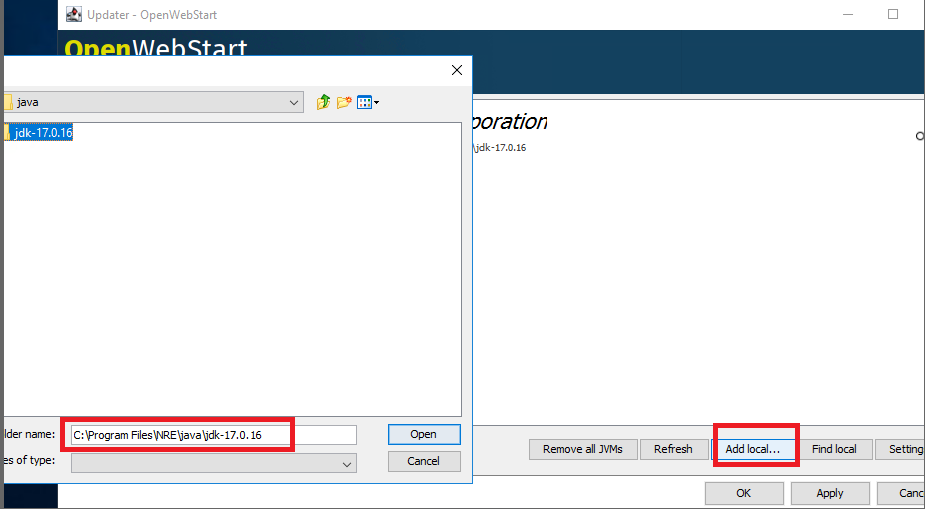
Additional Information
Affected Products
NetWorker FamilyArticle Properties
Article Number: 000370282
Article Type: Solution
Last Modified: 17 Sept 2025
Version: 1
Find answers to your questions from other Dell users
Support Services
Check if your device is covered by Support Services.