NVP-vProxy: Data Protection Restore Client Is Not Displaying Some (or Any) Backups
Summary: The NetWorker VMware Protection (NVP) solution is used to backup VMware Virtual Machines (VM). The web-based Data Protection Restore Client (DPRC) is used to perform File Level Restore (FLR) or Microsoft SQL app-consistent (MSVMAPPAGENT) restores. Some or all save sets are not visible from the DPRC. ...
This article applies to
This article does not apply to
This article is not tied to any specific product.
Not all product versions are identified in this article.
Symptoms
The Data Protection Restore Client (DPRC) is missing VM FLR or App backups.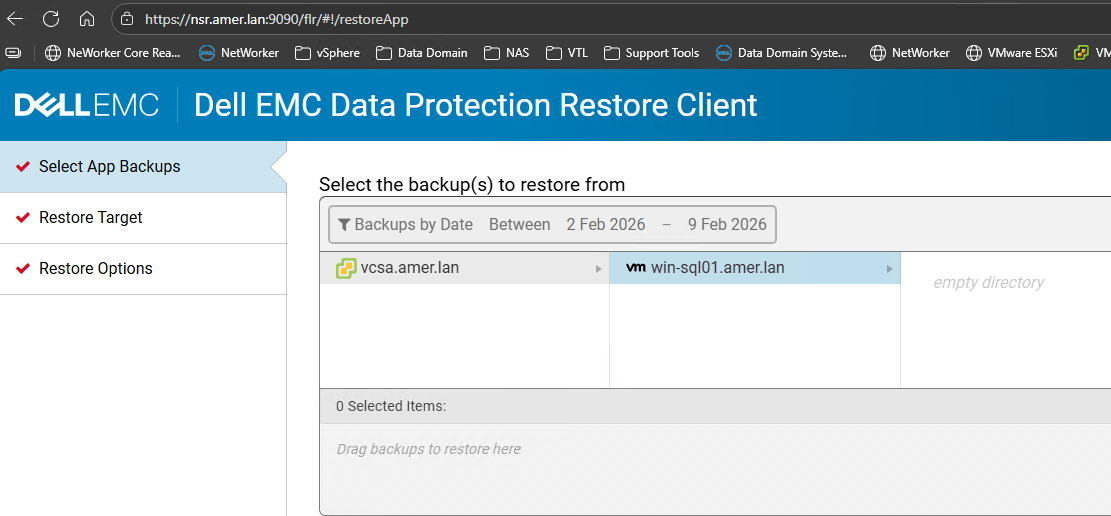
The following error appears for FLR or app-consistent SQL backups if no supported backups fall within the time-range specified.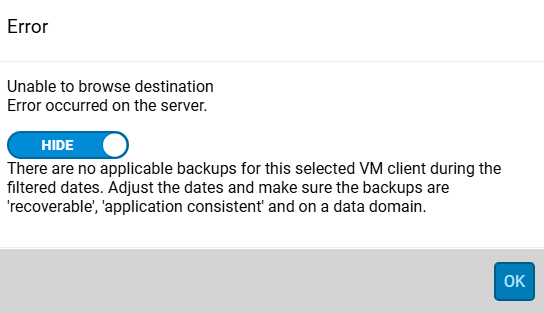
Alternatively, some VM backups may be listed and some backups which are expected to be available are missing.
Backups from the specified time range are found using NetWorker server command: mminfo -avot -q vmname=VM_NAME
Cause
The backup data exists on a non-Data Domain type device. For example, save sets only exist on Tape: mminfo -avot -q vmname=VM_NAME -r "savetime(20),ssid,cloneid,sumflags,clflags,volume,type"
[root@nsr ~]# mminfo -avot -q vmname=rhel-client01.amer.lan -r "savetime(20),ssid,cloneid,sumflags,clflags,volume,type"
    date     time   ssid          clone id fl clflg volume       type
    02/09/2026 16:48 3028964897 1770674048 cr     IM0001L1       LTO Ultrium

[root@nsr ~]# mminfo -avot -q vmname=win-sql01.amer.lan -r "savetime(20),ssid,cloneid,sumflags,clflags,volume,type"
    date     time   ssid          clone id fl clflg volume       type
    02/09/2026 14:58 3129621585 1770668648 cr     IM0001L1       LTO Ultrium
The "type" column must list "Data Domain" and the save set must be recoverable (cr).
Important consideration regarding non-Data Domain type backups:
The NetWorker VMware Protection (NVP) vProxy solution cannot backup or restore directly from tape. Performing an image restore (New VM, Revert VM, Disk, Instant Access, and so forth) provides "resurrection restore" functionality. This process involves selecting a clone pool on a Data Domain device. The restore automatically clones the save set to the Data Domain. Once the clone completes, the nsrvproxy_recover process is performed against the Data Domain copy. The described "resurrection restore" process is only supported for imaged-based restores, it is not possible to perform a resurrection restore for FLR or MSVMAPPAGENT backups. For more information see the NetWorker VMware Integration Guide, available through: Support for NetWorker | Manuals & Documents
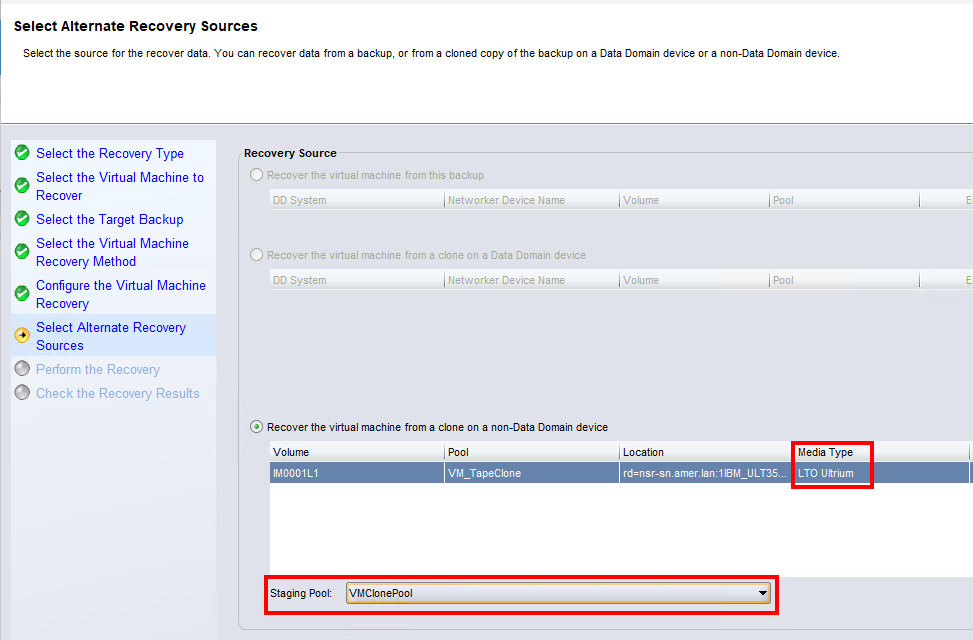
Data Protection Restore Client (DPRC) Functionality:
This is expected behavior. The DPRC only performs FLR, and MSVMAPPAGENT restores. Since these restore types do not perform "resurrection restore," the non-Data Domain type save sets are not displayed in DPRC.
NOTE: The scenario outlined in this KB demonstrates when ALL of the VMs backups within the time-range were on tape devices. If there are valid Data Domain backups within the time-range, the DPRC displays the valid Data Domain type save sets and ignores the non-Data Domain type ones. No error is provided; however, it appears that save sets are missing from DPRC.
Resolution
Clone the save sets from the non-Data Domain type device to a Data Domain clone pool. This process is detailed in the following article: NVP vProxy: How to manually clone a VM save set from a non-Data Domain device to a Data Domain clone device
Example:
[root@nsr ~]# mminfo -avot -q ssid=3129621585
 volume        type   client           date     time         size ssid      fl   lvl name
IM0001L1       LTO Ultrium vcsa.amer.lan 02/09/2026 02:58:08 PM 104 GB 3129621585 cr full vm:503ea434-0331-8ed6-8b19-b9cd408cce7a:vcsa.amer.lan

[root@nsr ~]# nsrclone -S 3129621585/1770668648 -b VMClonePool
180169:nsrclone: Step (1 of 16): NSRCLONE_INIT_PHASE_ONE: nsrclone has been started on host 'nsr.amer.lan', with command 'nsrclone -S 3129621585/1770668648 -b VMClonePool '.
...
...
...
         [CLONE SUCCESS SAVESETS]
3129621585/1770736684;
180187:nsrclone: Step (15 of 16): NSRCLONE_TERMINATE_PHASE_FOUR: The nsrclone verification did not detect failures.
02/10/26 10:26:09.561179 Cloned save set list: : 3129621585/1770668648

[root@nsr ~]# mminfo -avot -q ssid=3129621585 -r "savetime(20),vmname,ssid,cloneid,sumflags,clflags,volume,type"
    date     time   vm_name   ssid          clone id fl clflg volume       type
    02/09/2026 14:58 win-sql01.amer.lan 3129621585 1770668648 cr  IM0001L1 LTO Ultrium
    02/09/2026 14:58 win-sql01.amer.lan 3129621585 1770736684 cr  VMClonePool.001 Data Domain
The DD copy of the cloned save set is displayed in the DPRC.

If the save set is expired (E), you must change the retention period of the save set so that it becomes recoverable:
nsrmm -e "MM/DD/YYYY HH:mm:SS" -S SSID/CLONEID
Example:
nsrmm -e "02/09/2026 14:45:00" -S 2374063791/1770084015
Save set flags are explained in the following article: NetWorker: Understanding Save Set Flags
Additional Information
Affected Products
NetWorkerProducts
NetWorker FamilyArticle Properties
Article Number: 000425925
Article Type: Solution
Last Modified: 10 Feb 2026
Version: 1
Find answers to your questions from other Dell users
Support Services
Check if your device is covered by Support Services.