Avamar: Command-line SQL backup successful but MC GUI Activity shows "No DD"
Summary: A command-line SQL backup completes successfully and is restorable, but the Avamar Administrator GUI Activity window displays “No DD” because the backup is being sent to a Data Domain system. ...
This article applies to
This article does not apply to
This article is not tied to any specific product.
Not all product versions are identified in this article.
Symptoms
Command-line SQL backup is successful, but the Activity Window in the Avamar Administrator Administrator Activity shows "No DD"
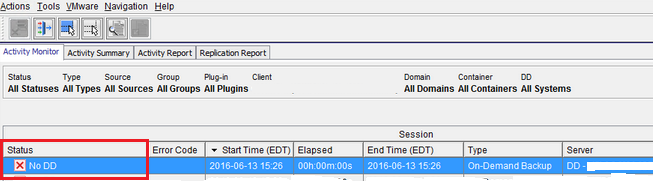
However, the backup log shows no errors and the backup is available for restore in the Avamar Administrator.
Cause
Command-line SQL backup being sent to Data Domain.
Resolution
- Add the
--send-adhoc-request=falseparameter to the command-line syntax or to theavsql.cmdfile located in theavs\vardirectory. - Alternatively, remove the
--ddrand--ddr-indexflags to send the backup to Avamar instead of Data Domain. - If a permanent resolution is required, open a new case with support and reference this KB article.
Affected Products
Avamar, Data DomainArticle Properties
Article Number: 000063024
Article Type: Solution
Last Modified: 24 سبتمبر 2026
Version: 5
Find answers to your questions from other Dell users
Support Services
Check if your device is covered by Support Services.