błędy zdalnego we/wy NFS; zmiana właściciela zasobnika dla zasobnika z obsługą FS może spowodować, że aplikacje i/lub użytkownicy nie będą mogli uzyskać dostępu do plików NFS
Summary: Poprzedni właściciel zasobnika jest niedozwolony lub ograniczony ObjectControllerException: metoda updateObjectInternal jest niedozwolona dla poprzedniego właściciela zasobnika
This article applies to
This article does not apply to
This article is not tied to any specific product.
Not all product versions are identified in this article.
Symptoms
Zmiana wprowadzona przez użytkownika na stronie właściciela zasobnika w interfejsie użytkownika:
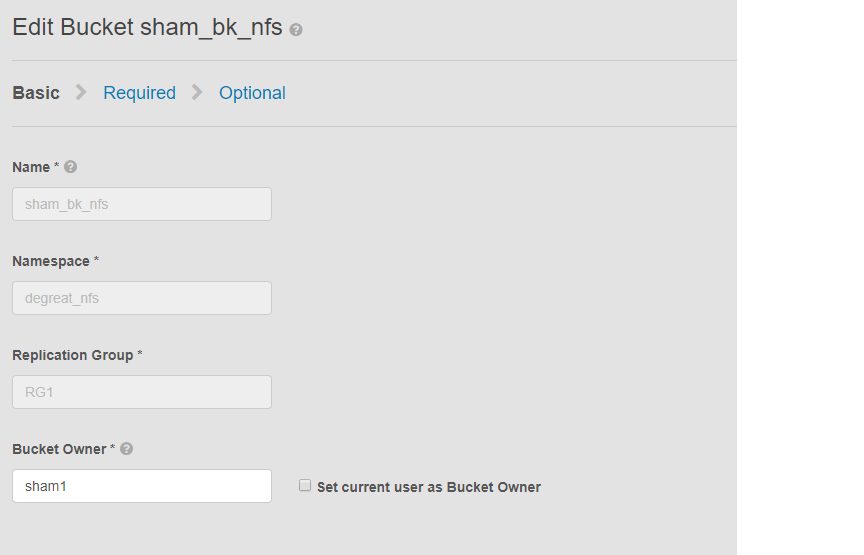
Ten problem dotyczy zasobników z włączoną obsługą NFS i zmiany właściciela zasobnika przez interfejs użytkownika. Może to spowodować utratę dostępu do zasobnika w systemie plików Linux przez aplikacje lub użytkowników, z którymi nawiązano połączenie. Nawet jeśli przywrócimy zmianę z powrotem do pierwotnego właściciela, dostęp nie będzie możliwy, co prowadzi do DU.
W tym przykładzie:
właściciel zasobnika został zmieniony na "sham2" przy użyciu interfejsu użytkownika. Ze względu na ograniczenia w ECS, nawet po zmianie nazwy właściciela zasobnika z powrotem na "sham1". ECS nie zmieni właściciela zasobnika z powrotem na "sham1" za pomocą interfejsu użytkownika. Na razie można to zrobić tylko za pomocą interfejsu wiersza polecenia korzystającego z interfejsu API z ładunkiem w celu zresetowania flagi właściciela do wartości true.
Sposoby zidentyfikowania problemu, na komputerze z systemem Linux poproś użytkownika o dotknięcie pliku, na przykład:
Ten problem dotyczy zasobników z włączoną obsługą NFS i zmiany właściciela zasobnika przez interfejs użytkownika. Może to spowodować utratę dostępu do zasobnika w systemie plików Linux przez aplikacje lub użytkowników, z którymi nawiązano połączenie. Nawet jeśli przywrócimy zmianę z powrotem do pierwotnego właściciela, dostęp nie będzie możliwy, co prowadzi do DU.
W tym przykładzie:
właściciel zasobnika został zmieniony na "sham2" przy użyciu interfejsu użytkownika. Ze względu na ograniczenia w ECS, nawet po zmianie nazwy właściciela zasobnika z powrotem na "sham1". ECS nie zmieni właściciela zasobnika z powrotem na "sham1" za pomocą interfejsu użytkownika. Na razie można to zrobić tylko za pomocą interfejsu wiersza polecenia korzystającego z interfejsu API z ładunkiem w celu zresetowania flagi właściciela do wartości true.
Sposoby zidentyfikowania problemu, na komputerze z systemem Linux poproś użytkownika o dotknięcie pliku, na przykład:
admin@node1~>touch file
touch: setting times of `file': Remote I/O error

se svc_log with the string  "method updateObjectInternal "

Command:
# svc_log -a -sr dataheadsvc | grep "method updateObjectInternal"
Example:
admin@node1~>svc_log -a -sr dataheadsvc | grep "method updateObjectInternal"
svc_log v1.0.22 (svc_tools v1.5.3)                 Started 2019-06-06 10:45:04

Running on nodes:              <All nodes>
Time range:                    2019-06-05 10:45:04 - 2019-06-06 10:45:04
Filter string(s):              <All messages>
Show nodename(s):              True
Search reclaim logs (if any):  False

com.emc.storageos.data.object.exception.ObjectControllerException: method updateObjectInternal not allowed for previous bucket owner sham1
Caused by: com.emc.storageos.data.object.exception.ObjectControllerException: method updateObjectInternal not allowed for previous bucket owner sham1
Cause
Utworzenie zasobnika z określonym użytkownikiem jako właścicielem, a następnie zmiana właściciela zasobnika. Na koniec nadanie pierwotnemu właścicielowi pełnej kontroli przy użyciu strony list ACL kończy się niepowodzeniem z wyjątkiem dziennika ECS:
ObjectControllerException: method updateObjectInternal not allowed for previous bucket owner <ownerid>
This is a known issue currently being evaluated by Dell EMC at this time.
Resolution
Obejście problemu polega na zmianie właściciela zasobnika przy użyciu interfejsu API za pośrednictwem interfejsu wiersza polecenia z ładunkiem w celu zresetowania flagi właściciela do wartości true.
1. Określ bieżącego właściciela zasobnika.
2. Utwórz prosty plik xml za pomocą edytora vi. W poniższym przykładzie nazywa się /tmp/bucket-owner.xml. Jest to proces dwuetapowy. Musimy ustawić go na nowego właściciela tymczasowo sham2. Podobnie jak w poniższym przykładzie, przed przywróceniem pierwotnego właściciela sham1 potwierdź dane wyjściowe:
. 7. Po zmianie konfiguracji nie powinniśmy już widzieć tego samego błędu
1. Określ bieżącego właściciela zasobnika.
Wymagaj hasła głównego interfejsu użytkownika w celu wygenerowania tokenu. Oto przykład:
admin@ecsnode1:~> tok=$(curl -iks https://XX.XX.XX.XX:4443/login -u 'root:ChangeMe' | grep X-SDS-AUTH-TOKEN)
Sprawdź bieżącego właściciela zasobnika (zastępczego zasobnika i przestrzeni nazw w danej sytuacji):
admin@node1:~> curl -s -k -X GET -H "$tok" https://XX.XX.XX.XX:4443/object/bucket/sham_bk_nfs/info?namespace=degreat_nfs | xmllint --format - | grep '<owner>'
  <owner>sham2</owner>
Potwierdza to, że parametr reset_previous_owners musi być ustawiony na true. Przywrócony właściciel zasobnika znajduje się w interfejsie użytkownika, ale interfejs API za pośrednictwem interfejsu wiersza poleceń potwierdza, że ECS nadal widzi właściciela zasobnika jako "sham2".
2. Utwórz prosty plik xml za pomocą edytora vi. W poniższym przykładzie nazywa się /tmp/bucket-owner.xml. Jest to proces dwuetapowy. Musimy ustawić go na nowego właściciela tymczasowo sham2. Podobnie jak w poniższym przykładzie, przed przywróceniem pierwotnego właściciela sham1 potwierdź dane wyjściowe:
admin@node1:~ # vi /tmp/bucket-owner.xml

admin@ecsnode1:~ # cat /tmp/bucket-owner.xml
<object_bucket_update_owner>
   <namespace>degreat_nfs</namespace>
   <new_owner>sham2</new_owner>
   <reset_previous_owners>true</reset_previous_owners>
</object_bucket_update_owner>

3. Change the bucket owner to the temporary owner.
Składnia interfejsu API wymagana do zmiany właściciela zasobnika na "sham2" za pośrednictwem pliku xml jest następująca:
admin@ecsnode1:~> curl -v -k -X "POST" "https://xx.xx.xx.xx:4443/object/bucket/sham_bk_nfs/owner" -H "$tok" -H "Content-Type: application/xml" -H "ACCEPT:application/xml" -d @/tmp/bucket-owner.xml -v
* Hostname was NOT found in DNS cache
*   Trying xx.xx.xx.xx...
* Connected to xx.xx.xx.xx (xx.xx.xx.xx) port 4443 (#0)
* successfully set certificate verify locations:
*   CAfile: none
  CApath: /etc/ssl/certs/
* SSLv3, TLS unknown, Certificate Status (22):
* SSLv3, TLS handshake, Client hello (1):
* SSLv3, TLS handshake, Server hello (2):
* SSLv3, TLS handshake, Certificate (11):
* SSLv3, TLS handshake, Server key exchange (12):
* SSLv3, TLS handshake, Server finished (14):
* SSLv3, TLS handshake, Client key exchange (16):
* SSLv3, TLS change cipher, Client hello (1):
* SSLv3, TLS handshake, Finished (20):
* SSLv3, TLS change cipher, Client hello (1):
* SSLv3, TLS handshake, Finished (20):
* SSL connection using TLSv1.2 / ECDHE-RSA-AES256-GCM-SHA384
* Server certificate:
*        subject: CN=localhost
*        start date: 2019-03-25 09:53:41 GMT
*        expire date: 2029-03-22 09:53:41 GMT
*        issuer: CN=localhost
*        SSL certificate verify result: self signed certificate (18), continuing anyway.
> POST /object/bucket/sham_bk_nfs/owner HTTP/1.1
> User-Agent: curl/7.37.0
> Host: xx.xx.xx.xx:4443
> X-SDS-AUTH-TOKEN: BAAcUy9KYlhxTlVYb2M0bnF3bTNscEsvSEdDeWhJPQMAjAQASHVybjpzdG9yYWdlb3M6VmlydHVhbERhdGFDZW50ZXJEYXRhOmJhOGQ3ZTkzLTMyMGYtNDNmNy05Y2FkLWM4YWQzMWFiMzY1MAIADTE1NTk3Mzk3OTA2MDgDAC51cm46VG9rZW46YjQ4NGNiZjEtNTkwNy00YWI3LTgzYTctM2Y3OGRhM2RiY2NiAgAC0A8=
> Content-Type: application/xml
> ACCEPT:application/xml
> Content-Length: 179
>
* upload completely sent off: 179 out of 179 bytes
< HTTP/1.1 200 OK
< Date: Thu, 06 Jun 2019 10:56:08 GMT
< Content-Length: 0
< Connection: keep-alive
<
* Connection #0 to host xx.xx.xx.xx left intact
4. Edit the simple.xml file previously created in step 2 and this time insert original owner of sham1
admin@node1:~ # vi /tmp/bucket-owner.xml

admin@ecsnode1:~ # cat /tmp/bucket-owner.xml
<object_bucket_update_owner>
   <namespace>degreat_nfs</namespace>
   <new_owner>sham1</new_owner>
   <reset_previous_owners>true</reset_previous_owners>
</object_bucket_update_owner>

5. Change the bucket owner back to the original owner
The API syntax required to change the bucket owner back to "sham1" through the xml file is as follows:
admin@ecsnode1:~> curl -v -k -X "POST" "https://xx.xx.xx.xx:4443/object/bucket/sham_bk_nfs/owner" -H "$tok" -H "Content-Type: application/xml" -H "ACCEPT:application/xml" -d @/tmp/bucket-owner.xml -v
* Hostname was NOT found in DNS cache
*   Trying xx.xx.xx.xx...
* Connected to xx.xx.xx.xx (xx.xx.xx.xx) port 4443 (#0)
* successfully set certificate verify locations:
*   CAfile: none
  CApath: /etc/ssl/certs/
* SSLv3, TLS unknown, Certificate Status (22):
* SSLv3, TLS handshake, Client hello (1):
* SSLv3, TLS handshake, Server hello (2):
* SSLv3, TLS handshake, Certificate (11):
* SSLv3, TLS handshake, Server key exchange (12):
* SSLv3, TLS handshake, Server finished (14):
* SSLv3, TLS handshake, Client key exchange (16):
* SSLv3, TLS change cipher, Client hello (1):
* SSLv3, TLS handshake, Finished (20):
* SSLv3, TLS change cipher, Client hello (1):
* SSLv3, TLS handshake, Finished (20):
* SSL connection using TLSv1.2 / ECDHE-RSA-AES256-GCM-SHA384
* Server certificate:
*        subject: CN=localhost
*        start date: 2019-03-25 09:53:41 GMT
*        expire date: 2029-03-22 09:53:41 GMT
*        issuer: CN=localhost
*        SSL certificate verify result: self signed certificate (18), continuing anyway.
> POST /object/bucket/sham_bk_nfs/owner HTTP/1.1
> User-Agent: curl/7.37.0
> Host: xx.xx.xx.xx:4443
> X-SDS-AUTH-TOKEN: BAAcUy9KYlhxTlVYb2M0bnF3bTNscEsvSEdDeWhJPQMAjAQASHVybjpzdG9yYWdlb3M6VmlydHVhbERhdGFDZW50ZXJEYXRhOmJhOGQ3ZTkzLTMyMGYtNDNmNy05Y2FkLWM4YWQzMWFiMzY1MAIADTE1NTk3Mzk3OTA2MDgDAC51cm46VG9rZW46YjQ4NGNiZjEtNTkwNy00YWI3LTgzYTctM2Y3OGRhM2RiY2NiAgAC0A8=
> Content-Type: application/xml
> ACCEPT:application/xml
> Content-Length: 179
>
* upload completely sent off: 179 out of 179 bytes
< HTTP/1.1 200 OK
< Date: Thu, 06 Jun 2019 10:56:08 GMT
< Content-Length: 0
< Connection: keep-alive
<
* Connection #0 to host xx.xx.xx.xx left intact


6.  Confirm the bucket owner change is reflected.
Upewnij się, że zmiana właściciela zasobnika to teraz "sham1".
admin@ecsnode1:~> curl -s -k -X GET -H "$tok" https://XX.XX.XX.XX:4443/object/bucket/sham_bk_nfs/info?namespace=degreat_nfs | xmllint --format - | grep '<owner>'
<owner>sham1</owner>
Po przywróceniu właściciela zasobnika w interfejsie API potwierdź, że host może teraz uzyskać dostęp do zasobnika w systemie plików Linux.
. 7. Po zmianie konfiguracji nie powinniśmy już widzieć tego samego błędu
svc_log -f "method updateObjectInternal not allowed" -start "20 hour ago" -sr all -sh -st hour
svc_log v1.0.22 (svc_tools v1.6.8)                 Started 2020-01-23 09:28:17

Running on nodes:              <All nodes>
Time range:                    2020-01-22 13:28:17 - 2020-01-23 09:28:17
Filter string(s):              'method updateObjectInternal not allowed'
Show nodename(s):              True
Search reclaim logs (if any):  False

Count of message occurrences per hour:

2020-01-22 13:xx - 5066
2020-01-22 14:xx - 9580
2020-01-22 15:xx - 9574
2020-01-22 16:xx - 9580
2020-01-22 17:xx - 9570
2020-01-22 18:xx - 9576
2020-01-22 19:xx - 9564
2020-01-22 20:xx - 9576
2020-01-22 21:xx - 9576
2020-01-22 22:xx - 9572
2020-01-22 23:xx - 9564
2020-01-23 00:xx - 9586
2020-01-23 01:xx - 9574
2020-01-23 02:xx - 9572
2020-01-23 03:xx - 4564
2020-01-23 04:xx - 0
2020-01-23 05:xx - 0
2020-01-23 06:xx - 0
2020-01-23 07:xx - 0
2020-01-23 08:xx - 0
2020-01-23 09:xx - 0


Dell EMC is aware of this issue and are working on a fix in a future release.
Additional Information
Powiązane bazy wiedzy NFS:
- tworzenie podstawowego eksportu NFS i montowanie go w kliencie
- ECS: błąd przesyłania strumieniowego w dzienniku dataheadsvc: procedura NFSv3 ŁĄCZE nie jest obsługiwane w żądaniu ReadLinkRequest
- ECS, niepowodzenie montowania NFS z komunikatem No such file or directory lub ERROR_OBJECT_NOT_FOUND, NFS mount failing with No such file or directory or ERROR_OBJECT_NOT_FOUND
- błędy zdalnego we/wy NFS; zmiana właściciela zasobnika dla zasobnika z obsługą FS może spowodować, że aplikacje/użytkownicy nie będą mogli uzyskać dostępu do plików NFS
- zapis NFS zgłasza błąd we/wy po określonej ilości danych.
- korzystanie z udostępniania plików NFS w ECS z magazynem danych VMware NFS
- najlepsze praktyki dotyczące montowania eksportów ECS NFS
- ECS, montowanie udziału NFS w kliencie Windows
- nie można zamontować NFS po zmianie ustawień eksportu plików w interfejsie użytkownika
- czy oprogramowanie Oracle WebCenter Content (WCC) jest zgodne z ECS?
Subskrybuj aktualizacje produktów.
Aby zasubskrybować aktualizacje, postępuj zgodnie z instrukcjami zawartymi w poniższym artykule z bazy wiedzy:
DELL EMC: Jak subskrybować strony z informacjami o produktach — Dell Support?
Affected Products
Elastic Cloud StorageProducts
ECS Appliance, ECS Appliance Software with Encryption, ECS Appliance Software without Encryption, Elastic Cloud StorageArticle Properties
Article Number: 000055535
Article Type: Solution
Last Modified: 29 تموز 2026
Version: 5
Find answers to your questions from other Dell users
Support Services
Check if your device is covered by Support Services.