Erros de E/S remota do NFS; a alteração do proprietário do bucket para o bucket habilitado para FS pode fazer com que aplicativos e/ou usuários não consigam acessar arquivos NFS
Summary: O proprietário do bucket anterior não tem permissão ou está restrito ObjectControllerException: atualização do método ObjectInternal não é permitido para o proprietário anterior do bucket ...
This article applies to
This article does not apply to
This article is not tied to any specific product.
Not all product versions are identified in this article.
Symptoms
Alteração feita pelo usuário na página do proprietário do bucket na interface do usuário:
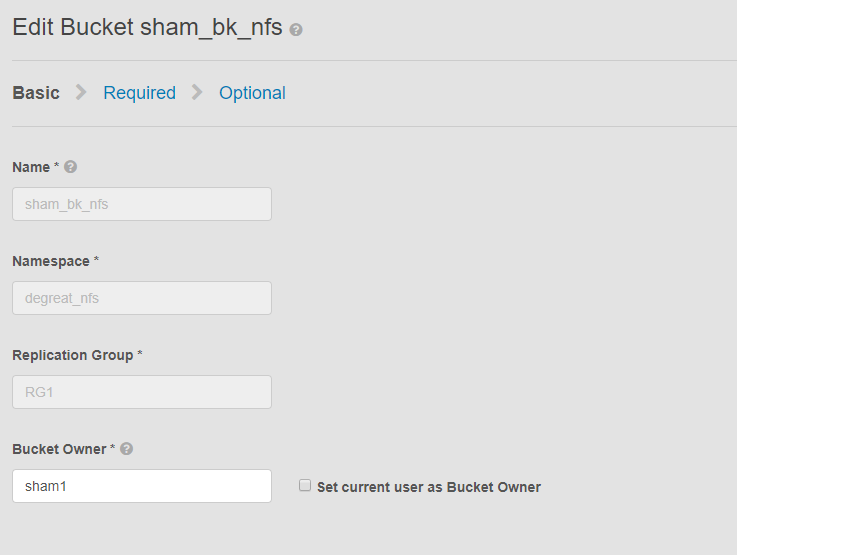
Esse problema se aplica a buckets habilitados para NFS e a uma alteração do proprietário do bucket pela interface do usuário. Isso pode fazer com que aplicativos ou usuários conectados percam o acesso ao bucket no file system do Linux. Mesmo se revertermos a alteração para o proprietário original novamente, o acesso não será possível, levando a DU.
Neste exemplo:
o proprietário do bucket foi alterado para "sham2" usando a interface do usuário. Devido a uma limitação no ECS, mesmo depois de alterar o nome do proprietário do bucket de volta para "sham1". O ECS não alterará o proprietário do bucket de volta para "sham1" usando a interface do usuário. Isso só pode ser feito por enquanto com a CLI usando uma API com payload para resetowner flag como true.
Maneiras de identificar o problema, na máquina Linux, peça ao usuário para tocar em um arquivo, por exemplo:
Esse problema se aplica a buckets habilitados para NFS e a uma alteração do proprietário do bucket pela interface do usuário. Isso pode fazer com que aplicativos ou usuários conectados percam o acesso ao bucket no file system do Linux. Mesmo se revertermos a alteração para o proprietário original novamente, o acesso não será possível, levando a DU.
Neste exemplo:
o proprietário do bucket foi alterado para "sham2" usando a interface do usuário. Devido a uma limitação no ECS, mesmo depois de alterar o nome do proprietário do bucket de volta para "sham1". O ECS não alterará o proprietário do bucket de volta para "sham1" usando a interface do usuário. Isso só pode ser feito por enquanto com a CLI usando uma API com payload para resetowner flag como true.
Maneiras de identificar o problema, na máquina Linux, peça ao usuário para tocar em um arquivo, por exemplo:
admin@node1~>touch file
touch: setting times of `file': Remote I/O error

se svc_log with the string  "method updateObjectInternal "

Command:
# svc_log -a -sr dataheadsvc | grep "method updateObjectInternal"
Example:
admin@node1~>svc_log -a -sr dataheadsvc | grep "method updateObjectInternal"
svc_log v1.0.22 (svc_tools v1.5.3)                 Started 2019-06-06 10:45:04

Running on nodes:              <All nodes>
Time range:                    2019-06-05 10:45:04 - 2019-06-06 10:45:04
Filter string(s):              <All messages>
Show nodename(s):              True
Search reclaim logs (if any):  False

com.emc.storageos.data.object.exception.ObjectControllerException: method updateObjectInternal not allowed for previous bucket owner sham1
Caused by: com.emc.storageos.data.object.exception.ObjectControllerException: method updateObjectInternal not allowed for previous bucket owner sham1
Cause
Criação de um bucket com um usuário específico como proprietário, seguido por uma alteração da propriedade do bucket. Por fim, dá ao proprietário original controle total usando a página ACLs falha com a exceção de registro do ECS:
ObjectControllerException: method updateObjectInternal not allowed for previous bucket owner <ownerid>
This is a known issue currently being evaluated by Dell EMC at this time.
Resolution
A solução temporária é alterar o proprietário do bucket usando a API por meio da CLI com payload para resetowner flag como true.
1. Determine o proprietário atual do bucket.
2. Crie um arquivo xml simples usando o editor vi. No exemplo abaixo, ele é chamado de /tmp/bucket-owner.xml. Este é um processo de várias etapas. Temos que defini-lo para um novo dono temporariamente de sham2. Como neste exemplo abaixo, antes de voltar para o proprietário original sham1, confirme o resultado:
. 7. Depois que a alteração de configuração for feita, não veremos mais o mesmo erro
1. Determine o proprietário atual do bucket.
Exija a senha root da interface do usuário para gerar o TOKEN. Por exemplo:
admin@ecsnode1:~> tok=$(curl -iks https://XX.XX.XX.XX:4443/login -u 'root:ChangeMe' | grep X-SDS-AUTH-TOKEN)
Verifique o proprietário atual do bucket (substitua o bucket e o namespace na sua situação):
admin@node1:~> curl -s -k -X GET -H "$tok" https://XX.XX.XX.XX:4443/object/bucket/sham_bk_nfs/info?namespace=degreat_nfs | xmllint --format - | grep '<owner>'
  <owner>sham2</owner>
Isso confirma que o parâmetro reset_previous_owners precisa ser definido como true. O proprietário do bucket revertido está na interface do usuário, mas a API por meio da CLI confirma que o ECS ainda está vendo o proprietário do bucket como "sham2".
2. Crie um arquivo xml simples usando o editor vi. No exemplo abaixo, ele é chamado de /tmp/bucket-owner.xml. Este é um processo de várias etapas. Temos que defini-lo para um novo dono temporariamente de sham2. Como neste exemplo abaixo, antes de voltar para o proprietário original sham1, confirme o resultado:
admin@node1:~ # vi /tmp/bucket-owner.xml

admin@ecsnode1:~ # cat /tmp/bucket-owner.xml
<object_bucket_update_owner>
   <namespace>degreat_nfs</namespace>
   <new_owner>sham2</new_owner>
   <reset_previous_owners>true</reset_previous_owners>
</object_bucket_update_owner>

3. Change the bucket owner to the temporary owner.
A sintaxe da API necessária para alterar o proprietário do bucket para "sham2" por meio do arquivo xml é a seguinte:
admin@ecsnode1:~> curl -v -k -X "POST" "https://xx.xx.xx.xx:4443/object/bucket/sham_bk_nfs/owner" -H "$tok" -H "Content-Type: application/xml" -H "ACCEPT:application/xml" -d @/tmp/bucket-owner.xml -v
* Hostname was NOT found in DNS cache
*   Trying xx.xx.xx.xx...
* Connected to xx.xx.xx.xx (xx.xx.xx.xx) port 4443 (#0)
* successfully set certificate verify locations:
*   CAfile: none
  CApath: /etc/ssl/certs/
* SSLv3, TLS unknown, Certificate Status (22):
* SSLv3, TLS handshake, Client hello (1):
* SSLv3, TLS handshake, Server hello (2):
* SSLv3, TLS handshake, Certificate (11):
* SSLv3, TLS handshake, Server key exchange (12):
* SSLv3, TLS handshake, Server finished (14):
* SSLv3, TLS handshake, Client key exchange (16):
* SSLv3, TLS change cipher, Client hello (1):
* SSLv3, TLS handshake, Finished (20):
* SSLv3, TLS change cipher, Client hello (1):
* SSLv3, TLS handshake, Finished (20):
* SSL connection using TLSv1.2 / ECDHE-RSA-AES256-GCM-SHA384
* Server certificate:
*        subject: CN=localhost
*        start date: 2019-03-25 09:53:41 GMT
*        expire date: 2029-03-22 09:53:41 GMT
*        issuer: CN=localhost
*        SSL certificate verify result: self signed certificate (18), continuing anyway.
> POST /object/bucket/sham_bk_nfs/owner HTTP/1.1
> User-Agent: curl/7.37.0
> Host: xx.xx.xx.xx:4443
> X-SDS-AUTH-TOKEN: BAAcUy9KYlhxTlVYb2M0bnF3bTNscEsvSEdDeWhJPQMAjAQASHVybjpzdG9yYWdlb3M6VmlydHVhbERhdGFDZW50ZXJEYXRhOmJhOGQ3ZTkzLTMyMGYtNDNmNy05Y2FkLWM4YWQzMWFiMzY1MAIADTE1NTk3Mzk3OTA2MDgDAC51cm46VG9rZW46YjQ4NGNiZjEtNTkwNy00YWI3LTgzYTctM2Y3OGRhM2RiY2NiAgAC0A8=
> Content-Type: application/xml
> ACCEPT:application/xml
> Content-Length: 179
>
* upload completely sent off: 179 out of 179 bytes
< HTTP/1.1 200 OK
< Date: Thu, 06 Jun 2019 10:56:08 GMT
< Content-Length: 0
< Connection: keep-alive
<
* Connection #0 to host xx.xx.xx.xx left intact
4. Edit the simple.xml file previously created in step 2 and this time insert original owner of sham1
admin@node1:~ # vi /tmp/bucket-owner.xml

admin@ecsnode1:~ # cat /tmp/bucket-owner.xml
<object_bucket_update_owner>
   <namespace>degreat_nfs</namespace>
   <new_owner>sham1</new_owner>
   <reset_previous_owners>true</reset_previous_owners>
</object_bucket_update_owner>

5. Change the bucket owner back to the original owner
The API syntax required to change the bucket owner back to "sham1" through the xml file is as follows:
admin@ecsnode1:~> curl -v -k -X "POST" "https://xx.xx.xx.xx:4443/object/bucket/sham_bk_nfs/owner" -H "$tok" -H "Content-Type: application/xml" -H "ACCEPT:application/xml" -d @/tmp/bucket-owner.xml -v
* Hostname was NOT found in DNS cache
*   Trying xx.xx.xx.xx...
* Connected to xx.xx.xx.xx (xx.xx.xx.xx) port 4443 (#0)
* successfully set certificate verify locations:
*   CAfile: none
  CApath: /etc/ssl/certs/
* SSLv3, TLS unknown, Certificate Status (22):
* SSLv3, TLS handshake, Client hello (1):
* SSLv3, TLS handshake, Server hello (2):
* SSLv3, TLS handshake, Certificate (11):
* SSLv3, TLS handshake, Server key exchange (12):
* SSLv3, TLS handshake, Server finished (14):
* SSLv3, TLS handshake, Client key exchange (16):
* SSLv3, TLS change cipher, Client hello (1):
* SSLv3, TLS handshake, Finished (20):
* SSLv3, TLS change cipher, Client hello (1):
* SSLv3, TLS handshake, Finished (20):
* SSL connection using TLSv1.2 / ECDHE-RSA-AES256-GCM-SHA384
* Server certificate:
*        subject: CN=localhost
*        start date: 2019-03-25 09:53:41 GMT
*        expire date: 2029-03-22 09:53:41 GMT
*        issuer: CN=localhost
*        SSL certificate verify result: self signed certificate (18), continuing anyway.
> POST /object/bucket/sham_bk_nfs/owner HTTP/1.1
> User-Agent: curl/7.37.0
> Host: xx.xx.xx.xx:4443
> X-SDS-AUTH-TOKEN: BAAcUy9KYlhxTlVYb2M0bnF3bTNscEsvSEdDeWhJPQMAjAQASHVybjpzdG9yYWdlb3M6VmlydHVhbERhdGFDZW50ZXJEYXRhOmJhOGQ3ZTkzLTMyMGYtNDNmNy05Y2FkLWM4YWQzMWFiMzY1MAIADTE1NTk3Mzk3OTA2MDgDAC51cm46VG9rZW46YjQ4NGNiZjEtNTkwNy00YWI3LTgzYTctM2Y3OGRhM2RiY2NiAgAC0A8=
> Content-Type: application/xml
> ACCEPT:application/xml
> Content-Length: 179
>
* upload completely sent off: 179 out of 179 bytes
< HTTP/1.1 200 OK
< Date: Thu, 06 Jun 2019 10:56:08 GMT
< Content-Length: 0
< Connection: keep-alive
<
* Connection #0 to host xx.xx.xx.xx left intact


6.  Confirm the bucket owner change is reflected.
Confirme se a mudança de proprietário do bucket agora é "sham1".
admin@ecsnode1:~> curl -s -k -X GET -H "$tok" https://XX.XX.XX.XX:4443/object/bucket/sham_bk_nfs/info?namespace=degreat_nfs | xmllint --format - | grep '<owner>'
<owner>sham1</owner>
Depois que o proprietário do bucket for revertido na API, confirme se o host agora pode acessar o bucket no file system Linux.
. 7. Depois que a alteração de configuração for feita, não veremos mais o mesmo erro
svc_log -f "method updateObjectInternal not allowed" -start "20 hour ago" -sr all -sh -st hour
svc_log v1.0.22 (svc_tools v1.6.8)                 Started 2020-01-23 09:28:17

Running on nodes:              <All nodes>
Time range:                    2020-01-22 13:28:17 - 2020-01-23 09:28:17
Filter string(s):              'method updateObjectInternal not allowed'
Show nodename(s):              True
Search reclaim logs (if any):  False

Count of message occurrences per hour:

2020-01-22 13:xx - 5066
2020-01-22 14:xx - 9580
2020-01-22 15:xx - 9574
2020-01-22 16:xx - 9580
2020-01-22 17:xx - 9570
2020-01-22 18:xx - 9576
2020-01-22 19:xx - 9564
2020-01-22 20:xx - 9576
2020-01-22 21:xx - 9576
2020-01-22 22:xx - 9572
2020-01-22 23:xx - 9564
2020-01-23 00:xx - 9586
2020-01-23 01:xx - 9574
2020-01-23 02:xx - 9572
2020-01-23 03:xx - 4564
2020-01-23 04:xx - 0
2020-01-23 05:xx - 0
2020-01-23 06:xx - 0
2020-01-23 07:xx - 0
2020-01-23 08:xx - 0
2020-01-23 09:xx - 0


Dell EMC is aware of this issue and are working on a fix in a future release.
Additional Information
Artigos da KB relacionados ao NFS:
- Como criar uma exportação NFS básica e montá-la em um client
- ECS: erro de streaming do log dataheadsvc: procedimento NFSv3 LINK não compatível na solicitação ReadLinkRequest
- ECS, falha na montagem do NFS com o erro No such file or directory ou ERROR_OBJECT_NOT_FOUND
- Erros de E/S remota do NFS; a alteração do proprietário do bucket para o bucket habilitado para FS pode fazer com que aplicativos/usuários não consigam acessar arquivos NFS
- A gravação NFS gera um erro de E/S após determinado volume de dados.
- Usando o compartilhamento de arquivos NFS a partir do ECS com um repositório de dados VMware NFS
- Práticas recomendadas para montar exportações NFS do ECS
- ECS, Como montar o compartilhamento NFS no client Windows
- Falha na montagem do NFS após alterar as configurações de exportação de arquivos na IU
- O Oracle WebCenter Content (WCC) é compatível com o ECS?
Inscreva-se para receber atualizações do produto.
Você pode assinar as atualizações seguindo as instruções no artigo da base de conhecimento abaixo:
DELL EMC: Como se inscrever nas páginas do produto – Suporte Dell?
Affected Products
Elastic Cloud StorageProducts
ECS Appliance, ECS Appliance Software with Encryption, ECS Appliance Software without Encryption, Elastic Cloud StorageArticle Properties
Article Number: 000055535
Article Type: Solution
Last Modified: 29 تموز 2026
Version: 5
Find answers to your questions from other Dell users
Support Services
Check if your device is covered by Support Services.