Avamar: BMR wizard UI do not open after machine boot
Summary: The Bare Metal Recovery (BMR) wizard fails to launch after booting a system with the Avamar BMR WinPE ISO, preventing recovery operations.
This article applies to
This article does not apply to
This article is not tied to any specific product.
Not all product versions are identified in this article.
Symptoms
Observed Symptoms
- BMR Wizard UI is not opening at all after the machine is booted with the Avamar BMR WinPE ISO.
- The WinPE command prompt is opened, however the Wizard does not appear.
Cause
Root Cause: Timestamp Limitation
The BMR Wizard UI contained a maximum timestamp limit set to 01.01.2021. After this date the wizard would not launch.
The limitation has been removed in a hotfix ISO for versions prior to 19.7 and later.
Example client version output confirming the fix:
% avtar –-version
Version: 18.1.100-33_HF328844
Resolution
Deploy BMR HotFix ISO
Download the appropriate HotFix ISO for the Avamar version in use and deploy it to the target platform.
- Identify the Avamar version (e.g., 18.1.100-33, 19.2.100-155).
- Download the matching HotFix ISO from the Dell Support page.
- Deploy the ISO to the server following standard deployment procedures.
- Verify the client version after deployment by running the command
avtar --versionat a command prompt.% avtar –-version Version: 18.1.100-33_HF328844 - Refer to the Dell Avamar for Windows Servers User Guide page 17 for detailed ISO deployment and BMR execution steps.
How to get the Hotfix:
Info: Downloading the Hotfix would require Sign in to Support page,

Method 1: Click on the download link
- For version 18.1.100-33: Use HF 328844: 32 bit and 64 bit ISO
- For version 18.2.100-134: Use HF 328658: 32 bit and 64 bit ISO
- For version 19.1.100-38: Use HF 328845: 32 bit and 64 bit ISO
- For version 19.2.100-155: Use HF 328864: 32 bit and 64 bit ISO
- For version 19.3.100-149: Use HF 328865: 32 bit and 64 bit ISO
- For version 19.4.100-116: Use HF 328866: 32 bit and 64 bit ISO
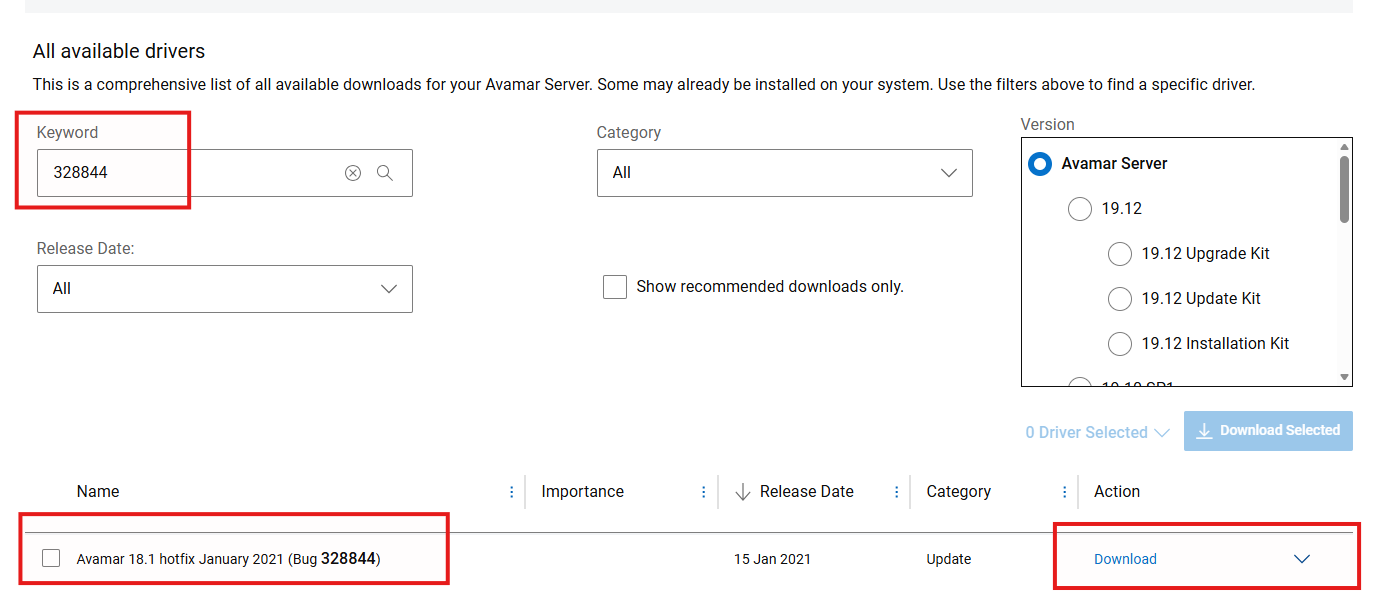
Method 2: Search for required Hotfix and Download.
Affected Products
Avamar, Avamar Client for WindowsArticle Properties
Article Number: 000181647
Article Type: Solution
Last Modified: 14 أيلول 2026
Version: 15
Find answers to your questions from other Dell users
Support Services
Check if your device is covered by Support Services.