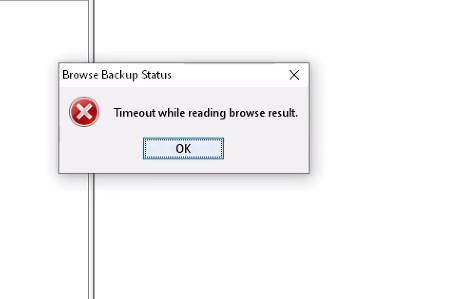
Avamar: Timeout while reading browse result error during Exchange Granular Log Restore
Summary: During Exchange Granular Log Restore (GLR) the Avamar GUI shows a "Timeout while reading browse result" error because a firewall blocks communication between the GLR proxy, server, and admin client. ...
This article applies to
This article does not apply to
This article is not tied to any specific product.
Not all product versions are identified in this article.
Symptoms
When initiating an Exchange Granular Log Restore (GLR) from the Avamar Admin GUI, the operation fails with the error message "Timeout while reading browse result" after approximately five minutes.
The expected list of databases does not appear in the GUI.
Log entries on the GLR Proxy show the browse process starting and then being externally cancelled: (avagent.log)
2022-01-21 09:09:38 avagent Info <6685>: Browse process 38764 (C:\Program Files\avs\bin\avexchglr) started
2022-01-21 09:09:39 avagent Info <10684>: Setting ctl message version to 3 (from 1)
2022-01-21 09:09:39 avagent Info <16136>: Setting ctl max message size to 268435456
2022-01-21 09:16:05 avagent Info <6687>: Browse process 38764 (C:\Program Files\avs\bin\avexchglr) finished (code 536870925: externally cancelled)
2022-01-21 09:16:05 avagent Warning <6690>: CTL workorder "Browse" non-zero exit status 'code 536870925: externally cancelled'
2022-01-21 09:16:06 avagent Info <10684>: Setting ctl message version to 3 (from 1)
2022-01-21 09:16:06 avagent Info <16136>: Setting ctl max message size to 268435456
Additional plugin logs indicate the request was cancelled and the plugin timed out: (
avexglr_plugin.log
2022-01-21 09:09:50 avexchglr Info <15423>: db name = Mailbox Database 1
2022-01-21 09:09:50 avexchglr Info <15423>: db name = Mailbox Database 2
2022-01-21 09:09:50 avexchglr Info <15423>: db name = Mailbox Database 3
.
.
2022-01-21 09:09:50 avexchglr Info <15423>: db name = Mailbox Database 10
2022-01-21 09:15:00 avexchglr Info <9528>: Cancel request received - no assistant or aborted assistant
2022-01-21 09:16:05 avexchglr Error <13527>: Could not set state machine to 'plugin timed out', because of STATE_EVENT_IGNORED - Ignoring requested state transition for the 'plugin_timedout' event with transition cause of 'CAUSE_PLUGIN_TIMEDOUT' while in the 'STATE_NOT_MOUNTED' state- avexchglrsvc.log
2022-01-21 09:15:05 avexchglrsvc.exe Info <40344>: Service: AvamarExchangeGLR will be stopped.
2022-01-21 09:16:05 avexchglrsvc.exe Info <40304>: Transitioning from 'STATE_NOT_MOUNTED' (1) to 'STATE_STOPPED' (0) due to the transition cause of 'CAUSE_SERVICE_STOP' (14)...
2022-01-21 09:16:05 avexchglrsvc.exe Info <40305>: Successfully transitioned from 'STATE_NOT_MOUNTED' (1) to 'STATE_STOPPED' (0) due to the transition cause of 'CAUSE_SERVICE_STOP' (14)
Cause
The firewall blocks communication between the GLR Proxy client and the Avamar server, or between the machine running the Avamar Admin GUI and the Avamar server.
Resolution
Resolve the firewall blockage:
- Contact the network administrator.
- Review firewall rules that govern traffic between the GLR Proxy client, the Avamar server, and the workstation running the Avamar Admin GUI.
- Allow the required ports and protocols for Avamar communication (e.g., TCP ports 28000‑28009, 443, and any custom ports used by the GLR plugin).
- Confirm the changes by re‑initiating the Exchange GLR operation.
If adjusting firewall rules is not possible, use an alternative GLR proxy or a workstation that is not subject to the restrictive firewall rules.
Affected Products
Avamar, Avamar, Avamar ServerArticle Properties
Article Number: 000201053
Article Type: Solution
Last Modified: 15 أيلول 2026
Version: 2
Find answers to your questions from other Dell users
Support Services
Check if your device is covered by Support Services.