NVP vProxy: VM protection operations fail with 5203 "the call timed out"
Summary: This KB is intended for Dell Partners and NetWorker support. This KB details a troubleshooting approach and does not provide a solution for any specific failure.
This article applies to
This article does not apply to
This article is not tied to any specific product.
Not all product versions are identified in this article.
Instructions
NetWorker VMware Protection (NVP) vProxy protection operations (backup or restore) fail with error 5203 "The call timed out."
The following error appears in Virtual Machine (VM) backup session logs or the vbackupd-engine.log on the vProxy:
YYYY-MM-DDTHH:mm:SSZ NOTICE: "Text": "Backup has FAILED. Failed to backup virtual disk \"Hard disk 1\". Failed to write data: Failed writing at offset 27294433280 of data file: [5203] The call timed out",
- VM backup session logs:
/opt/emc/vproxy/runtime/logs/recycle/vbackupd/DATE - VM recovery session logs:
/opt/emc/vproxy/runtime/logs/recycle/vrecpverd/DATE - Backup engine:
/opt/emc/vproxy/runtime/logs/vbackupd/vbackupd-engine.log
The vProxy's /opt/emc/vproxy/runtime/logs/vbackupd-boost.log may also report:
YYYY-MM-DDTHH:m:SSZ ERROR:  [ 7431:140655883974400] ddcl_do_nfs_proc_timeout(): Max retry limit reached for RPC:62, time elapsed:661 secs, retry attempts:2
YYYY-MM-DDTHH:m:SSZ INFO:   [ 7431:140655883974400] ddcl_ddcp_send_segs_recover: c->send_segs_recovery_needed = 1
YYYY-MM-DDTHH:m:SSZ WARN:   [ 7431:140655883974400] ddcl_ddcp_send_segs_recover(): for ctx=38601654  Recovered 0 RPCs duplicates=0: Max retry limit reached for procedure=DDCP_SEND_SEGS
YYYY-MM-DDTHH:m:SSZ ERROR:  [ 7431:140655883974400] ddcl_ddcp_send_file_loop: Call to send segs2 failed. [ERR=5203]
YYYY-MM-DDTHH:m:SSZ ERROR:  [ 7431:140655883974400] ddcl_ddcp_pwrite: Call to send file loop2 failed. [ERR=5203]
YYYY-MM-DDTHH:m:SSZ ERROR:  [ 7431:140655883974400] ddcl_ddcp_pwrite: Error in ddcl ddcp pwrite. [ERR=5203]
YYYY-MM-DDTHH:m:SSZ ERROR:  [ 7431:140655883974400] ddcl_set_filep_error: Setting error for file //NW-SERVER-NAME/POOL-NAME/active/LONG-SSID/temp-vm-94995-disk-key-2000-flat.vmdk: 5203-Max retry limit reached for procedure=DDCP_SEND_SEGS.
YYYY-MM-DDTHH:m:SSZ ERROR:  [ 7431:140655883974400] ddp_write() failed Offset 18706595840, BytesToWrite 1048576, BytesWritten 0 Err: 5203-Max retry limit reached for procedure=DDCP_SEND_SEGS
The 5203 error is reported to NetWorker from Data Domain; this issue is inactive of an issue either between the vProxy and Data Domain or on the Data Domain itself.
Investigate to see if there are any network latency issues between the vProxy and Data Domain:
- NetWorker: NVP vProxy Troubleshooting VM Backup and Restore Performance and Throughput
- NVP vProxy: Troubleshooting Network Connectivity For Backup and Restore Operations
While the above articles provide specific details and several troubleshooting steps, there are a couple points of primary importance:
- What transport mode is used? For example is HotAdd or Network Block Device (NBD) used? This is evident in the VM session log. Search for
TransportModeRequestedandVddkTransportMode. Hot add is the default and preferred method. NBD uses ESXi Network File Copy (NFC), it is typically slower and more likely to be impacted by network traffic on the ESXi management network. - What backup level is scheduled? For example, if level incremental is scheduled, only new data (changed bytes) as detected by VMware Change Block Tracking (CBT) are sent to the Data Domain. If level full is scheduled, then the entire disk is data is sent to the Data Domain. Performing level full backups can result in longer running backups as more data is processed and transmitted across the environment. Incremental backups are preferred since all NVP backups are virtual synthetic full on Data Domain, and due to less data processed (only new bytes), results in shorter backup windows.
NOTE: For more information on this, see: NVP vProxy-Understanding VMware VM backup levels and sizes shown in NetWorker - What are the underlying components of this communication? For example, is the communication between an on-premises VMware environment and Data Domain, or does traffic pass through the Internet (WAN), or are any cloud solutions (AWS, Azure, and so forth) involved? Each of these factors into specific networking or compute resources and traffic considerations.
- If the issue is reproducible, monitor latency between the vProxy and DD while the task is running (for example, during regular backups or restore). This can be done using
pingas detailed in NVP vProxy: Troubleshooting Network Connectivity For Backup and Restore Operations. If any packet loss issues are seen or latency is high(50 msor higher), then backup or restore operations can be impacted by timeouts.
If there are no transport mode or network issues observed, then there may be a storage I/O latency issue on the Data Domain. The above points are general, and the articles referenced must be considered on a case by case basis.
Collect the vProxy support bundle: NVP-vProxy: Log Collection Processes for VMware Protection Issues
Collect a DD support bundle from the Data Domain web portal: https://DATA-DOMAIN-ADDRESS/ddem/#/support
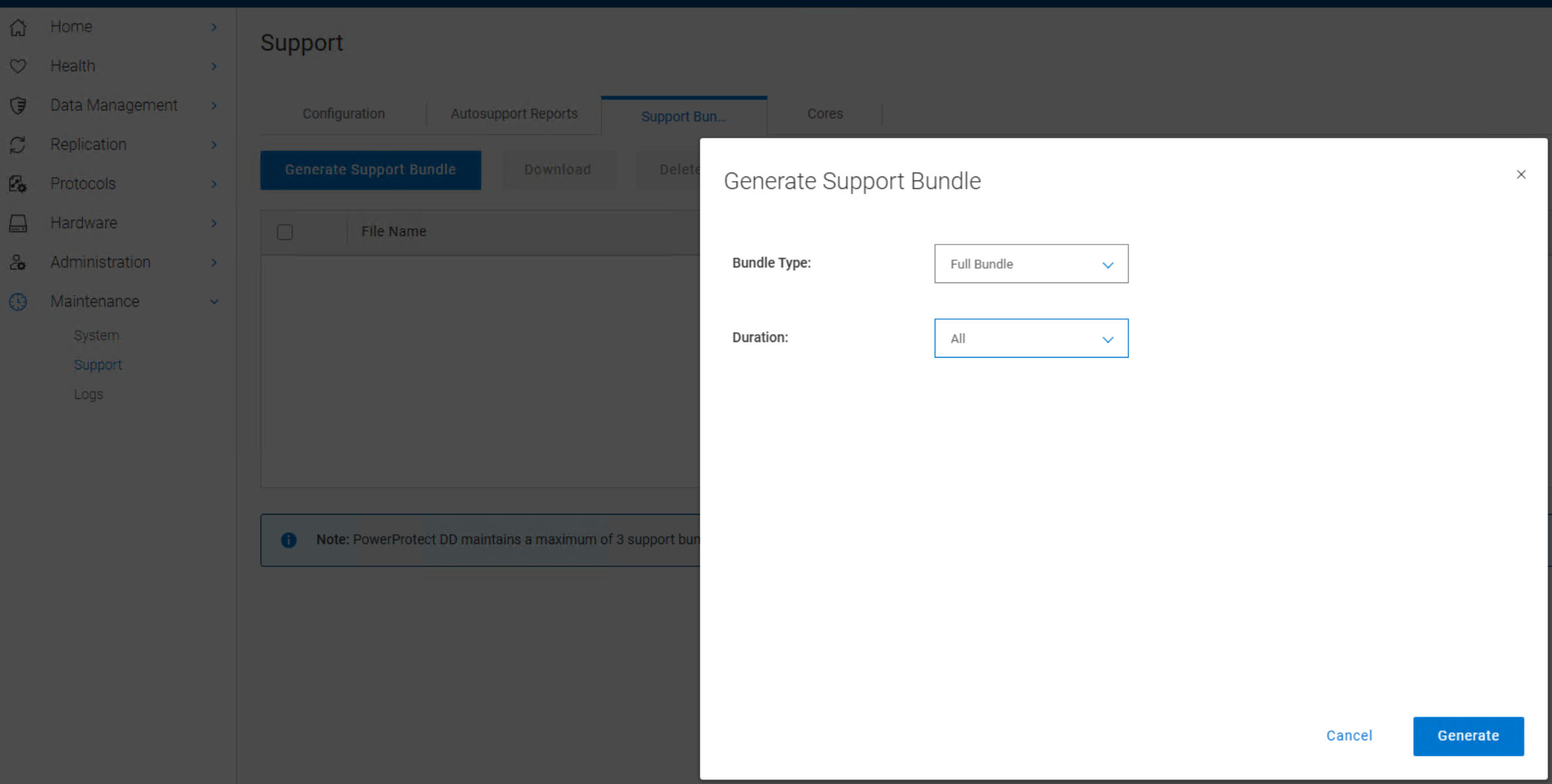
NOTE: When specifying a date or time range, ensure that the times selected encapsulate the time the failure was observed in NetWorker.
Review the bundle's \ddr\var\log\debug\ddfs.info log that overlaps with the NetWorker failure and look for failures which may align. For example:
DM_NS_BTREE: dmbt_commit: Committed B+Tree mid=1720731786 commit_id:126441 nvram_used:212928 pages flushed = 18 pages unsynced = 17 cummulative pages unsynced = 59
...
write_batch 0.627ms 0.371ms 79679 17052 1 0 0 0 96732 12.768 0.043
In this example, high unsynced page counts suggested that the DD is struggling to keep up. This indicates that DD is not flushing fast enough, risking memory overflow and write delays. The correlation here, is that the job in NetWorker is failing with "the call timed out."
On this particular DD it was found that there were multiple disk failure alerts: alerts show current
The disk failures were contributing to storage latency preventing the jobs from completing in a timely manner.
NOTE: This is just one example, there are many different network or storage latency factors that could result in a "call timed out" error. It may be necessary to have both a NetWorker and Data Domain support case opened.
Affected Products
Data Domain, NetWorkerProducts
NetWorker FamilyArticle Properties
Article Number: 000378723
Article Type: How To
Last Modified: 15 أيلول 2026
Version: 3
Find answers to your questions from other Dell users
Support Services
Check if your device is covered by Support Services.