Windows Server: Export system logs and application logs in Windows Event Viewer for PowerEdge Servers
Summary: This article explains how to export the Windows Server logs in Windows Server. These logs can help to identify and resolve windows issues.
This article applies to
This article does not apply to
This article is not tied to any specific product.
Not all product versions are identified in this article.
Instructions
Export Windows Server event logs
Use the following steps to export the Application or System event logs from Windows Event Viewer:
- Press Win + R to open the Run dialog box.
- Type the following command and press Enter:
eventvwr.msc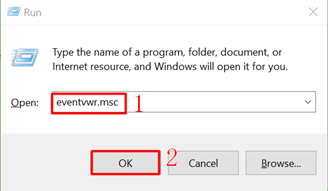
- In the left pane, click Windows Logs.
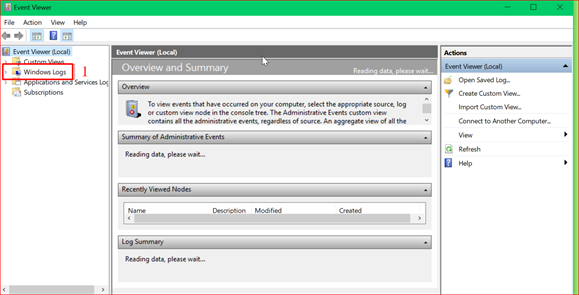
- Select System to view system logs or select Application to view application logs.
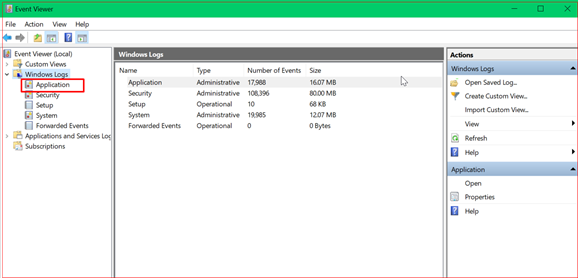
All events for the selected log are displayed.
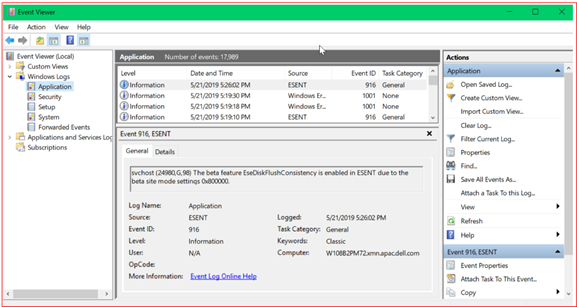
- In the top menu bar, click Action and then click Save All Events As.
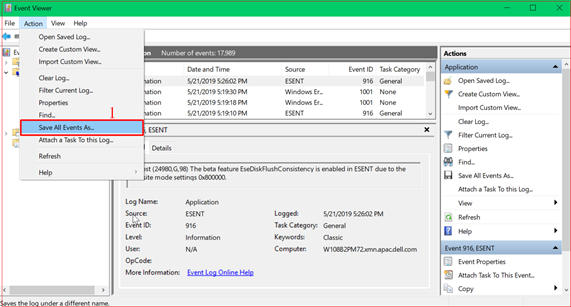
- Enter a file name and select a save location. These exported log files can be sent to Dell Technical Support to help identify and resolve issues.
Affected Products
Microsoft Windows Server 2016, Microsoft Windows Server 2019, Microsoft Windows Server 2022Products
PowerEdge M640, PowerEdge M640 (for PE VRTX), PowerEdge MX740C, PowerEdge MX750c, PowerEdge MX760c, PowerEdge MX840C, PowerEdge R240, PowerEdge R250, PowerEdge R260, PowerEdge R340, PowerEdge R350, PowerEdge R360, PowerEdge R440, PowerEdge R450
, PowerEdge R540, PowerEdge R550, PowerEdge R640, PowerEdge R6415, PowerEdge R650, PowerEdge R650xs, PowerEdge R6515, PowerEdge R6525, PowerEdge R660, PowerEdge R660xs, PowerEdge R6615, PowerEdge R6625, PowerEdge R740, PowerEdge R740XD, PowerEdge R740XD2, PowerEdge R7415, PowerEdge R7425, PowerEdge R750, PowerEdge R750XA, PowerEdge R750xs, PowerEdge R7515, PowerEdge R7525, PowerEdge R760, PowerEdge R760XA, PowerEdge R760xd2, PowerEdge R760xs, PowerEdge R7615, PowerEdge R7625, PowerEdge R840, PowerEdge R860, PowerEdge R940, PowerEdge R940xa, PowerEdge R960, PowerEdge T140, PowerEdge T150, PowerEdge T160, PowerEdge T340, PowerEdge T350, PowerEdge T360, PowerEdge T440, PowerEdge T550, PowerEdge T560, PowerEdge T640
...
Article Properties
Article Number: 000134674
Article Type: How To
Last Modified: 09 سبتمبر 2026
Version: 7
Find answers to your questions from other Dell users
Support Services
Check if your device is covered by Support Services.