Data Protection Advisor: 맞춤형 보고서를 미리 볼 때 오류 500 발생
Summary: Data Protection Advisor는 맞춤 보고서를 미리 볼 때 보고서가 예약된 대로 올바르게 실행되더라도 오류 500 발생을 표시합니다.
This article applies to
This article does not apply to
This article is not tied to any specific product.
Not all product versions are identified in this article.
Symptoms
DPA(Data Protection Advisor)에서 맞춤 보고서를 미리 볼 때 다음 오류 500이 표시됩니다.
RendererFactory could not create the RendererParametersXML
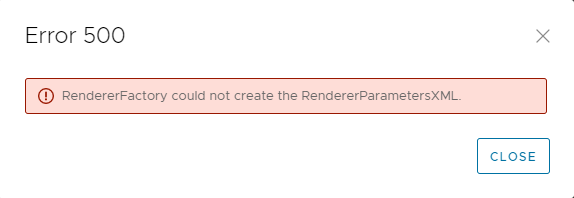
예약된 대로 보고서가 올바르게 실행됩니다.
이 문제는 Custom Report Templates에서 보고서를 미리 볼 때만 발생합니다.
애플리케이션 서버의 DPA server.log에 다음 메시지가 기록됩니다.
2022-11-07 15:00:07,170 ERROR [com.emc.dpa.command.reporter.execution.ReportRendererMDB] (Thread-56839) Error getting response from report engine for run id 7d326f70-0ac2-4d48-9b3d-300c306b86ad: com.emc.dpa.
datamodel.render.RendererServiceException: RendererFactory could not create the RendererParametersXML
...
Caused by: com.ctc.wstx.exc.WstxUnexpectedCharException: Unexpected character ' ' (code 32) (missing name?)
at [row,col {unknown-source}]: [3,69]
Cause
이 문제는 보고서 제목에 특수 문자 "&"가 포함되어 있을 때 발생합니다.
참고: 이 이름은 맞춤형 보고서 템플릿의 이름이 아닙니다. 보고서 형식 옵션에서 구성되는 보고서 제목입니다.
Resolution
보고서 제목에서 "&" 기호를 제거해야 합니다.
- Custom Report Templates에서 보고서를 선택하고 EDIT를 클릭합니다.
- Preview 탭을 클릭한 다음 REPORT FORMAT > TABLE FORMAT을 클릭합니다.
- Table Format 화면에서 Title 필드의 텍스트에서 "&" 기호를 제거합니다.
- 보고서를 저장하고 미리 보기가 오류 없이 실행되는지 확인합니다.
자세한 내용은 Dell 기술 지원 부서에 문의하십시오.
Affected Products
Data Protection AdvisorArticle Properties
Article Number: 000205086
Article Type: Solution
Last Modified: 15 سبتمبر 2026
Version: 6
Find answers to your questions from other Dell users
Support Services
Check if your device is covered by Support Services.