Data Protection Advisor:預覽自訂報告時發生錯誤 500
Summary: Data Protection Advisor 顯示錯誤 500 是在預覽自訂報告時發生 500 雖然報告在排程時可正確執行。
This article applies to
This article does not apply to
This article is not tied to any specific product.
Not all product versions are identified in this article.
Symptoms
在 Data Protection Advisor (DPA) 中預覽自訂報告時,會顯示下列錯誤 500:
RendererFactory could not create the RendererParametersXML
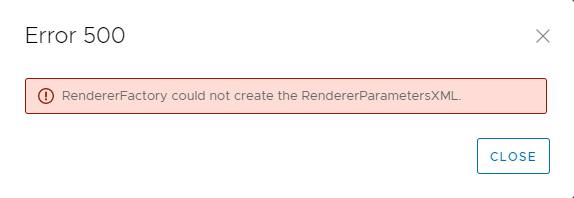
報告按計劃正確運行。
只有在 自定義報告範本下預覽報告時,才會發生此問題。
以下訊息會記錄在應用程式伺服器上的 DPA server.log中:
2022-11-07 15:00:07,170 ERROR [com.emc.dpa.command.reporter.execution.ReportRendererMDB] (Thread-56839) Error getting response from report engine for run id 7d326f70-0ac2-4d48-9b3d-300c306b86ad: com.emc.dpa.
datamodel.render.RendererServiceException: RendererFactory could not create the RendererParametersXML
...
Caused by: com.ctc.wstx.exc.WstxUnexpectedCharException: Unexpected character ' ' (code 32) (missing name?)
at [row,col {unknown-source}]: [3,69]
Cause
當報表標題包含「&」特殊字元時,會出現此問題。
注意: 這不是自訂報告範本的名稱。這是報表的標題,在「報表格式」選項中配置。
Resolution
必須從報表標題中刪除“&”符號。
- 在自訂報告範本中選取報告,然後按一下編輯。
- 按一下預覽標籤,然後按一下報告格式 > 表格格式。
- 在“表格格式”螢幕中,從“標題”字段中的文本中刪除“&”符號。
- 保存報表並確認預覽運行沒有錯誤。
如需更多詳細資訊,請聯絡 Dell 技術支援部門。
Affected Products
Data Protection AdvisorArticle Properties
Article Number: 000205086
Article Type: Solution
Last Modified: 15 سبتمبر 2026
Version: 6
Find answers to your questions from other Dell users
Support Services
Check if your device is covered by Support Services.