Dell Data Lakehouse: Alert DDL_1004 DDLOverUtilized
Summary: This article provides troubleshooting steps and resolution for Dell Data Lakehouse overutilized, which triggers the critical alert DDL_1004. Follow the steps outlined in this article to resolve the issue. ...
This article applies to
This article does not apply to
This article is not tied to any specific product.
Not all product versions are identified in this article.
Symptoms
The number of nodes in use exceeds the number of nodes that have been registered for the cluster. Update with a new LAC for the nodes that have not been registered.
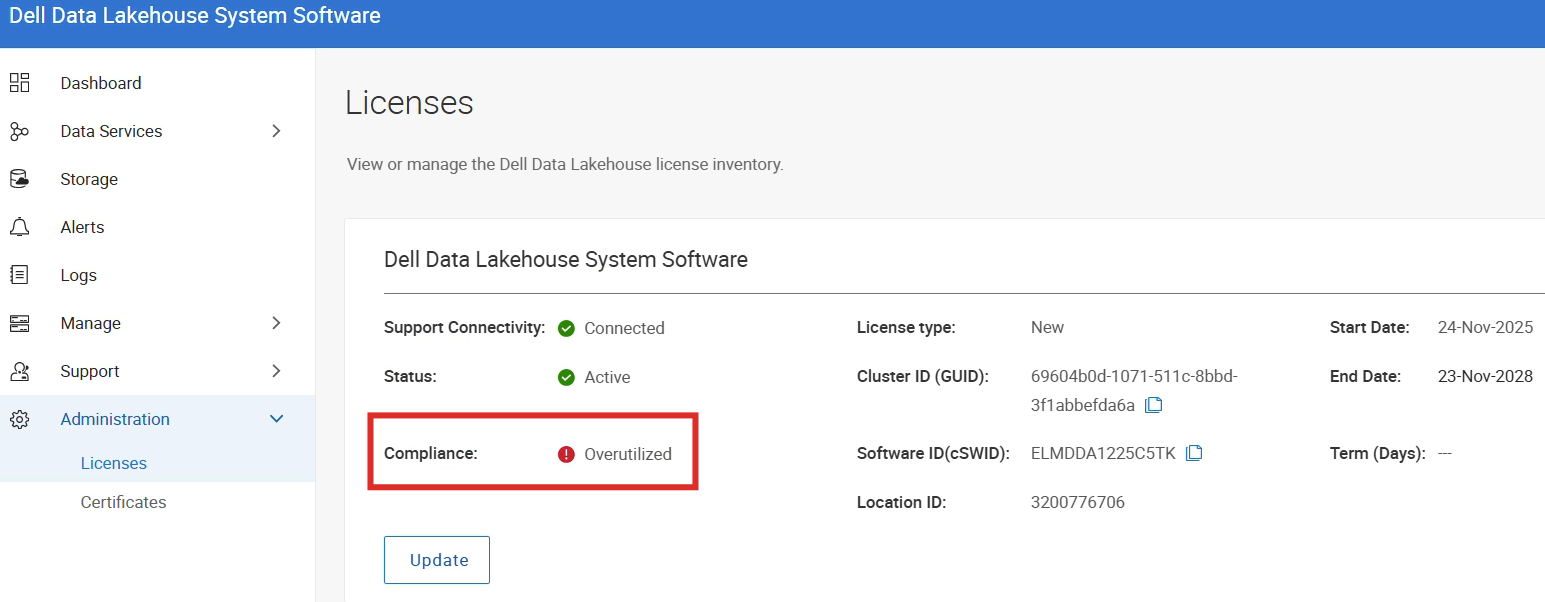
Within the admin WebUI, the compliance shows Overutilized with the licensing section.
Cause
Warning Severity:
This event may be produced in the below ways:
[WARNING] Some of the nodes that are as part of the cluster are not registered with the Dell Licensing backend.
Normal Severity:
This event is triggered when the DDL‑1004 warning alert is automatically acknowledged after the previously unregistered nodes have been registered.
Resolution
Follow these steps to update your Dell Data Lakehouse System Software license, follow these steps sequentially.
- Contact Dell Support to obtain a new License Activation Code.
- Go to Administration > Licenses.
- Under Dell Data Lakehouse System Software, click Update.
- Enter the new License Activation Code in the provided field.
- Click Apply to save the changes.
- Verify that the license status changes to Active.
- Verify that the compliance changes to OK.
If encountering any issues during the update process or if nodes are not updated correctly, check that any new alerts are raised. Collect the log bundle and contact Dell Support for further assistance with the details on the recently raised alerts.
Affected Products
Data ManagementArticle Properties
Article Number: 000418935
Article Type: Solution
Last Modified: 29 يناير 2026
Version: 1
Find answers to your questions from other Dell users
Support Services
Check if your device is covered by Support Services.