NVP-vProxy: SQL VM "Logs Only" Backup Fails "save level is invalid"
Summary: The NetWorker VMware Protection (NVP) solution is configured to perform Microsoft SQL Server backups using the MSVMAPPAGENT. The backup action was scheduled using the "Logs Only" backup level; however, the job immediately fails with "save level is invalid." This article demonstrates how to configure transaction log backups for SQL databases. ...
This article applies to
This article does not apply to
This article is not tied to any specific product.
Not all product versions are identified in this article.
Symptoms
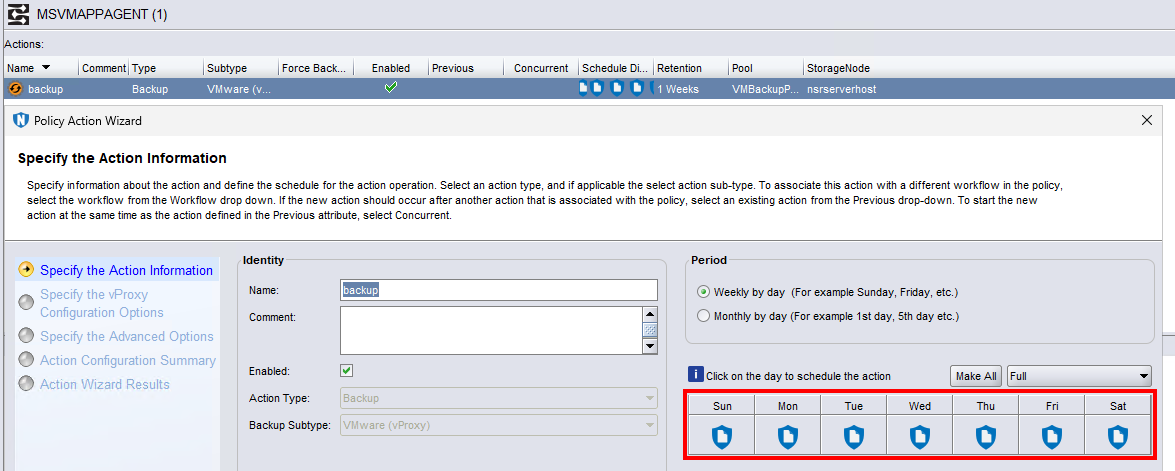
A Microsoft SQL server is configured to be backed up by a backup action using the "Logs Only" backup level:
The backup action immediately fails:
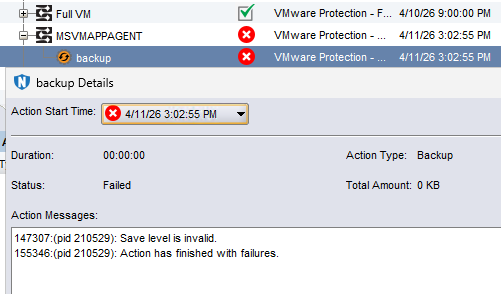
If the backup level is set to another level (for example: incremental or full) the SQL Virtual Machine (VM) backup succeeds.
Cause
This is a configuration issue.
Resolution
To configure Logs Only backup. The VM "Image level" backup and the "database backup" should be separate from the Transaction Log (txnlog) backup.
Configure Image Level and Database Backup:
- Create a backup group the contains the SQL VM:
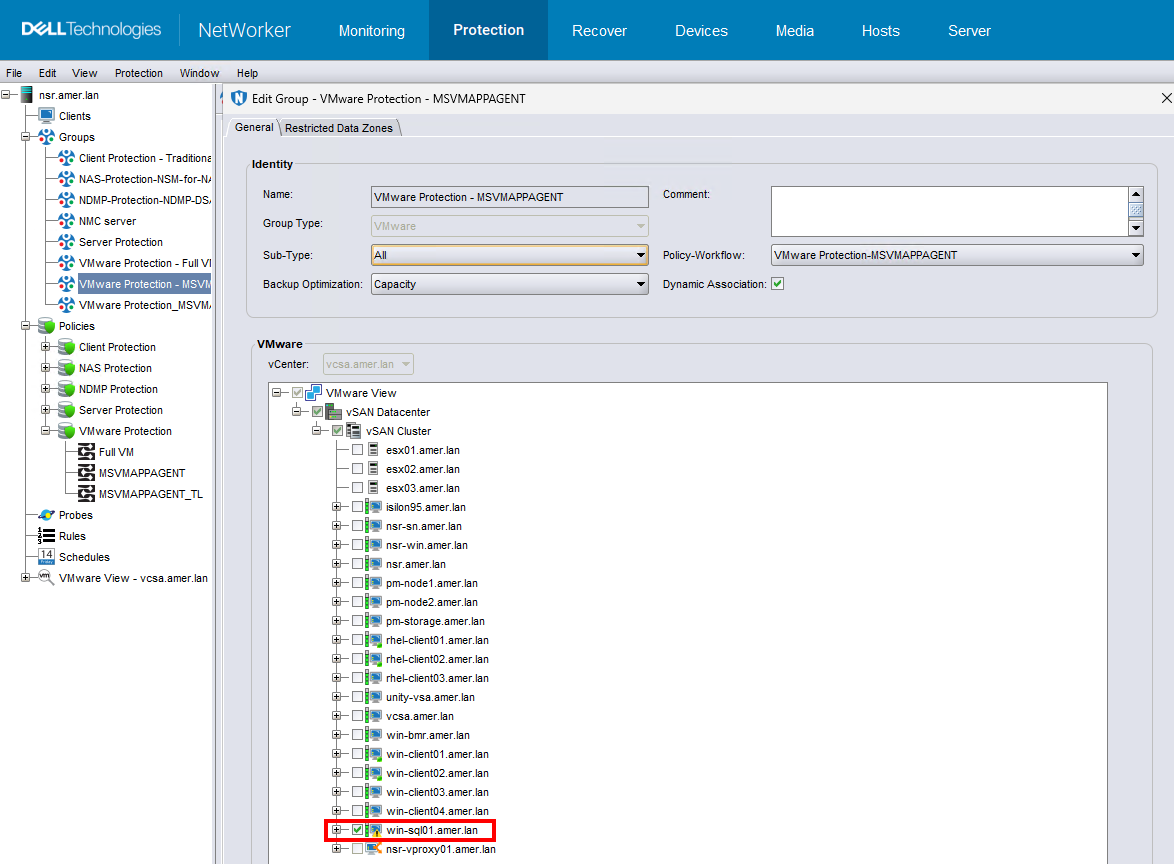
- Configure a Policy and Workflow to backup the SQL VM.
- The backup can be configured using level "Incremental." The initial backup is a level full and all subsequent backups are incremental.
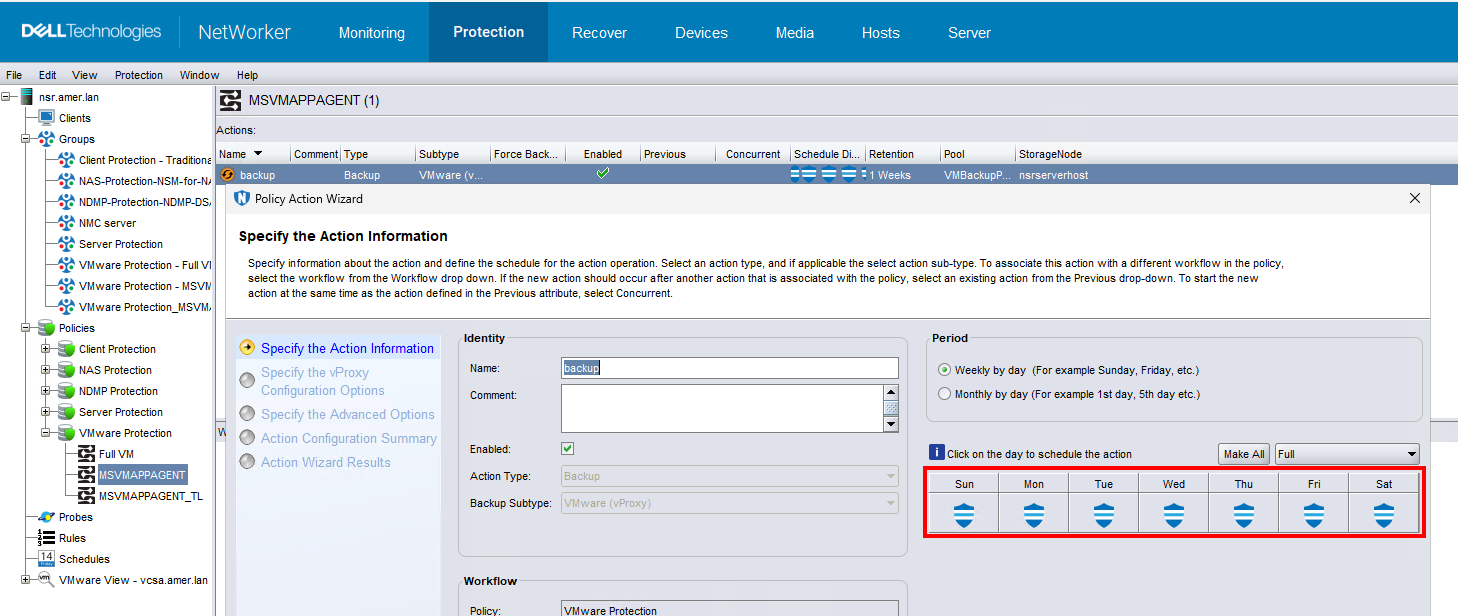
NOTE: All NVP backups are performed to Data Domain. The Data Domain automatically creates virtual synthetic full (VSF) backups from the incremental backups. All incremental backups are treated as "full" and can be used to recover the entire VM from the point of backup. For more information, see: NVP vProxy-Understanding VMware VM backup levels and sizes shown in NetWorker
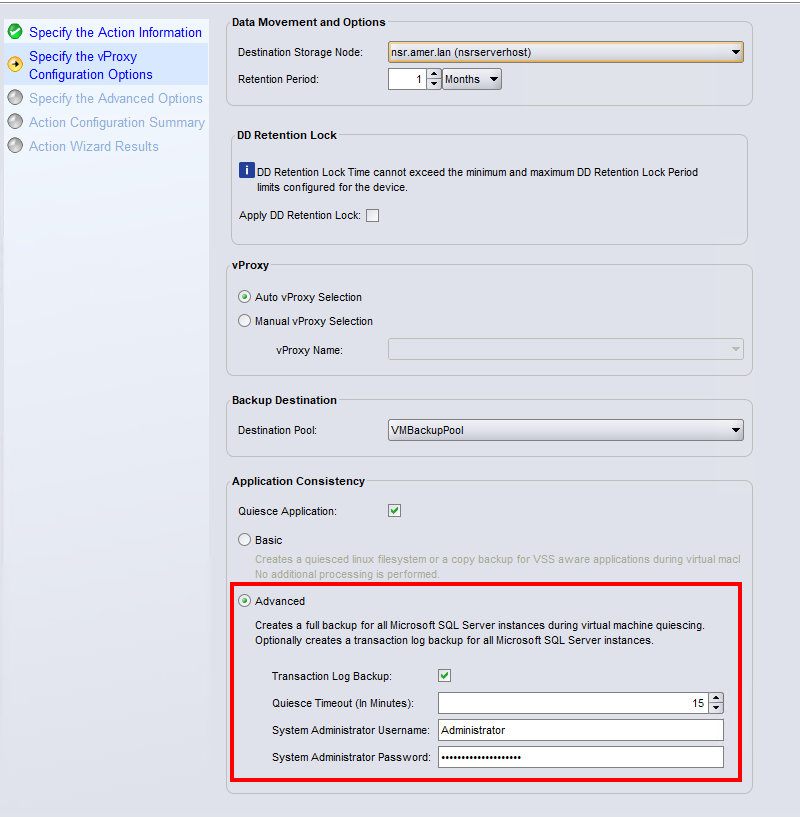
- In the Specify the vProxy Operations window, select Quiesce Application, select Advanced. (Optional) Select the Transaction Log Backup option to include the transaction logs with the database backup. Enter an Administrative user for the SQL server instance. The user account must have
sysadminrole in the SQL server.
.
- Perform a backup of the VM.
This backup creates a Virtual Machine Disk (VMDK) level backup of the VM which contains an application consistent copy of the database. The following logs are seen in the SQL Server Management Studio (SSMS) Log Viewer.

The following log also exists on the SQL VM: C:\Program Files\DPSAPPS\MSVMAPPAGENT\logs\msvmcatsnap.log
The backup shows as a level full backup in the NetWorker server media database, even when an incremental is scheduled (and performed): mminfo -avot -q vmname=SQL_VM-NAME,level=full
[root@nsr ~]# mminfo -avot -q vmname=win-sql01.amer.lan
 volume        type   client           date     time         size ssid      fl   lvl name
...
VMBackupPool.002 Data Domain vcsa.amer.lan 04/11/2026 11:38:14 AM 104 GB 4124732135 cr full vm:503ea434-0331-8ed6-8b19-b9cd408cce7a:vcsa.amer.lan
Configure Transaction Log Backups:
Prerequisites:
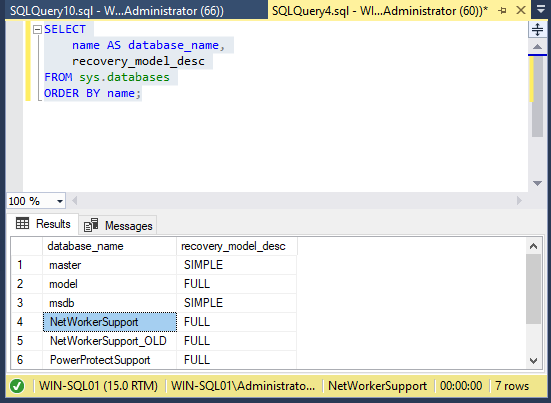
- The SQL database must use the
FULLorBULK_LOGGEDrecovery model. Databases with aSIMPLErecovery model do not support transaction log backups. These are SQL server settings external to NetWorker. The following SQL command lists the recovery mode:
SELECT
    name AS database_name,
    recovery_model_desc
FROM sys.databases
ORDER BY name;
Example:
- The
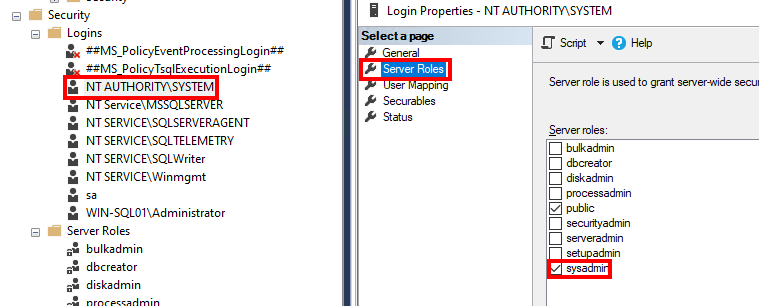
NT AUTHORITY\SYSTEMaccount must havesysadminrole in SQL server Security -> Logins settings: -
Transaction Log (txnlog) backups must be performed in a workflow with a defined interval. A separate group must be created containing the SQL VM. When you perform a "Transaction Log" backup, only the transaction logs are backed up, no VMware files are protected.
- Create another Group containing the SQL VM.
- Create a new Workflow for the transaction log backups. In the workflow properties, define an Interval:
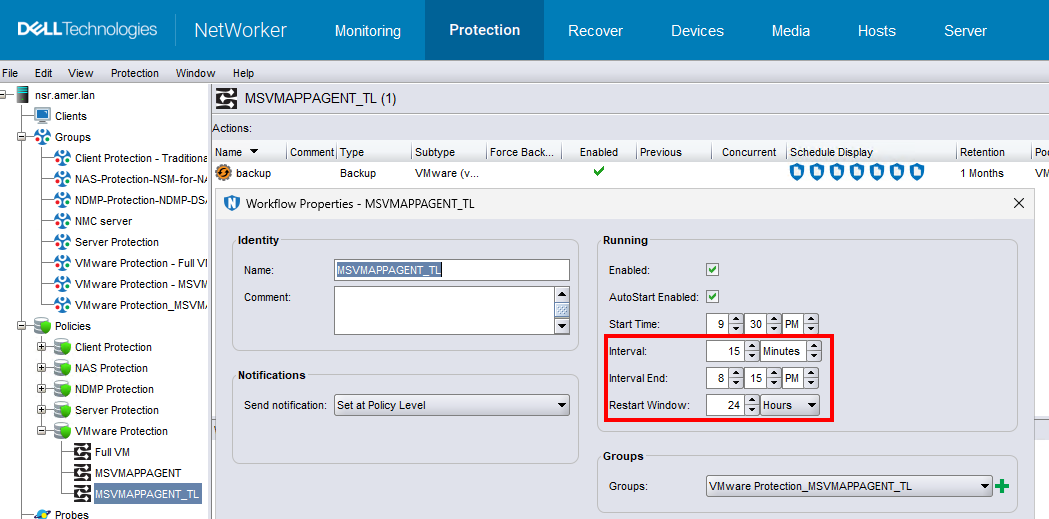
In this example configuration, the Image and Database backup are configured to start at 21:00 in the workflow MSVMAPPAGENT. The Transaction Log (txnlog) backup is configured to backup in the MSVMAPPAGENT_TL workflow every 15 minutes. The transaction log backups start 30 minutes after the initial database backup and run in 15 minute intervals until 20:45. The interval and scheduling depends on your protection requirements and the backup completion times in your environment.
- Create a backup action with the level Logs Only:

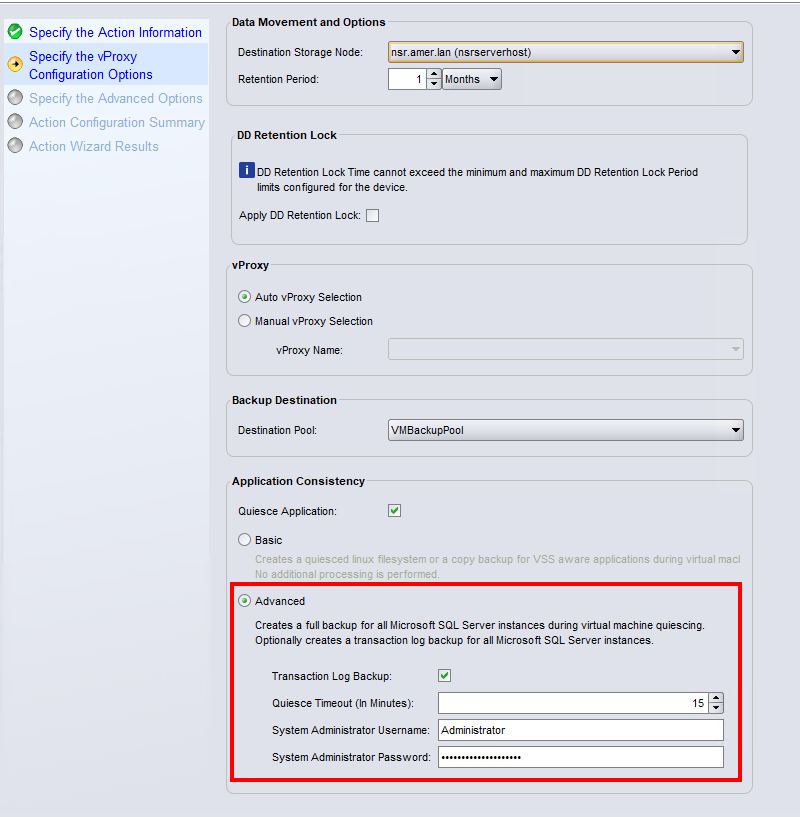
- In the Specify the vProxy Operations window, select Quiesce Application, select Advanced and select Transaction Log Backup. Enter an Administrative user for the SQL server instance. The user account must have
sysadminrole in the SQL server.
- Complete the action configuration.
NOTE: Transaction Log backups only run as per their schedule. If you manually start the Transaction Log backup workflow, a full database backup is performed instead.
When the backup is performed, the following logs are seen in the SQL Server Management Studio (SSMS) Log Viewer:

The following log also exists on the SQL VM: C:\Program Files\DPSAPPS\MSVMAPPAGENT\logs\msvmagent_appbackup.log
The NetWorker server mminfo command lists these backups with backup level txnlog: mminfo -avot -q vmname=SQL_VM-NAME,level=txnlog
[root@nsr ~]# mminfo -avot -q vmname=win-sql01.amer.lan,level=txnlog
 volume        type   client           date     time         size ssid      fl   lvl name
...
VMBackupPool.002 Data Domain vcsa.amer.lan 04/11/2026 03:01:02 PM 228 KB 4074412655 cr txnlog vm:503ea434-0331-8ed6-8b19-b9cd408cce7a:vcsa.amer.lan
VMBackupPool.002 Data Domain vcsa.amer.lan 04/11/2026 03:15:09 PM 229 KB 4057636287 cr txnlog vm:503ea434-0331-8ed6-8b19-b9cd408cce7a:vcsa.amer.lan
VMBackupPool.002 Data Domain vcsa.amer.lan 04/11/2026 03:30:09 PM 229 KB 4040859971 cr txnlog vm:503ea434-0331-8ed6-8b19-b9cd408cce7a:vcsa.amer.lan
VMBackupPool.002 Data Domain vcsa.amer.lan 04/11/2026 03:45:09 PM 230 KB 4024083655 cr txnlog vm:503ea434-0331-8ed6-8b19-b9cd408cce7a:vcsa.amer.lan
Additional Information
The following logs on the SQL VM detail the MSVMAPPAGENT operations:
- Discovery log:
C:\Program Files\DPSAPPS\MSVMAPPAGENT\logs\msvmagent_discovery.log - FULL backup:
C:\Program Files\DPSAPPS\MSVMAPPAGENT\logs\msvmcatsnap.log - Transaction log backup:
C:\Program Files\DPSAPPS\MSVMAPPAGENT\logs\msvmagent_appbackup.log - Restore of FULL backup:
C:\Program Files\DPSAPPS\MSVMAPPAGENT\logs\msvmagent_snapshotrestore.log - Restore of transaction log backup:
C:\Program Files\DPSAPPS\MSVMAPPAGENT\logs\msvmagent_apprestore.log
Affected Products
NetWorkerProducts
NetWorker FamilyArticle Properties
Article Number: 000451473
Article Type: Solution
Last Modified: 17 أبريل 2026
Version: 2
Find answers to your questions from other Dell users
Support Services
Check if your device is covered by Support Services.