Dell Unity: How to Reboot A Storage Processor
Summary: This article provides different methods to safely reboot a Unity Storage Processor (SP).
This article applies to
This article does not apply to
This article is not tied to any specific product.
Not all product versions are identified in this article.
Instructions
Rebooting a Storage Processor (SP) can safely resolve minor problems with the SP, its components, or the system software on the SP.
Caution:
When an SP reboots, it stops servicing I/O to hosts. In virtual deployments, data is unavailable during an SP reboot. In physical deployments, all NAS servers on the SP fail over to the other SP, if it is healthy. By default, when the SP has finished rebooting, the NAS servers fail back to it. If the Failback Policy is disabled, all NAS servers owned by the rebooting SP will not failback automatically. Once the SP is back online, NAS Servers will remain on the peer SP. Performance can be impacted when all NAS servers reside on a single SP. You can manually fail back the NAS servers when both SPs are online.
Unisphere:
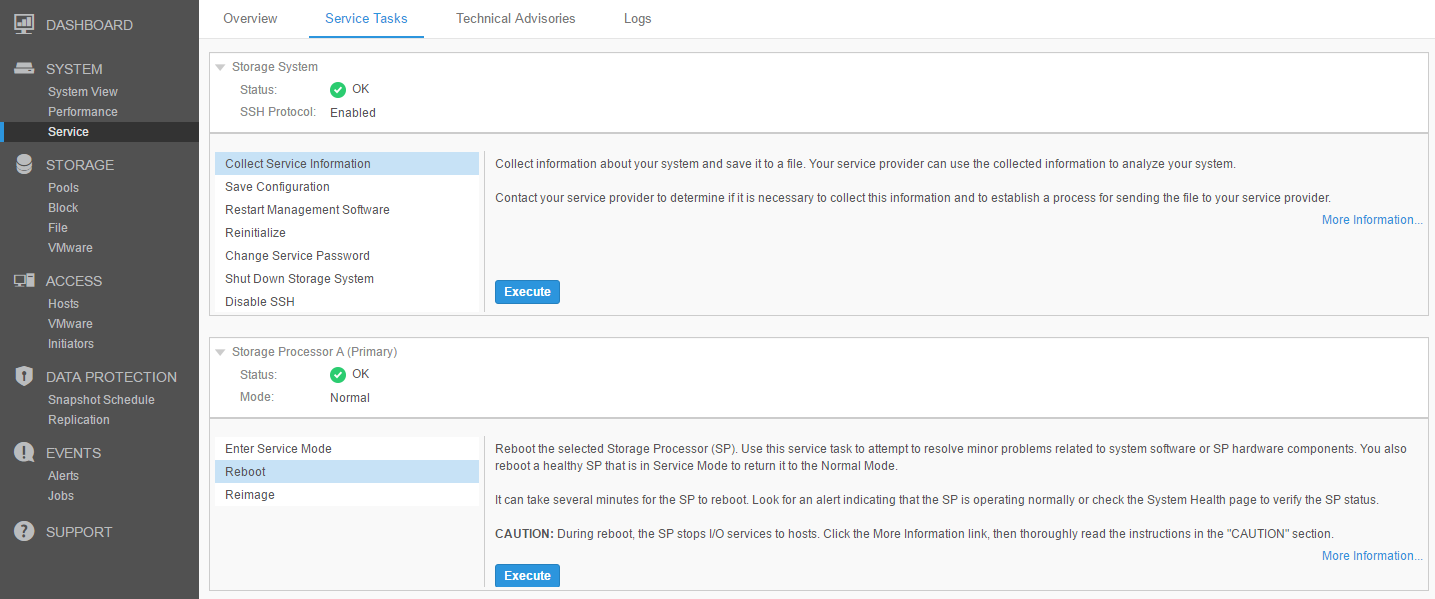
- Execute the Reboot task and confirm.
- Wait around 20 minutes while the SP reboots.
- SP reboot is completed when the Mode field displays Normal.
- Bear in mind that the Unisphere UI may not refresh automatically. If prompted, reload the Unisphere UI. Or reload the UI manually.
- In virtual deployments, you can monitor the reboot by using the VMware console. For information, see the VMware documentation.
SSH:
- Issue the command:
svc_shutdown --reboot spx- W
here spx is spa or spb, depending if the SP to be rebooted is SPA or SPB.
- SP Boot can be monitored from the surviving SP with the following command:
-
svc_diag --monitor-peer
-
For further information on how to monitor the SP boot sequence, see Dell Unity: How to monitor the peer SP boot sequence (Dell Correctable)
Additional Information
For more detailed procedures, see SolVe Online: Self Service Procedures for Products.
Affected Products
Dell EMC Unity, Dell EMC Unity XT 380, Dell EMC Unity XT 380F, Dell EMC Unity XT 480, Dell EMC Unity XT 480F, Dell EMC Unity 650F, Dell EMC Unity XT 680, Dell EMC Unity XT 680F, Dell EMC Unity Family |Dell EMC Unity All Flash, Dell EMC Unity HybridProducts
Dell Unity 450F DC, Dell Unity 300 DC, Dell Unity 350F DC, Dell Unity 400 DC, Dell EMC Unity XT 880, Dell EMC Unity XT 880F, Dell Unity Operating Environment (OE)Article Properties
Article Number: 000004451
Article Type: How To
Last Modified: 12 ربيع الآخر 1448
Version: 7
Find answers to your questions from other Dell users
Support Services
Check if your device is covered by Support Services.