Dell Unity: How to Identify the Primary Storage Processor
Summary: This article explains how to identify the Primary Storage Processor (SP) on a Dell Unity system. It describes how to determine which SP is hosting the ECOM management service by using either the Unisphere GUI or an SSH/SOL session, and how to verify the Primary SP by checking for the active ECOM process. ...
This article applies to
This article does not apply to
This article is not tied to any specific product.
Not all product versions are identified in this article.
Instructions
The management software (ECOM), which provides Unisphere and related management services, runs on one Storage Processor (SP) at a time. The SP hosting these services is designated as the Primary SP.
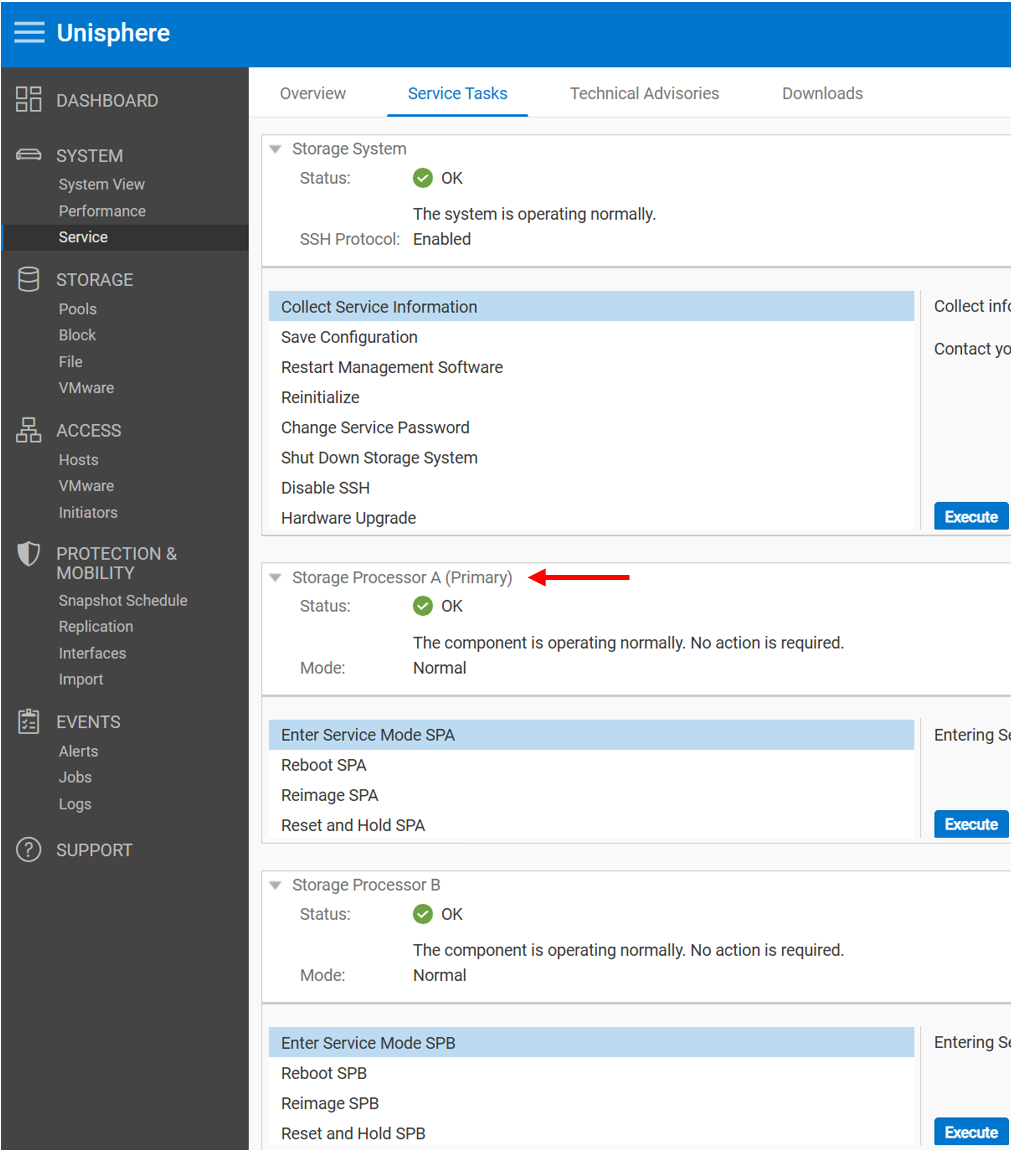
You can identify the Primary SP from the Service page in Unisphere, as shown in the following example.
View the Primary SP in Unisphere (UI)
- Log in to the Unity Unisphere GUI using an account with administrative privileges.
- Select the Service tab.
- Navigate to Service Tasks.
- Locate the Primary Storage Processor information to determine which SP is currently hosting the management services.
Alternatively, if you want to keep it very concise:
The management software (ECOM), including Unisphere and related management services, runs on a single Storage Processor (SP), known as the Primary SP. The current Primary SP can be viewed from the Service page in Unisphere.
View the Primary SP Using SSH
You can also identify the Primary Storage Processor (SP) using an SSH or Serial Over LAN (SOL) connection.
The Primary SP runs the ECOM management service and returns a Process ID (PID) when the following command is executed:
Example:
- In this example, no PID is returned, indicating that SPB is not the Primary SP.
spa:~/user# pgrep ECOM
28771
The non-primary SP does not run the ECOM service. Running the same command on that SP returns no output because no ECOM process is active.
Example:
- In this example, no PID is returned, indicating that SPB is not the Primary SP.
spb:~/user# pgrep ECOM
The Primary SP runs the ECOM management service and returns a Process ID (PID) when the following command is executed:
Example:
- In this example, no PID is returned, indicating that SPB is not the Primary SP.
spa:~/user# pgrep ECOM
28771
The non-primary SP does not run the ECOM service. Running the same command on that SP returns no output because no ECOM process is active.
Example:
- In this example, no PID is returned, indicating that SPB is not the Primary SP.
spb:~/user# pgrep ECOMAdditional Information
Unlike the legacy Dell EMC VNX and CLARiiON arrays where the management process (Management Server) was active on both Storage Processors, on Unity arrays, the choice was made to have only one active Storage Processor (Primary SP) to reduce the number of IP addresses required.
If the primary SP reboots, panics, or the management connection goes down, the management software automatically fails over to the peer SP. After a failover, it may take a few minutes for all the services to fully start. Users that are logged in to Unisphere during the failover may see a message indicating that the connection was lost. When the failover process completes, you can restore access to Unisphere by refreshing the browser.
Note that host access to storage data resources is not affected by this.
After the failover, the management software continues to run on the new SP, even if the other SP returns to a healthy state. This SP continues to run as the Primary SP, until it is rebooted or failed over.
Affected Products
Dell EMC Unity, Dell EMC Unity XT 380, Dell EMC Unity XT 380F, Dell EMC Unity XT 480, Dell EMC Unity XT 480F, Dell EMC Unity 650F, Dell EMC Unity XT 680, Dell EMC Unity XT 680F, Dell EMC Unity Family |Dell EMC Unity All Flash, Dell EMC Unity HybridProducts
Dell Unity 450F DC, Dell Unity 300 DC, Dell Unity 350F DC, Dell Unity 400 DC, Dell EMC Unity XT 880, Dell EMC Unity XT 880F, Dell Unity Operating Environment (OE)Article Properties
Article Number: 000022649
Article Type: How To
Last Modified: 12 ربيع الآخر 1448
Version: 6
Find answers to your questions from other Dell users
Support Services
Check if your device is covered by Support Services.