PowerScale: Grundlegendes zu nicht standardmäßigen NFSv4-Einstellungen
Summary: Grundlegendes zu nicht standardmäßigen NFSv4-Einstellungen in einem PowerScale-Cluster
This article applies to
This article does not apply to
This article is not tied to any specific product.
Not all product versions are identified in this article.
Instructions
Manchmal führt das NFSv4-Standard-Setup zu unerwarteten Ergebnissen. Die folgenden Probleme können auftreten und wie angegeben angepasst werden. Best Practice empfiehlt, nicht standardmäßige Einstellungen zu vermeiden, da diese häufig die Unterstützung für NFSv4-Zugriffskontrolllisten (Access Control List, ACL) beeinträchtigen.
- NFSv4-Domain nicht konfiguriert:
- "Root ownership" wird angezeigt als
nobody:nobody, während Nicht-Root-Nutzer korrekteuser:groupKontext. Ohne Domaininformationen ist die ACL-Unterstützung beim Mounten unwahrscheinlich. Weitere Informationen finden Sie unter PowerScale: NFSv4-Clients können nicht auf Ressourcen zugreifen, da Eigentümer/Gruppe als nobody/nogroup aufgeführt ist, um weitere Details zu erhalten.
- "Root ownership" wird angezeigt als
- Die NFSv4-Domain ist konfiguriert:
- "Root ownership" wird angezeigt als
root:wheelanstelle vonroot:root. Dies geschieht, weil NFSv4 UID- und GID-Namen vom Server zurückgibt. In OneFS werden UID 0 und GID 0 zugeordnetroot:wheel. Linux-Systemen fehlt möglicherweise die Gruppe "wheel" oder weist ihr GID 10 zu. Ein möglicher Workaround ist das Hinzufügen von root zur Gruppe "wheel" auf dem Linux-Client. Dies würde Änderungen an jedem Client erfordern, vermeidet jedoch serverseitige Konfigurationsänderungen. Eine clusterseitige Alternative wäre das Einstellennfsv4-no-namesJa, aber das hat Vorbehalte.
- "Root ownership" wird angezeigt als
- NFSv4 No Names sind auf nicht standardmäßige Werte gesetzt JA:
- Diese Einstellung sendet UIDs/GIDs anstelle von
user@domain. "Root ownership" wird angezeigt alsroot:root, aber die ACL-Unterstützung schlägt fehl, weil das Protokolluser@domainSyntax pro RFC. Diese Einstellung wird nicht als permanente Problemumgehung empfohlen, da sie die NFSv4-ACL-Funktionalität beeinträchtigt.
- Diese Einstellung sendet UIDs/GIDs anstelle von
Technische Details zu NFS-Zoneneinstellungen sind verfügbar, indem Sie den folgenden Befehl ausführen:
# isi nfs settings zone modify -h
Description:
    Change the default NFS zone options.

Required Privileges:
    ISI_PRIV_NFS

Usage:
    isi nfs settings zone modify
        [--nfsv4-domain <string>]
        [--revert-nfsv4-domain]
        [--nfsv4-replace-domain <boolean>]
        [--revert-nfsv4-replace-domain]
        [--nfsv4-no-domain <boolean>]
        [--revert-nfsv4-no-domain]
        [--nfsv4-no-domain-uids <boolean>]
        [--revert-nfsv4-no-domain-uids]
        [--nfsv4-no-names <boolean>]
        [--revert-nfsv4-no-names]
        [--nfsv4-allow-numeric-ids <boolean>]
        [--revert-nfsv4-allow-numeric-ids]
        [--zone <string>]
        [{--verbose | -v}]
        [{--help | -h}]

Options:
    --nfsv4-domain <string>
        NFSv4 domain name.
    --revert-nfsv4-domain
        Set value to system default for --nfsv4-domain.
    --nfsv4-replace-domain <boolean>
        Replace owner/group domain with nfs domainname. (v4).
    --revert-nfsv4-replace-domain
        Set value to system default for --nfsv4-replace-domain.
    --nfsv4-no-domain <boolean>
        Send owners/groups without domainname (v4).
    --revert-nfsv4-no-domain
        Set value to system default for --nfsv4-no-domain.
    --nfsv4-no-domain-uids <boolean>
        Send UIDs/GIDs without domainname (v4).
    --revert-nfsv4-no-domain-uids
        Set value to system default for --nfsv4-no-domain-uids.
    --nfsv4-no-names <boolean>
        Always send owners/groups as UIDs/GIDs (v4).
    --revert-nfsv4-no-names
        Set value to system default for --nfsv4-no-names.
    --nfsv4-allow-numeric-ids <boolean>
        Send owners/groups as UIDs/GIDs when lookups fail or if no_names=1 (v4).
    --revert-nfsv4-allow-numeric-ids
        Set value to system default for --nfsv4-allow-numeric-ids.
    --zone <string>
        Access zone.

  Display Options:
    --verbose | -v
        Display more detailed information.
    --help | -h
        Display help for this command.
Standardeinstellungen über die Befehlszeilenschnittstelle:
# isi nfs settings zone view
           NFSv4 Domain: localhost
   NFSv4 Replace Domain: Yes
        NFSv4 No Domain: No
   NFSv4 No Domain UIDs: Yes
         NFSv4 No Names: No
NFSv4 Allow Numeric IDs: Yes
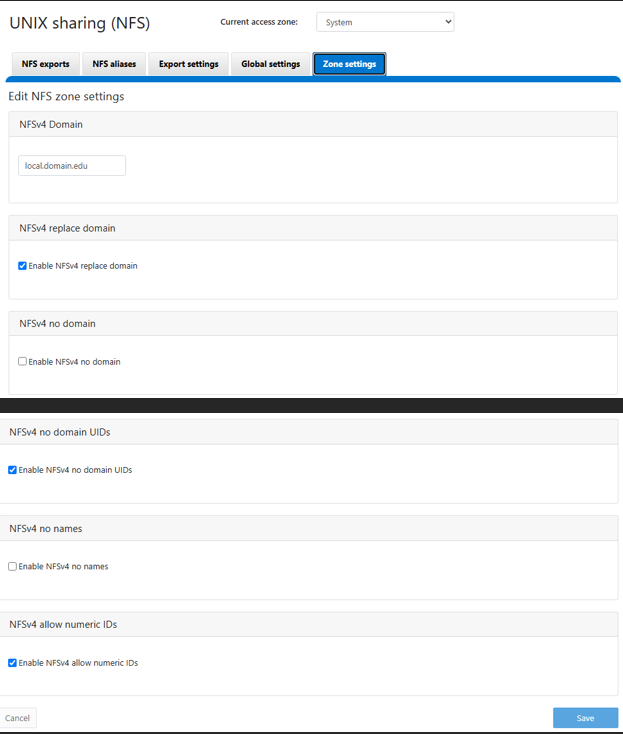
Standardeinstellungen wie in OneFS WebU zu sehen. Dieses Image stammt aus einer OneFS 9.13 WebUI, sollte aber mit früheren Versionen ähnlich sein:
Additional Information
Affected Products
PowerScale OneFSProducts
IsilonArticle Properties
Article Number: 000023023
Article Type: How To
Last Modified: 05 ربيع الآخر 1448
Version: 5
Find answers to your questions from other Dell users
Support Services
Check if your device is covered by Support Services.