MHC Azure Stack 14G | PowerShell warns 'CacheDiskStateNonHybrid' or 'CacheDiskStateIneligibleDataPartition' after disk replacement
Summary: PowerShell warns 'CacheDiskStateNonHybrid' or 'CacheDiskStateIneligibleDataPartition' after disk replacement.
This article applies to
This article does not apply to
This article is not tied to any specific product.
Not all product versions are identified in this article.
Symptoms
PowerShell warns 'CacheDiskStateNonHybrid' or 'CacheDiskStateIneligibleDataPartition' after disk replacement.
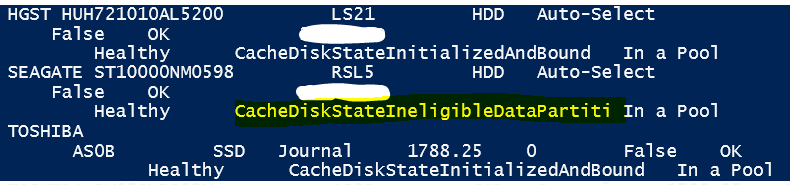
Although the disk is supported in the support matrix, it shows 'CacheDiskStateNonHybrid' or 'CacheDiskStateIneligibleDataPartition' warning message which causes 'test-azurestack' failure and VM failure.
Under hard drives summary of 'test-azurestack -debug', the problematic disk can trigger the warning message 'CacheDiskStateNonHybrid' or 'CacheDiskStateIneligibleDataPartition'.
Upgrading firmware to a higher version does not fix this problem.

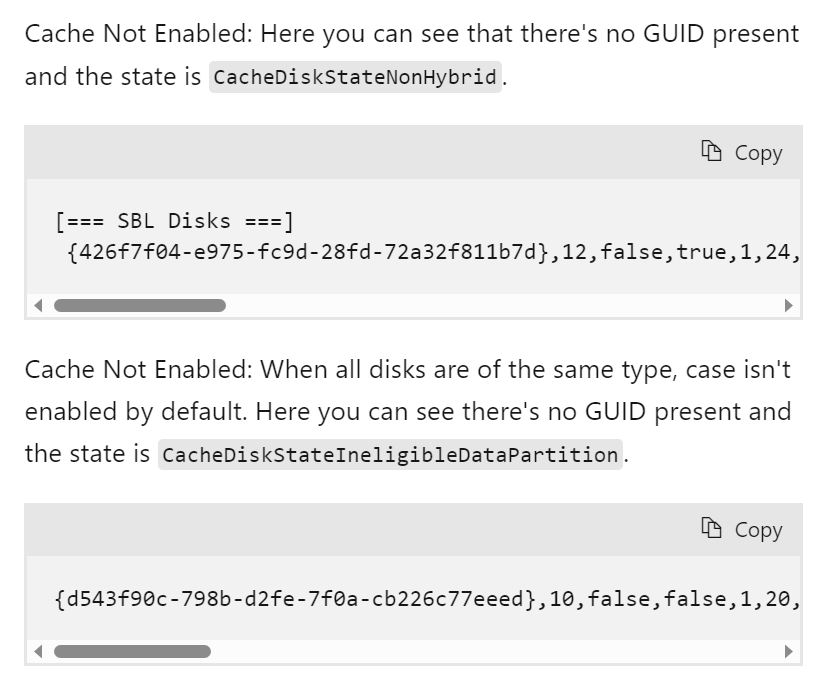
This error is mentioned in the Microsoft S2D official document, but there is no feasible solution in the document.
Storage Spaces Direct troubleshooting | Microsoft Learn
Although the disk is supported in the support matrix, it shows 'CacheDiskStateNonHybrid' or 'CacheDiskStateIneligibleDataPartition' warning message which causes 'test-azurestack' failure and VM failure.
Under hard drives summary of 'test-azurestack -debug', the problematic disk can trigger the warning message 'CacheDiskStateNonHybrid' or 'CacheDiskStateIneligibleDataPartition'.
Upgrading firmware to a higher version does not fix this problem.
This error is mentioned in the Microsoft S2D official document, but there is no feasible solution in the document.
Storage Spaces Direct troubleshooting | Microsoft Learn
Cause
There is no legacy data on the new disk.
Resolution
To resolve this issue, clear the legacy factory data.
To clear the legacy factory data, remove the disk from the storage pool, format it manually, and add it back to the pool. Afterwards, the disk cache state becomes 'CacheDiskStateInitializedAndBound' as expected.
If you have no other server to place the disk into to reset the disk, contact Dell support. There is a procedure available without removing the disk, but this will require a PEP session and "Break the glass".
To clear the legacy factory data, remove the disk from the storage pool, format it manually, and add it back to the pool. Afterwards, the disk cache state becomes 'CacheDiskStateInitializedAndBound' as expected.
If you have no other server to place the disk into to reset the disk, contact Dell support. There is a procedure available without removing the disk, but this will require a PEP session and "Break the glass".
Article Properties
Article Number: 000217626
Article Type: Solution
Last Modified: 27 جمادى الأولى 1445
Version: 3
Find answers to your questions from other Dell users
Support Services
Check if your device is covered by Support Services.