NMDA: Configure SAP IQ Database Backup with NMDA 19.x
Summary: How to configure Systems Applications and Products Intelligent Query (SAP IQ) Database with NetWorker Module for Databases and Applications (NMDA) version 19.x.
This article applies to
This article does not apply to
This article is not tied to any specific product.
Not all product versions are identified in this article.
Instructions
Starting with NetWorker Module for Databases and Applications (NMDA) 19.x, the NMDA software supports the backup of all the Systems Applications and Products Intelligent Query (SAP IQ) transaction logs and log archives. After you perform the log backup, use NMDA to perform an SAP IQ point-in-time recovery that restores the database to a transaction log offset.
The database includes five types of SAP IQ stores:
- Catalog store-Contains metadata and information for managing the database, in the file dbname.db.
- IQ main store-Contains the database data and transaction log.
- IQ temporary store-Contains temporary data that is used in loading or querying the database.
- RLV store-Contains in-memory data.
- IQ shared temporary store-Contains temporary data for a multiplex environment.
NOTE: NMDA supports only simplex environments, not multiplex environments.
NMDA supports four backup levels for the backup of SAP IQ database data; full, incremental, incremental since full, and transaction log. You must specify the appropriate backup level for the SAP IQ database data that you want to back up.
NMDA supports the backup of all the SAP IQ transaction logs and log archives as NetWorker save sets. When you run the SAP IQ transaction log backups, the NetWorker software uses a file system backup to back up the logs and log archives.
The SAP IQ transaction log backups do not check for any log gaps or missing log files. To enable the SAP IQ transaction log backups, you must set the mandatory parameter NSR_BACKUP_LEVEL to the value txnlog in the NMDA SAP IQ backup configuration file. See the NMDA Administration and Installation Guide for more detailed information.
- Install NetWorker client and NMDA on SAP IQ database server.
Before you install NMDA, install both the NetWorker base client and extended client software packages on the database server host.

Figure 1: Install the NetWorker base-client and extended-client software on the database server host.
- Link NMDA to the server environment
cd <SAP_IQ_installation_directory>/IQ-16_0/lib64
ln -s /usr/lib/libnsriqbr.so libnsriqbr.so
lrwxrwxrwx. 1 root root       22 Aug 25 12:40 libnsriqbr.so -> /usr/lib/libnsriqbr.so
- Setting up the SAP IQ interface file
During the NMDA SAP IQ backup operations, the Open Client Server (OCS) library communicates with the SAP IQ server. To enable this communication, the SAP IQ interfaces file must exist in the $SYBASE directory. Before you perform any NMDA SAP IQ backups, ensure that the SAP IQ interfaces file exists in the $SYBASE directory. You can run the dscp utility to generate the interface file. For example:
[root@bu- bin64]# pwd
/iq/IQ-16_1/bin64
[root@bu-vm-61 bin64]# dscp
>> open
ok
Session 1 InterfacesDriver>> add SAPIQ_DEMODB
Service: [ASE]
Transport Type: [tcp]
Transport Address: 10.20.110.101 3334
Transport Type: [tcp]
Transport Address:
Security Mechanism [] :
HA Failoverserver:
Retry Count:
Retry Delay:
Added SAPIQ_DEMODB
Session 1 InterfacesDriver>> list all
On UNIX platforms, the interfaces file is located in the $SYBASE installation directory. On Windows, the sql.ini file is located in the %SYBASE%\ini installation directory. The interfaces file, which lists the name and address of every known server, is usually named interfaces.
[root@bu-vm-61 iq]# cat interfaces
utility_db
        master tcp ether 10.234.166.61 2638
        query tcp ether 10.234.166.61 2638
newmydb1
        master tcp ether 10.234.166.61 3333
        query tcp ether 10.234.166.61 3333
newmydb1.iq
        master tcp ether 10.234.166.61 3333
        query tcp ether 10.234.166.61 3333
- Setting up configuration file (
/nsr/apps/config/nmda_iq_backup.cfg)
NOTE: NMDA does not support the backup configuration wizard for scheduled SAP IQ backups. You must configure these scheduled backups without the wizard.
The configuration file templates are located in the following directory:
On UNIX:
On UNIX:
/nsr/apps/config
nmda_iq_backup.cfg-Template for SAP IQ backup parameters
nmda_iq_restore.cfg-Template for SAP IQ restore parameters
Make a copy of the required templates. The uninstall of NMDA software removes the original templates.
Create the NMDA configuration file based on the templates:
The configuration file templates are located in the following directory:
On UNIX:
/nsr/apps/config:
- Copy the appropriate template file to any location on the client host.
- Ensure that the configuration file has read permissions for the group and other users.
- You can name the configuration file with any preferred name. The following parameters are mandatory for manual backup in the NMDA IQ backup configuration file. Manual backups of SAP IQ are started by invoking nsrdasv from the command line. All backup parameters are input using standard NMDA configuration file.
IQ_OCS_PATH(Mandatory for an SAP IQ scheduled backup. Optional for an SAP IQ manual backupIQ_OCS_PATH =/iq/IQ-16_1/OCS-16_0IQ_USERPATH(specific cases only)SYBASE> Location of the SAP IQ software installationUSER_PSWD(when the SAP IQ server has a password)
NOTE: Set the encrypted SAP IQ user password in the
USER_PSWD parameter with the nsrdaadmin -P -z configuration_file_path.
# nsrdaadmin -P -z /home/SybaseIQ/NMDA-IQ_BACKUP.cfg.
- Enter password
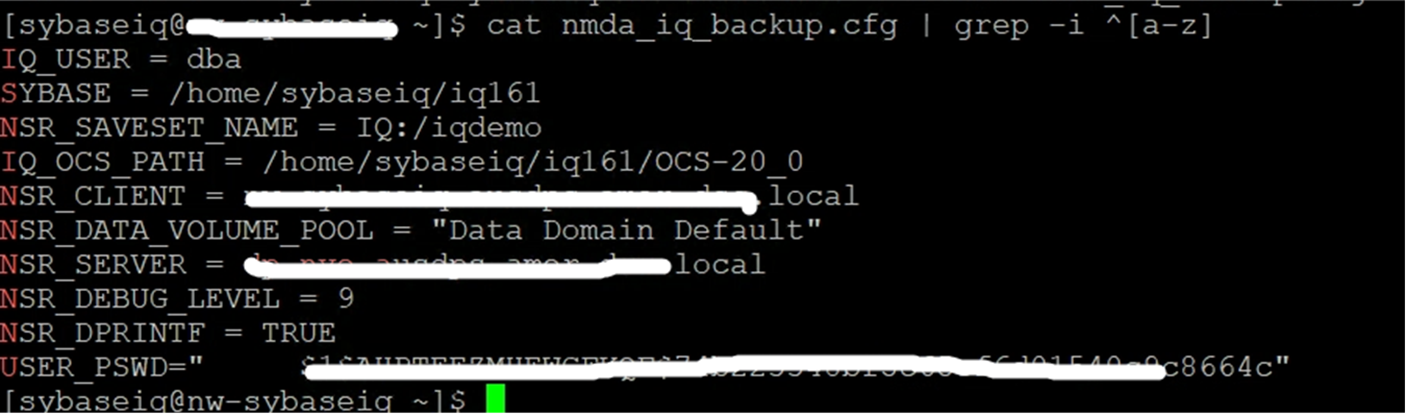
Figure 2: Enter password
NOTE: NMDA does not support the backup configuration wizard for scheduled SAP IQ backups. You must configure these scheduled backups without the wizard.
- Log in to NMC and go to Protection > Clients > New
Key in the client_name, Save Set, and Backup Command.
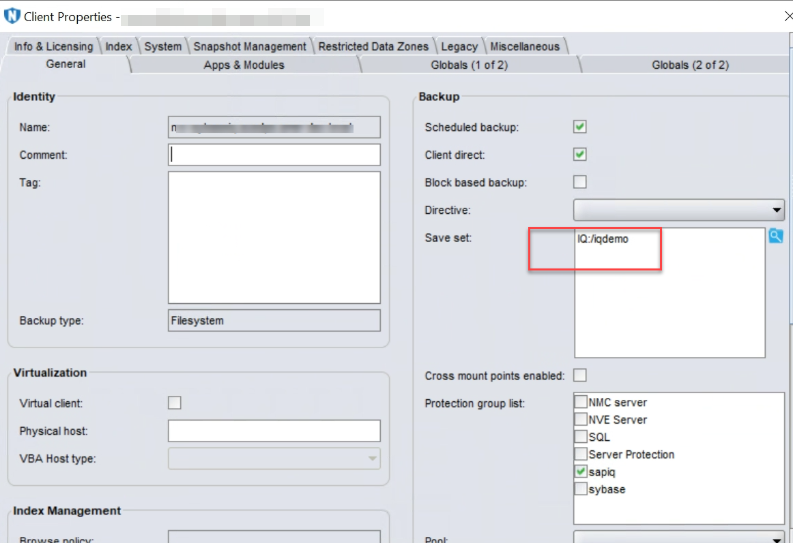
Figure 3: Key in the client_name and Save Set
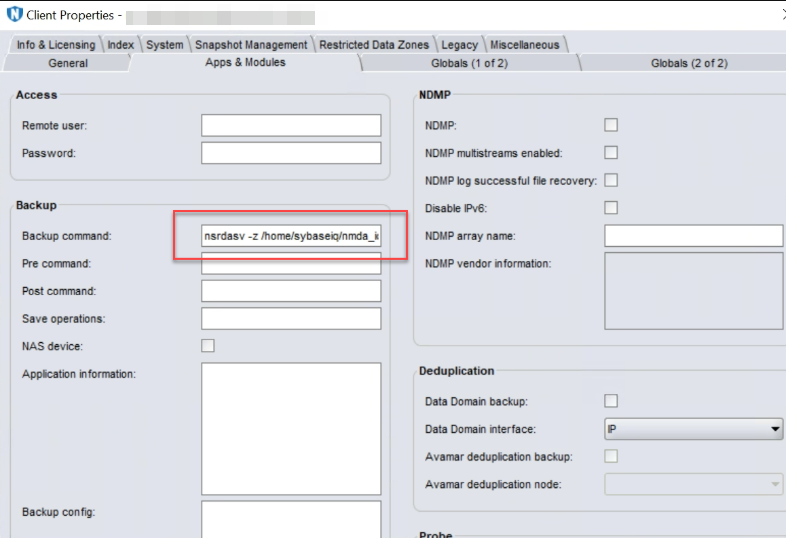
Figure 4: Key in the Backup Command
- Test both manual and scheduled backups. Ensure that the pool, device, and policy are created before running any backups.
Manual backup is run using the following command:
nsrdasv –z <cfg_file_pathname
#nsrdasv -z /home/Sybase/NMDA_IQ_BACKUP.cfg
Recovery is done using the command:
nsriqrc -z <configuration file>
See the NMDA Administration Guide for details.
The database must be off to restore a FULL, INCREMENTAL SINCE FULL, or INCREMENTAL restore of either a READWRITE FILES ONLY or an all files backup. The database may or may not be running to restore a backup of read-only files.
Additional Information
All the NMDA IQ backups are under namespace 'iq'. It can be used as below when querying the client index file information in the namespace with 'nsrinfo':
nsrinfo –s <server> -c <client> -n iqRestore is done through the command:
sriqrc -z <configuration file>
Affected Products
Data Backup & Protection Software, NetWorkerProducts
NetWorker FamilyArticle Properties
Article Number: 000219292
Article Type: How To
Last Modified: 02 ذو الحجة 1447
Version: 4
Find answers to your questions from other Dell users
Support Services
Check if your device is covered by Support Services.