VxRail: vCenter is Unable to Add a Node Back Using its FQDN
Summary: After upgrade to 8.0.x, vCenter cannot add the node by its Fully Qualified Domain Name (FQDN), handshake errors; IP works, and a firewall blocking SSL traffic between vCenter and ESXi host is cause. ...
This article applies to
This article does not apply to
This article is not tied to any specific product.
Not all product versions are identified in this article.
Symptoms
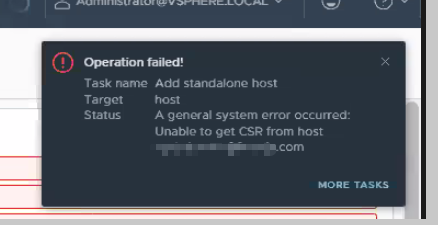
Using the node's IP address works.
VCenter can reach the node on ports 443 and 22.
The user tried to generate the certificate on the node, but it still failed.
Reference Broadcom article VMware vSphere Update Manager had an unknown error while scanning host for upgrade on 6.7 U3
Vpxd.log:
2024-08-07T11:52:05.390Z info vpxd[250707] [Originator@6876 sub=vpxLro opID=lzjnobzy-1382-auto-12g-h5:70000638-d4] [VpxLRO] -- BEGIN lro-8542 -- datacenter-3 -- vim.Datacenter.queryConnectionInfoViaSpec -- 5221a2b0-37ba-501f-8a0a-96bb396d9578(52d9c116-18b2-4cc7-49a5-696a0a04ed45)
2024-08-07T11:52:05.696Z warning vpxd[252175] [Originator@6876 sub=IO.Connection opID=lzjnobzy-1382-auto-12g-h5:70000638-d4] Failed to SSL handshake; SSL(<io_obj p:0x00007fc0a92ff050, h:64, <TCP 'x.x.x.x : 59262'>, <TCP 'x.x.x.x : 443'>>), e: 104(Connection reset by peer), duration: 204msec
2024-08-07T11:52:05.696Z warning vpxd[252175] [Originator@6876 sub=HttpConnectionPool-000001 opID=lzjnobzy-1382-auto-12g-h5:70000638-d4] Failed to get pooled connection; <cs p:00007fc0d4858120, TCP:xxx.xxx.com:443 [xxx.xxx.com]>, SSL(<io_obj p:0x00007fc0a92ff050, h:64, <TCP 'x.x.x.x : 59262'>, <TCP 'x.x.x.x : 443'>>), duration: 305msec, N7Vmacore15SystemExceptionE(Connection reset by peer: The connection is terminated by the remote end with a reset packet. Usually, this is a sign of a network problem,  timeout, or service overload.)
Cause
A firewall device was located between the vCenter and the ESXi host. The firewall is blocking SSL applications.
Resolution
Have the user engage their networking or security team to check for firewall policy settings.
If related traffic is blocked, they should see the relevant events on the firewall management page.
Additional Information
If you are facing this type of situation, you can also do a packet capture on vCenter and ESXi.
Affected Products
VxRail, VxRail Appliance SeriesArticle Properties
Article Number: 000227682
Article Type: Solution
Last Modified: 03 ربيع الآخر 1448
Version: 3
Find answers to your questions from other Dell users
Support Services
Check if your device is covered by Support Services.