PowerEdge: vSAN Ready Nodes unable to find vSAN network list during cluster turn on
Summary: During cluster turn on of vSAN ready nodes, the vSAN network list does not exist. This causes the virtual machine (VM) status to be invalid.
This article applies to
This article does not apply to
This article is not tied to any specific product.
Not all product versions are identified in this article.
Symptoms
The VM status as invalid As shown in the below screenshot

Cause
This issue is caused due to reboot_helper.py prepare script which is used during shutdown of the node.
This script prepares the node so that the cluster can be shut down. In addition, this script removes vSAN services from the VMkernel dedicated for vSAN.
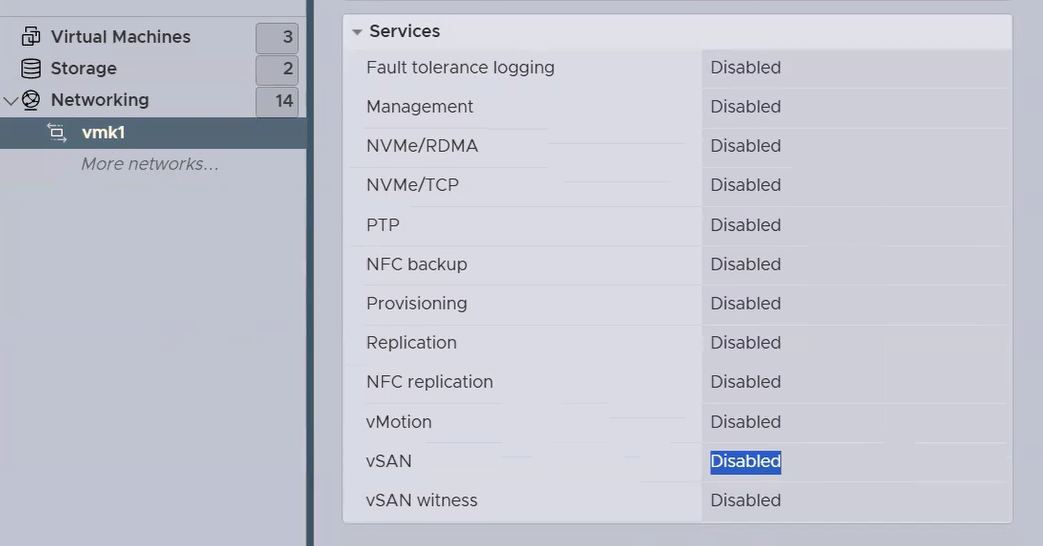
Resolution
To resolve the issue, enable the vSAN services on the VMkernel dedicated for vSAN.
The below command has to be run on all the vSAN cluster nodes.

Affected Products
Dell EMC vSAN Ready Nodes, Dell EMC vSAN C6420 Ready Node, Dell EMC vSAN MX740c Ready Node, Dell EMC vSAN MX750c Ready Node, Dell vSAN Ready Node MX760c, Dell EMC vSAN R440 Ready Node, Dell EMC vSAN R640 Ready Node, Dell EMC vSAN R6415 Ready Node
, Dell EMC vSAN R650 Ready Node, Dell EMC vSAN R6515 Ready Node, vSAN Ready Node R660, Dell vSAN R6615 Ready Node, Dell EMC vSAN R740 Ready Node, Dell EMC vSAN R740xd Ready Node, Dell EMC vSAN R750 Ready Node, Dell EMC vSAN R7515 Ready Node, Dell EMC vSAN R760 Ready Node, Dell vSAN R7615 Ready Node, Dell vSAN Ready Node R7625, Dell EMC vSAN R840 Ready Node, Dell EMC vSAN T350 Ready Node
...
Article Properties
Article Number: 000297877
Article Type: Solution
Last Modified: 16 جمادى الأولى 1447
Version: 2
Find answers to your questions from other Dell users
Support Services
Check if your device is covered by Support Services.