PowerStore: SMB Domain Join Status is Not Updated Properly when Using svc_nas_cifssupport
Summary: PowerStore UI may not reflect the new state of the Server Message Block (SMB) server's join state when joining or unjoining an Active Directory domain using the svc_nas_cifssupport command-line tool. ...
This article applies to
This article does not apply to
This article is not tied to any specific product.
Not all product versions are identified in this article.
Symptoms
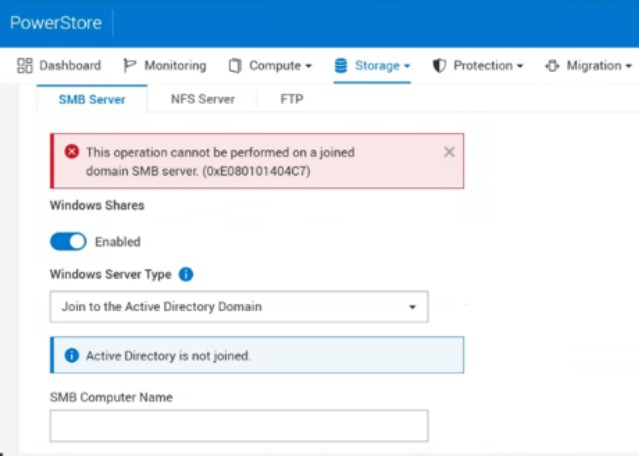
An inability to manage SMB server Active Directory configuration through the PowerStore UI or PSTCLI.
The following error my appear:
Cause
While the internal state of the SMB server is updated appropriately, when joining or unjoining a domain using svc_nas_cifssupport, the current status is not properly synced to the PowerStore management database.
Resolution
How to identify the issue:
Attempting to modify the SMB server Active Directory join state using the PowerStore UI may return conflicting errors when attempting to modify the join state. For example, if the domain is joined using svc_nas_cifssupport, the PowerStore UI may show that it is not joined and return an error when trying to join. Also, the system may report issues with AD connectivity although no impact occurs.
# pstcli -d POWERSTORE_MGMT_IP -u admin -service -session

cli> nas_server show -query "name = NAS_SERVER_NAME" -select id
 #  |                  id
----+--------------------------------------
  1 | xxxxxxxxx-xxxx-xxxx-xxxx-xxxxxxxxxxxx

cli> nas_server object_sync -object_type nas_server -id NAS_SERVER_ID_FROM_ABOVE -mode local
Success

cli> smb_server show
 #  |                  id                  | computer_name |     domain     | workgroup | is_standalone | is_joined | nas_server.name
----+--------------------------------------+---------------+----------------+-----------+---------------+-----------+-----------------
  1 | yyyyyyyy-yyyy-yyyy-yyyy-xxxxxxxxxxxx| COMPUTER_NAME | AD_DOMAIN.COM  |           | no            | yes       | NAS_SERVER_NAME
Workaround:
The PowerStore platform current state can be properly synced when using the PSTCLI. Further changes can be done using normal means in the UI or PSTCLI.
Affected Products
PowerStoreArticle Properties
Article Number: 000322164
Article Type: Solution
Last Modified: 26 رجب 1447
Version: 2
Find answers to your questions from other Dell users
Support Services
Check if your device is covered by Support Services.