NetWorker:ddboost 裝置掛接失敗,並出現錯誤 5044 唯讀檔案系統
Summary: NetWorker 無法掛接出現錯誤 5044 唯讀檔案系統的 ddboost 裝置。
This article applies to
This article does not apply to
This article is not tied to any specific product.
Not all product versions are identified in this article.
Symptoms
NetWorker 伺服器無法掛接 ddboost 裝置後 目的地 NetWorker 伺服器上的協調複寫。NetWorker Management Console (NMC) 顯示下列錯誤:
ddp_utime() failed path_name=/nwservername/devicename/volhdr Err 5044 Read-only file system
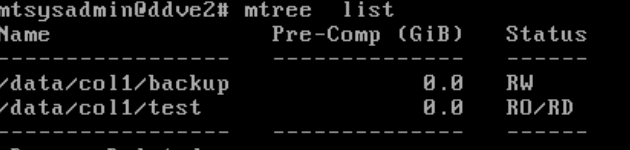
The Data Domain mtree 清單顯示:
Cause
如果 MTree 為 RO/RD,則無法接受寫入,因為它是複製目標。NetWorker 儲存節點預期 ddboost 安裝時要寫入的設備。
- RW = 讀取寫入→ MTree 為可寫入讀取。
- RO = 唯讀 → MTree 無法接受任何寫入作業。
- RD = 複製目的地→ MTree 是複寫的目標,且已鎖定寫入
Resolution
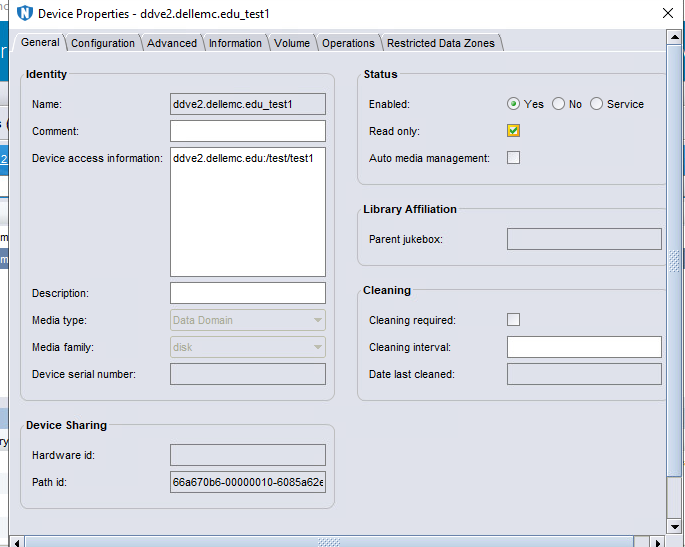
NetWorker 組態應會以唯讀方式反映此 Data Domain ddboost 裝置。此選項會跳過與寫入相關的操作(如標記或更新媒體),並允許裝載成功。
- 在 NMC 中,以滑鼠右鍵按 一下複製的裝置和裝置屬性 -> 啟用唯讀核取方塊。
- 掛接複製的裝置。
Affected Products
NetWorker Family, Data DomainArticle Properties
Article Number: 000406826
Article Type: Solution
Last Modified: 26 رجب 1447
Version: 1
Find answers to your questions from other Dell users
Support Services
Check if your device is covered by Support Services.