PowerProtect Data Manager Oracle Backup Copies Count Number Is Incorrect
Summary: PowerProtect Data Manager count of oracle backup copies is bigger than where it is showing from "View copies" page.
This article applies to
This article does not apply to
This article is not tied to any specific product.
Not all product versions are identified in this article.
Symptoms
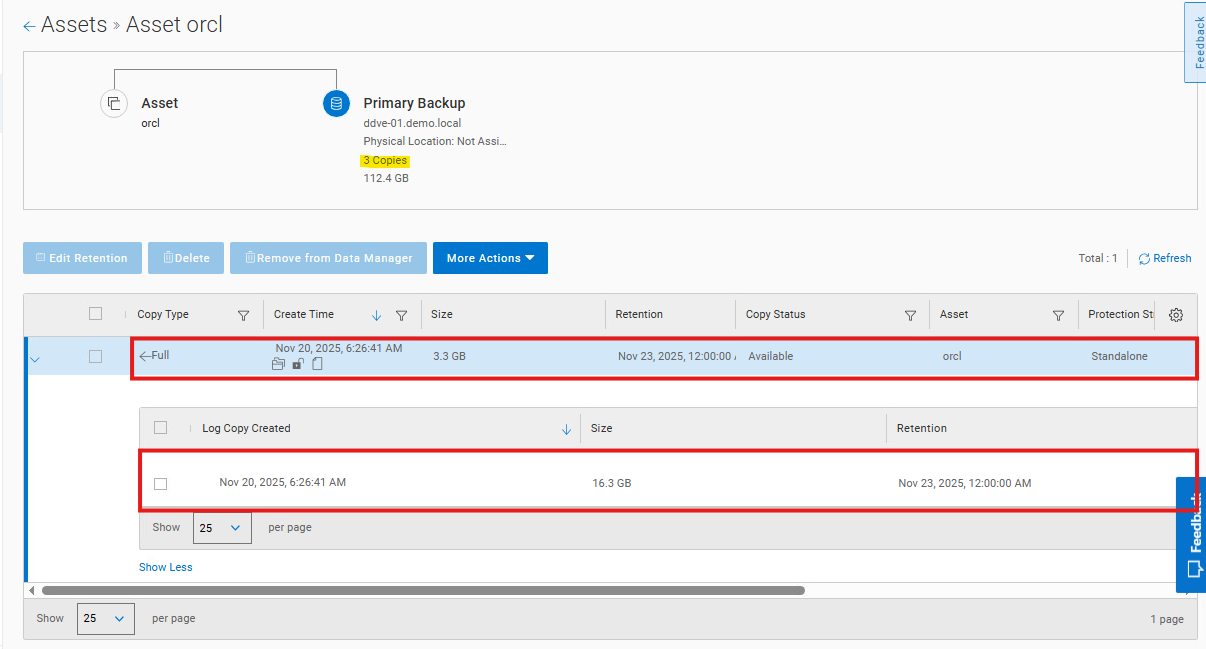
Issue can be reproduced in a demo center, one full backup generates three copies:
Datafile backup, Archive log backup, control file backup. Primary backup tree shows the number of copies as 3, but the copies tree view is listing "datafile backup and archive log backup". Control file backup is counted as a copy number.
Cause
Confirmed with the Dev team it is by design.
Changing the number of copies or the copies of information showing with the tree view will affect multiple components in the PowerProtect Data Manager side.
One full backup generates three copies:
- Datafile backup
- Archive log backup
- Control File backup
If that is the Archive log backup, each backup generates two copies:
- Archive log backup
- Control File backup
The UI only displays the datafile backups and the Archive log backup on the UI. The copies not showing on the UI is the Control File backup.
Resolution
Explanation will be added in the admin guide in future release.
Additional Information
N/A
Videos
N/A
Affected Products
PowerProtect Data ManagerArticle Properties
Article Number: 000407025
Article Type: Solution
Last Modified: 04 رجب 1447
Version: 1
Find answers to your questions from other Dell users
Support Services
Check if your device is covered by Support Services.