NetWorker Family: DD Boost device is Marked as suspect
Zusammenfassung: DD Boost device is Marked as suspect, which result in backups not progressing. And Mounting and Unmounting operation for the device fails.
Dieser Artikel gilt für
Dieser Artikel gilt nicht für
Dieser Artikel ist nicht an ein bestimmtes Produkt gebunden.
In diesem Artikel werden nicht alle Produktversionen aufgeführt.
Symptome
- NetWorker DD Boost devices are marked as Suspect impacting data protection operations
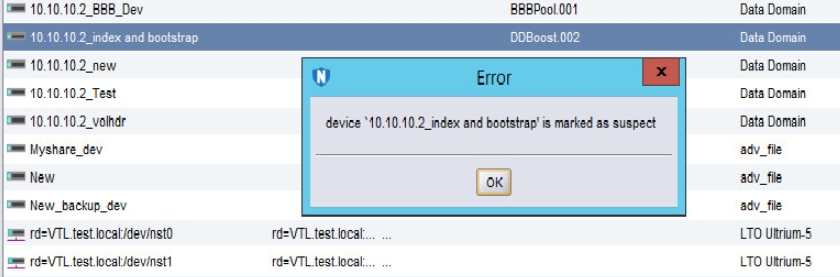
- Any activity on the device such as a "Mount and Unmount" operation fails, stating the following error:
"Device name is Marked as Suspect."
Ursache
There are multiple causes for the device to be marked as suspect. The Most likely reasons are as follows:
- The NetWorker Server/Storage node losses connection to the DD and conversely.
- The Username/password has changed and the same is not being updated in the "Device Properties."
- The Password for the user has expired.
- The account for the User has been locked from the DD end.
Lösung
1. Has the ddboost user password been changed recently?
a. If the ddboost user password was changed recently, open the Device properties in NetWorker.
b. Go to the Configuration tab and update the ddboost user password:
b. Go to the Configuration tab and update the ddboost user password:
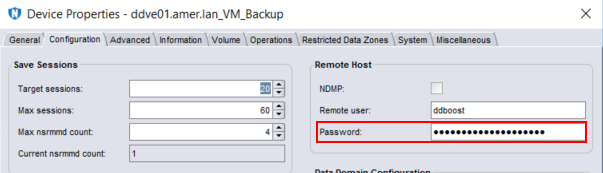
c. Once the password has been updated, click Ok.
NOTE: This process must be repeated for any ddboost device configured using the same ddboost user account.
d. Right-click the device and select disable.
e. Right-click the device and select enable.
f. Mount the device.
2. If the ddboost user password was not changed, ensure that it is not expired or locked.
a. Data Domain: DD Boost user shows locked status.
b. Disable and enable the device from NetWorker.
c. Perform a Mount operation.
b. Disable and enable the device from NetWorker.
c. Perform a Mount operation.
3. Check communication between the NetWorker Server or Storage node:
Betroffene Produkte
NetWorkerProdukte
NetWorker Family, Data DomainArtikeleigenschaften
Artikelnummer: 000050014
Artikeltyp: Solution
Zuletzt geändert: 17 Apr. 2026
Version: 6
Antworten auf Ihre Fragen erhalten Sie von anderen Dell NutzerInnen
Support Services
Prüfen Sie, ob Ihr Gerät durch Support Services abgedeckt ist.