High Definition Audio Controller Error on Precision Laptops
Zusammenfassung: This article discusses the High Definition Audio Controller showing an error code 55 and no audio using external speakers on Precision Workstations and Dell Pro Max laptops.
Dieser Artikel gilt für
Dieser Artikel gilt nicht für
Dieser Artikel ist nicht an ein bestimmtes Produkt gebunden.
In diesem Artikel werden nicht alle Produktversionen aufgeführt.
Symptome
Affected Platforms:
- Dell Pro Max 14 Premium MA14250
- Dell Pro Max 16 Premium MA16250
- Precision 5690
- Precision 7680
- Precision 7780
Symptoms:
- The High Definition Audio Controller shows error code 55 in the device manager.
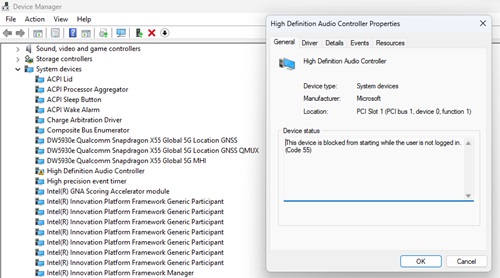
- There is no audio using an external monitor connected to the computer due to the driver being in an error state.
Ursache
A combination of settings causes this issue:
- Enable Pre-Boot DMA Support and Enable OS Kernel DMA Support being enabled in the BIOS.
- The Group Policy Object: Enumeration policy for external devices incompatible with Kernel DMA Protection is enabled.
- Enumeration Policy is set to Only while logged in (default) or block all.
When these settings are configured in this way, it causes error code 55 with the High Definition Audio Controller as it does not contain DMA remapping.
Lösung
Updating the BIOS to version 1.17.0 or later on the computer resolves the issue. To download and install the BIOS, refer to the BIOS Update Guide.
Note: Dell Pro Max 16 Premium MA16250 and Dell Pro Max 14 Premium MA14250 (function already implement in the shipping BIOS, users must enable the following settings).
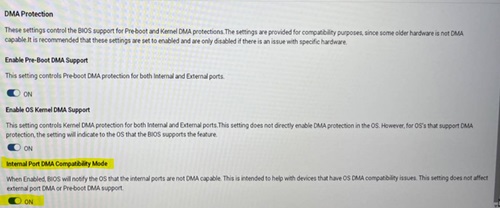
After updating the BIOS, you must enable Internal Port DMA Compatibility Mode under the Virtualization Section of the BIOS.
Betroffene Produkte
Dell Pro Max 14 Premium MA14250, Dell Pro Max 16 Premium MA16250, Precision 7680, Precision 7780Produkte
Mobile Precision 5690Artikeleigenschaften
Artikelnummer: 000224493
Artikeltyp: Solution
Zuletzt geändert: 09 Juni 2026
Version: 12
Antworten auf Ihre Fragen erhalten Sie von anderen Dell NutzerInnen
Support Services
Prüfen Sie, ob Ihr Gerät durch Support Services abgedeckt ist.