無法使用 Alienware 電腦取消家用電腦無線網卡測試的 SupportAssist
Summary: 瞭解為何在按下取消按鈕後,SupportAssist 中的無線網路卡測試仍顯示已完成。
This article applies to
This article does not apply to
This article is not tied to any specific product.
Not all product versions are identified in this article.
Symptoms
當 Alienware 15 DA15260 或 Alienware 15 DA15265連線至 Wi-Fi 網路時,家用電腦專用的 SupportAssist 中的測試可能不會正確取消。從受影響的電腦中,開啟 Dell SupportAssist 5.0 版,前往支援標籤,然後按一下測試硬體底下的開始使用按鈕。在通訊裝置下方,按一下無線網路卡裝置右側的執行測試。按一下 「開始 」按鈕,然後按一下 「取消 」按鈕。
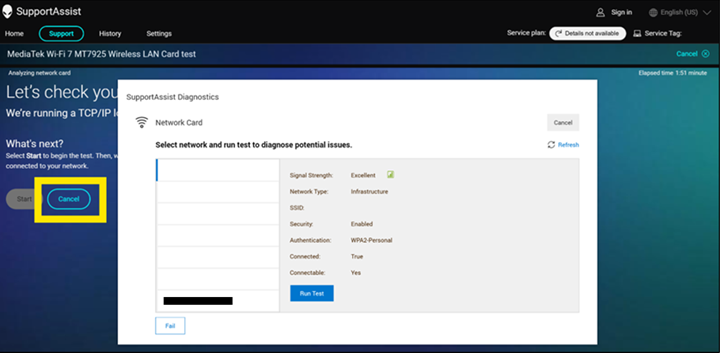
在 歷程記錄 頁面中,測試會顯示 已完成 ,而非 已取消。
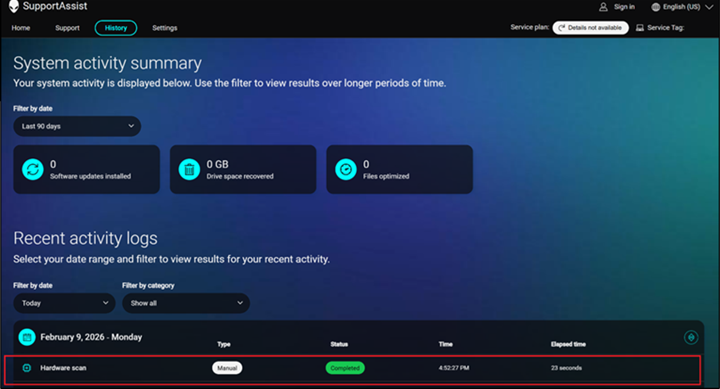
受影響的平台:
- Alienware 15 DA15260
- Alienware 15 DA15265
受影響的軟體:
- 家用電腦專用的 SupportAssist 5.0 版
Cause
發生這種情況是因為網路測試沒有使用者交互。家用電腦專用的 SupportAssist 預期只會顯示網路清單。
Resolution
注意: 開始更新之前,請先執行下列步驟:
- 備份所有個人資料。如需更多資訊,請參閱 備份與還原。
- 如果在筆記本電腦上執行更新,請連接交流電變壓器。
- 如果更新是在桌上型電腦上執行,請確定電源保持連接。
在電腦上將家用電腦專用的 SupportAssist 更新至 5.1.1 版或更新版本,便可解決此問題。若要下載和安裝家用電腦專用的 SupportAssist,請參閱家用電腦專用的 SupportAssist。
Affected Products
Alienware 15 DA15260, Alienware 15 DA15265, SupportAssist for Home PCsArticle Properties
Article Number: 000467685
Article Type: Solution
Last Modified: 06 Jul 2026
Version: 3
Find answers to your questions from other Dell users
Support Services
Check if your device is covered by Support Services.