PowerProtect:如何对报告节点问题进行故障处理
Summary: 本文概述如何对 PowerProtect Data Manager (PPDM) 报告问题进行初步分析。
This article applies to
This article does not apply to
This article is not tied to any specific product.
Not all product versions are identified in this article.
Instructions
日志位置
19.17 之前的版本:
基本日志位置: /opt/emc/dpa/
代理日志: /opt/emc/dpa/agent/dpaagent.log
服务器日志: //opt/emc/dpa/services/server.logs
数据存储区日志: /opt/emc/dpa/services/datastore*.logs
报告管理: /opt/emc/dpa/reporting/reportingmgmt.log
版本 19.17 及更高版本:
基本日志位置: /var/log/dellemc/reporting
Reporting Data Collector(代理): /var/log/dellemc/reporting/reporting-data-collector/reporting-data-collector.log
报告服务: /var/log/dellemc/reporting/reporting-service/reporting-service.log
PostgresSQL: /var/log/dellemc/reporting/postgresql/postgresql*.log
报告管理: /var/log/dellemc/reporting/reportingmgmt/reportingmgmt.log
更改版本 19.17 及更高版本的日志级别:
- 配置位置:
/var/lib/dellemc/reporting/config/logback-config.xml - 特定于服务的日志记录级别:
<service-name>.log.level
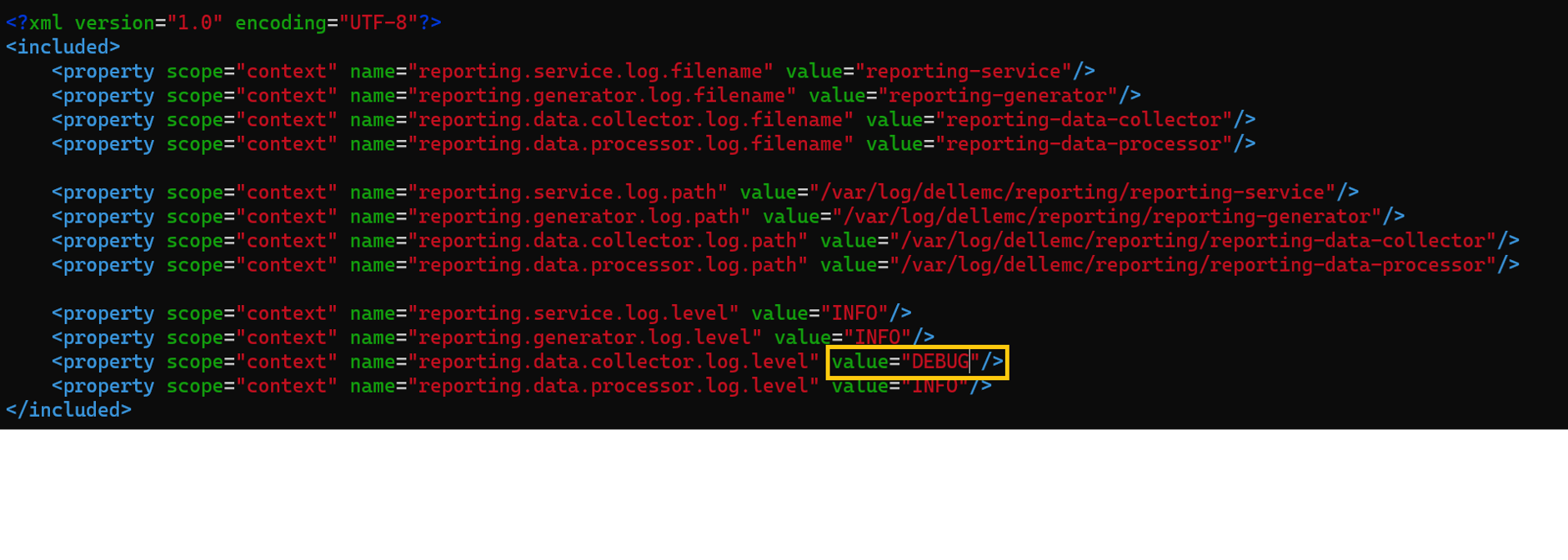
管理 Reporting Services
19.17 之前的版本:
命令格式:
基础位置: /opt/emc/dpa/services/bin
dpa.sh <service> <operation>
Operation: start, stop, restart
服务: svc, app, ds, agent
示例: dpa.sh svc start
版本 19.17 及更高版本:
命令格式: systemclt <operation> <service name>
Operation: start, stop, restart, status
服务:
报告服务: reporting-service, reporting-data-collector, reporting-generator, reporting-data-processor
外部服务: postgresql , rabbitmq-server
示例: systemclt restart reporting-service
每项服务都将单独管理。
已知问题/故障处理
部署/升级失败:要成功部署报告引擎,请确保网络配置正确。正向查找和反向查找都应解析到 PPDM 主机,并从 PPDM 解析到报告引擎主机。
观察到错误:Error : InfrastructureNodeSessions unsuccessful during initialization. Unable to deploy node <Reporting/Search_Engine_FQDN>. Unable to determine the state of node VM '<Reporting/Search_Engine_FQDN>' or the 'vProxy Agent' agent running on it. Unable to connect to Node VM: dial tcp: lookup <Reporting/Search_Engine_FQDN> on <DNS_Server>:53: no such host
检查名称解析:nslookup PPDM FQDNnslookup PPDM IPnslookup reporting node FQDNnslookup reporting node IP
在 19.18 之前的版本中,由于配置了多个域名系统 (DNS) 主机,因此存在更新失败的问题。请参阅此文章以解决问题:将 PowerProtect Data Manager 报告引擎部署或升级到 19.17 报告引擎可能会失败
升级到 19.20 及更高版本后,报告节点停滞在维护模式:
这 reportingmgmt.log 显示这一点 data-migration “permission denied”错误发生:
2025-08-11T12:54:33.434+09:30: reportingmgmt: data-migration: ERROR: Error while checking if data is present: relation "reportdata.client_config_tmp" does not exist
LINE 1: SELECT COUNT(1) FROM reportdata.client_config_tmp请按照此知识库文章中的解决方法作:Powerprotect Data Manager:升级后报告引擎卡在维护模式下
由于证书错误,报告节点服务无法启动:
报告服务日志 /opt/dell/reporting/log/reporting-service/reporting-service.log 显示以下内容 missing required certificates 错误,请参阅概述的步骤以帮助解决该问题。
2025-03-04T00:00:06.416Z ERROR [17574] [main] [c.e.c.s.CoreStartupApplication.init(39)] -  Not able to initialize services, missing required certificates.
2025-03-04T00:00:06.418Z ERROR [17574] [main] [c.e.c.s.CoreStartupApplication.init(43)] -  Error in initializing services
java.lang.IllegalArgumentException: Context must not be null

按照以下知识库文章中的解决方法重新生成证书
请参阅知识库文章 PowerProtect Data Manager:由于证书错误,无法启动 Reporting Services
报告节点无法发送电子邮件:
从报告节点连接到邮件服务器并检查名称解析。
在 reporting-service.log 出现类似错误:
2024-02-05 15:32:37,010 ERROR [com.emc.dpa.command.notification.NotificationSenderMDB] (Thread-131073) Problems while sending e-mail notification: com.sun.mail.smtp.SMTPSendFailedException:451 5.7.3 发送邮件需要 STARTTLS [MailServer 2024-02-05T08:32:36.994Z 08DC257F199B3AC5]
按照此知识库文章在报告节点上手动启用启动 TLS 开关:PowerProtect:Data Manager 报告浏览器无法使用已启用 StartTLS 的 SMTP 服务器发送电子邮件报告。
从版本 19.20 及更高版本开始,SMTP 配置页面中 UI 上的交换机启用 TLS 启动。
Affected Products
PowerProtect Data ManagerArticle Properties
Article Number: 000392915
Article Type: How To
Last Modified: 19 Dec 2025
Version: 1
Find answers to your questions from other Dell users
Support Services
Check if your device is covered by Support Services.