Dell DCXXXXX, Dell Pro Essential, Inspiron, and Vostro Laptops do not Enter Hibernate
Summary: This article talks about Dell DCXXXXX, Dell Pro Essential, Inspiron, and Vostro laptops that do not enter hibernate state when RAM usage is over 90%.
This article applies to
This article does not apply to
This article is not tied to any specific product.
Not all product versions are identified in this article.
Symptoms
Affected Platforms:
- Dell 15 DC15250
- Dell 15 DC15255
- Dell Pro 15 Essential PV15250
- Dell Pro 15 Essential PV15255
- Inspiron 15 3530
- Inspiron 15 3535
- Vostro 15 3535
- Vostro 14 3435
- Vostro 15 3530
- Vostro 14 3430
Cause
In such issues, the Memory performance in Task Manager usually shows RAM usage over 90%. The hibernate state fails when memory is not available or insufficient. This is a limitation within the Microsoft Windows operating system.
Resolution
Expected behavior when RAM usage is over 90%
Check Memory usage in Task Manager.
- Press and hold the Ctrl + Shift keys, then press Esc key on your keyboard.
- Go to Performance tab, and check Memory.
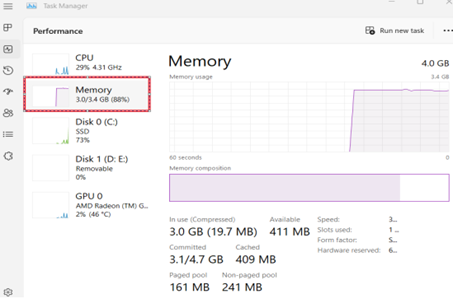
If memory usage is over 90%
- Laptop cannot enter the hibernate state when RAM usage is over 90%.
- RAM usage close to 100% may cause programs to not respond and close unexpectedly.
Close some unnecessary applications to reduce RAM usage. Observe Memory usage in the Task Manager UI.
If RAM usage is not over 90%
Follow the troubleshooting steps as instructed below.
- Go to Settings > Update & Security > Troubleshoot.
- Select Power option and click Run the troubleshooter button.
- Follow the on-screen instructions to troubleshoot Hibernation issue.
Affected Products
Dell 15 DC15250, Dell 15 DC15255, Dell Pro 15 Essential PV15250, Dell Pro 15 Essential PV15255, Inspiron 15 3530, Inspiron 15 3535, Vostro 14 3430, Vostro 14 3435, Vostro 15 3530, Vostro 15 3535Article Properties
Article Number: 000208364
Article Type: Solution
Last Modified: 10 Nov 2025
Version: 5
Find answers to your questions from other Dell users
Support Services
Check if your device is covered by Support Services.