Dell Security Management Server Virtual Upgrade 在 Interfaces.d 上失败
Summary: 升级 Dell Security Management Server 虚拟应用装置失败,并显示引用 interfaces.d 目录的错误。
This article applies to
This article does not apply to
This article is not tied to any specific product.
Not all product versions are identified in this article.
Symptoms
受影响的产品:
- Dell Security Management Server Virtual
受影响的版本:
- v10.2.9 至 v10.2.11
受影响的操作系统:
- Linux
Dell Security Management Server Virtual upgrade 停止,并显示消息 Failed to restore from backup file : ,在尝试恢复 etc/network/interfaces 目录中的文件后,会发生这种情况。
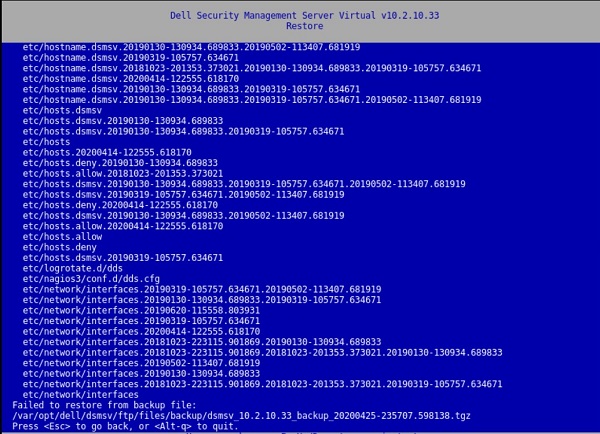
图 1:(仅限英文)恢复返回 无法从备份文件恢复:
按下键会导致窗口中显示:
[Errno 21] Is a directory:
‘/etc/network/interfaces.d’.
/var/log/messages 文件中也存在此错误:
![[Errno 21]是目录:“/etc/network/interfaces.d”](https://supportkb.dell.com/img/ka06P000000PutAQAS/ka06P000000PutAQAS_zh_CN_6.jpeg)
图 2:(仅限英文)[Errno 21] Is a directory: ‘/etc/network/interfaces.d’
Cause
不适用
Resolution
要解决此问题,请按照说明重命名 interfaces.d 目录。
- 登录到 Dell Security Management Server 虚拟控制台。
- 在 Dell Security Management Server Virtual 管理控制台中选择 Launch Shell。
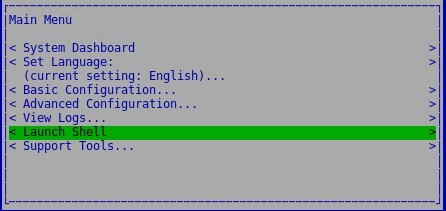
图 3:(仅限英文)启动 Shell
- 使用 命令
su dellsupport切换到dellsupport用户帐户。

图 4:(仅限英文)切换到 dellsupport
- 提供
dellsupport用户的密码。默认情况下,密码为dellsupport。

图 5:(仅限英文)键入密码
- 使用以下命令重命名 interfaces.d 目录:
sudo mv /etc/network/interfaces.d /etc/network/interfaces.old

图 6:(仅英文)键入 sudo mv /etc/network/interfaces.d /etc/network/interfaces.old
- 通过键
exit入或使用ctrl-d两次退出 shell,并通过用户界面运行升级。
要联系支持部门,请参阅 Dell Data Security 国际支持电话号码。
转至 TechDirect,在线生成技术支持请求。
要获得更多见解和资源,请加入戴尔安全社区论坛。
Additional Information
Videos
Affected Products
Dell EncryptionArticle Properties
Article Number: 000131146
Article Type: Solution
Last Modified: 06 Jul 2023
Version: 10
Find answers to your questions from other Dell users
Support Services
Check if your device is covered by Support Services.