"HYPERVISOR_ERROR" Bluescreen on Dell Pro Desktop
Summary: Learn what to do if a "HYPERVISOR_ERROR" bluescreen occurs on a Dell Pro Micro QCM1255, Dell Pro Slim QCS1255, or Dell Pro Tower QCT1255.
This article applies to
This article does not apply to
This article is not tied to any specific product.
Not all product versions are identified in this article.
Symptoms
Dell Pro desktop computers with an AMD Ryzen 5 8500G CPU might experience "HYPERVISOR_ERROR" bluescreens. The error says, "Your device ran into a problem and needs to restart. We're just collecting some error info, and then we'll restart for you."
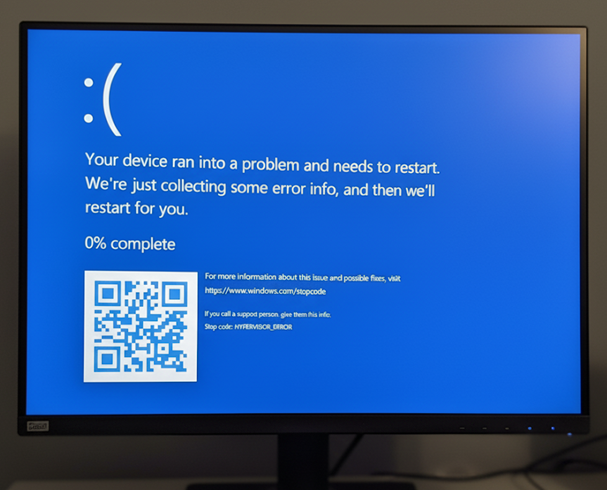
Garbage display issues may also be experienced while using the computer.
Affected Platforms:
- Dell Pro Micro QCM1255
- Dell Pro Slim QCS1255
- Dell Pro Tower QCT1255
Affected BIOS Versions:
- v1.0.5
- v1.1.3
- v1.2.1
- v1.3.2
- v1.4.1
- v1.4.2
- v1.5.0
Cause
AMD processor power management defects cause this issue.
Resolution
Updating to BIOS version 1.6.2 or later on the computer resolves the issue. To download and install the BIOS, refer to the Dell BIOS and UEFI Update Download and Installation Guide.
Affected Products
Dell Pro Micro QCM1255, Dell Pro Slim QCS1255, Dell Pro Tower QCT1255Article Properties
Article Number: 000362072
Article Type: Solution
Last Modified: 23 May 2026
Version: 5
Find answers to your questions from other Dell users
Support Services
Check if your device is covered by Support Services.