Dell AX 系統:Intel 資料串流加速器的未簽署驅動程式
Summary: 搭載 Azure Stack HCI 23H2 作業系統 (OS) 的 Dell AX 系統回報未簽署的 Intel 資料串流加速器驅動程式「PCI\VEN_8086&DEV_0825」
This article applies to
This article does not apply to
This article is not tied to any specific product.
Not all product versions are identified in this article.
Symptoms
Windows 叢集驗證報告中的警告訊息如下:

Get-WindowsDriver -All -Online | Where-Object OriginalFileName-like *dsa.inf

Driver: dsa.inf
OriginalFileName: C:\Windows\System32\DriverStore\FileRepository\dsa.inf_amd64_add6b6518c9f6a5d\dsa.inf
Inbox: True
ClassName: Dsa
BootCritical: False
ProviderName: Microsoft
Date: 2006-06-21 12:00:00 AM
Version: 10.0.25398.1
Cause
根據Microsoft工程,此驅動程式並不適合隨 Azure Stack HCI 23H2 一起提供。
Resolution
卸載驅動程式。
解除安裝驅動程式的步驟:
- 在出現 ONIE 提示時,執行下列命令:
Get-PnpDevice -FriendlyName "*streaming*" | Select-Object Name, InstanceId, Status

- 尋找驅動程式資訊。
Get-PnpDeviceProperty -InstanceId "PCI\VEN_8086&DEV_0B25&SUBSYS_00008086&REV_00\3&3CD80BA&0&08" -KeyName DEVPKEY_Device_DriverInfPath,DEVPKEY_Device_DriverVersion,DEVPKEY_Device_DriverProvider,DEVPKEY_Device_DriverDesc

- 卸載驅動程式。
Pnputil /delete-driver dsa.inf /uninstall

- 再次檢查設備資訊,
Get-PnpDeviceProperty -InstanceId "PCI\VEN_8086&DEV_0B25&SUBSYS_00008086&REV_00\3&3CD80BA&0&08" -KeyName DEVPKEY_Device_DriverInfPath,DEVPKEY_Device_DriverVersion,DEVPKEY_Device_DriverProvider,DEVPKEY_Device_DriverDesc

請注意驅動程式和名稱變更。
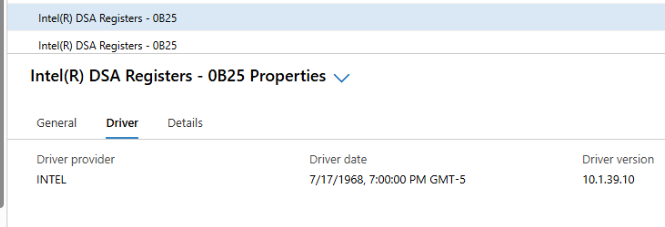
- 裝置管理員中現在會顯示正確的驅動程式。

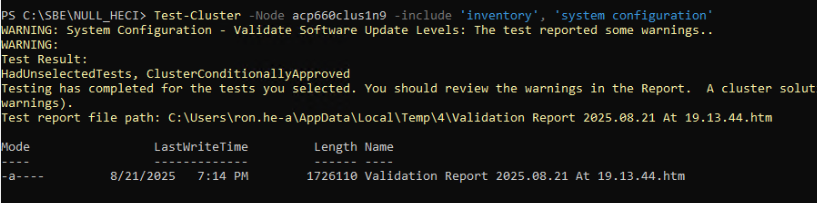
- 產生叢集驗證。
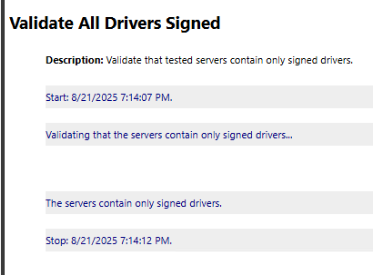
所有驅動程式現在都已簽名。
注意:必須在 azure 本地群集中的每個節點上執行這些步驟。
Affected Products
AX-660, AX-760Article Properties
Article Number: 000359860
Article Type: Solution
Last Modified: 04 Dec 2025
Version: 2
Find answers to your questions from other Dell users
Support Services
Check if your device is covered by Support Services.